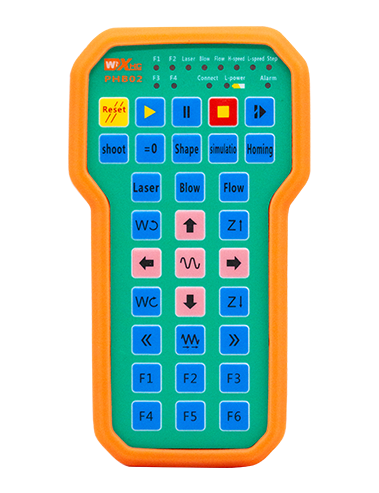
Təsvir

1.Məhsul təqdimatı
Wireless Remote Control is used for manual guidance, yerləşdirmə, tool setting and other operations of CNC machine tools. Bu məhsul simsiz ötürmə texnologiyasını qəbul edir, Ənənəvi bahar tel bağlantısının aradan qaldırılması, Kabellər səbəb olan avadanlıq çatışmazlıqlarını azaltmaq, kabelin sürüklənməsinin mənfi cəhətlərinin aradan qaldırılması, yağ ləkələri, və s., and is more convenient to operate.It is widely applicable to CNC machine tools such as gantry machining centers, gantry vertical lathes, and CNC gear processing machines, and is compatible with various mainstream CNC system brands on the market, including Siemens, Mitsubishi, Fanuc, Syntec and more.
2.Məhsul xüsusiyyətləri
1. simsiz işləmə məsafəsi ilə 433MHz simsiz rabitə texnologiyasını qəbul edir 20 metr.
2.Adaptiv tezlik atlama; 32 simsiz uzaqdan idarəetmə dəstləri müdaxilə olmadan eyni vaxtda istifadə edilə bilər.
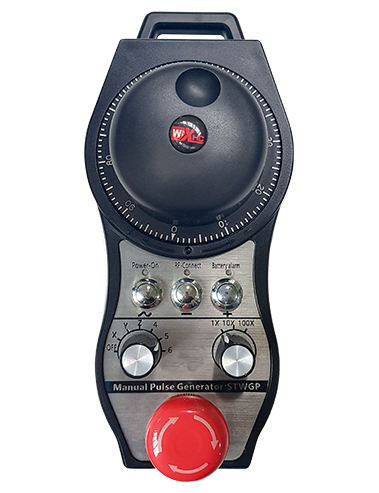
3.Supports the emergency stop button, and the emergency stop button remains effective even after the remote control is powered off.
4.Dayaq 3 keçid IO siqnal çıxışı ilə xüsusi düymələr.
5.6 oxlu idarəetməni dəstəkləyir, və 7 12 oxlu nəzarət fərdiləşdirilə bilər.
6. 3-sürətli böyütmə nəzarətini dəstəkləyir, və 4-sürətli böyütmə nəzarəti fərdiləşdirilə bilər.
7.aktivləşdirmə düyməsi funksiyasını dəstəkləyir, kommutasiya IO siqnallarını çıxara bilər, və həmçinin ox seçiminə nəzarət edir, böyütmə və kodlayıcı.
8.Proqram vasitəsi ilə oxun seçimi və böyüdülməsinin kodlaşdırma növünün dəyişdirilməsini dəstəkləyir.
9. Supports pulse encoder with specification of 100 Bir inqilab üçün nəbzlər.
10. Supports standard Type-C charging with 5V-2A charging specification; built-in battery
specification: 14500 / 1100mAh.
| Working Voltage and Current of Handheld Terminal |
3.7V/20.0mA |
| Charging Battery Specification |
3.7V/14500/1100mAh
|
| Low Voltage Alarm Range of Handheld Terminal |
<3.35V |
| Receiver Power Supply Voltage |
DC5V-24V/1A |
| Receiver Emergency Stop Output Load Range |
AC125V-1A / DC30V-2A |
| Receiver Enable Output Load Range |
AC125V-1A / DC30V-2A |
| Receiver Custom Button Output Load Range |
DC24V / 50MA
|
| Receiver Axis Selection Output Load Range |
DC24V / 50MA |
| Receiver magnification Output Load Range |
DC24V / 50MA |
| Handheld Terminal Transmit Power |
15dbm
|
| Həssaslıq alan qəbuledici |
-100dbm |
| Simsiz rabitə tezliyi |
433Mhz tezlik qrupu
|
| Wireless Communication Distance |
20 meters barrier-free distance
|
| Operating Temperature |
-25℃<X<55℃ |
| Safe drop height |
1 m
|
| Number of Custom Buttons |
3
|
| Product Weight |
546.86(g) |
| Product Dimensions |
200*87*72(mm) |
4. Məhsul funksiyası Giriş

Qeydlər:
① Emergency Stop Button:
Təcili yardım düyməsini basın, the two groups of emergency stop IO outputs on the receiver will disconnect, and all remote control functions will be invalidated.Release the emergency stop button, the emergency stop IO outputs on the receiver will be closed, and all remote control functions will be restored. Bundan sonra, even if the remote control is powered off, pressing the emergency stop button can still activate the emergency stop IO output of the receiver.
② Enable Button:
Press either enable button on both sides, the two sets of enable IO outputs on the receiver will conduct. Release the enable button, and the enable IO outputs will disconnect. It is necessary to press and hold the enable button before toggling axis selection, magnification or rotating the remote control for the operation to take effect.This function can be canceled through the configuration software.
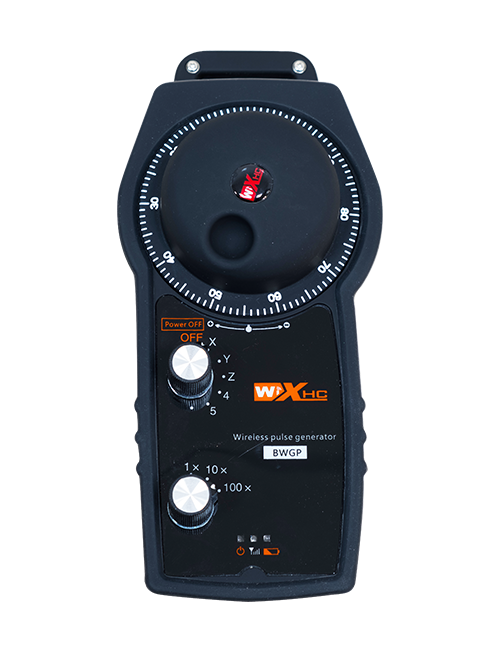
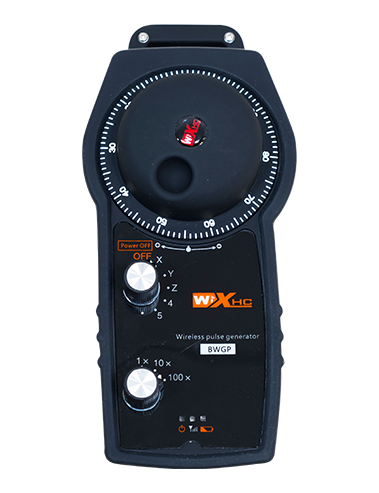
③ Axis Selection Switch (Power Switch):
Aktiv düyməsini basıb saxlayın, then toggling the axis selection switch can control the movement of axis .Press and hold the enable button, then toggle the axis selection switch to switch the motion axis controlled by the remote control. Toggle the switch from the OFF position to any axis position, and the remote control will power on automatically.
④ Pulse Encoder:
Press and hold the enable button and rotate the pulse encoder, it will output pulse signals to control the movement of the machine axis.
⑤ LCD Display Screen:

5. Product Accessories Diagram

6. Məhsulun quraşdırılması təlimatı
6.1 Məhsulun quraşdırılması addımları
1. Install the receiver in the electrical cabinet via the buckle on its back, or mount it inside the electrical cabinet through the screw holes at the four corners of the receiver.
2. Alıcı məftil diaqramımıza baxın, onu saytdakı avadanlıqla müqayisə edin, and connect the equipment to the receiver with cables.
3. After the receiver is fixed in place, install the supporting antenna of the receiver properly. Mount or place the outer end of the antenna outside the electrical cabinet. It is recommended to place it on the top of the electrical cabinet for optimal signal performance. Do not leave the antenna uninstalled or place it inside the electrical cabinet; əks halda, signal failure may occur.
4. Nəhayət, turn on the remote control power switch, then you can remotely operate the machine via the remote control.
6.2 Receiver Installation Dimensions

6.3 Alıcı məftil istinad diaqramı
7. Məhsul Əməliyyat Təlimatları
1. Maşın və qəbuledicidə güc. The receiver operation indicator flashes. After the wireless electronic remote control is fully charged, toggle it from the OFF gear to the X-axis gear, and the remote control display lights up.
2. Select the axis : Aktiv düyməsini basıb saxlayın, toggle the axis selection switch to select the axis to be operated.
3. Select the magnification: Aktiv düyməsini basıb saxlayın, toggle the magnification switch to select the required magnification gear.
4. Axis movement: Aktiv düyməsini basıb saxlayın, select the axis selection switch and the magnification switch, then rotate the pulse encoder. Rotate clockwise to move the axis in the positive direction, and rotate counterclockwise to move the axis in the negative direction.
5. Hər hansı bir xüsusi düyməni basıb saxlayın, the corresponding button IO output of the receiver will turn on; release the button, and the output will turn off.
6. Təcili yardım düyməsini basın, the corresponding emergency stop IO output of the receiver disconnects and the remote control function becomes invalid. Release the emergency stop button, the emergency stop IO output closes and the remote control function is restored.
7. If the wireless remote control is not operated for a period of time, Güc istehlakını azaltmaq üçün avtomatik olaraq yuxu rejiminə daxil olacaqdır. It can be used normally again by pressing the enable button again.
8.If the wireless remote control is not used for a long time, turn the axis switch to OFF to turn off the power and extend battery life
8. Məhsul modelinin təsviri
①:UWGP stands for appearance style.
②:Pulse Output Parameters:
01: Pulse çıxış siqnalının bir olduğunu göstərir, B; Pulse gərginliyi 5v; Pulse miqdarı 100ppr.
02: Pulse çıxış siqnalının bir olduğunu göstərir, B; Nəbz voltajı 12v; pulse quantity 25PPR.
03: Pulse çıxış siqnalının bir olduğunu göstərir, B, Bir -, B -; Pulse gərginliyi 5v; Pulse miqdarı 100ppr.
04: Aşağı səviyyəli bir NPN açıq dövrə çıxışını göstərir, a və b nəbzi çıxış siqnalları ilə; The number of pulses is 100PPR.
05: Yüksək səviyyəli PNP mənbəyinin çıxışını göstərir, a və b nəbzi çıxış siqnalları ilə; Pulsların sayı 100ppr.
③:Represents the axis selection switch quantity; 6 stands for 6 oxta, 7 stands for 7 oxta, and so on.
④: Represents the signal type of the axis selection switch.A stands for point-to-point output signal, and B stands for encoder output signal.
⑤: Represents the signal type of the magnification switch.A stands for point-to-point output signal, and B stands for encoder output signal.
⑥: Xüsusi düymələrin sayını təmsil edir; 3 corresponds to 6 Xüsusi düymələr.
⑦: Represents the power supply for the system remote control. 05 stands for 5V power supply, və 24 stands for 24V power supply.
⑧: Represents the contact charging mode. It starts charging automatically when placed back on the charging base.
9. Məhsul problemlərinin aradan qaldırılması

10. Maintenance and upkeep
1. Zəhmət olmasa, xidmət həyatını genişləndirmək üçün otaq temperaturu və təzyiqində quru bir mühitdə istifadə edin.
2. Please avoid using in abnormal environments such as rain and water to extend the service life.
3. Please keep the appearance of the remote control clean to extend its service life.
4. Please avoid crushing, dropping, or bumping, və s. to prevent damage to the precision components inside the remote control or accuracy errors.
5. Uzun müddət istifadə olunmasa, please store the remote control in a clean and safe place.
6. Avoid moisture and shock during storage and transportation.
11. Təhlükəsizlik haqqında məlumat
1. Zəhmət olmasa işləməyin işləməməsindən əvvəl təlimatları diqqətlə oxuyun və qadağan edin.
2. Please charge the remote control in a timely manner when the battery level is too low, to avoid malfunction and operational errors caused by insufficient power.
3. If you repair it yourself and cause damage, the warranty will be void.