Popis

1.Úvod produktu
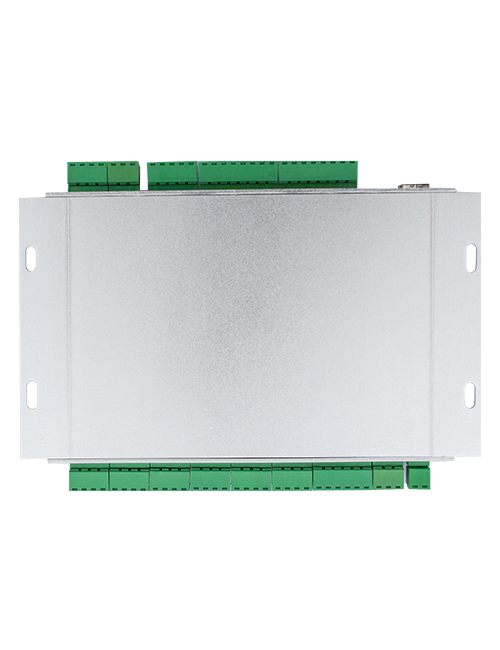
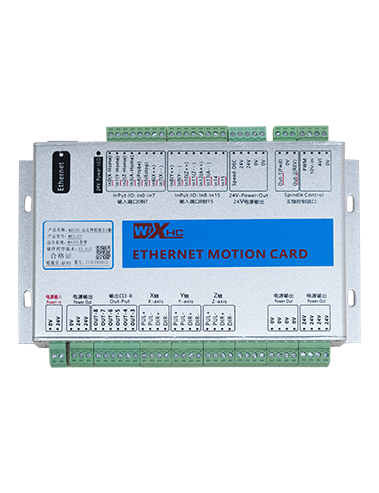
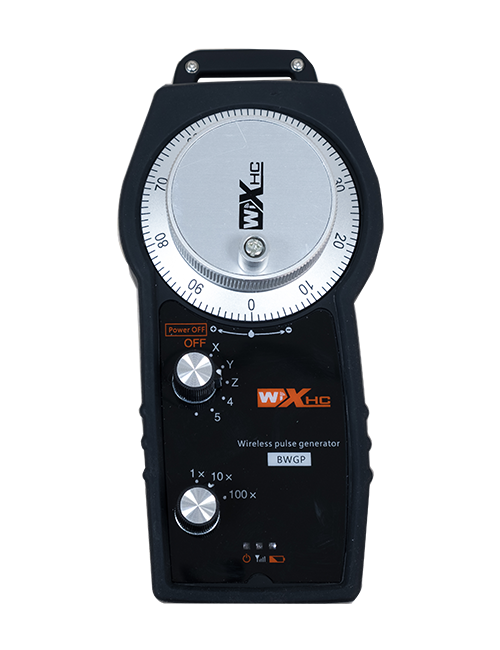
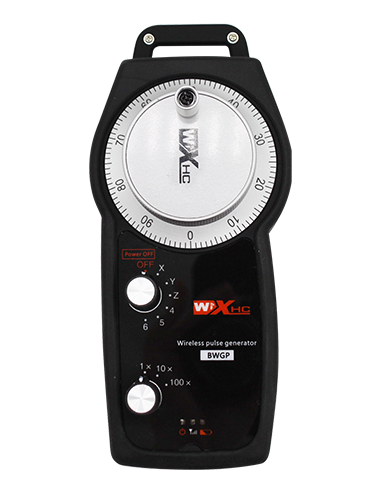
Wireless Remote Control is used for manual guidance, polohování, tool setting and other operations of CNC machine tools. Tento produkt využívá technologii bezdrátového přenosu, odstranění tradičního připojení pružinového drátu, snížení poruch zařízení způsobených kabely, odstranění nevýhod tažení kabelů, olejové skvrny, atd., and is more convenient to operate.It is widely applicable to CNC machine tools such as gantry machining centers, gantry vertical lathes, and CNC gear processing machines, and is compatible with various mainstream CNC system brands on the market, including Siemens, Mitsubishi, FANUC, Syntec and more.
2.Vlastnosti produktu
1. Přijímá 433MHz bezdrátovou komunikační technologii s bezdrátovou operační vzdáleností 20 metry.
2.Adaptivní frekvenční přeskakování; 32 sady bezdrátových dálkových ovladačů lze používat současně bez rušení.
3.Supports the emergency stop button, and the emergency stop button remains effective even after the remote control is powered off.
4.Podpory 3 vlastní tlačítka s přepínáním výstupu IO signálu.
5.Podporuje 6osé ovládání, a 7 až 12osé ovládání je přizpůsobitelné.
6. Podporuje 3rychlostní ovládání zvětšení, a 4rychlostní ovládání zvětšení je přizpůsobitelné.
7.podporuje funkci aktivačního tlačítka, který může vydávat spínací IO signály, a také výběr řídicí osy, zvětšení a kodér.
8.Podporuje úpravu typu kódování výběru a zvětšení osy pomocí softwaru.
9. Supports pulse encoder with specification of 100 pulzů na otáčku.
10. Supports standard Type-C charging with 5V-2A charging specification; built-in battery
specification: 14500 / 1100mAh.
| Working Voltage and Current of Handheld Terminal |
3.7V/20.0mA |
| Charging Battery Specification |
3.7V/14500/1100mAh
|
| Low Voltage Alarm Range of Handheld Terminal |
<3.35PROTI |
| Receiver Power Supply Voltage |
DC5V-24V/1A |
| Receiver Emergency Stop Output Load Range |
AC125V-1A/DC30V-2A |
| Receiver Enable Output Load Range |
AC125V-1A/DC30V-2A |
| Receiver Custom Button Output Load Range |
DC 24V/50mA
|
| Receiver Axis Selection Output Load Range |
DC 24V/50mA |
| Receiver magnification Output Load Range |
DC 24V/50mA |
| Handheld Terminal Transmit Power |
15dBm
|
| Citlivost příjmu přijímače |
-100dBm |
| Frekvence bezdrátové komunikace |
433frekvenční pásmo MHz
|
| Wireless Communication Distance |
20 meters barrier-free distance
|
| Operating Temperature |
-25℃<X<55℃ |
| Safe drop height |
1 m
|
| Number of Custom Buttons |
3
|
| Product Weight |
546.86(g) |
| Product Dimensions |
200*87*72(mm) |
4. Úvod funkce produktu

Poznámky:
① Emergency Stop Button:
Stiskněte tlačítko nouzového zastavení, the two groups of emergency stop IO outputs on the receiver will disconnect, and all remote control functions will be invalidated.Release the emergency stop button, the emergency stop IO outputs on the receiver will be closed, and all remote control functions will be restored. Navíc, even if the remote control is powered off, pressing the emergency stop button can still activate the emergency stop IO output of the receiver.
② Enable Button:
Press either enable button on both sides, the two sets of enable IO outputs on the receiver will conduct. Release the enable button, and the enable IO outputs will disconnect. It is necessary to press and hold the enable button before toggling axis selection, magnification or rotating the remote control for the operation to take effect.This function can be canceled through the configuration software.
③ Axis Selection Switch (Power Switch):
Stiskněte a podržte tlačítko aktivace, then toggling the axis selection switch can control the movement of axis .Press and hold the enable button, then toggle the axis selection switch to switch the motion axis controlled by the remote control. Toggle the switch from the OFF position to any axis position, and the remote control will power on automatically.
④ Pulse Encoder:
Press and hold the enable button and rotate the pulse encoder, it will output pulse signals to control the movement of the machine axis.
⑤ LCD Display Screen:

5. Product Accessories Diagram

6. Průvodce instalací produktu
6.1 Kroky instalace produktu
1. Install the receiver in the electrical cabinet via the buckle on its back, or mount it inside the electrical cabinet through the screw holes at the four corners of the receiver.
2. Podívejte se na naše schéma zapojení přijímače, porovnejte jej s vaším zařízením na místě, and connect the equipment to the receiver with cables.
3. After the receiver is fixed in place, install the supporting antenna of the receiver properly. Mount or place the outer end of the antenna outside the electrical cabinet. It is recommended to place it on the top of the electrical cabinet for optimal signal performance. Do not leave the antenna uninstalled or place it inside the electrical cabinet; jinak, signal failure may occur.
4. Konečně, turn on the remote control power switch, then you can remotely operate the machine via the remote control.
6.2 Receiver Installation Dimensions

6.3 Referenční schéma zapojení přijímače
7. Návod k obsluze produktu
1. Zapněte stroj a přijímač. The receiver operation indicator flashes. After the wireless electronic remote control is fully charged, toggle it from the OFF gear to the X-axis gear, and the remote control display lights up.
2. Select the axis : Stiskněte a podržte tlačítko aktivace, toggle the axis selection switch to select the axis to be operated.
3. Select the magnification: Stiskněte a podržte tlačítko aktivace, toggle the magnification switch to select the required magnification gear.
4. Axis movement: Stiskněte a podržte tlačítko aktivace, select the axis selection switch and the magnification switch, then rotate the pulse encoder. Rotate clockwise to move the axis in the positive direction, and rotate counterclockwise to move the axis in the negative direction.
5. Stiskněte a podržte libovolné vlastní tlačítko, the corresponding button IO output of the receiver will turn on; release the button, and the output will turn off.
6. Stiskněte tlačítko nouzového zastavení, the corresponding emergency stop IO output of the receiver disconnects and the remote control function becomes invalid. Release the emergency stop button, the emergency stop IO output closes and the remote control function is restored.
7. If the wireless remote control is not operated for a period of time, automaticky přejde do režimu spánku, aby se snížila spotřeba energie. It can be used normally again by pressing the enable button again.
8.If the wireless remote control is not used for a long time, turn the axis switch to OFF to turn off the power and extend battery life
①:UWGP stands for appearance style.
②:Pulse Output Parameters:
01: Označuje, že výstupní signál pulzu je A, B; Pulzní napětí 5V; pulzní množství 100PPR.
02: Označuje, že výstupní signál pulzu je A, B; Pulzní napětí 12V; pulse quantity 25PPR.
03: Označuje, že výstupní signál pulzu je A, B, A -, B -; Pulzní napětí 5V; pulzní množství 100PPR.
04: Indikuje nízkoúrovňový výstup otevřeného obvodu NPN, s pulzními výstupními signály A a B; The number of pulses is 100PPR.
05: Označuje výstup zdroje PNP na vysoké úrovni, s pulzními výstupními signály A a B; Počet pulsů je 100PPR.
③:Represents the axis selection switch quantity; 6 stands for 6 osy, 7 stands for 7 osy, and so on.
④: Represents the signal type of the axis selection switch.A stands for point-to-point output signal, and B stands for encoder output signal.
⑤: Represents the signal type of the magnification switch.A stands for point-to-point output signal, and B stands for encoder output signal.
⑥: Představuje počet vlastních tlačítek; 3 corresponds to 6 vlastní tlačítka.
⑦: Represents the power supply for the system remote control. 05 stands for 5V power supply, a 24 stands for 24V power supply.
⑧: Represents the contact charging mode. It starts charging automatically when placed back on the charging base.
9. Odstraňování problémů s produktem

10. Maintenance and upkeep
1. Použijte jej prosím v suchém prostředí při pokojové teplotě a tlaku k prodloužení jeho životnosti.
2. Please avoid using in abnormal environments such as rain and water to extend the service life.
3. Please keep the appearance of the remote control clean to extend its service life.
4. Please avoid crushing, dropping, or bumping, atd. to prevent damage to the precision components inside the remote control or accuracy errors.
5. Pokud se nepoužívá po dlouhou dobu, please store the remote control in a clean and safe place.
6. Avoid moisture and shock during storage and transportation.
11. Bezpečnostní informace
1. Před použitím si prosím pečlivě přečtěte pokyny a zakazujte odborníky v provozu.
2. Please charge the remote control in a timely manner when the battery level is too low, to avoid malfunction and operational errors caused by insufficient power.
3. If you repair it yourself and cause damage, the warranty will be void.