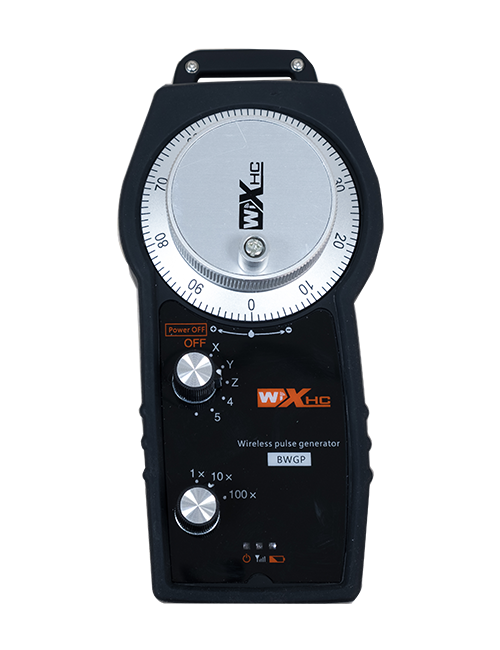
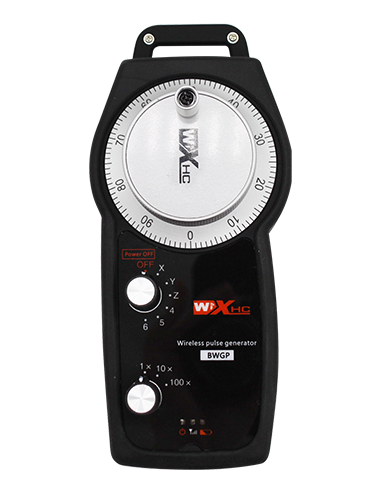
Deskribapen

1.Produktuaren aurkezpena
Wireless Remote Control is used for manual guidance, kokatzea, tool setting and other operations of CNC machine tools. Produktu honek haririk gabeko transmisio teknologia hartzen du, Udaberriko alanbre konexio tradizionala ezabatuz, Kableek eragindako ekipoen porrotak murriztea, Kablearen arrastatze desabantailak ezabatuz, Olio orbanak, etc., and is more convenient to operate.It is widely applicable to CNC machine tools such as gantry machining centers, gantry vertical lathes, and CNC gear processing machines, and is compatible with various mainstream CNC system brands on the market, including Siemens, Mitsubishi, Ancuc, Syntec and more.
2.Produktuaren ezaugarriak
1. 433MHz-ko haririk gabeko komunikazio-teknologia hartzen du haririk gabeko funtzionamendu-distantziarekin 20 neurgailuak.
2.Maiztasun-jauzia moldagarria; 32 Hari gabeko urruneko aginte multzoak aldi berean erabil daitezke interferentziarik gabe.
3.Supports the emergency stop button, and the emergency stop button remains effective even after the remote control is powered off.
4.Euskarri 3 botoi pertsonalizatuak IO seinalearen irteera aldatzeko.
5.6 ardatzeko kontrola onartzen du, eta 7 12 ardatzeko kontrola pertsonalizagarria da.
6. 3 abiadurako handitze kontrola onartzen du, eta 4 abiadurako handitze kontrola pertsonalizagarria da.
7.gaitzeko botoiaren funtzioa onartzen du, IO-seinale kommutagarriak atera ditzakeena, eta ardatzen hautaketa ere kontrolatu, handitzea eta kodetzailea.
8.Ardatz hautatzeko eta handitzeko kodeketa mota aldatzea onartzen du softwarearen bidez.
9. Supports pulse encoder with specification of 100 iraultza bakoitzeko pultsuak.
10. Supports standard Type-C charging with 5V-2A charging specification; built-in battery
specification: 14500 / 1100mah.
3. Produktuaren zehaztapenak
| Working Voltage and Current of Handheld Terminal |
3.7V/20.0mA |
| Charging Battery Specification |
3.7V/14500/1100mAh
|
| Low Voltage Alarm Range of Handheld Terminal |
<3.35V V |
| Receiver Power Supply Voltage |
DC5V-24V/1A |
| Receiver Emergency Stop Output Load Range |
AC125V-1A / DC30V-2A |
| Receiver Enable Output Load Range |
AC125V-1A / DC30V-2A |
| Receiver Custom Button Output Load Range |
DC24V / 50ma
|
| Receiver Axis Selection Output Load Range |
DC24V / 50ma |
| Receiver magnification Output Load Range |
DC24V / 50ma |
| Handheld Terminal Transmit Power |
15dbm
|
| Hartzailea sentsibilitatea jasotzen |
-100dbm |
| Haririk gabeko komunikazio maiztasuna |
433MHz Maiztasun Banda
|
| Wireless Communication Distance |
20 meters barrier-free distance
|
| Operating Temperature |
-25℃<X<55℃ |
| Safe drop height |
1 m
|
| Number of Custom Buttons |
3
|
| Product Weight |
546.86(g) |
| Product Dimensions |
200*87*72(mm) |
4. Produktuen funtzioa Sarrera

Ohar:
① Emergency Stop Button:
Sakatu Larrialdietarako Gelditu botoia, the two groups of emergency stop IO outputs on the receiver will disconnect, and all remote control functions will be invalidated.Release the emergency stop button, the emergency stop IO outputs on the receiver will be closed, and all remote control functions will be restored. Horrez gain, even if the remote control is powered off, pressing the emergency stop button can still activate the emergency stop IO output of the receiver.
② Enable Button:
Press either enable button on both sides, the two sets of enable IO outputs on the receiver will conduct. Release the enable button, and the enable IO outputs will disconnect. It is necessary to press and hold the enable button before toggling axis selection, magnification or rotating the remote control for the operation to take effect.This function can be canceled through the configuration software.
③ Axis Selection Switch (Power Switch):
Luze sakatu Gaitu botoia, then toggling the axis selection switch can control the movement of axis .Press and hold the enable button, then toggle the axis selection switch to switch the motion axis controlled by the remote control. Toggle the switch from the OFF position to any axis position, and the remote control will power on automatically.
④ Pulse Encoder:
Press and hold the enable button and rotate the pulse encoder, it will output pulse signals to control the movement of the machine axis.
⑤ LCD Display Screen:

5. Product Accessories Diagram

6. Produktuen instalazio gida
6.1 Produktuen instalazio urratsak
1. Install the receiver in the electrical cabinet via the buckle on its back, or mount it inside the electrical cabinet through the screw holes at the four corners of the receiver.
2. Ikusi gure hartzailearen kable bidezko diagrama, Konparatu zure gunearen ekipoekin, and connect the equipment to the receiver with cables.
3. After the receiver is fixed in place, install the supporting antenna of the receiver properly. Mount or place the outer end of the antenna outside the electrical cabinet. It is recommended to place it on the top of the electrical cabinet for optimal signal performance. Do not leave the antenna uninstalled or place it inside the electrical cabinet; bestela, signal failure may occur.
4. Azkenik, turn on the remote control power switch, then you can remotely operate the machine via the remote control.
6.2 Receiver Installation Dimensions

6.3 Hartzailearen kablearen erreferentzia diagrama
7. Produktuen funtzionamenduaren argibideak
1. Makina eta hartzailea boterea. The receiver operation indicator flashes. After the wireless electronic remote control is fully charged, toggle it from the OFF gear to the X-axis gear, and the remote control display lights up.
2. Select the axis : Luze sakatu Gaitu botoia, toggle the axis selection switch to select the axis to be operated.
3. Select the magnification: Luze sakatu Gaitu botoia, toggle the magnification switch to select the required magnification gear.
4. Axis movement: Luze sakatu Gaitu botoia, select the axis selection switch and the magnification switch, then rotate the pulse encoder. Rotate clockwise to move the axis in the positive direction, and rotate counterclockwise to move the axis in the negative direction.
5. Luze sakatu edozein pertsonalizatutako botoia, the corresponding button IO output of the receiver will turn on; release the button, and the output will turn off.
6. Sakatu Larrialdietarako Gelditu botoia, the corresponding emergency stop IO output of the receiver disconnects and the remote control function becomes invalid. Release the emergency stop button, the emergency stop IO output closes and the remote control function is restored.
7. If the wireless remote control is not operated for a period of time, Lotura modua automatikoki sartuko da energia kontsumoa murrizteko. It can be used normally again by pressing the enable button again.
8.If the wireless remote control is not used for a long time, turn the axis switch to OFF to turn off the power and extend battery life
8. Produktuaren ereduaren deskribapena
①:UWGP stands for appearance style.
②:Pulse Output Parameters:
01: Pultsu irteera seinalea a da adierazten du, Ban; Pultsu tentsioa 5V; Pultsu kantitatea 100ppr.
02: Pultsu irteera seinalea a da adierazten du, Ban; Pultsu tentsioa 12v; pulse quantity 25PPR.
03: Pultsu irteera seinalea a da adierazten du, Ban, -A -, Ban -; Pultsu tentsioa 5V; Pultsu kantitatea 100ppr.
04: Maila baxuko NPN zirkuitu irekiko irteera adierazten du, A eta B pultsu irteerako seinaleekin; The number of pulses is 100PPR.
05: Goi mailako PNP iturriaren irteera adierazten du, A eta B pultsu irteerako seinaleekin; Pultsu kopurua 100ppr da.
③:Represents the axis selection switch quantity; 6 stands for 6 ardor, 7 stands for 7 ardor, and so on.
④: Represents the signal type of the axis selection switch.A stands for point-to-point output signal, and B stands for encoder output signal.
⑤: Represents the signal type of the magnification switch.A stands for point-to-point output signal, and B stands for encoder output signal.
⑥: Pertsonalizatutako botoien kopurua adierazten du; 3 corresponds to 6 Neurrira botoiak.
⑦: Represents the power supply for the system remote control. 05 stands for 5V power supply, eta 24 stands for 24V power supply.
⑧: Represents the contact charging mode. It starts charging automatically when placed back on the charging base.
9. Produktuaren arazoak konpontzeko

10. Maintenance and upkeep
1. Mesedez, erabili ingurune lehor batean giro-tenperaturan eta presioan bere zerbitzuaren bizitza luzatzeko.
2. Please avoid using in abnormal environments such as rain and water to extend the service life.
3. Please keep the appearance of the remote control clean to extend its service life.
4. Please avoid crushing, dropping, or bumping, etz. to prevent damage to the precision components inside the remote control or accuracy errors.
5. Denbora luzez erabiltzen ez bada, please store the remote control in a clean and safe place.
6. Avoid moisture and shock during storage and transportation.
11. Segurtasunari buruzko informazioa
1. Irakurri arretaz argibideak arretaz erabili eta debekatu profesional ez profesionalak funtzionatzea.
2. Please charge the remote control in a timely manner when the battery level is too low, to avoid malfunction and operational errors caused by insufficient power.
3. If you repair it yourself and cause damage, the warranty will be void.