Digitaka 2 bolabolabolabolaboti ni kote ., ena siqeleti ni peleti ni INui.;
Digitaka -2 qaqa;
Na veitokoni ni 3 na vakatorocaketaki 3 e lewa .;


1.iTaba ni iTukutuku
2. Na iyaya Na iyaya ni kecega
| Operating voltage and current of wireless remote |
3V/14MA
|
| Battery specifications | 2 AA alkaline batteries, size 5 |
| Low voltage alarm range of wireless remote | < 2.3mavoa |
| Na kaukauwa ni livaliva ni kaukauwa ni livaliva . | DC5V-24V/A |
| Receiver emergency stop output load range | AC125V-1A/DC30V-2A |
| Receiver enable output load range |
AC125V-1A/DC30V-2A
|
| Receiver custom button output load range | DC24V/50mA |
| Receiver axis selection output load range | DC24V/50mA |
| Receiver magnification output load range | DC24V/50mA |
| Transmission power of handheld terminal |
15dBm
|
| Receiver receiving sensitivity | -100dBm |
| Wireless communication frequency | 433MHz frequency band |
| Wireless communication distance | Barrier free distance of 40 bose |
| Operation temperature | -25℃ < sota < 55℃ |
| Anti fall height | 1 (vakacegui) |
| Custom button quantity | 2 |


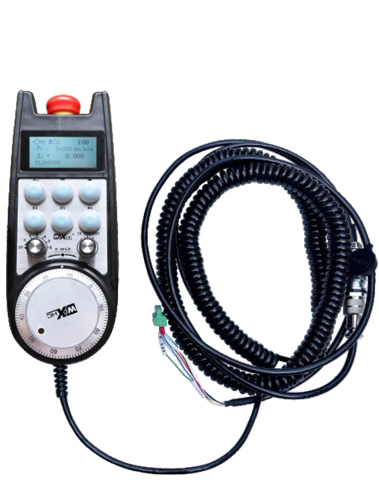
① Pulse encoder:
Na Presita ka taura na ibulukau ni bulukau ., Vakadewataka, e dua na sikinala ni pultial .,and control the movement ofthe machine axis.
② Enable button:
Press either enable button on either side, and the two sets of enable IO outputs on the receiver will conduct. Release the enable button to disconnect the enable IO output; And before switching the axis selection magnification and shaking the handwheel,the enable button needs to be held down to be effective; This function can be cancelled through configuration software.
③ Indicator lights:
Left side light: power on light,the handwheel uses the axis to select OFF for power on, and this light stays on after power on;
Middle light: a signal light that lights up when operating any function ofthe handwheel, and does not light up when there is no operation;
Right side light: Rarama ni alamu ni volitika lailai, low battery level,this lightflashes or stays on, battery needs to be replaced.
④ Emergency stop button:
Tabaka na leqa ni leqa tubukoso na ibulukau ni leqa tubukoso ., kei na rua na ituvatuva ni leqa tubu ko Ikosiousitisi e rau na vakacegui ., ka sa yaga na cakacaka kecega ni liga ni liga ..
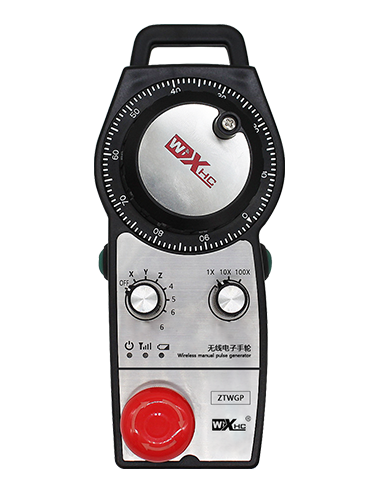
⑤ Magnification switch:
Press and hold the enable button to switch the magnification switch, which can switch the magnification controlled by the handwheel.
⑥ Axis selection switch (baravi):
Press and hold the enable button to switch the axis selection switch, which can switch the movement axis controlled by the handwheel. Switch this switch from OFF to any axis and turn on the handwheel power.
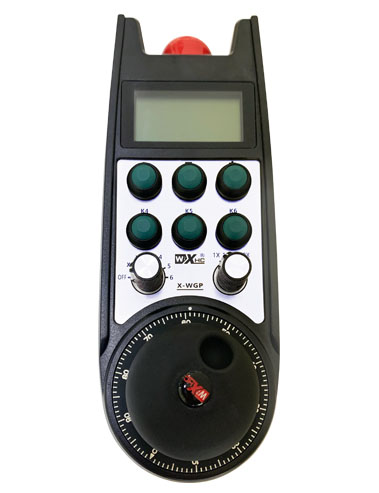
⑦ Custom button:
Two custom buttons, na veitaratara yadua ki na dua na IOOupputed na ciqoma.

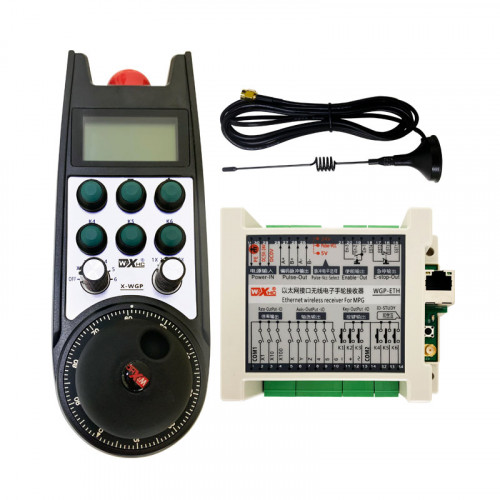
1. Vakacaucautaka o koya e ciqoma na cabinet ni livaliva ki na ilati ., se vakacuruma ki na kabinet ena loma ni qilaiso waqa ena tutuna va na kena e ciqoma ..
2. Vakanuinui vinaka ki na noda ciqoma na ringram ka veidutaitaka vata kei na nomu na iyaya ni cakacaka .. Connect the equipment to the receiver via cables.
3.After the receiver is properly fixed, na annana e dua na ka e rawata o koya e ciqoma e dodonu me semati ., and the outer end of the antenna should be installed or placed outside the electrical cabinet. E vakatututaki me biuta ena dela ni na cabinet ni cabinet me baleta na vinaka duadua .. It is prohibited to leave the antenna unconnected or place it inside the electrical cabinet, as this may result in the signal being unusable.
4. Icavacava, turn on the power switch of the handwheel, and you can operate the machine remotely using the handwheel.
6.2 Ciqoma na kena vakayagataki

6.3 Na Veisaututaki Vakacegui.

7. Tuvanaka na veituberi ni veivakadodonutaki.
1. Power on the machine and the receiver. The receiver’s working indicator light flashes. Install the battery in the wireless electronic handwheel, secure the battery cover, kei
turn on the power switch of the wireless electronic handwheel. The handwheel’s battery level indicator light is on.
2. Digitaka na axis .: Na Presita ka taura na ibulukau ni bulukau ., toggle the axis selection switch, and select the axis you want to operate.
3. Digia na ivakatakilakila: Na Presita ka taura na ibulukau ni bulukau ., toggle the magnification switch,and select the desired magnification level.
4. Toso na axisis.: Na Presita ka taura na ibulukau ni bulukau ., digitaka na ivavama kakua ni ki na ilawalawa ni digidigi., Digitaka na kena ivakatagedegede lalai ., and then rotate the pulse encoder. Rotate clockwise to move the
positive axis and counterclockwise to move the negative axis.
5. Press ka qarava na ibulukau ni ivakarau cava ga., and the corresponding button IO output of the receiver will be turned on. Release the button, and the output will be turned off.
6. Tabaka na leqa ni leqa tubukoso na ibulukau ni leqa tubukoso ., Na leqa ni leqa ni leqa ni veika e baleti IO erau na cegu mada ga., ena vakaleqai .,serekali na ibulukau ni leqa tubukoso ni leqa tubukoso ., sa na sogo tiko na leqa ni leqa au dau cegu mada ga kina na Auut ., kei na cakacaka ni liga ena vakalesui tale ..
7. Kevaka e sega ni cakacaka ena loma ni dua na gauna ni cakacaka na liga ni liga ., it will automatically enter sleep mode to reduce power consumption. Ni sa vakayagataki tale […], the handwheel can be activated by pressing the enable button.
8. Kevaka e sega ni vakayagataki vakadede na liga ., it is recommended to switch the handwheel shaft to the OFF position, kauta mai na kaukauwa ni liga ., kei na nodra bula na batikadi ..
8. i cala na iVavalala

① :ZTWGP represents the appearance style
②:Na itaba ni isulu:
01: Indicates that the pulse output signal is A, B; Sa rauta na voqa ni 5V.; pulse quantity 100PPR.
02:Indicating thatthe pulse output signals are A and B; Pulse voltage 12V; pulse quantity 100PPR.
03:Indicating thatthe pulse output signals are A, B, A -, B -; Sa rauta na voqa ni 5V.; pulse quantity 100PPR.
04:Vakadidike ni dua na tabana e lailai-ni-lewa rawa ni NPN ena dola ., a sa pulou tani na A kei B .;The number of pulses is 100PPR.
05:Idiridede levu na ivurevure ni PNP., a sa pulou tani na A kei B .; The number of pulses is 100PPR.
③:Representing the number of axis selection switches, 2 matataka 2 vuni.
④:Represents the type of axis selection switch signal, E dua na matataka na sikinala ni tikina ena tikina oya ., kei na B e matataka na ivakatakilakila ni curuvanua mai na sikinala ..
⑤:Represents the type of multiplication switch signal, E dua na matataka na sikinala ni tikina ena tikina oya ., kei na B e matataka na ivakatakilakila ni curuvanua mai na sikinala ..
⑥:Represents the number of custom buttons, 2 matataka 2 gaunisala.
⑦:Represents the power supply for the system handwheel, kei 05 matataka na kaukauwa 5V..
⑧:L represents the left column (left knife holder), and R represents the right column (right knife holder).
9.Solution to Product Malfunctions

1. Sa kerei mo ni vakayagataka ena dua na vanua mamaca ena katakata kei na veivakacokotaki me rawa ni vakalevutaki kina na kena bula ni veiqaravi ..
2. Sa kerei mo ni kakua ni vakayagataka ena vanua ni soqo me vaka na tau ni uca kei na wai me rawa ni vakalevutaki kina na bula ni veiqaravi ..
3. Kerei me maroroi vinaka na i rairai ni liga me savasava na kena vakatetei na nona bula ni veiqaravi ..
4. Sa kerei mo ni kakua ni tukuna na., lutu, ibulibuli, kei na so tale. me tarovi kina na vakacaca ki na na precisions ena loma ni cala ni cala ni liga se eccuracy ..
5. Kevaka e sega ni vakayagataki ena dua na gauna balavu ., mo ni maroroi ira na liga ni cakacaka ena dua na vanua savasava ka taqomaki vinaka .. Ena gauna ni veivoli kei na veilakoyaki ., e dodonu me soli na ilavo me soli vei ira na moiistima kei na veivorati ..
11. oti
1. Yalovinaka wilika vakavinaka na idusidusi ni bera ni vakayagataki ka vakatabui ira na sega ni kenadau ena veiqaravi ..
2. Please replace the battery in a timely manner when the battery level is too low to avoid errors caused by insufficient battery power and inability to operate the handwheel.
3. Kevaka e vakavinakataki ., Yalovinaka veitaratara kei na kena e kenadau ena .. Kevaka e yaco na vakacaca ena kena vakavinakataki na ., Ena sega ni vakarautaka na ivakatawanisipi na ivakasala ni cakacaka .