Tuairisgeul

1.Ro-ràdh toraidh
Wireless Remote Control is used for manual guidance, A 'suidheachadh, tool setting and other operations of CNC machine tools. An toradh seo a 'gabhail ris an teicneòlas tar-chuir gun uèir, A 'cur às do cheangal Slighe na h-earraich, A 'lughdachadh fàilligeadh uidheamachd air adhbhrachadh le càbaill, A 'cur às do eas-bhuannachdan a' tarraing càball, stains ola, msaa., and is more convenient to operate.It is widely applicable to CNC machine tools such as gantry machining centers, gantry vertical lathes, and CNC gear processing machines, and is compatible with various mainstream CNC system brands on the market, including Siemens, Mitsubishi, Fanuc, Syntec and more.
2.Feartan toraidh
1. A’ gabhail ri teicneòlas conaltraidh gun uèir 433MHz le astar obrachaidh gun uèir de 20 meatairean.
2.Hopping tricead freagarrach; 32 faodar seataichean de smachdan iomallach gun uèir a chleachdadh aig an aon àm gun eadar-theachd.
3.Supports the emergency stop button, and the emergency stop button remains effective even after the remote control is powered off.
4.A 'toirt taic 3 putanan àbhaisteach le atharrachadh toradh comharra IO.
5.A 'toirt taic do smachd 6-axis, agus 7 gu smachd 12-axis faodar a ghnàthachadh.
6. A 'toirt taic do smachd meudachaidh 3-luath, agus tha smachd meudachaidh 4-astar gnàthaichte.
7.a’ toirt taic don ghnìomh putan comas, as urrainn comharran atharrachadh IO a thoirt a-mach, agus cuideachd smachd a chumail air taghadh axis, meudachaidh agus encoder.
8.A’ toirt taic do bhith ag atharrachadh an seòrsa còdaidh de thaghadh axis agus meudachaidh tro bhathar-bog.
9. Supports pulse encoder with specification of 100 buillean gach revolution.
10. Supports standard Type-C charging with 5V-2A charging specification; built-in battery
specification: 14500 / 1100mah.
3. Sònrachaidhean toraidh
| Working Voltage and Current of Handheld Terminal |
3.7V/20.0mA |
| Charging Battery Specification |
3.7V/14500/1100mAh
|
| Low Voltage Alarm Range of Handheld Terminal |
<3.35V |
| Receiver Power Supply Voltage |
DC5V-24V/1A |
| Receiver Emergency Stop Output Load Range |
AC125V-1A/DC30V-2A |
| Receiver Enable Output Load Range |
AC125V-1A/DC30V-2A |
| Receiver Custom Button Output Load Range |
DC24V/50mA
|
| Receiver Axis Selection Output Load Range |
DC24V/50mA |
| Receiver magnification Output Load Range |
DC24V/50mA |
| Handheld Terminal Transmit Power |
15dBm
|
| Neach-gabhail a 'faighinn mothachadh |
-100dBm |
| Tricead conaltraidh gun uèir |
433Còmhlan tricead MHz
|
| Wireless Communication Distance |
20 meters barrier-free distance
|
| Operating Temperature |
-25℃<X<55℃ |
| Safe drop height |
1 m
|
| Number of Custom Buttons |
3
|
| Product Weight |
546.86(g) |
| Product Dimensions |
200*87*72(mm) |
4. Ro-ràdh gnìomh toraidh

Notaichean:
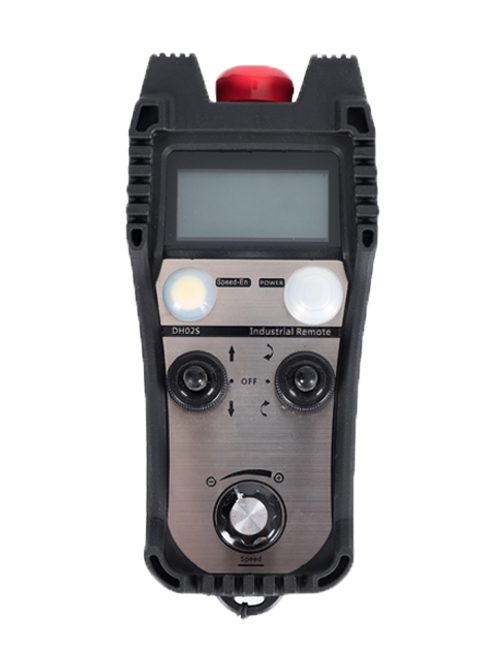
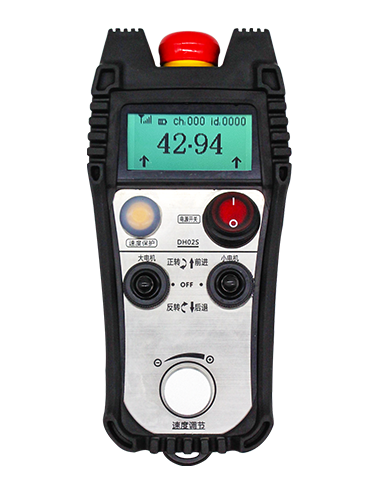
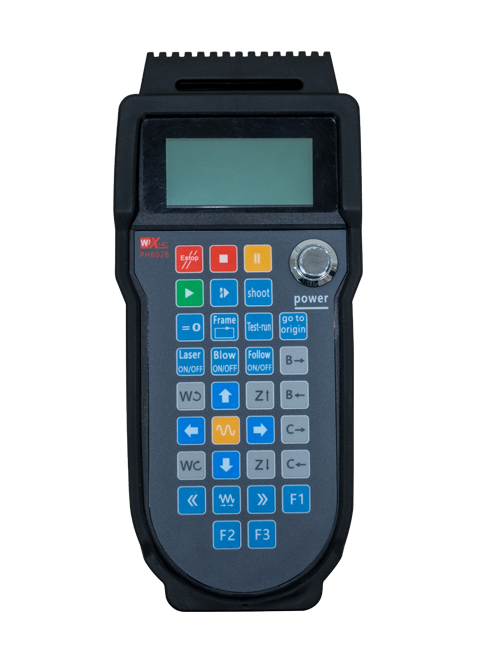
① Emergency Stop Button:
Brùth air a 'phutan stad èiginneach, the two groups of emergency stop IO outputs on the receiver will disconnect, and all remote control functions will be invalidated.Release the emergency stop button, the emergency stop IO outputs on the receiver will be closed, and all remote control functions will be restored. A bharrachd air, even if the remote control is powered off, pressing the emergency stop button can still activate the emergency stop IO output of the receiver.
② Enable Button:
Press either enable button on both sides, the two sets of enable IO outputs on the receiver will conduct. Release the enable button, and the enable IO outputs will disconnect. It is necessary to press and hold the enable button before toggling axis selection, magnification or rotating the remote control for the operation to take effect.This function can be canceled through the configuration software.
③ Axis Selection Switch (Power Switch):
Brùth agus cùm am putan Dèan comas, then toggling the axis selection switch can control the movement of axis .Press and hold the enable button, then toggle the axis selection switch to switch the motion axis controlled by the remote control. Toggle the switch from the OFF position to any axis position, and the remote control will power on automatically.
④ Pulse Encoder:
Press and hold the enable button and rotate the pulse encoder, it will output pulse signals to control the movement of the machine axis.
⑤ LCD Display Screen:

5. Product Accessories Diagram

6. Stiùireadh stàlaidh toraidh
6.1 Ceumannan stàlaidh toraidh
1. Install the receiver in the electrical cabinet via the buckle on its back, or mount it inside the electrical cabinet through the screw holes at the four corners of the receiver.
2. Thoir sùil air an diagram uèiridhte againn, Dèan coimeas eadar e le do uidheamachd air an làrach, and connect the equipment to the receiver with cables.
3. After the receiver is fixed in place, install the supporting antenna of the receiver properly. Mount or place the outer end of the antenna outside the electrical cabinet. It is recommended to place it on the top of the electrical cabinet for optimal signal performance. Do not leave the antenna uninstalled or place it inside the electrical cabinet; eile, signal failure may occur.
4. Mu dheireadh, turn on the remote control power switch, then you can remotely operate the machine via the remote control.
6.2 Receiver Installation Dimensions

6.3 Diagram iomraidh a 'ghlacadair uèirneachd
7. Stiùireadh Obrachaidh toraidh
1. Cumhachd air an inneal agus an ghlacadair. The receiver operation indicator flashes. After the wireless electronic remote control is fully charged, toggle it from the OFF gear to the X-axis gear, and the remote control display lights up.
2. Select the axis : Brùth agus cùm am putan Dèan comas, toggle the axis selection switch to select the axis to be operated.
3. Select the magnification: Brùth agus cùm am putan Dèan comas, toggle the magnification switch to select the required magnification gear.
4. Axis movement: Brùth agus cùm am putan Dèan comas, select the axis selection switch and the magnification switch, then rotate the pulse encoder. Rotate clockwise to move the axis in the positive direction, and rotate counterclockwise to move the axis in the negative direction.
5. Brùth agus cùm putan gnàthaichte sam bith, the corresponding button IO output of the receiver will turn on; release the button, and the output will turn off.
6. Brùth air a 'phutan stad èiginneach, the corresponding emergency stop IO output of the receiver disconnects and the remote control function becomes invalid. Release the emergency stop button, the emergency stop IO output closes and the remote control function is restored.
7. If the wireless remote control is not operated for a period of time, thèid e a-steach gu fèin-ghluasadach ann am modh cadail gus caitheamh cumhachd a lughdachadh. It can be used normally again by pressing the enable button again.
8.If the wireless remote control is not used for a long time, turn the axis switch to OFF to turn off the power and extend battery life
8. Tuairisgeul modail toraidh
①:UWGP stands for appearance style.
②:Pulse Output Parameters:
01: A’ nochdadh gur e an comharra toraidh pulse A, B; Volset voltage 5v; meud cuisle 100PPR.
02: A’ nochdadh gur e an comharra toraidh pulse A, B; bholtaids Pulse 12V; pulse quantity 25PPR.
03: A’ nochdadh gur e an comharra toraidh pulse A, B, A -, B -; Volset voltage 5v; meud cuisle 100PPR.
04: A 'comharrachadh toradh cuairtean fosgailte NPN Fosgailte NPN ìosal, le comharran toraidh pulse de A agus B.; The number of pulses is 100PPR.
05: A 'comharrachadh toradh stòr pnp àrd-ìre, le comharran toraidh pulse de A agus B.; Is e an àireamh de bhuillean 100PPR.
③:Represents the axis selection switch quantity; 6 stands for 6 tuaghan, 7 stands for 7 tuaghan, and so on.
④: Represents the signal type of the axis selection switch.A stands for point-to-point output signal, and B stands for encoder output signal.
⑤: Represents the signal type of the magnification switch.A stands for point-to-point output signal, and B stands for encoder output signal.
⑥: A’ riochdachadh an àireamh de phutanan gnàthaichte; 3 corresponds to 6 putanan gnàthaichte.
⑦: Represents the power supply for the system remote control. 05 stands for 5V power supply, agus 24 stands for 24V power supply.
⑧: Represents the contact charging mode. It starts charging automatically when placed back on the charging base.
9. Fuasgladh dhuilgheadasan toraidh

10. Maintenance and upkeep
1. Cleachd e ann an àrainneachd tioram aig teòthachd an t-seòmair agus cuideam gus a bheatha seirbheis a leudachadh.
2. Please avoid using in abnormal environments such as rain and water to extend the service life.
3. Please keep the appearance of the remote control clean to extend its service life.
4. Please avoid crushing, dropping, or bumping, msaa. to prevent damage to the precision components inside the remote control or accuracy errors.
5. Mura cleachdeadh e airson ùine mhòr, please store the remote control in a clean and safe place.
6. Avoid moisture and shock during storage and transportation.
11. Fiosrachadh sàbhailteachd
1. Feuch an leugh thu an stiùireadh gu faiceallach mus cleachd thu agus toirmeasg neo-phroifeiseantaich bho bhith ag obair.
2. Please charge the remote control in a timely manner when the battery level is too low, to avoid malfunction and operational errors caused by insufficient power.
3. If you repair it yourself and cause damage, the warranty will be void.