Deskripsyon

1.Pwodwi Entwodiksyon
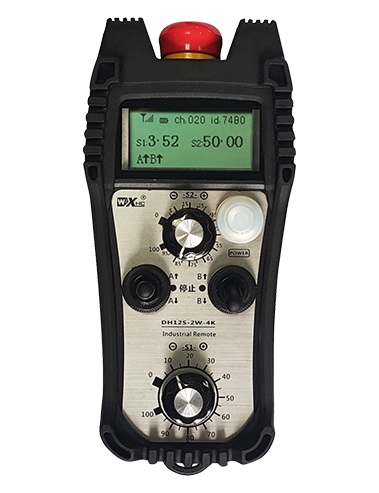
Wireless Remote Control is used for manual guidance, pwezante, tool setting and other operations of CNC machine tools. Pwodwi sa a adopte teknoloji transmisyon san fil, elimine tradisyonèl koneksyon fil prentan an, diminye echèk ekipman ki te koze pa câbles, elimine dezavantaj yo nan trennen kab, tach lwil oliv, elatriye., and is more convenient to operate.It is widely applicable to CNC machine tools such as gantry machining centers, gantry vertical lathes, and CNC gear processing machines, and is compatible with various mainstream CNC system brands on the market, including Siemens, Mitsubishi, Fanm, Syntec and more.
2.Karakteristik pwodwi yo
1. Adopte teknoloji kominikasyon san fil 433MHz ak yon distans opere san fil 20 mèt.
2.Frekans adaptab so; 32 ansanm san fil kontwòl remote ka itilize ansanm san entèferans.
3.Supports the emergency stop button, and the emergency stop button remains effective even after the remote control is powered off.
4.Sipò 3 bouton koutim ak chanje pwodiksyon siyal IO.
5.Sipòte kontwòl 6-aks, ak 7 a 12-aks kontwòl se customizable.
6. Sipòte kontwòl agrandisman 3-vitès, ak kontwòl agrandisman 4-vitès se customizable.
7.sipòte fonksyon bouton pèmèt, ki ka pwodiksyon chanje siyal IO, epi tou kontwole seleksyon aks, agrandisman ak ankode.
8.Sipòte modifye kalite kodaj seleksyon aks ak agrandisman atravè lojisyèl.
9. Supports pulse encoder with specification of 100 pulsasyon pou chak revolisyon.
10. Supports standard Type-C charging with 5V-2A charging specification; built-in battery
specification: 14500 / 1100mAh.
| Working Voltage and Current of Handheld Terminal |
3.7V/20.0mA |
| Charging Battery Specification |
3.7V/14500/1100mAh
|
| Low Voltage Alarm Range of Handheld Terminal |
<3.35V |
| Receiver Power Supply Voltage |
DC5V-24V/1A |
| Receiver Emergency Stop Output Load Range |
AC125V-1A/DC30V-2A |
| Receiver Enable Output Load Range |
AC125V-1A/DC30V-2A |
| Receiver Custom Button Output Load Range |
DC24V/50mA
|
| Receiver Axis Selection Output Load Range |
DC24V/50mA |
| Receiver magnification Output Load Range |
DC24V/50mA |
| Handheld Terminal Transmit Power |
15dBm
|
| Reseptè k ap resevwa sansiblite |
-100dBm |
| Frekans kominikasyon san fil |
433Band frekans MHz
|
| Wireless Communication Distance |
20 meters barrier-free distance
|
| Operating Temperature |
-25℃<X<55℃ |
| Safe drop height |
1 m
|
| Number of Custom Buttons |
3
|
| Product Weight |
546.86(g) |
| Product Dimensions |
200*87*72(mm) |
4. Pwodwi Fonksyon Entwodiksyon

Nòt:
① Emergency Stop Button:
Peze bouton pou kanpe ijans lan, the two groups of emergency stop IO outputs on the receiver will disconnect, and all remote control functions will be invalidated.Release the emergency stop button, the emergency stop IO outputs on the receiver will be closed, and all remote control functions will be restored. Anplis de sa, even if the remote control is powered off, pressing the emergency stop button can still activate the emergency stop IO output of the receiver.
② Enable Button:
Press either enable button on both sides, the two sets of enable IO outputs on the receiver will conduct. Release the enable button, and the enable IO outputs will disconnect. It is necessary to press and hold the enable button before toggling axis selection, magnification or rotating the remote control for the operation to take effect.This function can be canceled through the configuration software.
③ Axis Selection Switch (Power Switch):
Peze epi kenbe bouton an pèmèt, then toggling the axis selection switch can control the movement of axis .Press and hold the enable button, then toggle the axis selection switch to switch the motion axis controlled by the remote control. Toggle the switch from the OFF position to any axis position, and the remote control will power on automatically.
④ Pulse Encoder:
Press and hold the enable button and rotate the pulse encoder, it will output pulse signals to control the movement of the machine axis.
⑤ LCD Display Screen:

5. Product Accessories Diagram

6. Gid Enstalasyon Pwodwi
6.1 Etap enstalasyon pwodwi
1. Install the receiver in the electrical cabinet via the buckle on its back, or mount it inside the electrical cabinet through the screw holes at the four corners of the receiver.
2. Gade dyagram fil elektrik reseptè nou an, konpare li ak ekipman sou plas ou a, and connect the equipment to the receiver with cables.
3. After the receiver is fixed in place, install the supporting antenna of the receiver properly. Mount or place the outer end of the antenna outside the electrical cabinet. It is recommended to place it on the top of the electrical cabinet for optimal signal performance. Do not leave the antenna uninstalled or place it inside the electrical cabinet; otreman, signal failure may occur.
4. Anfen, turn on the remote control power switch, then you can remotely operate the machine via the remote control.
6.2 Receiver Installation Dimensions

6.3 Dyagram referans fil elektrik reseptè
7. Enstriksyon pou operasyon pwodwi yo
1. Pouvwa sou machin nan ak reseptè a. The receiver operation indicator flashes. After the wireless electronic remote control is fully charged, toggle it from the OFF gear to the X-axis gear, and the remote control display lights up.
2. Select the axis : Peze epi kenbe bouton an pèmèt, toggle the axis selection switch to select the axis to be operated.
3. Select the magnification: Peze epi kenbe bouton an pèmèt, toggle the magnification switch to select the required magnification gear.
4. Axis movement: Peze epi kenbe bouton an pèmèt, select the axis selection switch and the magnification switch, then rotate the pulse encoder. Rotate clockwise to move the axis in the positive direction, and rotate counterclockwise to move the axis in the negative direction.
5. Peze epi kenbe nenpòt bouton koutim, the corresponding button IO output of the receiver will turn on; release the button, and the output will turn off.
6. Peze bouton pou kanpe ijans lan, the corresponding emergency stop IO output of the receiver disconnects and the remote control function becomes invalid. Release the emergency stop button, the emergency stop IO output closes and the remote control function is restored.
7. If the wireless remote control is not operated for a period of time, li pral otomatikman antre nan mòd dòmi diminye konsomasyon pouvwa. It can be used normally again by pressing the enable button again.
8.If the wireless remote control is not used for a long time, turn the axis switch to OFF to turn off the power and extend battery life
8. Pwodwi Modèl Deskripsyon
①:UWGP stands for appearance style.
②:Pulse Output Parameters:
01: Endike ke siyal pwodiksyon batman kè a se A, B; Batman kè vòltaj 5V; batman kè kantite 100PPR.
02: Endike ke siyal pwodiksyon batman kè a se A, B; Batman kè vòltaj 12V; pulse quantity 25PPR.
03: Endike ke siyal pwodiksyon batman kè a se A, B, A -, B -; Batman kè vòltaj 5V; batman kè kantite 100PPR.
04: Endike yon pwodiksyon sikwi louvri NPN ki ba, ak siyal pwodiksyon batman kè A ak B; The number of pulses is 100PPR.
05: Endike wo nivo pwodiksyon sous PNP, ak siyal pwodiksyon batman kè A ak B; Nimewo a nan pulsasyon se 100PPR.
③:Represents the axis selection switch quantity; 6 stands for 6 rach, 7 stands for 7 rach, and so on.
④: Represents the signal type of the axis selection switch.A stands for point-to-point output signal, and B stands for encoder output signal.
⑤: Represents the signal type of the magnification switch.A stands for point-to-point output signal, and B stands for encoder output signal.
⑥: Reprezante kantite bouton koutim yo; 3 corresponds to 6 bouton koutim.
⑦: Represents the power supply for the system remote control. 05 stands for 5V power supply, ak 24 stands for 24V power supply.
⑧: Represents the contact charging mode. It starts charging automatically when placed back on the charging base.
9. Pwodwi depanaj

10. Maintenance and upkeep
1. Tanpri itilize li nan yon anviwònman sèk nan tanperati chanm ak presyon pou yon ekstansyon pou lavi sèvis li yo.
2. Please avoid using in abnormal environments such as rain and water to extend the service life.
3. Please keep the appearance of the remote control clean to extend its service life.
4. Please avoid crushing, dropping, or bumping, elatriye. to prevent damage to the precision components inside the remote control or accuracy errors.
5. Si ou pa itilize pou yon tan long, please store the remote control in a clean and safe place.
6. Avoid moisture and shock during storage and transportation.
11. Enfòmasyon sou sekirite
1. Tanpri li enstriksyon yo ak anpil atansyon anvan ou itilize ak entèdi pwofesyonèl ki pa nan opere.
2. Please charge the remote control in a timely manner when the battery level is too low, to avoid malfunction and operational errors caused by insufficient power.
3. If you repair it yourself and cause damage, the warranty will be void.