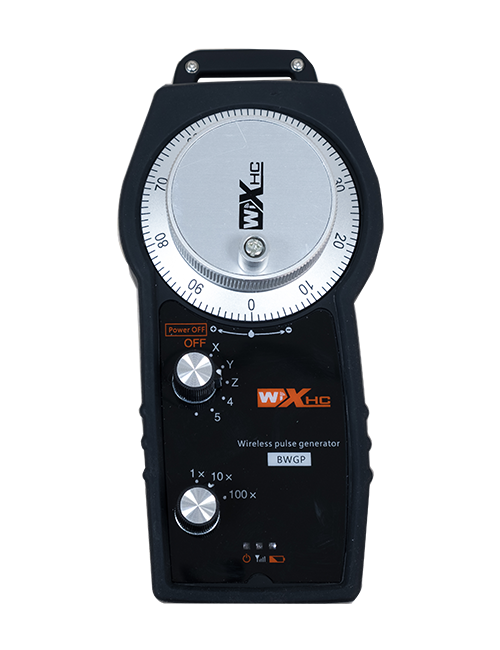
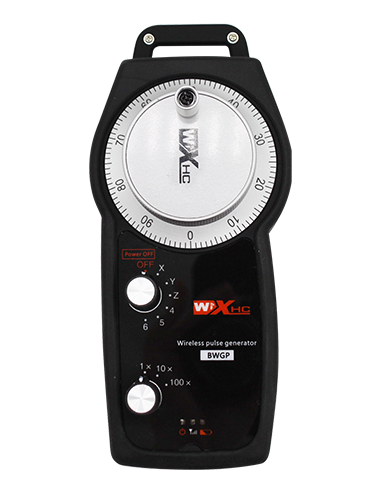
Түсіндірме

1.Өнімді енгізу
Wireless Remote Control is used for manual guidance, Орналастыру, tool setting and other operations of CNC machine tools. Бұл өнім сымсыз тарату технологиясын қабылдады, Көктемгі дәстүрлі сым байланысын жою, Кабельдерден туындаған жабдықтың ақауларын азайту, Кабельді сүйретудің кемшіліктерін жою, Мұнай дақтары, т.б., and is more convenient to operate.It is widely applicable to CNC machine tools such as gantry machining centers, gantry vertical lathes, and CNC gear processing machines, and is compatible with various mainstream CNC system brands on the market, including Siemens, Mitsubishi, Фабрик, Syntec and more.
2.Өнімнің ерекшеліктері
1. Сымсыз жұмыс қашықтығымен 433 МГц сымсыз байланыс технологиясын қабылдайды 20 Есептегіштер.
2.Адаптивті жиілікті секіру; 32 сымсыз қашықтан басқару құралдарының жиынтықтарын кедергісіз бір уақытта пайдалануға болады.
3.Supports the emergency stop button, and the emergency stop button remains effective even after the remote control is powered off.
4.Қолдау 3 ауысу IO сигнал шығысы бар пайдаланушы түймелері.
5.6 осьті басқаруды қолдайды, жіне 7 12 осьті басқару теңшеуге болады.
6. 3 жылдамдықты үлкейтуді басқаруды қолдайды, және 4 жылдамдықты үлкейтуді басқару теңшеуге болады.
7.қосу түймесі функциясын қолдайды, коммутациялық IO сигналдарын шығара алады, сонымен қатар осьті таңдауды басқару, үлкейту және кодтаушы.
8.Бағдарлама арқылы осьті таңдау мен үлкейтудің кодтау түрін өзгертуді қолдайды.
9. Supports pulse encoder with specification of 100 Революция үшін импульстар.
10. Supports standard Type-C charging with 5V-2A charging specification; built-in battery
specification: 14500 / 1100мама.
3. Өнімнің техникалық сипаттамалары
| Working Voltage and Current of Handheld Terminal |
3.7V/20.0mA |
| Charging Battery Specification |
3.7V/14500/1100mAh
|
| Low Voltage Alarm Range of Handheld Terminal |
<3.35V |
| Receiver Power Supply Voltage |
DC5V-24V/1A |
| Receiver Emergency Stop Output Load Range |
AC125V-1A / DC30V-2A |
| Receiver Enable Output Load Range |
AC125V-1A / DC30V-2A |
| Receiver Custom Button Output Load Range |
DC24V / 50MA
|
| Receiver Axis Selection Output Load Range |
DC24V / 50MA |
| Receiver magnification Output Load Range |
DC24V / 50MA |
| Handheld Terminal Transmit Power |
15даб
|
| Сезімталдықты қабылдайтын ресвер |
-100даб |
| Сымсыз байланыс жиілігі |
433MHZ жиілік диапазоны
|
| Wireless Communication Distance |
20 meters barrier-free distance
|
| Operating Temperature |
-25℃<Х<55℃ |
| Safe drop height |
1 м
|
| Number of Custom Buttons |
3
|
| Product Weight |
546.86(g) |
| Product Dimensions |
200*87*72(mm) |
4. Өнім функциясын енгізу

ЕСталдар:
① Emergency Stop Button:
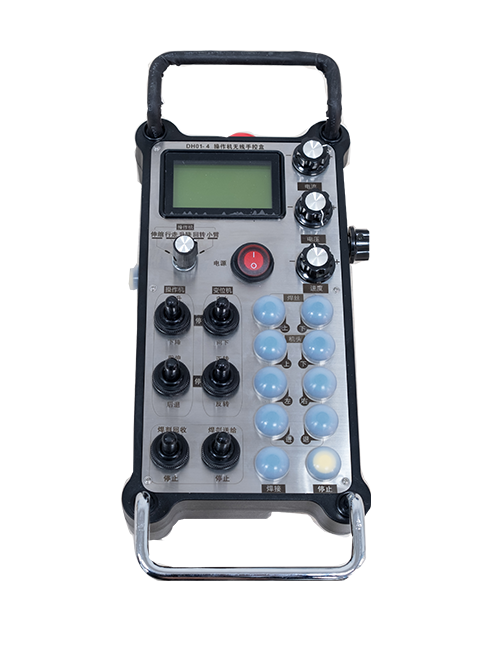
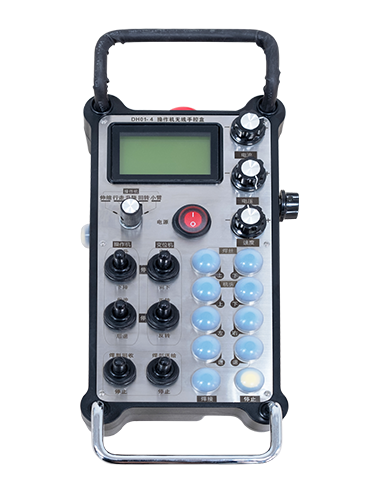
Төтенше тоқтату түймесін басыңыз, the two groups of emergency stop IO outputs on the receiver will disconnect, and all remote control functions will be invalidated.Release the emergency stop button, the emergency stop IO outputs on the receiver will be closed, and all remote control functions will be restored. Сонымен қатар, even if the remote control is powered off, pressing the emergency stop button can still activate the emergency stop IO output of the receiver.
② Enable Button:
Press either enable button on both sides, the two sets of enable IO outputs on the receiver will conduct. Release the enable button, and the enable IO outputs will disconnect. It is necessary to press and hold the enable button before toggling axis selection, magnification or rotating the remote control for the operation to take effect.This function can be canceled through the configuration software.
③ Axis Selection Switch (Power Switch):
Қосу түймесін басып тұрыңыз, then toggling the axis selection switch can control the movement of axis .Press and hold the enable button, then toggle the axis selection switch to switch the motion axis controlled by the remote control. Toggle the switch from the OFF position to any axis position, and the remote control will power on automatically.
④ Pulse Encoder:
Press and hold the enable button and rotate the pulse encoder, it will output pulse signals to control the movement of the machine axis.
⑤ LCD Display Screen:

5. Product Accessories Diagram

6. Өнімді орнату бойынша нұсқаулық
6.1 Өнімді орнату қадамдары
1. Install the receiver in the electrical cabinet via the buckle on its back, or mount it inside the electrical cabinet through the screw holes at the four corners of the receiver.
2. Біздің ресивердің сымының диаграммасына жүгініңіз, Оны жергілікті жабдықпен салыстырыңыз, and connect the equipment to the receiver with cables.
3. After the receiver is fixed in place, install the supporting antenna of the receiver properly. Mount or place the outer end of the antenna outside the electrical cabinet. It is recommended to place it on the top of the electrical cabinet for optimal signal performance. Do not leave the antenna uninstalled or place it inside the electrical cabinet; әйтпесе, signal failure may occur.
4. Соңында, turn on the remote control power switch, then you can remotely operate the machine via the remote control.
6.2 Receiver Installation Dimensions

6.3 Ресивердің сымдары туралы анықтамалық диаграмма
7. Өнімді пайдалану жөніндегі нұсқаулық
1. Құрылғыдағы және ресивердегі қуат. The receiver operation indicator flashes. After the wireless electronic remote control is fully charged, toggle it from the OFF gear to the X-axis gear, and the remote control display lights up.
2. Select the axis : Қосу түймесін басып тұрыңыз, toggle the axis selection switch to select the axis to be operated.
3. Select the magnification: Қосу түймесін басып тұрыңыз, toggle the magnification switch to select the required magnification gear.
4. Axis movement: Қосу түймесін басып тұрыңыз, select the axis selection switch and the magnification switch, then rotate the pulse encoder. Rotate clockwise to move the axis in the positive direction, and rotate counterclockwise to move the axis in the negative direction.
5. Кез келген жеке түймесін басып тұрыңыз, the corresponding button IO output of the receiver will turn on; release the button, and the output will turn off.
6. Төтенше тоқтату түймесін басыңыз, the corresponding emergency stop IO output of the receiver disconnects and the remote control function becomes invalid. Release the emergency stop button, the emergency stop IO output closes and the remote control function is restored.
7. If the wireless remote control is not operated for a period of time, Ол қуатты тұтынуды азайту үшін автоматты түрде ұйқы режиміне өтеді. It can be used normally again by pressing the enable button again.
8.If the wireless remote control is not used for a long time, turn the axis switch to OFF to turn off the power and extend battery life
8. Өнім моделінің сипаттамасы
①:UWGP stands for appearance style.
②:Pulse Output Parameters:
01: Импульстің шығу сигналының сигналы а екенін көрсетеді, Б; Импульстік кернеу 5В; импульс саны 100ppr.
02: Импульстің шығу сигналының сигналы а екенін көрсетеді, Б; Импульстік кернеу 12v; pulse quantity 25PPR.
03: Импульстің шығу сигналының сигналы а екенін көрсетеді, Б, А -, Б -; Импульстік кернеу 5В; импульс саны 100ppr.
04: Төмен деңгейдегі NPN ашық тізбегін көрсетеді, Импульстің шығыс сигналдары A және B сигналдарымен; The number of pulses is 100PPR.
05: PNP жоғары деңгейлі шығуын көрсетеді, Импульстің шығыс сигналдары A және B сигналдарымен; Импульстың саны - 100PPR.
③:Represents the axis selection switch quantity; 6 stands for 6 білік, 7 stands for 7 білік, and so on.
④: Represents the signal type of the axis selection switch.A stands for point-to-point output signal, and B stands for encoder output signal.
⑤: Represents the signal type of the magnification switch.A stands for point-to-point output signal, and B stands for encoder output signal.
⑥: Жеке батырмалардың санын білдіреді; 3 corresponds to 6 Жеке түймелер.
⑦: Represents the power supply for the system remote control. 05 stands for 5V power supply, жіне 24 stands for 24V power supply.
⑧: Represents the contact charging mode. It starts charging automatically when placed back on the charging base.
9. Өнімнің ақауларын жою

10. Maintenance and upkeep
1. Оны бөлме температурасында құрғақ ортада қолданыңыз және оның қызмет ету мерзімін ұзарту үшін қысым.
2. Please avoid using in abnormal environments such as rain and water to extend the service life.
3. Please keep the appearance of the remote control clean to extend its service life.
4. Please avoid crushing, dropping, or bumping, т.б. to prevent damage to the precision components inside the remote control or accuracy errors.
5. Егер ұзақ уақыт пайдаланылмаса, please store the remote control in a clean and safe place.
6. Avoid moisture and shock during storage and transportation.
11. Қауіпсіздік туралы ақпарат
1. Пайдаланудан бұрын нұсқауларды қолданар алдында нұсқаулықты мұқият оқып шығыңыз және қолданбасаңыз.
2. Please charge the remote control in a timely manner when the battery level is too low, to avoid malfunction and operational errors caused by insufficient power.
3. If you repair it yourself and cause damage, the warranty will be void.