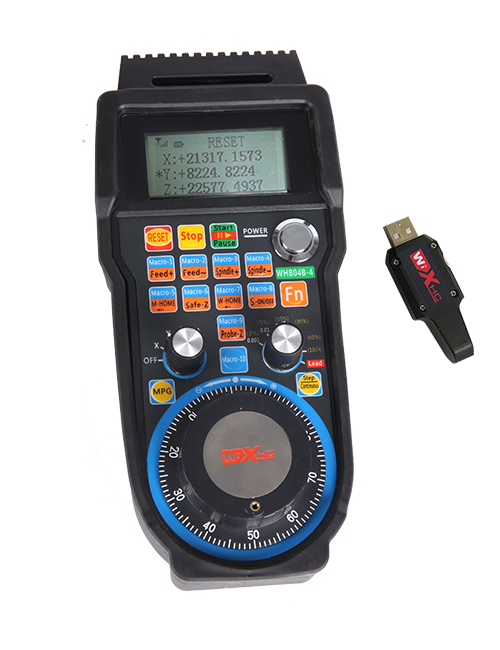
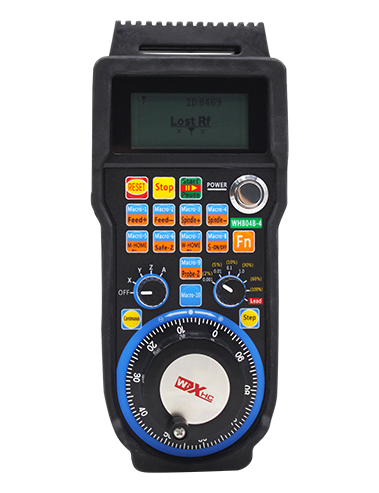
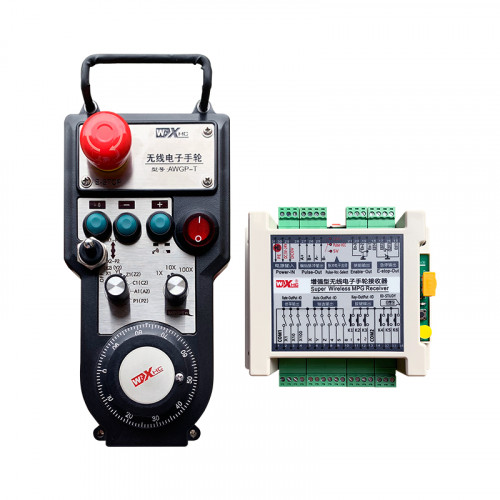
ອະນຸຍາດ 2 ປຸ່ມທີ່ສາມາດປັບແຕ່ງໄດ້, ກັບຜົນຜະລິດສັນຍານ IO ປະເພດ IO;
ອະນຸຍາດ -2 ການຄວບຄຸມແກນ;
ສະຫນັບສະຫນູນການຄວບຄຸມຂະຫນາດ 3 ລະດັບ;


1.ການແນະນໍາກ່ຽວກັບຜະລິດຕະພັນ
2. ລັກສະນະທີ່ເປັນປະໂຫຍດຂອງຜະລິດຕະພັນ
| ແຮງດັນການເຮັດວຽກ ແລະປະຈຸບັນຂອງຣີໂໝດໄຮ້ສາຍ |
3V/14MA
|
| ຂໍ້ມູນຈໍາເພາະຂອງຫມໍ້ໄຟ | 2 ແບດເຕີຣີ AA ເປັນດ່າງ, ຂະໜາດ 5 |
| ຊ່ວງສັນຍານເຕືອນແຮງດັນຕໍ່າຂອງຣີໂໝດໄຮ້ສາຍ | < 2.3ວິທີ |
| ເຄື່ອງຮັບໄຟຟ້າການສະຫນອງພະລັງງານ | DC5V-24V/A |
| ໄລຍະການໂຫຼດຂອງສັນຍານຢຸດສຸກເສີນຂອງຕົວຮັບ | AC125V-1A/DC30V-2A |
| ຜູ້ຮັບເປີດໄລຍະການໂຫຼດຜົນຜະລິດ |
AC125V-1A/DC30V-2A
|
| ຊ່ວງເວລາໂຫຼດປຸ່ມຜູ້ຮັບທີ່ກຳນົດເອງ | DC24V/50mA |
| ໄລຍະການໂຫຼດຜົນຜະລິດການຄັດເລືອກແກນຮັບ | DC24V/50mA |
| ໄລຍະການໂຫຼດກຳລັງຂະຫຍາຍຕົວຮັບ | DC24V/50mA |
| ການສົ່ງໄຟຟ້າຂອງເຄື່ອງໃຊ້ມືຖື |
15dBm
|
| ຜູ້ຮັບຄວາມອ່ອນໄຫວ | -100dBm |
| ຄວາມຖີ່ການສື່ສານໄຮ້ສາຍ | 433ຄື້ນຄວາມຖີ່ MHz |
| ໄລຍະການສື່ສານໄຮ້ສາຍ | ສິ່ງກີດຂວາງທາງໄກຂອງ 40 ປະມານ |
| ອຸນຫະພູມການດໍາເນີນງານ | -25℃ < ສະຖາວັນ < 55℃ |
| ຄວາມສູງຕ້ານການຕົກ | 1 (ແມັດ) |
| ປະລິມານປຸ່ມທີ່ກຳນົດເອງ | 2 |


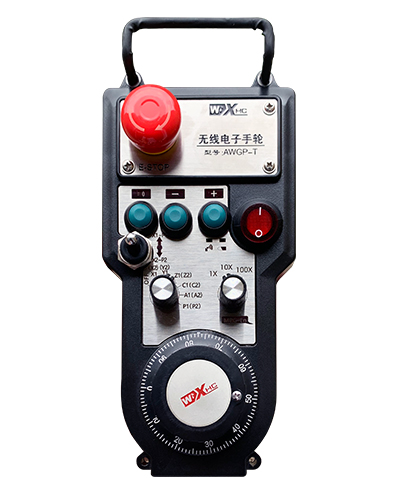
① Pulse encoder:
ກົດປຸ່ມແລະກົດປຸ່ມ Enable, ສັ່ນເຂົ້າລະຫັດກໍາມະຈອນ, ປ່ອຍສັນຍານກໍາມະຈອນ,ແລະຄວບຄຸມການເຄື່ອນໄຫວຂອງແກນເຄື່ອງຈັກ.
② Enable button:
ກົດປຸ່ມເປີດໃຊ້ງານທັງສອງຂ້າງ, ແລະສອງຊຸດຂອງຜົນໄດ້ຮັບ IO ເປີດຢູ່ໃນຕົວຮັບຈະດໍາເນີນການ. ປ່ອຍປຸ່ມເປີດໃຊ້ງານເພື່ອຕັດການເຊື່ອມຕໍ່ການເປີດໃຊ້ IO output; ແລະກ່ອນທີ່ຈະປ່ຽນການຂະຫຍາຍການເລືອກແກນແລະສັ່ນມື,ປຸ່ມເປີດໃຊ້ຕ້ອງຖືກຄ້າງໄວ້ເພື່ອໃຫ້ມີປະສິດທິພາບ; ຟັງຊັນນີ້ສາມາດຖືກຍົກເລີກຜ່ານຊອບແວການຕັ້ງຄ່າ.
③ Indicator lights:
ໄຟຂ້າງຊ້າຍ: ພະລັງງານຢູ່ໃນແສງສະຫວ່າງ,handwheel ໃຊ້ແກນເພື່ອເລືອກ OFF ເພື່ອເປີດເຄື່ອງ, ແລະໄຟນີ້ຈະເປີດຢູ່ຫຼັງຈາກເປີດ;
ແສງກາງ: ໄຟສັນຍານທີ່ສະຫວ່າງຂຶ້ນເມື່ອເຮັດວຽກໃດໆຂອງ handwheel, ແລະບໍ່ສະຫວ່າງໃນເວລາທີ່ບໍ່ມີການດໍາເນີນງານ;
ແສງສະຫວ່າງດ້ານຂວາ: ແສງແຮງກະແສໄຟຟ້າແຮງດັນຕ່ໍາ, ລະດັບຫມໍ້ໄຟຕ່ໍາ,lightflashes ນີ້ຫຼືຍັງຄົງຢູ່, ແບັດເຕີຣີຕ້ອງປ່ຽນແທນ.
④ Emergency stop button:
ກົດປຸ່ມຢຸດສຸກເສີນ, ແລະສອງຊຸດຂອງຍາມສຸກເສີນຢຸດ io ຜົນໄດ້ຮັບໃນຜູ້ຮັບຈະຖືກຕັດຂາດ, ແລະທຸກຫນ້າທີ່ຂອງ handwheel ຈະບໍ່ຖືກຕ້ອງ.
⑤ Magnification switch:
ກົດປຸ່ມເປີດໃຊ້ຄ້າງໄວ້ເພື່ອປ່ຽນສະວິດການຂະຫຍາຍ, ເຊິ່ງສາມາດປ່ຽນການຂະຫຍາຍທີ່ຄວບຄຸມໂດຍ handwheel.
⑥ Axis selection switch (ສະຫຼັບພະລັງງານ):
ກົດປຸ່ມເປີດໃຊ້ຄ້າງໄວ້ເພື່ອປ່ຽນສະວິດການເລືອກແກນ, ເຊິ່ງສາມາດປ່ຽນແກນການເຄື່ອນໄຫວທີ່ຄວບຄຸມໂດຍ handwheel. ປ່ຽນສະວິດນີ້ຈາກປິດເປັນແກນໃດກໍໄດ້ ແລະເປີດໄຟມື.
⑦ Custom button:
ສອງປຸ່ມກຳນົດເອງ, ແຕ່ລະຄົນທີ່ສອດຄ້ອງກັບຈຸດຜົນຜະລິດ IO ກ່ຽວກັບຜູ້ຮັບ.

1. ຕິດຕັ້ງເຄື່ອງຮັບເຂົ້າໄປໃນຕູ້ໄຟຟ້າຜ່ານ buckle ຢູ່ດ້ານຫລັງ, ຫຼືຕິດຕັ້ງມັນເຂົ້າໄປໃນຕູ້ຜ່ານຮູ screw ຢູ່ສີ່ແຈຂອງເຄື່ອງຮັບ.
2. ອ້າງເຖິງແຜນວາດສາຍໄຟຂອງພວກເຮົາແລະປຽບທຽບກັບອຸປະກອນທີ່ຢູ່ໃນສະຖານທີ່ຂອງທ່ານ. ເຊື່ອມຕໍ່ອຸປະກອນກັບເຄື່ອງຮັບຜ່ານສາຍເຄເບີ້ນ.
3.ຫຼັງຈາກເຄື່ອງຮັບໄດ້ຖືກແກ້ໄຂຢ່າງຖືກຕ້ອງ, ເສົາອາກາດທີ່ມີໃຫ້ກັບຜູ້ຮັບຕ້ອງໄດ້ເຊື່ອມຕໍ່, ແລະປາຍນອກຂອງເສົາອາກາດຄວນຖືກຕິດຕັ້ງຫຼືວາງໄວ້ນອກຕູ້ໄຟຟ້າ. ມັນໄດ້ຖືກແນະນໍາໃຫ້ວາງມັນຢູ່ເທິງສຸດຂອງຕູ້ໄຟຟ້າສໍາລັບຜົນກະທົບທີ່ດີທີ່ສຸດ. ຫ້າມບໍ່ໃຫ້ສາຍອາກາດບໍ່ເຊື່ອມຕໍ່ ຫຼືວາງໄວ້ພາຍໃນຕູ້ໄຟຟ້າ, ເນື່ອງຈາກວ່ານີ້ອາດຈະເຮັດໃຫ້ສັນຍານບໍ່ສາມາດໃຊ້ໄດ້.
4. ທີ່ສຸດ, ເປີດສະວິດໄຟຂອງ handwheel, ແລະທ່ານສາມາດປະຕິບັດງານເຄື່ອງຈາກໄລຍະໄກໂດຍໃຊ້ handwheel.
6.2 ຂະຫນາດການຕິດຕັ້ງຮັບ

6.3 ແຜນວາດສາຍໄຟສາຍ

7. ຄໍາແນະນໍາກ່ຽວກັບການປະຕິບັດງານຜະລິດຕະພັນ
1. ພະລັງງານຢູ່ໃນເຄື່ອງແລະເຄື່ອງຮັບ. The receiver’s working indicator light flashes. ຕິດຕັ້ງຫມໍ້ໄຟໃນ handwheel ເອເລັກໂຕຣນິກໄຮ້ສາຍ, ຮັບປະກັນການປົກຫຸ້ມຂອງຫມໍ້ໄຟ, ແລະ
ເປີດສະວິດໄຟຂອງ handwheel ເອເລັກໂຕຣນິກໄຮ້ສາຍ. The handwheel’s battery level indicator light is on.
2. ເລືອກ Axis ປະສານງານ: ກົດປຸ່ມແລະກົດປຸ່ມ Enable, ສະຫຼັບປຸ່ມເລືອກແກນ, ແລະເລືອກແກນທີ່ທ່ານຕ້ອງການດໍາເນີນການ.
3. ເລືອກ Magnification: ກົດປຸ່ມແລະກົດປຸ່ມ Enable, ສະຫຼັບປຸ່ມຂະຫຍາຍ,ແລະເລືອກລະດັບການຂະຫຍາຍທີ່ຕ້ອງການ.
4. ການເຄື່ອນຍ້າຍແກນ: ກົດປຸ່ມແລະກົດປຸ່ມ Enable, ເລືອກປ່ຽນການຄັດເລືອກ Axis, ເລືອກປ່ຽນຂະຫນາດໃຫຍ່, ແລະຫຼັງຈາກນັ້ນ rotate ຕົວເຂົ້າລະຫັດກໍາມະຈອນ. ໝຸນຕາມເຂັມໂມງເພື່ອຍ້າຍ
ແກນບວກ ແລະ counterclockwise ເພື່ອຍ້າຍແກນລົບ.
5. ກົດປຸ່ມແລະກົດປຸ່ມ Custom ໃດໆ, ແລະປຸ່ມທີ່ສອດຄ້ອງກັນ IO ຜົນຜະລິດຂອງເຄື່ອງຮັບຈະຖືກເປີດ. ປ່ອຍປຸ່ມ, ແລະຜົນຜະລິດຈະຖືກປິດ.
6. ກົດປຸ່ມຢຸດສຸກເສີນ, ສຸກເສີນສຸກເສີນທີ່ສອດຄ້ອງກັນເປີດ io ຜົນໄດ້ຮັບຂອງຜູ້ຮັບຈະຖືກຕັດຂາດ, ການເຮັດວຽກຂອງ handwheel ຈະຖືກປິດໃຊ້ງານ,ປ່ອຍປຸ່ມ Stop ສຸກເສີນ, ການຢຸດການຢຸດງານສຸກເສີນ Io ຈະຖືກປິດ, ແລະຫນ້າທີ່ handwheel ຈະໄດ້ຮັບການຟື້ນຟູ.
7. ຖ້າຫາກວ່າ handwheel ບໍ່ໄດ້ດໍາເນີນງານສໍາລັບໄລຍະເວລາໃດຫນຶ່ງ, ມັນຈະເຂົ້າສູ່ໂໝດນອນໂດຍອັດຕະໂນມັດເພື່ອຫຼຸດການໃຊ້ພະລັງງານ. ເມື່ອມັນຖືກນໍາໃຊ້ອີກຄັ້ງ, handwheel ສາມາດເປີດໃຊ້ໄດ້ໂດຍການກົດປຸ່ມເປີດ.
8. ຖ້າຫາກວ່າ handwheel ບໍ່ໄດ້ຖືກໃຊ້ເປັນເວລາດົນນານ, ຂໍແນະນຳໃຫ້ສະຫຼັບແກນມືໃສ່ໃນຕຳແໜ່ງ OFF, ປິດພະລັງງານ handwheel, ແລະຂະຫຍາຍຊີວິດຫມໍ້ໄຟ.
8. ລາຍລະອຽດຂອງຜະລິດຕະພັນ

① :ZTWGP ເປັນຕົວແທນຂອງຮູບແບບຮູບລັກສະນະ
②:ຕົວກໍານົດການຜະລິດກໍາມະຈອນ:
01: ຊີ້ບອກວ່າສັນຍານອອກກຳມະຈອນແມ່ນ A, ຂ; ແຮງດັນກໍາຈັດກໍາມະຈອນ 5V; ປະລິມານກໍາມະຈອນ 100 PPR.
02:ຊີ້ໃຫ້ເຫັນວ່າສັນຍານຜົນຜະລິດກໍາມະຈອນແມ່ນ A ແລະ B; ແຮງດັນໄຟຟ້າ 12V; ປະລິມານກໍາມະຈອນ 100 PPR.
03:ຊີ້ບອກວ່າສັນຍານອອກກຳມະຈອນແມ່ນ A, ຂ, ກ -, ຂ -; ແຮງດັນກໍາຈັດກໍາມະຈອນ 5V; ປະລິມານກໍາມະຈອນ 100 PPR.
04:ສະແດງເຖິງການຜະລິດວົງຈອນ NPN ທີ່ມີລະດັບຕໍ່າ, ກັບສັນຍານຜົນຜະລິດກໍາມະຈອນຂອງ A ແລະ B;ຈໍານວນຂອງກໍາມະຈອນແມ່ນ 100PPR.
05:ສະແດງໃຫ້ເຫັນຜົນຜະລິດແຫຼ່ງ PNP ໃນລະດັບສູງ, ກັບສັນຍານຜົນຜະລິດກໍາມະຈອນຂອງ A ແລະ B; ຈໍານວນຂອງກໍາມະຈອນແມ່ນ 100PPR.
③:ເປັນຕົວແທນຈໍານວນຂອງປຸ່ມເລືອກແກນ, 2 ເປັນຕົວແທນ 2 ຂວອນ.
④:ເປັນຕົວແທນປະເພດຂອງສັນຍານສະຫຼັບການເລືອກແກນ, A ສະແດງເຖິງສັນຍານຜົນຜະລິດທີ່ກໍານົດໄວ້ໃນຈຸດ, ແລະ B ເປັນຕົວແທນໃຫ້ແກ່ສັນຍານຜົນຜະລິດທີ່ຖືກເຂົ້າລະຫັດ.
⑤:ສະແດງໃຫ້ເຫັນປະເພດຂອງສັນຍານສະຫຼັບການຄູນ, A ສະແດງເຖິງສັນຍານຜົນຜະລິດທີ່ກໍານົດໄວ້ໃນຈຸດ, ແລະ B ເປັນຕົວແທນໃຫ້ແກ່ສັນຍານຜົນຜະລິດທີ່ຖືກເຂົ້າລະຫັດ.
⑥:ເປັນຕົວແທນຂອງຈໍານວນປຸ່ມທີ່ກໍາຫນົດເອງ, 2 ເປັນຕົວແທນ 2 ປຸ່ມປະເພນີ.
⑦:ເປັນຕົວແທນການສະຫນອງພະລັງງານສໍາລັບ handwheel ຂອງລະບົບ, ແລະ 05 ເປັນຕົວແທນໃຫ້ແກ່ການສະຫນອງພະລັງງານ 5V.
⑧:L ເປັນຕົວແທນຂອງຖັນຊ້າຍ (ຜູ້ຖືມີດຊ້າຍ), ແລະ R ເປັນຕົວແທນຂອງຖັນຂວາ (ຜູ້ຖືມີດຂວາ).
9.ການແກ້ໄຂການທໍາງານຂອງຜະລິດຕະພັນ

1. ກະລຸນາໃຊ້ມັນໃນສະພາບແວດລ້ອມແຫ້ງໃນອຸນຫະພູມໃນຫ້ອງແລະຄວາມກົດດັນເພື່ອຂະຫຍາຍຊີວິດການບໍລິການຂອງຕົນ.
2. ກະລຸນາຫລີກລ້ຽງການໃຊ້ໃນສະພາບແວດລ້ອມທີ່ຜິດປົກກະຕິເຊັ່ນ: ຝົນແລະຟອງນ້ໍາເພື່ອໃຫ້ອາຍຸການບໍລິການ.
3. ກະລຸນາຮັກສາຮູບລັກສະນະຂອງ handwheel ສະອາດເພື່ອຂະຫຍາຍຊີວິດການບໍລິການຂອງຕົນ.
4. ກະລຸນາຫລີກລ້ຽງການບີບຕົວ, ການຕົກຕໍ່າ, ຕໍາແພ, ປົງຄາຍ. ເພື່ອປ້ອງກັນຄວາມເສຍຫາຍຂອງສ່ວນປະກອບທີ່ແມ່ນຄວາມແມ່ນຍໍາພາຍໃນ handwheel ຫຼືຄວາມຜິດພາດທີ່ຖືກຕ້ອງ.
5. ຖ້າບໍ່ໃຊ້ເປັນເວລາດົນນານ, ກະລຸນາເກັບມ້ຽນ handwheel ໃນສະຖານທີ່ທີ່ສະອາດແລະປອດໄພ. ໃນລະຫວ່າງການເກັບຮັກສາແລະການຂົນສົ່ງ, ຄວນເອົາໃຈໃສ່ຄວນຈ່າຍໃຫ້ກັບຄວາມຊຸ່ມຊື່ນແລະຄວາມຕ້ານທານຊ shock ອກ.
11. ຂໍ້ມູນຄວາມປອດໄພ
1. ກະລຸນາອ່ານຄໍາແນະນໍາຢ່າງລະມັດລະວັງກ່ອນທີ່ຈະໃຊ້ແລະຫ້າມຜູ້ຊ່ຽວຊານຈາກການປະຕິບັດງານ.
2. ກະລຸນາປ່ຽນແບັດເຕີຣີໃຫ້ທັນເວລາ ເມື່ອລະດັບແບັດເຕີຣີຕໍ່າເກີນໄປເພື່ອຫຼີກລ່ຽງຄວາມຜິດພາດທີ່ເກີດຈາກພະລັງງານແບັດເຕີຣີບໍ່ພຽງພໍ ແລະ ບໍ່ສາມາດເຮັດວຽກໄດ້..
3. ຖ້າຕ້ອງການສ້ອມແປງ, ກະລຸນາຕິດຕໍ່ຜູ້ຜະລິດ. ຖ້າຄວາມເສຍຫາຍແມ່ນເກີດມາຈາກການສ້ອມແປງຕົວເອງ, ຜູ້ຜະລິດຈະບໍ່ໃຫ້ການຮັບປະກັນ