Description

1.Fampidirana vokatra
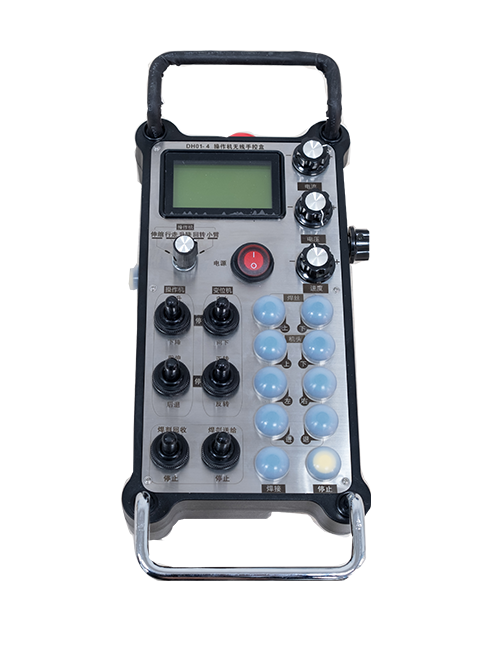
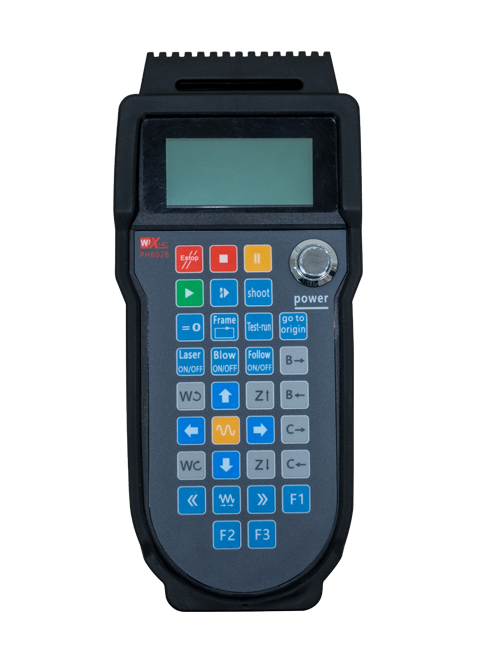
Wireless Remote Control is used for manual guidance, toerany, tool setting and other operations of CNC machine tools. Ity vokatra ity dia mampiditra teknolojia fifindrana an-tserasera tsy misy tariby, Famongorana ny fifandraisana tariby nentim-paharazana, Ny fampihenana ny fitaovana tsy fahombiazan'ny tariby, Famongorana ny fatiantoka ny tariby mitarika, Sitroka menaka, Sns, and is more convenient to operate.It is widely applicable to CNC machine tools such as gantry machining centers, gantry vertical lathes, and CNC gear processing machines, and is compatible with various mainstream CNC system brands on the market, including Siemens, Mitsubishi, Fanuc, Syntec and more.
2.Endri-javatra vokatra
1. Mampiasa teknolojian'ny fifandraisana tsy misy tariby 433MHz miaraka amin'ny halaviran'ny fiasana tsy misy tariby 20 metatra.
2.Mitsambikina matetika; 32 azo ampiasaina miaraka tsy misy fanelingelenana ny andiana fanaraha-maso lavitra tsy misy tariby.
3.Supports the emergency stop button, and the emergency stop button remains effective even after the remote control is powered off.
4.fanohanana 3 bokotra mahazatra miaraka amin'ny famoahana famantarana IO.
5.Manohana fanaraha-maso 6-axis, SY 7 ny fanaraha-maso 12-axis dia azo zahana.
6. Manohana fanaraha-maso 3-speed magnification, ary 4-hafainganam-pandeha fanaraha-maso dia customizable.
7.manohana ny fiasan'ny bokotra enable, izay afaka mamoaka famantarana IO switching, ary koa mifehy ny fifantenana axis, fampitomboana sy encoder.
8.Manohana ny fanovana ny karazana encoding ny fifantenana ny axis sy ny fanitarana amin'ny alalan'ny rindrambaiko.
9. Supports pulse encoder with specification of 100 pulses isaky ny revolisiona.
10. Supports standard Type-C charging with 5V-2A charging specification; built-in battery
specification: 14500 / 1100mah.
3. Famaritana momba ny vokatra
| Working Voltage and Current of Handheld Terminal |
3.7V/20.0mA |
| Charging Battery Specification |
3.7V/14500/1100mAh
|
| Low Voltage Alarm Range of Handheld Terminal |
<3.35V |
| Receiver Power Supply Voltage |
DC5V-24V/1A |
| Receiver Emergency Stop Output Load Range |
Ac125v-1a / dc30v-2a |
| Receiver Enable Output Load Range |
Ac125v-1a / dc30v-2a |
| Receiver Custom Button Output Load Range |
DC24V / 50MA
|
| Receiver Axis Selection Output Load Range |
DC24V / 50MA |
| Receiver magnification Output Load Range |
DC24V / 50MA |
| Handheld Terminal Transmit Power |
15DBM
|
| Mpandray mandray ny fahatsapan-tena |
-100DBM |
| Fivarotana Wireless matetika |
433MHZ Band Streency
|
| Wireless Communication Distance |
20 meters barrier-free distance
|
| Operating Temperature |
-25℃<X<55℃ |
| Safe drop height |
1 m
|
| Number of Custom Buttons |
3
|
| Product Weight |
546.86(g) |
| Product Dimensions |
200*87*72(mm) |
4. Fampidirana ny vokatra fampidirana

-tsoratra:
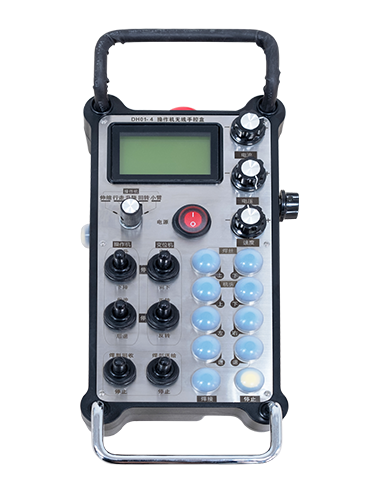
① Emergency Stop Button:
Tsindrio ny bokotra fiatoana vonjy maika, the two groups of emergency stop IO outputs on the receiver will disconnect, and all remote control functions will be invalidated.Release the emergency stop button, the emergency stop IO outputs on the receiver will be closed, and all remote control functions will be restored. Ankoatry ny, even if the remote control is powered off, pressing the emergency stop button can still activate the emergency stop IO output of the receiver.
② Enable Button:
Press either enable button on both sides, the two sets of enable IO outputs on the receiver will conduct. Release the enable button, and the enable IO outputs will disconnect. It is necessary to press and hold the enable button before toggling axis selection, magnification or rotating the remote control for the operation to take effect.This function can be canceled through the configuration software.
③ Axis Selection Switch (Power Switch):
Tsindrio ary hazony ny bokotra, then toggling the axis selection switch can control the movement of axis .Press and hold the enable button, then toggle the axis selection switch to switch the motion axis controlled by the remote control. Toggle the switch from the OFF position to any axis position, and the remote control will power on automatically.
④ Pulse Encoder:
Press and hold the enable button and rotate the pulse encoder, it will output pulse signals to control the movement of the machine axis.
⑤ LCD Display Screen:

5. Product Accessories Diagram

6. Guide fametrahana vokatra
6.1 Dingana fametrahana vokatra
1. Install the receiver in the electrical cabinet via the buckle on its back, or mount it inside the electrical cabinet through the screw holes at the four corners of the receiver.
2. Jereo ny sary an-tsokosoko mpandray anjara, Ampitahao amin'ny fitaovana an-tserasera, and connect the equipment to the receiver with cables.
3. After the receiver is fixed in place, install the supporting antenna of the receiver properly. Mount or place the outer end of the antenna outside the electrical cabinet. It is recommended to place it on the top of the electrical cabinet for optimal signal performance. Do not leave the antenna uninstalled or place it inside the electrical cabinet; otherwise, signal failure may occur.
4. Farany, turn on the remote control power switch, then you can remotely operate the machine via the remote control.
6.2 Receiver Installation Dimensions

7. Torolàlana momba ny asa
1. Hery amin'ny masinina sy ny mpandray. The receiver operation indicator flashes. After the wireless electronic remote control is fully charged, toggle it from the OFF gear to the X-axis gear, and the remote control display lights up.
2. Select the axis : Tsindrio ary hazony ny bokotra, toggle the axis selection switch to select the axis to be operated.
3. Select the magnification: Tsindrio ary hazony ny bokotra, toggle the magnification switch to select the required magnification gear.
4. Axis movement: Tsindrio ary hazony ny bokotra, select the axis selection switch and the magnification switch, then rotate the pulse encoder. Rotate clockwise to move the axis in the positive direction, and rotate counterclockwise to move the axis in the negative direction.
5. Tsindrio ary mitazona bokotra fanao mahazatra, the corresponding button IO output of the receiver will turn on; release the button, and the output will turn off.
6. Tsindrio ny bokotra fiatoana vonjy maika, the corresponding emergency stop IO output of the receiver disconnects and the remote control function becomes invalid. Release the emergency stop button, the emergency stop IO output closes and the remote control function is restored.
7. If the wireless remote control is not operated for a period of time, Hiditra amin'ny fomba fatoriana mandeha ho azy mba hampihenana ny fanjifana herinaratra. It can be used normally again by pressing the enable button again.
8.If the wireless remote control is not used for a long time, turn the axis switch to OFF to turn off the power and extend battery life
8. Famaritana modely vokatra
①:UWGP stands for appearance style.
②:Pulse Output Parameters:
01: Manondro fa ny famantarana ny famoaham-bolo, amin '; Pulse Voltage 5V; Sokajy pulsa 100ppr.
02: Manondro fa ny famantarana ny famoaham-bolo, amin '; Pulse Voltage 12V; pulse quantity 25PPR.
03: Manondro fa ny famantarana ny famoaham-bolo, amin ', ny -, amin ' -; Pulse Voltage 5V; Sokajy pulsa 100ppr.
04: Manondro ny famoahana sokay misy okin-tany ambany, miaraka amin'ny marika famoaram-peo amin'ny A sy B; The number of pulses is 100PPR.
05: Manondro ny famoahana loharanom-baovao PNP avo lenta, miaraka amin'ny marika famoaram-peo amin'ny A sy B; Ny isan'ny pulses dia 100ppr.
③:Represents the axis selection switch quantity; 6 stands for 6 famaky, 7 stands for 7 famaky, and so on.
④: Represents the signal type of the axis selection switch.A stands for point-to-point output signal, and B stands for encoder output signal.
⑤: Represents the signal type of the magnification switch.A stands for point-to-point output signal, and B stands for encoder output signal.
⑥: Maneho ny isan'ireo bokotra mahazatra; 3 corresponds to 6 bokotra mahazatra.
⑦: Represents the power supply for the system remote control. 05 stands for 5V power supply, SY 24 stands for 24V power supply.
⑧: Represents the contact charging mode. It starts charging automatically when placed back on the charging base.
9. Famahana ny vokatra vokatra

10. Maintenance and upkeep
1. Azafady mba ampiasao amin'ny tontolo maina amin'ny mari-pana sy ny fanerena hanitatra ny fiainany.
2. Please avoid using in abnormal environments such as rain and water to extend the service life.
3. Please keep the appearance of the remote control clean to extend its service life.
4. Please avoid crushing, dropping, or bumping, sns. to prevent damage to the precision components inside the remote control or accuracy errors.
5. Raha tsy ampiasaina mandritra ny fotoana maharitra, please store the remote control in a clean and safe place.
6. Avoid moisture and shock during storage and transportation.
11. Fampahalalana momba ny fiarovana
1. Azafady vakio tsara ny torolàlana alohan'ny fampiasana sy mandrara ny tsy matihanina tsy miasa.
2. Please charge the remote control in a timely manner when the battery level is too low, to avoid malfunction and operational errors caused by insufficient power.
3. If you repair it yourself and cause damage, the warranty will be void.