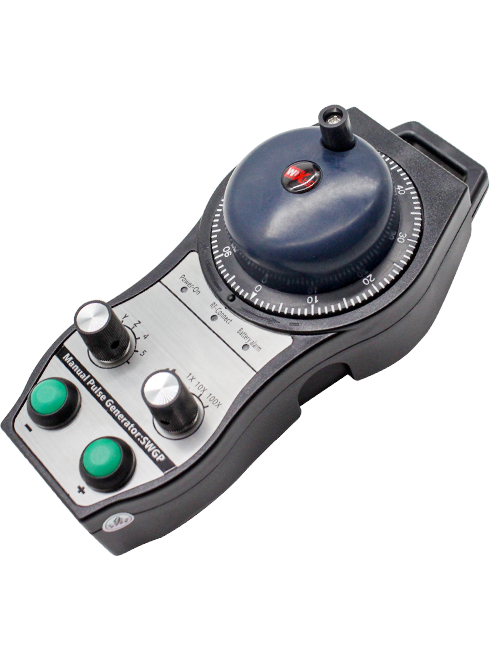
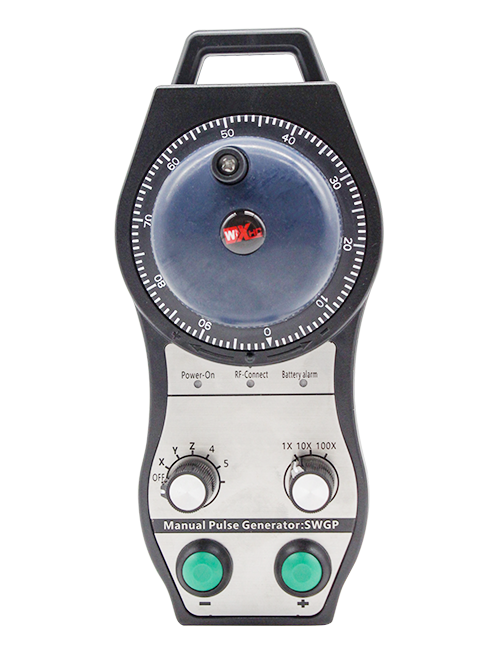
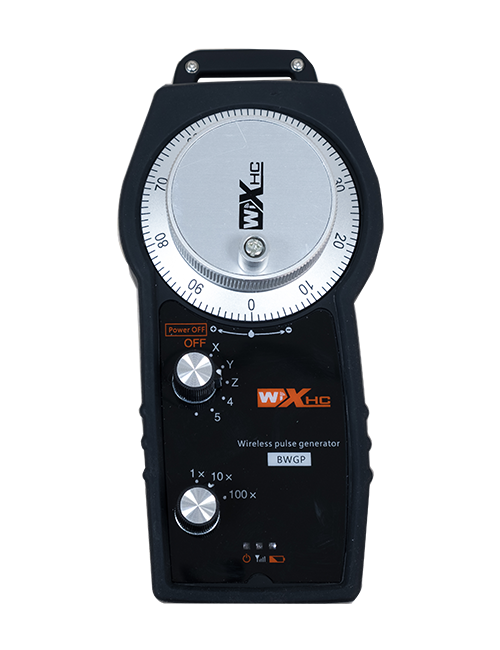
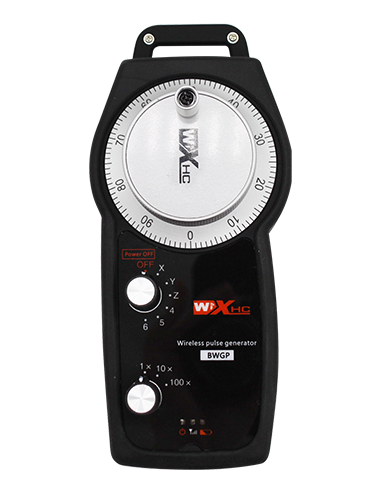
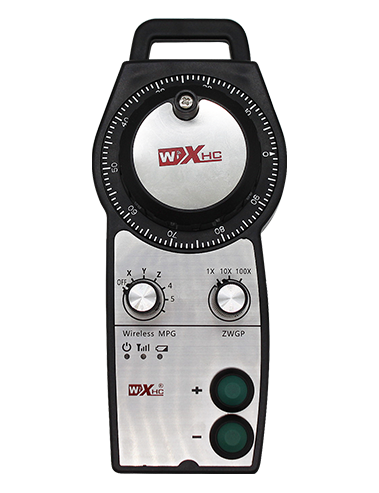
പിന്തുണ 2 ഇഷ്ടാനുസൃത പകൽ ബട്ടണുകൾ, സ്വിച്ച്-ടൈപ്പ് ഐഒ സിഗ്നൽ output ട്ട്പുട്ട് ഉപയോഗിച്ച്;
പിന്തുണ -2 ആക്സിസ് നിയന്ത്രണം;
3 ലെവൽ മാഗ്നിഫിക്കേഷൻ നിയന്ത്രണത്തെ പിന്തുണയ്ക്കുന്നു;


1.ഉൽപ്പന്ന ആമുഖം
2. ഉൽപ്പന്ന പ്രവർത്തന സവിശേഷതകൾ
| Operating voltage and current of wireless remote |
3V/14MA
|
| Battery specifications | 2 AA alkaline batteries, size 5 |
| Low voltage alarm range of wireless remote | < 2.3വി |
| റിസീവർ പവർ സപ്ലൈ വോൾട്ടേജ് | DC5V-24V/A |
| Receiver emergency stop output load range | AC125V-1A/DC30V-2A |
| Receiver enable output load range |
AC125V-1A/DC30V-2A
|
| Receiver custom button output load range | DC24V/50mA |
| Receiver axis selection output load range | DC24V/50mA |
| Receiver magnification output load range | DC24V/50mA |
| Transmission power of handheld terminal |
15dBm
|
| Receiver receiving sensitivity | -100dBm |
| Wireless communication frequency | 433MHz frequency band |
| Wireless communication distance | Barrier free distance of 40 മീറ്റർ |
| Operation temperature | -25℃ < എക്സ് < 55℃ |
| Anti fall height | 1 (മാപിനി) |
| Custom button quantity | 2 |


① Pulse encoder:
പ്രവർത്തനക്ഷമമാക്കുക ബട്ടൺ അമർത്തിപ്പിടിക്കുക, പൾസ് എൻകോഡർ കുലുക്കുക, ഒരു പൾസ് സിഗ്നൽ പുറപ്പെടുവിക്കുക,and control the movement ofthe machine axis.
② Enable button:
Press either enable button on either side, and the two sets of enable IO outputs on the receiver will conduct. Release the enable button to disconnect the enable IO output; And before switching the axis selection magnification and shaking the handwheel,the enable button needs to be held down to be effective; This function can be cancelled through configuration software.
③ Indicator lights:
Left side light: power on light,the handwheel uses the axis to select OFF for power on, and this light stays on after power on;
Middle light: a signal light that lights up when operating any function ofthe handwheel, and does not light up when there is no operation;
Right side light: ലോ വോൾട്ടേജ് അലാറം ലൈറ്റ്, low battery level,this lightflashes or stays on, battery needs to be replaced.
④ Emergency stop button:
എമർജൻസി സ്റ്റോപ്പ് ബട്ടൺ അമർത്തുക, കൂടാതെ റിസീവറിലെ രണ്ട് സെറ്റ് എമർജൻസി സ്റ്റോപ്പ് IO ഔട്ട്പുട്ടുകൾ വിച്ഛേദിക്കപ്പെടും, ഹാൻഡ് വീലിൻ്റെ എല്ലാ പ്രവർത്തനങ്ങളും അസാധുവാകും.
⑤ Magnification switch:
Press and hold the enable button to switch the magnification switch, which can switch the magnification controlled by the handwheel.
⑥ Axis selection switch (വൈദ്യുതി സ്വിച്ച്):
Press and hold the enable button to switch the axis selection switch, which can switch the movement axis controlled by the handwheel. Switch this switch from OFF to any axis and turn on the handwheel power.
⑦ Custom button:
Two custom buttons, ഓരോന്നും റിസീവറിലെ ഒരു IO ഔട്ട്പുട്ട് പോയിൻ്റുമായി ബന്ധപ്പെട്ടിരിക്കുന്നു.

1. പിന്നിലെ ബക്കിളിലൂടെ വൈദ്യുത കാബിനറ്റിലേക്ക് റിസീവർ ഇൻസ്റ്റാൾ ചെയ്യുക, അല്ലെങ്കിൽ റിസീവറിൻ്റെ നാല് മൂലകളിലുള്ള സ്ക്രൂ ദ്വാരങ്ങളിലൂടെ കാബിനറ്റിലേക്ക് ഇൻസ്റ്റാൾ ചെയ്യുക.
2. ഞങ്ങളുടെ റിസീവർ വയറിംഗ് ഡയഗ്രം പരിശോധിക്കുക, നിങ്ങളുടെ ഓൺ-സൈറ്റ് ഉപകരണങ്ങളുമായി ഇത് താരതമ്യം ചെയ്യുക. Connect the equipment to the receiver via cables.
3.After the receiver is properly fixed, റിസീവർ ഘടിപ്പിച്ച ആൻ്റിന ബന്ധിപ്പിച്ചിരിക്കണം, and the outer end of the antenna should be installed or placed outside the electrical cabinet. മികച്ച സിഗ്നൽ ഇഫക്റ്റിനായി ഇത് ഇലക്ട്രിക്കൽ കാബിനറ്റിൻ്റെ മുകളിൽ സ്ഥാപിക്കാൻ ശുപാർശ ചെയ്യുന്നു. It is prohibited to leave the antenna unconnected or place it inside the electrical cabinet, as this may result in the signal being unusable.
4. ഒടുവിൽ, turn on the power switch of the handwheel, and you can operate the machine remotely using the handwheel.
6.2 റിസീവർ ഇൻസ്റ്റാളേഷൻ അളവുകൾ

6.3 റിസീവർ വയറിംഗ് റഫറൻസ് ഡയഗ്രം

7. ഉൽപ്പന്ന പ്രവർത്തന നിർദ്ദേശങ്ങൾ
1. Power on the machine and the receiver. The receiver’s working indicator light flashes. Install the battery in the wireless electronic handwheel, secure the battery cover, ഒപ്പം
turn on the power switch of the wireless electronic handwheel. The handwheel’s battery level indicator light is on.
2. കോർഡിനേറ്റ് അക്ഷം തിരഞ്ഞെടുക്കുക: പ്രവർത്തനക്ഷമമാക്കുക ബട്ടൺ അമർത്തിപ്പിടിക്കുക, toggle the axis selection switch, and select the axis you want to operate.
3. മാഗ്നിഫിക്കേഷൻ തിരഞ്ഞെടുക്കുക: പ്രവർത്തനക്ഷമമാക്കുക ബട്ടൺ അമർത്തിപ്പിടിക്കുക, toggle the magnification switch,and select the desired magnification level.
4. ചലിക്കുന്ന അച്ചുതണ്ട്: പ്രവർത്തനക്ഷമമാക്കുക ബട്ടൺ അമർത്തിപ്പിടിക്കുക, ആക്സിസ് സെലക്ഷൻ സ്വിച്ച് തിരഞ്ഞെടുക്കുക, മാഗ്നിഫിക്കേഷൻ സ്വിച്ച് തിരഞ്ഞെടുക്കുക, and then rotate the pulse encoder. Rotate clockwise to move the
positive axis and counterclockwise to move the negative axis.
5. ഏതെങ്കിലും ഇഷ്ടാനുസൃത ബട്ടൺ അമർത്തിപ്പിടിക്കുക, and the corresponding button IO output of the receiver will be turned on. Release the button, and the output will be turned off.
6. എമർജൻസി സ്റ്റോപ്പ് ബട്ടൺ അമർത്തുക, റിസീവറിൻ്റെ അനുബന്ധ എമർജൻസി സ്റ്റോപ്പ് IO ഔട്ട്പുട്ട് വിച്ഛേദിക്കപ്പെടും, ഹാൻഡ്വീൽ പ്രവർത്തനം പ്രവർത്തനരഹിതമാക്കും,എമർജൻസി സ്റ്റോപ്പ് ബട്ടൺ റിലീസ് ചെയ്യുക, എമർജൻസി സ്റ്റോപ്പ് IO ഔട്ട്പുട്ട് അടയ്ക്കും, ഒപ്പം ഹാൻഡ്വീൽ പ്രവർത്തനം പുനഃസ്ഥാപിക്കപ്പെടും.
7. ഒരു നിശ്ചിത സമയത്തേക്ക് ഹാൻഡ്വീൽ പ്രവർത്തിപ്പിച്ചില്ലെങ്കിൽ, it will automatically enter sleep mode to reduce power consumption. അത് വീണ്ടും ഉപയോഗിക്കുമ്പോൾ, the handwheel can be activated by pressing the enable button.
8. ഹാൻഡ്വീൽ ദീർഘകാലം ഉപയോഗിക്കുന്നില്ലെങ്കിൽ, it is recommended to switch the handwheel shaft to the OFF position, ഹാൻഡ്വീൽ പവർ ഓഫ് ചെയ്യുക, ബാറ്ററി ലൈഫ് നീട്ടുകയും ചെയ്യും.
8. ഉൽപ്പന്ന മോഡൽ വിവരണം

① :ZTWGP represents the appearance style
②:പൾസ് ഔട്ട്പുട്ട് പാരാമീറ്ററുകൾ:
01: Indicates that the pulse output signal is A, B; പൾസ് വോൾട്ടേജ് 5V; pulse quantity 100PPR.
02:Indicating thatthe pulse output signals are A and B; Pulse voltage 12V; pulse quantity 100PPR.
03:Indicating thatthe pulse output signals are A, B, A -, B -; പൾസ് വോൾട്ടേജ് 5V; pulse quantity 100PPR.
04:താഴ്ന്ന നിലയിലുള്ള NPN ഓപ്പൺ സർക്യൂട്ട് ഔട്ട്പുട്ട് സൂചിപ്പിക്കുന്നു, എ, ബി എന്നിവയുടെ പൾസ് ഔട്ട്പുട്ട് സിഗ്നലുകൾക്കൊപ്പം;The number of pulses is 100PPR.
05:ഉയർന്ന തലത്തിലുള്ള PNP ഉറവിട ഔട്ട്പുട്ട് സൂചിപ്പിക്കുന്നു, എ, ബി എന്നിവയുടെ പൾസ് ഔട്ട്പുട്ട് സിഗ്നലുകൾക്കൊപ്പം; The number of pulses is 100PPR.
③:Representing the number of axis selection switches, 2 പ്രതിനിധീകരിക്കുന്നു 2 കോടാലി.
④:Represents the type of axis selection switch signal, ഒരു പോയിൻ്റ്-ടു-പോയിൻ്റ് ഔട്ട്പുട്ട് സിഗ്നലിനെ പ്രതിനിധീകരിക്കുന്നു, കൂടാതെ ബി എൻകോഡ് ചെയ്ത ഔട്ട്പുട്ട് സിഗ്നലിനെ പ്രതിനിധീകരിക്കുന്നു.
⑤:Represents the type of multiplication switch signal, ഒരു പോയിൻ്റ്-ടു-പോയിൻ്റ് ഔട്ട്പുട്ട് സിഗ്നലിനെ പ്രതിനിധീകരിക്കുന്നു, കൂടാതെ ബി എൻകോഡ് ചെയ്ത ഔട്ട്പുട്ട് സിഗ്നലിനെ പ്രതിനിധീകരിക്കുന്നു.
⑥:Represents the number of custom buttons, 2 പ്രതിനിധീകരിക്കുന്നു 2 ഇഷ്ടാനുസൃത ബട്ടണുകൾ.
⑦:Represents the power supply for the system handwheel, ഒപ്പം 05 5V വൈദ്യുതി വിതരണത്തെ പ്രതിനിധീകരിക്കുന്നു.
⑧:L represents the left column (left knife holder), and R represents the right column (right knife holder).
9.Solution to Product Malfunctions

1. റൂം താപനിലയിലും മർദ്ദത്തിലും വരണ്ട അന്തരീക്ഷത്തിൽ അതിൻ്റെ സേവന ആയുസ്സ് വർദ്ധിപ്പിക്കുന്നതിന് ദയവായി ഇത് ഉപയോഗിക്കുക.
2. സേവന ആയുസ്സ് വർദ്ധിപ്പിക്കുന്നതിന് മഴയും വെള്ളക്കുമിളകളും പോലുള്ള അസാധാരണമായ പരിതസ്ഥിതികളിൽ ഉപയോഗിക്കുന്നത് ഒഴിവാക്കുക.
3. ഹാൻഡ് വീലിൻ്റെ സേവനജീവിതം വർദ്ധിപ്പിക്കുന്നതിന് അതിൻ്റെ രൂപം വൃത്തിയായി സൂക്ഷിക്കുക.
4. ദയവായി ഞെരുക്കുന്നത് ഒഴിവാക്കുക, വീഴുന്നു, ബമ്പിംഗ്, മുതലായവ. ഹാൻഡ് വീലിനുള്ളിലെ കൃത്യമായ ഘടകങ്ങളുടെ കേടുപാടുകൾ അല്ലെങ്കിൽ കൃത്യത പിശകുകൾ തടയുന്നതിന്.
5. വളരെക്കാലം ഉപയോഗിച്ചില്ലെങ്കിൽ, ദയവായി ഹാൻഡ് വീൽ വൃത്തിയുള്ളതും സുരക്ഷിതവുമായ സ്ഥലത്ത് സൂക്ഷിക്കുക. സംഭരണത്തിലും ഗതാഗതത്തിലും, ഈർപ്പം, ഷോക്ക് പ്രതിരോധം എന്നിവയ്ക്ക് ശ്രദ്ധ നൽകണം.
11. സുരക്ഷാ വിവരങ്ങൾ
1. ഉപയോഗിക്കുന്നതിന് മുമ്പ് നിർദ്ദേശങ്ങൾ ശ്രദ്ധാപൂർവ്വം വായിക്കുകയും പ്രൊഫഷണലല്ലാത്തവരെ പ്രവർത്തിക്കുന്നതിൽ നിന്ന് വിലക്കുകയും ചെയ്യുക.
2. Please replace the battery in a timely manner when the battery level is too low to avoid errors caused by insufficient battery power and inability to operate the handwheel.
3. അറ്റകുറ്റപ്പണി ആവശ്യമെങ്കിൽ, ദയവായി നിർമ്മാതാവിനെ ബന്ധപ്പെടുക. കേടുപാടുകൾ സംഭവിക്കുന്നത് സ്വയം നന്നാക്കുന്നതിലൂടെയാണെങ്കിൽ, നിർമ്മാതാവ് വാറൻ്റി നൽകില്ല