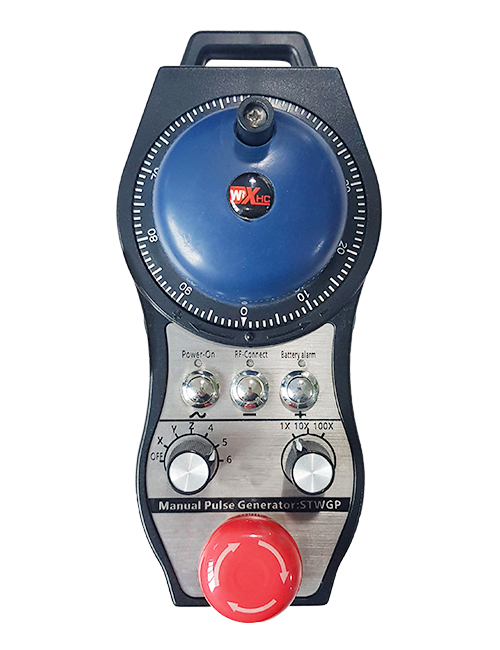
Menyokong 2 Butang yang disesuaikan, dengan output isyarat IO jenis suis;
Menyokong -2 Kawalan paksi;
Menyokong kawalan pembesaran 3 peringkat;


1.Pengenalan Produk
2. Ciri -ciri Fungsian Produk
| Operating voltage and current of wireless remote |
3V/14MA
|
| Battery specifications | 2 AA alkaline batteries, size 5 |
| Low voltage alarm range of wireless remote | < 2.3V |
| Voltan bekalan kuasa penerima | DC5V-24V/A |
| Receiver emergency stop output load range | AC125V-1A/DC30V-2A |
| Receiver enable output load range |
AC125V-1A/DC30V-2A
|
| Receiver custom button output load range | DC24V/50mA |
| Receiver axis selection output load range | DC24V/50mA |
| Receiver magnification output load range | DC24V/50mA |
| Transmission power of handheld terminal |
15dBm
|
| Receiver receiving sensitivity | -100dBm |
| Wireless communication frequency | 433MHz frequency band |
| Wireless communication distance | Barrier free distance of 40 meter |
| Operation temperature | -25℃ < X < 55℃ |
| Anti fall height | 1 (meter) |
| Custom button quantity | 2 |


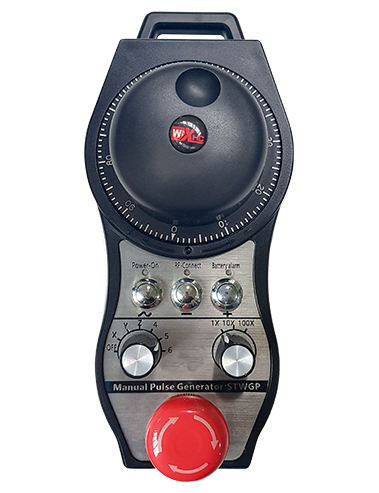
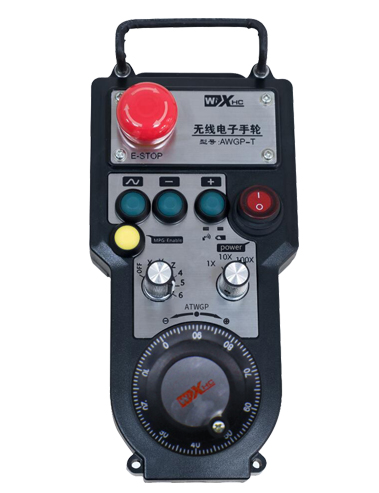
① Pulse encoder:
Tekan dan tahan butang Enable, Goncang pengekod nadi, memancarkan isyarat nadi,and control the movement ofthe machine axis.
② Enable button:
Press either enable button on either side, and the two sets of enable IO outputs on the receiver will conduct. Release the enable button to disconnect the enable IO output; And before switching the axis selection magnification and shaking the handwheel,the enable button needs to be held down to be effective; This function can be cancelled through configuration software.
③ Indicator lights:
Left side light: power on light,the handwheel uses the axis to select OFF for power on, and this light stays on after power on;
Middle light: a signal light that lights up when operating any function ofthe handwheel, and does not light up when there is no operation;
Right side light: Lampu penggera voltan rendah, low battery level,this lightflashes or stays on, battery needs to be replaced.
④ Emergency stop button:
Tekan butang berhenti kecemasan, dan kedua -dua set output IO Stop kecemasan pada penerima akan terputus, dan semua fungsi roda tangan akan menjadi tidak sah.
⑤ Magnification switch:
Press and hold the enable button to switch the magnification switch, which can switch the magnification controlled by the handwheel.
⑥ Axis selection switch (suis kuasa):
Press and hold the enable button to switch the axis selection switch, which can switch the movement axis controlled by the handwheel. Switch this switch from OFF to any axis and turn on the handwheel power.
⑦ Custom button:
Two custom buttons, masing -masing sepadan dengan titik output IO pada penerima.

1. Pasang penerima ke dalam kabinet elektrik melalui gancu di belakang, atau pasangkannya ke dalam kabinet melalui lubang skru di empat sudut penerima.
2. Rujuk rajah pendawaian penerima kami dan bandingkan dengan peralatan di tempat anda. Connect the equipment to the receiver via cables.
3.After the receiver is properly fixed, antena yang dilengkapi dengan penerima mesti dihubungkan, and the outer end of the antenna should be installed or placed outside the electrical cabinet. Disyorkan untuk meletakkannya di bahagian atas kabinet elektrik untuk kesan isyarat terbaik. It is prohibited to leave the antenna unconnected or place it inside the electrical cabinet, as this may result in the signal being unusable.
4. Akhirnya, turn on the power switch of the handwheel, and you can operate the machine remotely using the handwheel.
6.2 Dimensi pemasangan penerima

6.3 Rajah rujukan pendawaian penerima

7. Arahan Operasi Produk
1. Power on the machine and the receiver. The receiver’s working indicator light flashes. Install the battery in the wireless electronic handwheel, secure the battery cover, dan
turn on the power switch of the wireless electronic handwheel. The handwheel’s battery level indicator light is on.
2. Pilih paksi koordinat: Tekan dan tahan butang Enable, toggle the axis selection switch, and select the axis you want to operate.
3. Pilih pembesaran: Tekan dan tahan butang Enable, toggle the magnification switch,and select the desired magnification level.
4. Bergerak paksi: Tekan dan tahan butang Enable, Pilih suis pemilihan paksi, Pilih suis pembesaran, and then rotate the pulse encoder. Rotate clockwise to move the
positive axis and counterclockwise to move the negative axis.
5. Tekan dan tahan mana-mana butang tersuai, and the corresponding button IO output of the receiver will be turned on. Release the button, and the output will be turned off.
6. Tekan butang berhenti kecemasan, output stop IO kecemasan yang sepadan dengan penerima akan diputuskan, Fungsi Handwheel akan dilumpuhkan,Lepaskan butang berhenti kecemasan, output IO stop kecemasan akan ditutup, dan fungsi tangan akan dipulihkan.
7. Jika roda tangan tidak dikendalikan untuk satu tempoh masa, it will automatically enter sleep mode to reduce power consumption. Apabila ia digunakan semula, the handwheel can be activated by pressing the enable button.
8. Jika roda tangan tidak digunakan untuk masa yang lama, it is recommended to switch the handwheel shaft to the OFF position, matikan kuasa roda tangan, dan memanjangkan hayat bateri.
8. Penerangan Model Produk

① :ZTWGP represents the appearance style
②:Parameter output nadi:
01: Indicates that the pulse output signal is A, B; Voltan nadi 5V; pulse quantity 100PPR.
02:Indicating thatthe pulse output signals are A and B; Pulse voltage 12V; pulse quantity 100PPR.
03:Indicating thatthe pulse output signals are A, B, A -, B -; Voltan nadi 5V; pulse quantity 100PPR.
04:Menunjukkan output litar terbuka NPN peringkat rendah, dengan isyarat keluaran nadi A dan B;The number of pulses is 100PPR.
05:Menunjukkan output sumber PNP peringkat tinggi, dengan isyarat keluaran nadi A dan B; The number of pulses is 100PPR.
③:Representing the number of axis selection switches, 2 mewakili 2 paksi.
④:Represents the type of axis selection switch signal, A mewakili isyarat keluaran titik ke titik, dan b mewakili isyarat output yang dikodkan.
⑤:Represents the type of multiplication switch signal, A mewakili isyarat keluaran titik ke titik, dan b mewakili isyarat output yang dikodkan.
⑥:Represents the number of custom buttons, 2 mewakili 2 butang tersuai.
⑦:Represents the power supply for the system handwheel, dan 05 mewakili bekalan kuasa 5V.
⑧:L represents the left column (left knife holder), and R represents the right column (right knife holder).
9.Solution to Product Malfunctions

1. Sila gunakannya dalam persekitaran yang kering pada suhu bilik dan tekanan untuk melanjutkan hayat perkhidmatannya.
2. Sila elakkan menggunakan persekitaran yang tidak normal seperti gelembung hujan dan air untuk melanjutkan hayat perkhidmatan.
3. Sila teruskan penampilan tangan yang bersih untuk melanjutkan hayat perkhidmatannya.
4. Tolong elakkan memerah, jatuh, bumping, dll. untuk mengelakkan kerosakan pada komponen ketepatan di dalam ralat roda atau ketepatan.
5. Sekiranya tidak digunakan untuk masa yang lama, Sila simpan roda tangan di tempat yang bersih dan selamat. Semasa penyimpanan dan pengangkutan, Perhatian harus dibayar kepada kelembapan dan rintangan kejutan.
11. Maklumat keselamatan
1. Sila baca arahan dengan teliti sebelum menggunakan dan melarang bukan profesional dari beroperasi.
2. Please replace the battery in a timely manner when the battery level is too low to avoid errors caused by insufficient battery power and inability to operate the handwheel.
3. Sekiranya pembaikan diperlukan, Sila hubungi pengeluar. Sekiranya kerosakan disebabkan oleh pembaikan diri, Pengilang tidak akan memberikan jaminan

-500x650.png)