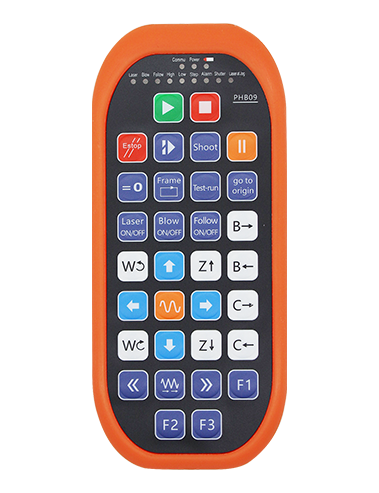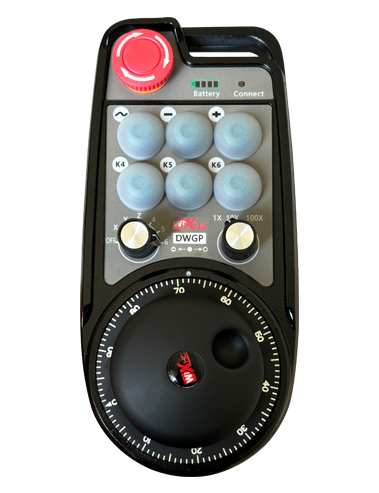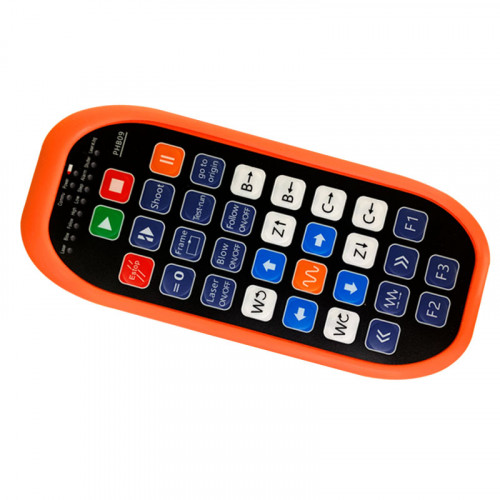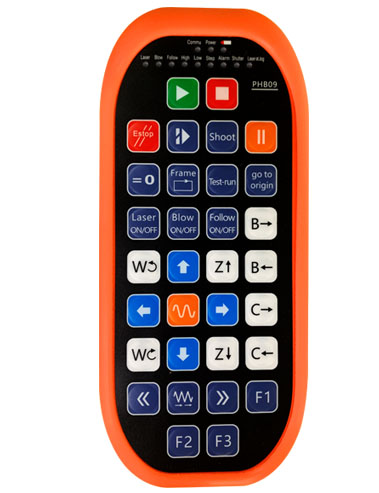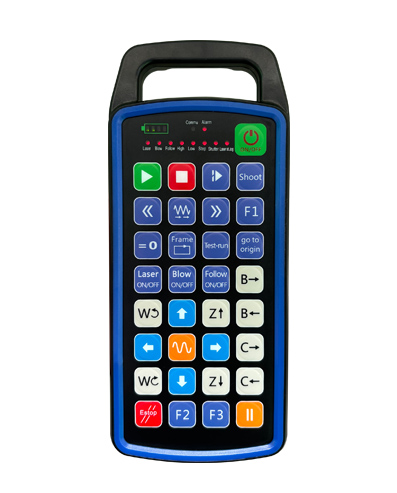
Appoġġ 32 programmar tal-buttuna tad-dwana
Appoġġ 9 programmazzjoni tad-displej tad-dawl LED tad-dwana
Bl-użu tat-teknoloġija tal-komunikazzjoni mingħajr fili 433MHZ, l-operazzjoni bla fili
distanza hija 80 miters

£300.00
Appoġġ 32 programmar tal-buttuna tad-dwana
Appoġġ 9 programmazzjoni tad-displej tad-dawl LED tad-dwana
Bl-użu tat-teknoloġija tal-komunikazzjoni mingħajr fili 433MHZ, l-operazzjoni bla fili
distanza hija 80 miters
1.Introduzzjoni tal-Prodott
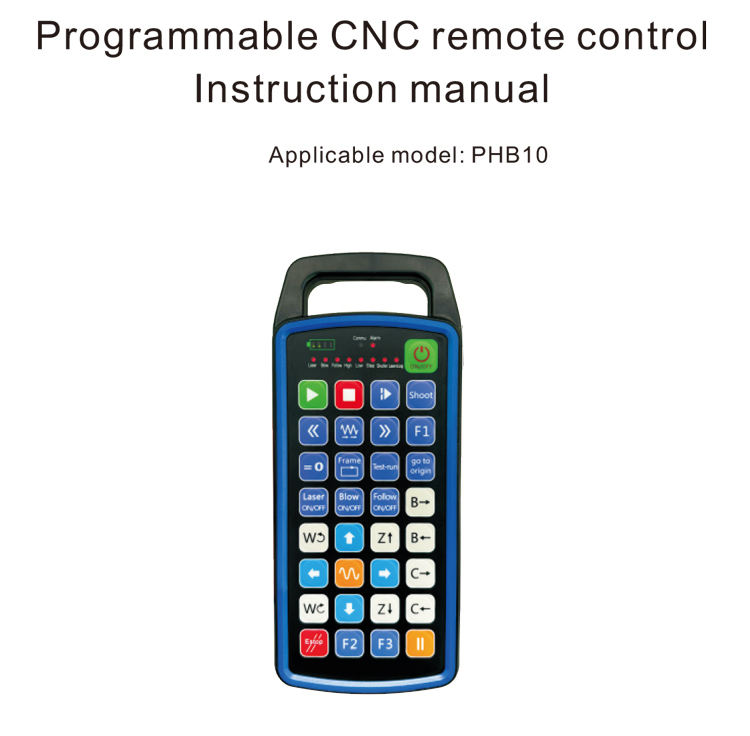
Il-kontroll mill-bogħod CNC programmabbli PHB10 huwa adattat għall-wireless
operazzjoni ta 'kontroll mill-bogħod ta' diversi sistemi CNC. Huwa jappoġġa definit mill-utent
ipprogrammar biex jiġu żviluppati funzjonijiet tal-buttuni, u tirrealizza kontroll mill-bogħod ta 'diversi
funzjonijiet fuq is-sistema CNC; jappoġġja programmazzjoni definita mill-utent biex tiżviluppa
Dwal LED biex jixegħlu u jitfi, u tirrealizza wirja dinamika tal-istatus tas-sistema;
il-kontroll mill-bogħod jiġi b'batterija rikarikabbli u jappoġġja Tip-Ċ
iċċarġjar tal-interface.
2.Karatteristiċi tal-prodott
1. Bl-użu tat-teknoloġija tal-komunikazzjoni mingħajr fili 433MHZ, l-operazzjoni bla fili
distanza hija 80 miters;
2.Bl-użu tal-funzjoni tal-qbiż tal-frekwenza awtomatika, 32 settijiet ta 'remoti mingħajr fili
kontrolluri jistgħu jintużaw fl-istess ħin mingħajr ma jaffettwaw lil xulxin;
3.Appoġġ 32 programmar tal-buttuna tad-dwana;
4.Appoġġ 9 programmazzjoni tad-displej tad-dawl LED tad-dwana;
5.Appoġġ IP67 livell reżistenti għall-ilma;
6.Appoġġ iċċarġjar standard ta 'interface tat-Tip-C; 5Speċifikazzjoni tal-iċċarġjar V-2A;
1100 Batterija ta 'kapaċità kbira mAh, b'funzjoni awtomatika ta 'rqad standby; tirrealizza
standby ta 'enerġija baxxa ultra-twila;
7.Appoġġ wirja f'ħin reali tal-qawwa.
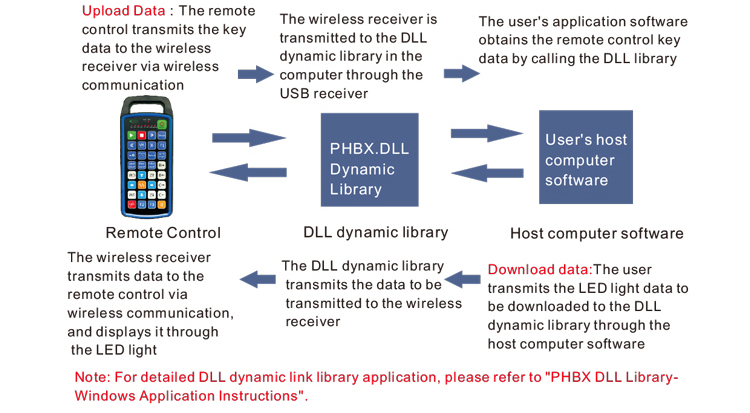
3.Prinċipju tax-xogħol
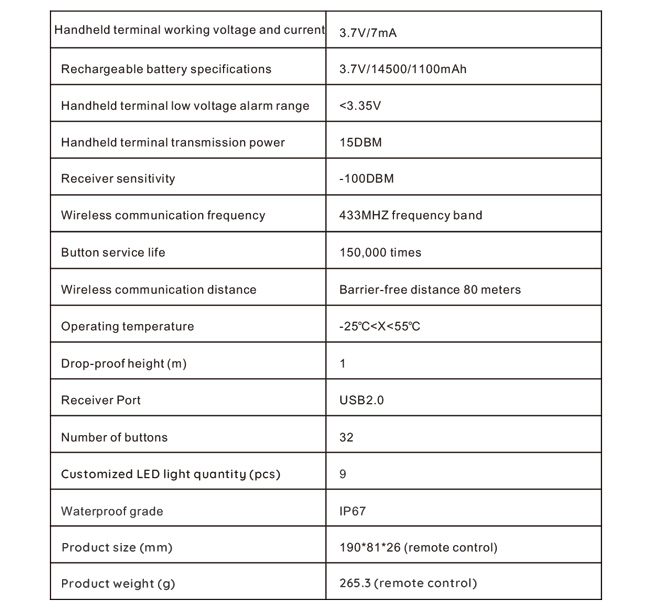
4. Speċifikazzjonijiet tal-prodott
5.Introduzzjoni tal-funzjoni tal-prodott
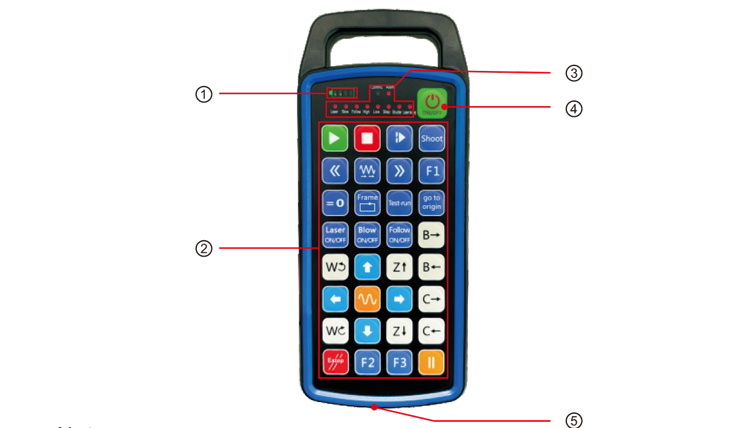
Noti:
①Battery level display:
Tixgħel wara li jinxtegħel, jintefa wara li jintefa;
Jekk id-dawl indikatur tal-batterija huwa bar wieħed biss u jibqa' jteptep, tfisser il-
batterija hija baxxa wisq. Jekk jogħġbok ibdel il-batterija;
Jekk id-dwal indikaturi tal-batterija huma kollha mixgħula u d-dwal LED l-oħra jteptpu lura u
'l quddiem, ifisser li l-batterija hija baxxa ħafna. Jekk jogħġbok ibdel il-batterija;
Jekk l-indikatur tal-batterija ma jixgħelx jew jintefa, u l-apparat ma jistax ikun
beda billi tagħfas u żżomm il-buttuna tal-qawwa, Jekk jogħġbok ibdel il-batterija;
②Button area:32 buttuni rranġati f'4X8, programmazzjoni definita mill-utent;
③Status LED:
COMMU: Dawl indikatur tal-buttuna, jixgħel meta l-buttuna tingħafas u tmur
barra meta l-buttuna tiġi rilaxxata; dwal oħra huma wirjiet tad-dwana;
④Power switch:
Agħfas fit-tul għal 3 sekondi biex tinxtegħel, agħfas fit-tul għal 3 sekondi biex titfi;
⑤Charging port:
Uża ċarġer tat-Tip C biex tiċċarġja, vultaġġ tal-iċċarġjar 5V, kurrenti 1A-2A; iċċarġjar
ħin 3-5 sigħat;
Meta tiċċarġja, l-indikatur tal-qawwa jteptep, li jindika li qed jiċċarġja. Meta
iċċarġjat kompletament, l-indikatur tal-qawwa se juri bar sħiħ mingħajr ma jteptep.
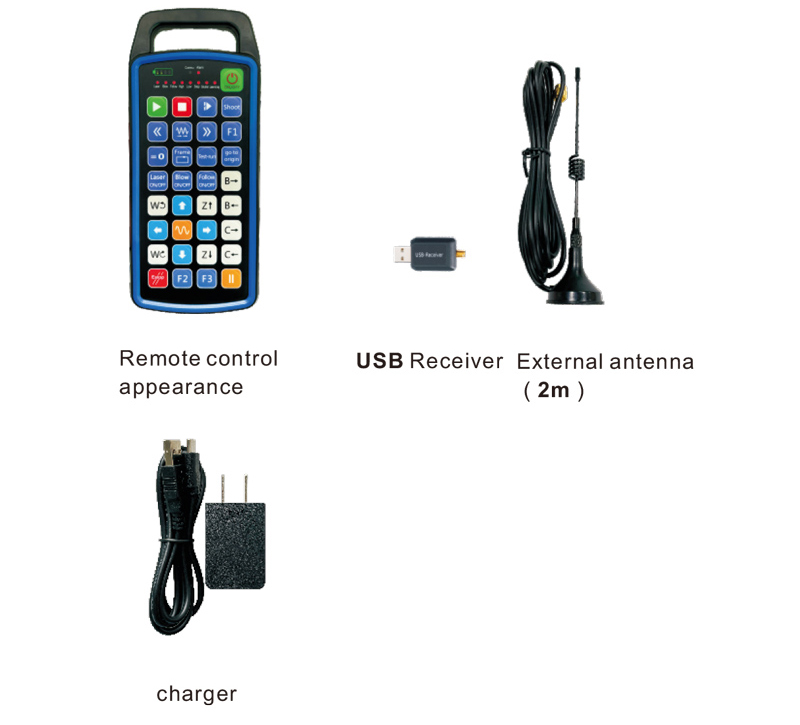
6.Dijagramma tal-Aċċessorji tal-Prodott
7.Gwida għall-Installazzjoni tal-Prodott
1 . I daħħal ir-riċevitur USB fil-kompjuter, il-kompjuter awtomatikament
jirrikonoxxu u installa s-sewwieq tal-apparat USB mingħajr manwal
2. Daħħal il-kontroll remot fil-ċarġer. Wara li l-batterija tkun kompletament iċċarġjata, agħfas
u żomm il-buttuna tal-qawwa għal 3 sekondi. Il-kontroll mill-bogħod jinxtegħel u l-qawwa
indikatur se jixgħel, li jindika li l-power-on huwa suċċess.
3. Wara li tixgħel, tista 'twettaq kwalunkwe operazzjoni tal-buttuna. Il-kontroll mill-bogħod
jista 'jappoġġja tħaddim ta' buttuna doppja fl-istess ħin. Meta tagħfas xi buttuna, Il
Id-dawl COMMU fuq il-kontroll remot se jixgħel, li jindika li din il-buttuna hija valida.
8.Istruzzjonijiet ta' Operazzjoni tal-Prodott
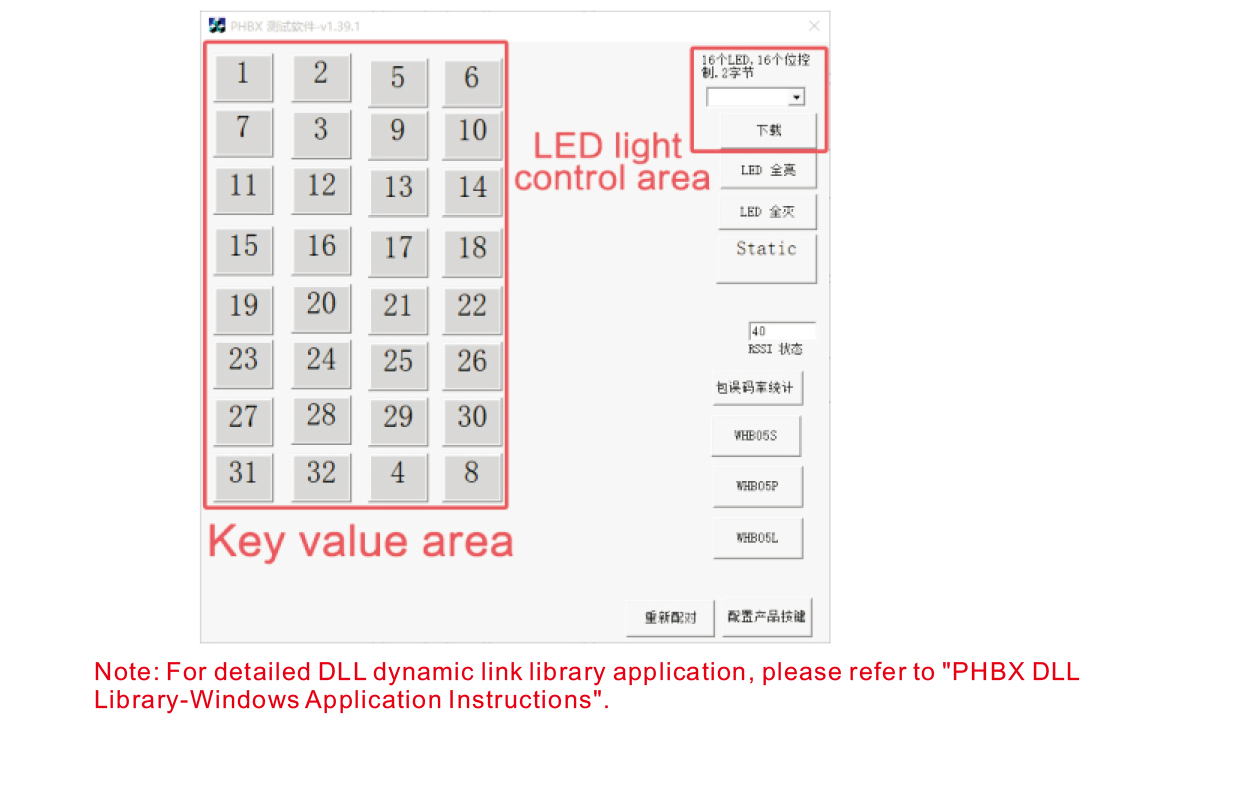
Qabel l-iżvilupp u l-użu tal-prodott, tista' tuża s-softwer demo li nipprovdu lil
ittestja l-buttuni fuq il-kontroll mill-bogħod u d-dawl LED fuq il-kontroll mill-bogħod. Tista'
uża wkoll id-demo bħala rutina ta' referenza għall-iżvilupp futur tal-ipprogrammar.
Qabel ma tuża s-softwer Demo, jekk jogħġbok plagg ir-riċevitur USB fil-kompjuter,
kun żgur li l-kontrollur remot ikollu qawwa suffiċjenti, agħfas u żomm il-buttuna tal-qawwa biex t
urn fuqha, u mbagħad użaha;
Meta tingħafas kwalunkwe buttuna fuq il-kontroll remot, id-demo tas-software tat-test se juri
il-valur ewlieni korrispondenti. Wara li ħarġuha, il-wiri tal-valur ewlieni jisparixxi,
li jindika li l-upload taċ-ċavetta huwa normali;
Tista 'wkoll tagħżel in-numru tad-dawl LED fuq id-demo tas-softwer tat-test, ikklikkja download,
u n-numru tad-dawl korrispondenti fuq il-kontroll mill-bogħod jixegħlu, li jindika li l
Id-dawl LED qed jitniżżel b'mod normali.
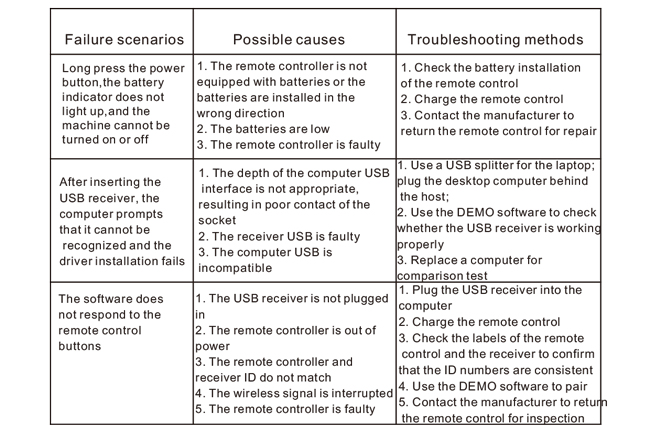
9.Issolvi l-problemi tal-Prodott
10. Manutenzjoni u kura
1. Jekk jogħġbok użah f'ambjent niexef b'temperatura u pressjoni normali biex testendi
il-ħajja tas-servizz;
2. Tużax oġġetti li jaqtgħu biex tmiss iż-żona taċ-ċavetta biex testendi l-ħajja tas-servizz taċ-ċavetta;
3. Jekk jogħġbok żomm iż-żona taċ-ċavetta nadifa biex tnaqqas ix-xedd taċ-ċavetta;
4. Evita li tagħfas u taqa 'biex tikkawża ħsara lill-kontroll mill-bogħod;
5. Jekk ma jintużax għal żmien twil, jekk jogħġbok neħħi l-batterija u aħżen il-kontroll mill-bogħod
u batterija f'post nadif u sigur;
6. Oqgħod attent għall-prova ta 'umdità waqt il-ħażna u t-trasport.
11.Informazzjoni dwar is-sigurtà
1. Jekk jogħġbok aqra l-istruzzjonijiet bir-reqqa qabel l-użu. Dawk li mhumiex professjonisti huma pprojbiti
joperaw.
2. Jekk jogħġbok uża l-ċarġer oriġinali jew ċarġer prodott minn manifattur regolari mal-
l-istess speċifikazzjonijiet.
3. Jekk jogħġbok iċċarġja fil-ħin biex tevita tħaddim ħażin minħabba qawwa insuffiċjenti li tikkawża l-
il-kontroll mill-bogħod ma jkunx risponsiv.
4. Jekk hija meħtieġa t-tiswija, Jekk jogħġbok ikkuntattja lill-manifattur. Jekk il-ħsara hija kkawżata minn awto-tiswija,
Il-manifattur ma jipprovdix garanzija.