Cov lus piav qhia
Cov Khoom Qauv
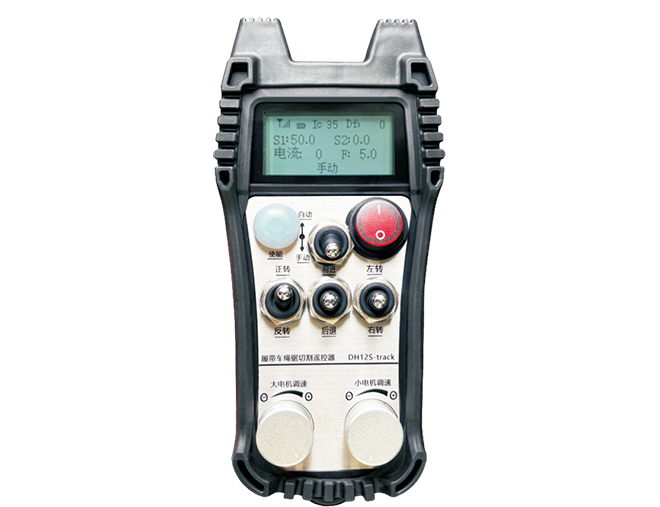
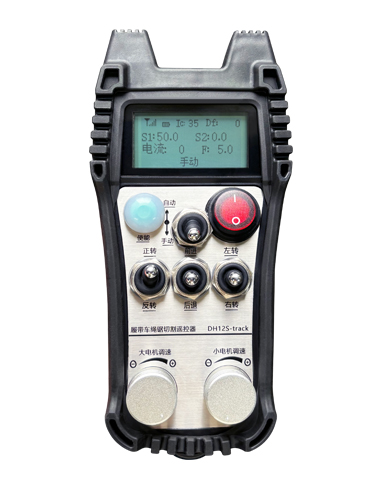
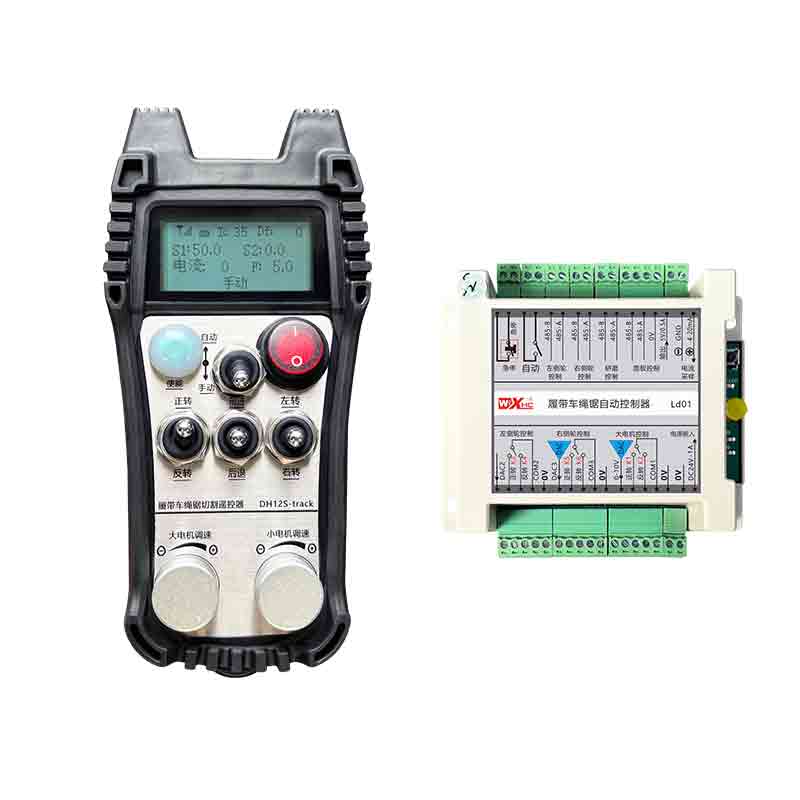
Model: DH12S-LD
Cov Khoom Siv Tau:crawler wire saw machine
Daim duab Khoom Accessories
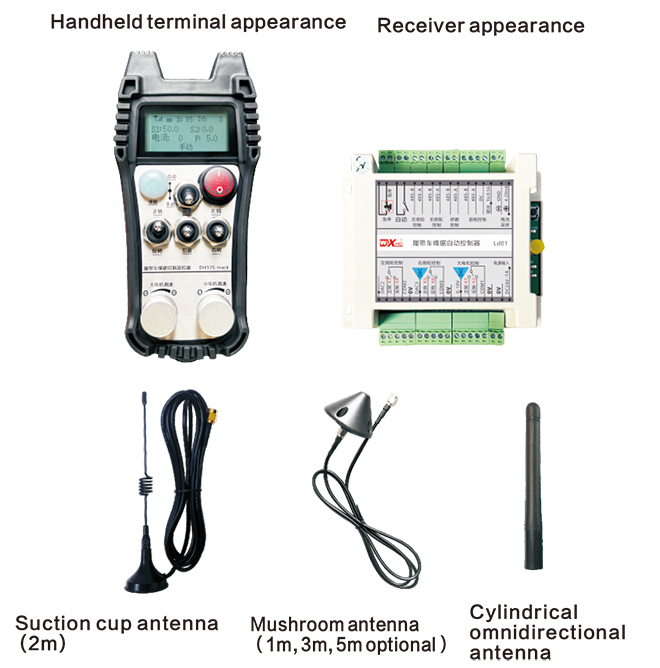
Ceeb toom: Koj tuaj yeem xaiv ib qho ntawm peb lub kav hlau txais xov. Lub kav hlau txais xov nqus yog tus qauv los ntawm lub neej ntawd.
Cov Chaw Taws Teeb Tswj Hloov Lus Piav Qhia
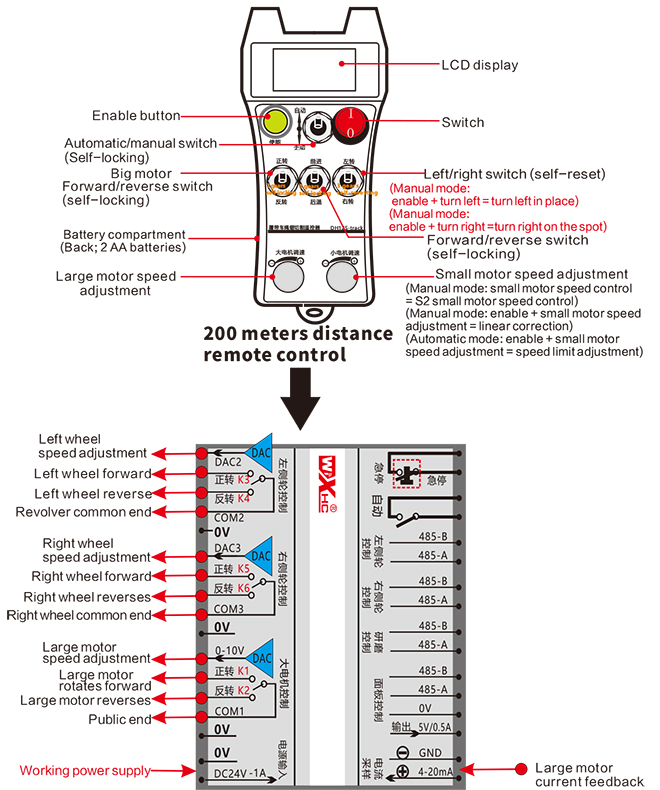
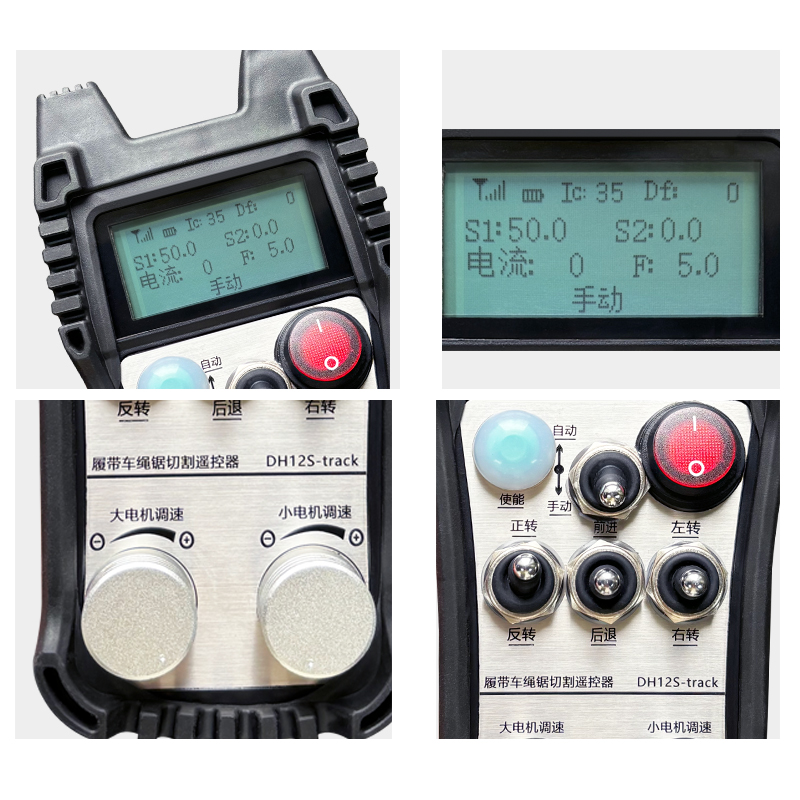
Qhia Cov Ntsiab Lus Qhia
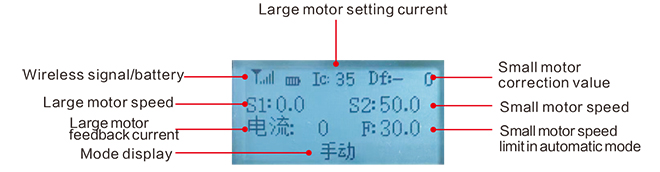
Large motor speed:S1:0-50
Small motor speed: S2: 0-50
Maximumspeedlimitofautomatic cuttingsmallmotor:F:0-30(parametersadjustable)
Automatic cutting maximum current: Ic: 0-35 (Adjustable ntsuas)
Linear correction value: Df: -99-99 (1 unit is about 0.02V)

Tsawg voltage: Cov chaw taws teeb tswj roj teeb tsawg dhau, Thov hloov lub roj teeb.

Network Disconnected: Wireless teeb liab cuam tshuam. Thov xyuas lub hwj chim receiver, Fais fab nws dua, thiab rov pib dua cov chaw taws teeb tswj.
Cov Lus Qhia Txog Kev Ua Haujlwm Chaw Taws Teeb Tswj
1.Turn on the remote control
When the is powered on, the RF-LED light on the receiver starts to flash;install two AA batteries in threceiver e remote control, turn on the power switch, andthe display will show the motor speed, indicating successful startup.
2.Large motor and speed regulation
Turn the “rau pem hauv ntej / rov qab” switch to forward, the receiver’s large motor will turn on, and the display will show forward
Turn the “rau pem hauv ntej / rov qab” switch to reverse, the large motor of the receiver will turn on in reverse, and the display will show reverse
Rotate the “large motor speed adjustment” knob to adjust the receiver’s large motor speed adjustment output voltage 0-10V;
3.Small motor and speed regulation
Move the “rau pem hauv ntej / rov qab” switch to forward, lub log sab laug rau pem hauv ntej thiab lub log sab xis rau pem hauv ntej ntawm lub receiver yog qhib, thiab cov zaub qhia rau pem hauv ntej
Turn the “Forward/Reverse” switch to reverse, lub log sab laug rov qab thiab lub log sab xis rov qab ntawm lub receiver yog qhib, thiab cov zaub qhia rov qab
4.Lem sab laug thiab sab xis
Turn the “Sab laug/sab xis” hloov mus rau sab laug, the receiver’s right wheel will forward and turn on,thiab cov zaub yuav qhia sab laug
Turn the “Lem sab laug/sab xis” Hloov mus rau sab xis, Lub log sab laug ntawm lub receiver yuav txav mus rau pem hauv ntej thiab tig, thiab cov zaub yuav qhia lem sab xis
5.Lem rau hauv qhov chaw
Hauv phau ntawv hom:
Tig sab laug hauv qhov chaw: Press and hold the “Qhib ” Khawm, turn the “Lem sab laug/sab xis” hloov mus rau sab laug, lub log sab laug rov qab thiab lub log sab xis rau pem hauv ntej ntawm lub receiver tau qhib,thiab pib tig sab laug hauv qhov chaw;
Lem sab xis hauv qhov chaw: Press and hold the “Qhib ” Khawm, turn the “Lem sab laug/sab xis” hloov mus rau sab xis, lub log sab laug rau pem hauv ntej thiab lub log sab xis rov qab ntawm lub receiver yog qhib, and the receiver starts to turn right in place;
6.Small motor speed limit adjustment
In automatic mode: press and hold the “Qhib ” button and rotate the “Small Motor Speed Adjustment” to adjust the maximum speed of the small motor during automatic cutting;
7.Tsis siv neeg txiav
The first step is to start the big motor; the second step is to switch the mode switch to “Auto”; the third step is to start the small motor and the screen will display “Cutting Auto”,indicating that it has entered the automatic cutting mode;
8. Straight line correction
When the left and right walking motors are moving forward and backward, the left and right speeds are inconsistent, and the straight-line walking deviates. You can use the linear correction function of the remote control to fine-tune the speed of the left and right wheels;
Correction principle: Through the correction function, Qhov ceev ntawm lub log sab laug yog fine-tuned kom phim qhov ceev ntawm txoj cai log, Qhov no yog ua los synchronize lub speeds ntawm sab laug thiab txoj cai log thiab tshem tawm deviation;
Deviation kho txoj kev ua hauj lwm: Hauv phau ntawv hom, press and hold the “Qhib ” button and rotate the “Me me lub cev muaj zog ceev kho”;
Tig clockwise kom nce lub log sab laug ceev voltage, thiab kho tus nqi ntawm cov zaub yuav nce;
Tig counterclockwise kom txo tau sab laug log ceev voltage, thiab cov zaub kho tus nqi yuav txo;
Kho kom raug ntau yam: Kho tus nqi -90 rau 90; Qhov kho voltage rau ib chav kho yog li ntawm 0.02V;
9. Parameter ntawv qhia zaub mov (cov neeg siv raug txwv tsis pub hloov kho nws yam tsis muaj kev tso cai)
Some functions of the remote control can be adjusted through parameters. Hauv phau ntawv hom, Thaum lub cev muaj zog me me ceev yog S2 10, thawb qhov hloov mus rau pem hauv ntej / rov qab mus rau peb zaug hauv kab, Tom qab ntawd thawb nws cia peb zaug sib law liag nkag mus rau hauv cov ntawv qhia zaub mov parameter;
Tawm ntawm cov ntawv qhia zaub mov parameter: choose to save or not save, Tom qab ntawd nias lub khawm kom paub meej tias tawm;
Maximum current: Kev khiav hauj lwm rated tam sim no ntawm lub cev muaj zog txiav yog 80% ntawm no tam sim no;
Speed control parameters: tsis siv neeg txiav tswj parameters, default 800, kev hloov kho raug txwv;
Deceleration parameter: automatic cutting control parameter. Thaum txiav tus nqi hloov tam sim no tshaj tus nqi no,deceleration begins.
Acceleration a1: automatic cutting control parameter, when the cutting current is lower than the set cutting current, the speed of acceleration;
Deceleration a2: automatic cutting control parameter, when the cutting current is higher than the set
cutting current, the speed of deceleration;
Automatic knife retraction: invalid;
Start self-locking: 0, no self-locking; 1, self-locking. Press the enable key + forward and reverse to take effect and self-lock.
Maximum walking: the maximum speed of the small motor.
Txiav tam sim no: set the maximum current of the main motor for automatic cutting. If the feedback current exceeds this value, it will start to decelerate.
Lub neej ntawd ceev txwv: the default maximum speed of automatic cutting speed when turning on the machine.
Automatic mode: 0, the automatic switch is automatically controlled; 1, the automatic switch controls the automatic IO output point.
Kev txwv ceev offset: the maximum speed of the small motor during automatic cutting.
Siab tshaj plaws tus tswv tsev: maximum speed of large motor.
Cov yam ntxwv hluav taws xob ntawm cov chaw taws teeb tswj

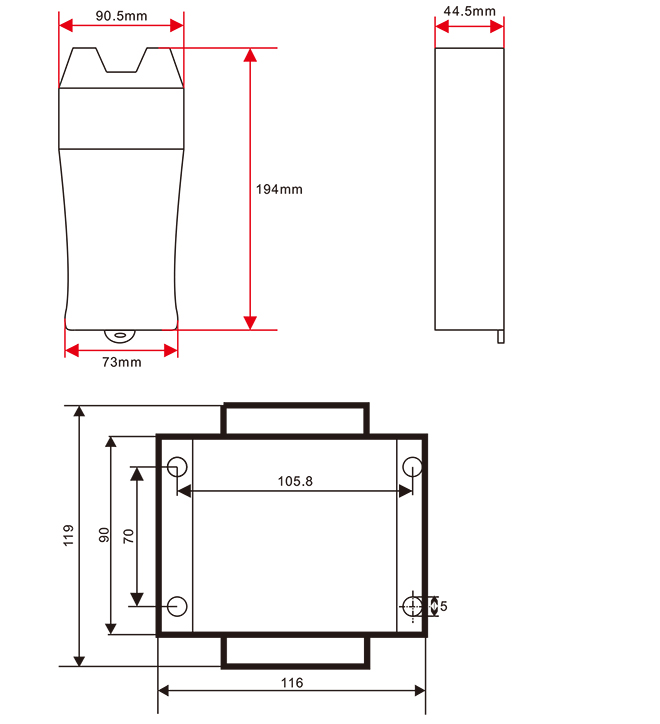
Chaw taws teeb tswj qhov ntev
Qhov kawg txhais txoj cai ntawm cov khoom no tsuas yog peb lub tuam txhab.