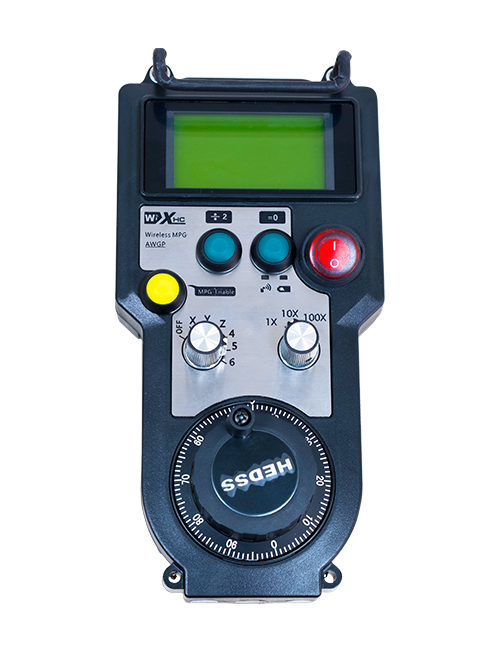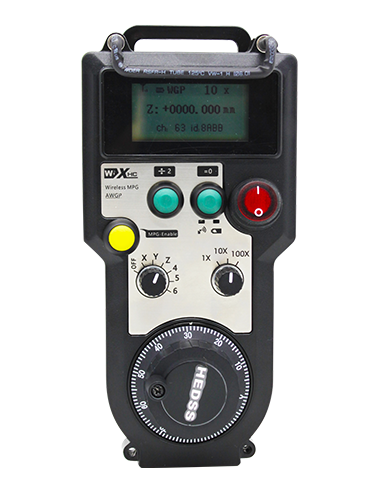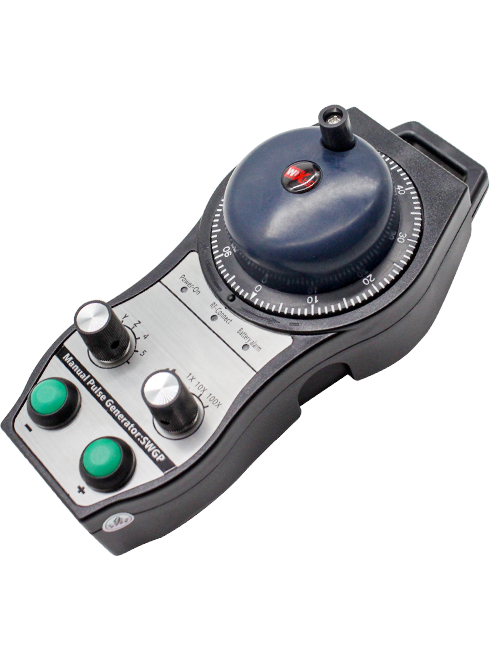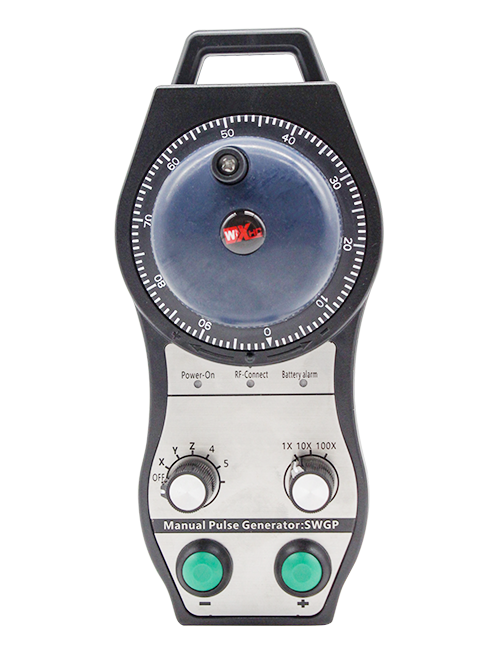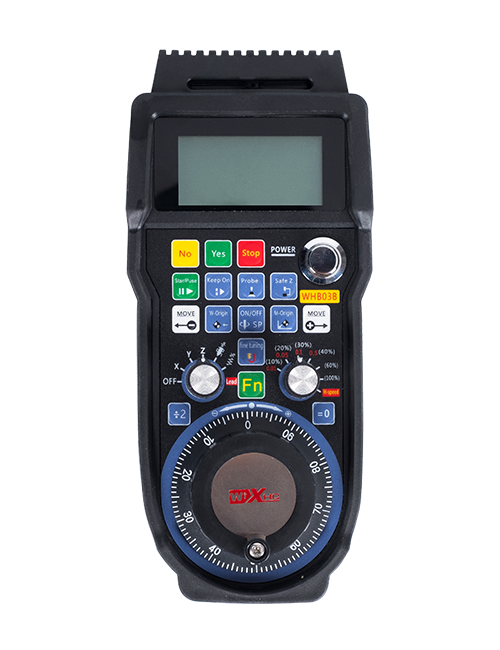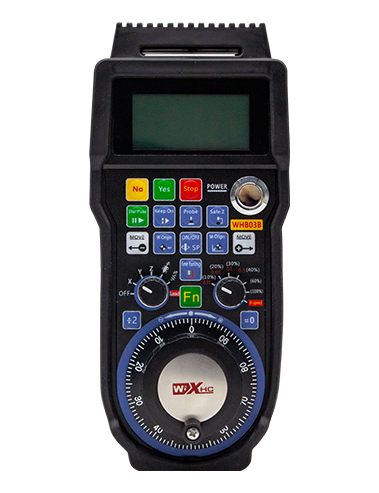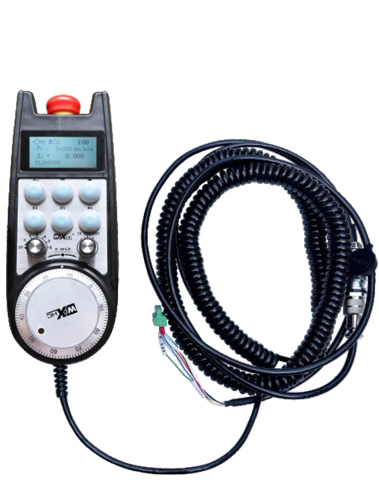
1. Use a 6-core aviation plug cable for connection, with a handwheel cable length of 10 meters.
2. Lub handwheel screen yuav tso saib system workpiece coordinates, mechanical coordinates,pub tus nqi, axis xaiv, magnification, thiab lwm yam ntaub ntawv.
3. Txhawb nqa thaum muaj xwm ceev nres khawm, Hloov IO teeb liab tso zis, thiab handwheel thaum muaj xwm ceev nres yog tseem zoo.
4. Supports 6 Kev cai nyees khawm, hloov IO teeb liab, thiab yuav tso tawm cov teeb liab rau lub kaw lus los ntawm IO xaim los yog kev sib txuas lus.
Wired electronic handwheel Instruction Manual
Cov lus piav qhia
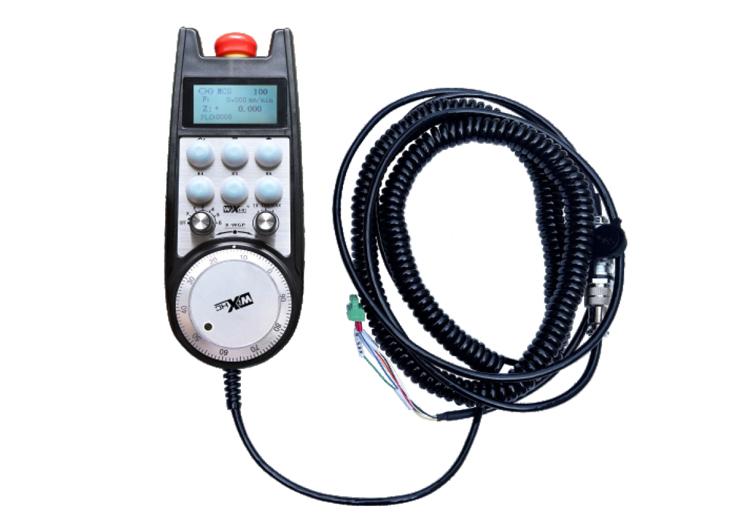
1. Khoom taw qhia
Lub tshuab hluav taws xob yog siv rau kev qhia phau ntawv, Positioning, cov cuab yeej sib txig, thiab lwm yam kev ua haujlwm ntawm CNC tshuab cuab yeej. Cov qauv ntawm lub log tes hluav taws xob no yog qhov tseeb Siemens zaub xaim handwheel. Lub log tes txuas nrog X130 interface ntawm Siemens system los ntawm lub network cable, thiab cov kaw lus sib koom tes tau nyeem thiab tso tawm ntawm lub log LCD npo los ntawm S7 raws tu qauv kev sib txuas lus. Lub log tes tseem tuaj yeem tswj hwm qhov system axis xaiv, magnification, nyees khawm, thiab lwm yam teeb liab los ntawm kev sib txuas lus.
2.Cov khoom lag luam ua haujlwm
1. Use a 6-core aviation plug cable for connection, with a handwheel cable length of 10 meters.
2. Lub handwheel screen yuav tso saib system workpiece coordinates, mechanical coordinates,pub tus nqi, axis xaiv, magnification, thiab lwm yam ntaub ntawv.
3. Txhawb nqa thaum muaj xwm ceev nres khawm, Hloov IO teeb liab tso zis, thiab handwheel thaum muaj xwm ceev nres yog tseem zoo.
4. Supports 6 Kev cai nyees khawm, hloov IO teeb liab, thiab yuav tso tawm cov teeb liab rau lub kaw lus los ntawm IO xaim los yog kev sib txuas lus.
5. Supports 6 or 8 axis control, nrog hloov IO teeb liab uas yuav tso zis rau lub system los ntawm IO xaim los yog kev sib txuas lus.
6. Supports 3 or 4 theem ntawm kev tswj hwm lub zog, nrog hloov IO teeb liab uas yuav tso zis rau lub system los ntawm IO xaim los yog kev sib txuas lus.
7. Txhawb nqa mem tes encoder, 100 pulses ib tig, Yuav tso tawm cov teeb liab rau lub kaw lus los ntawm AB mem tes xaim.
8. Txhawb Siemens S7 raws tu qauv thiab Siemens 828D, 840DSL, IB thiab lwm yam qauv kab ke.
3. Cov khoom lag luam specifications
| Handwheel khiav hauj lwm fais fab mov voltage | DC24V / 1A |
| Receiver fais fab mov voltage | DC24V / 1A |
| Receiver IO tso zis load ntau | DC24V |
| Handwheel kawg cable ntev | 10m |
| Receiver kawg cable ntev | 1m |
| Receiver kawg network cable ntev | 3m |
| Kev khiav hauj lwm kub | -25℃<X<55℃ |
| Anti-caij nplooj zeeg qhov siab | 1m |
| Kev cai khawm kom muaj nuj nqis | 6 |
| Khoom qhov ntev | 233*90.7*77.4(mm) |
4.Khoom muaj nuj nqi taw qhia
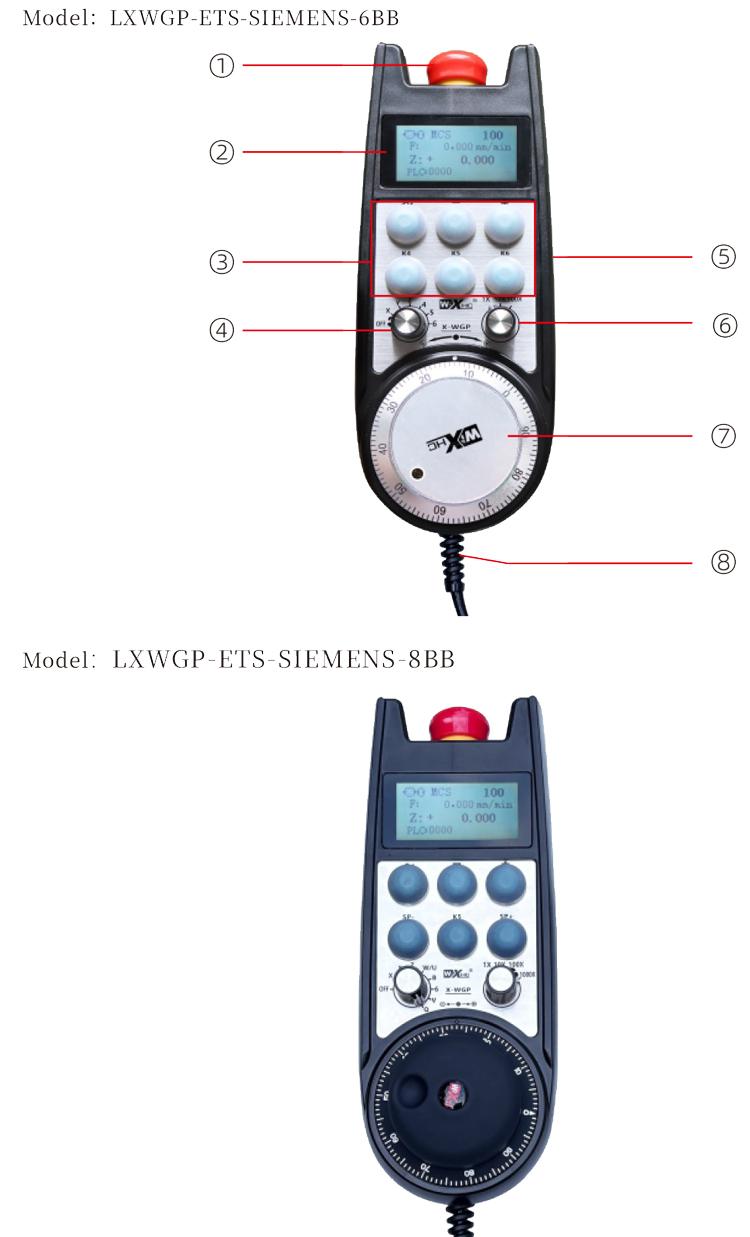
Ceeb toom:
Thaum muaj xwm ceev nres khawm:
Nias lub pob nres thaum muaj xwm ceev, thiab ob pawg ntawm kev kub ntxhov nres IO tso zis ntawm lub receiver yuav raug txiav tawm, thiab tag nrho cov haujlwm ntawm lub log tes yuav raug xiam oob qhab.
Tom qab tso tawm qhov chaw nres tsheb thaum muaj xwm ceev, the emergency stop IO output on the receiver is closed, tag nrho cov haujlwm ntawm lub log tes tau rov qab los.
② Screen display:
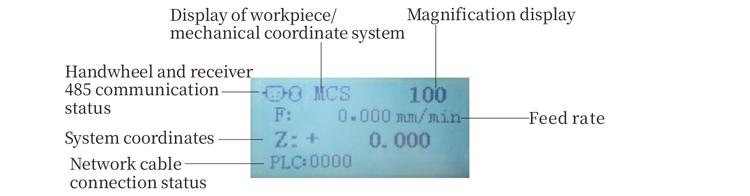
PLC: 0000 qhia tias lub network cable tsis txuas nrog, PLC: 1010 qhia tau tias lub network cable tau ua tiav txuas nrog PLC system.
PLC: 1110 sawv cev rau kev sau ntawv zoo ntawm cov ntaub ntawv system rau lub log tes, PLC: 0001 sawv cev rau kev sib txuas zoo nrog lub khoos phis tawm.
③ Custom button:
6 Kev cai nyees khawm, txhua tus sib raug rau ib qho IO tso zis taw tes ntawm lub txais, kuj txuas nrog lub kaw lus los ntawm kev sib txuas lus.
④ Axis selection switch:
Lub axis xaiv hloov tuaj yeem xaiv lub axis txav los ntawm lub log tes.
⑤ Enable button:
Nias thiab tuav tog twg los ua kom lub pob ntawm ob sab los qhib lub mem tes encoder. T, h.
⑥ Magnification switch:a
b.
⑦ Pulse encoder:
o, b, emit a pulse signal, p.
⑧ Handwheel cable:
w, g, used for handwheel power supply and communication.
5. Product accessory diagram
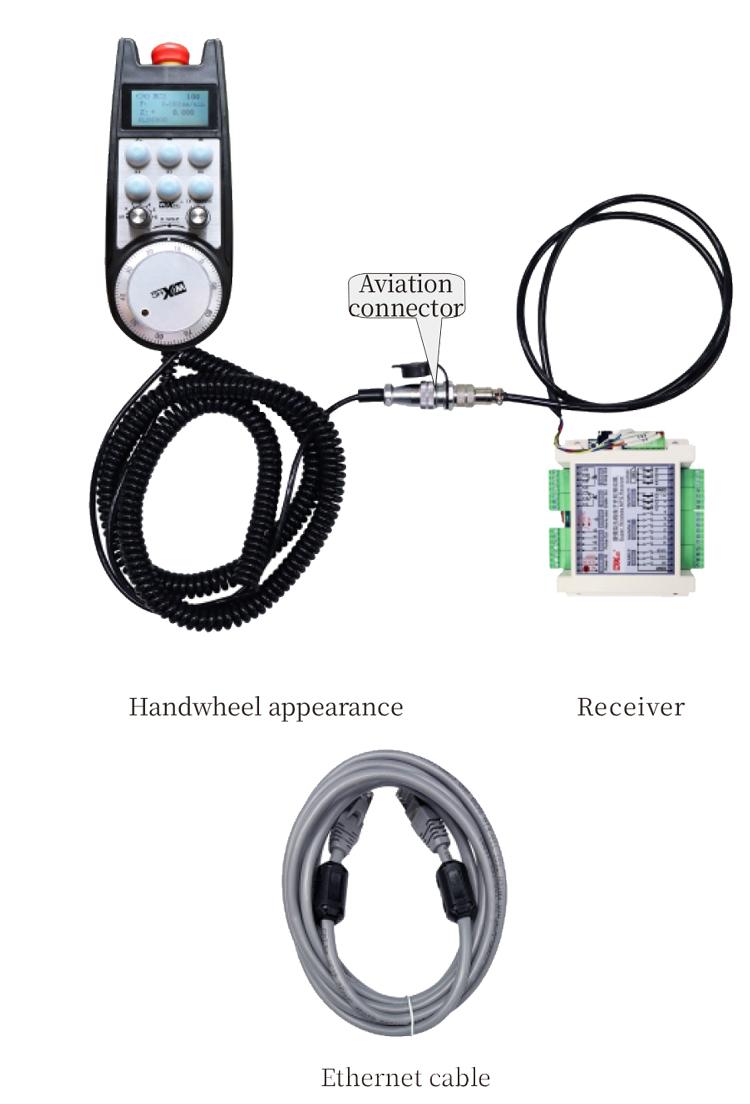
6. Product Installation Guide
6.1 n
6.1 n
1. t.
2. a. Connect the device to the receiver through cables and connect the receiver to the X130 interface of the system using Ethernet cables.
3. After fixing the receiver, install the aviation plug base at the handwheel opening position on the panel, and plug the other end of the base into the handwheel interface on the receiver. Then insert the aviation plug of the handwheel cable into the base and tighten the fixing device.
6.2 Receiver installation dimensions
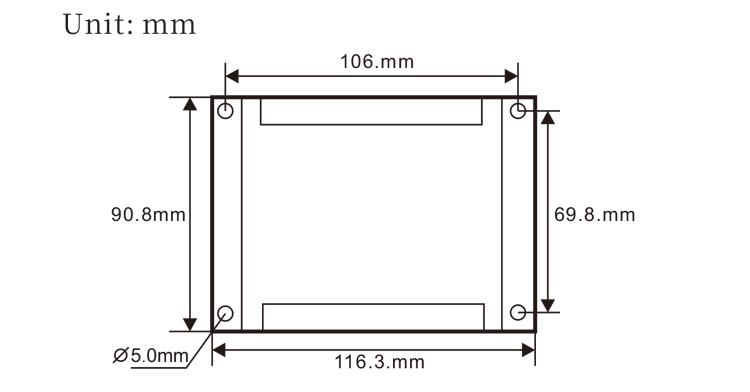
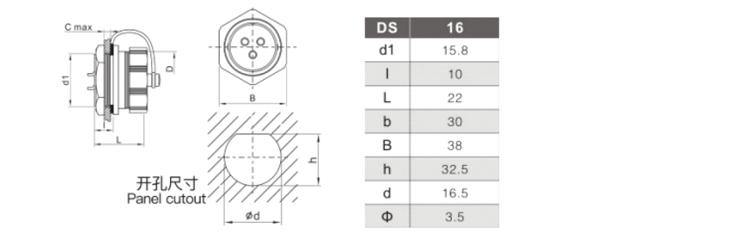
6.3 Installation dimensions of aviation plugs
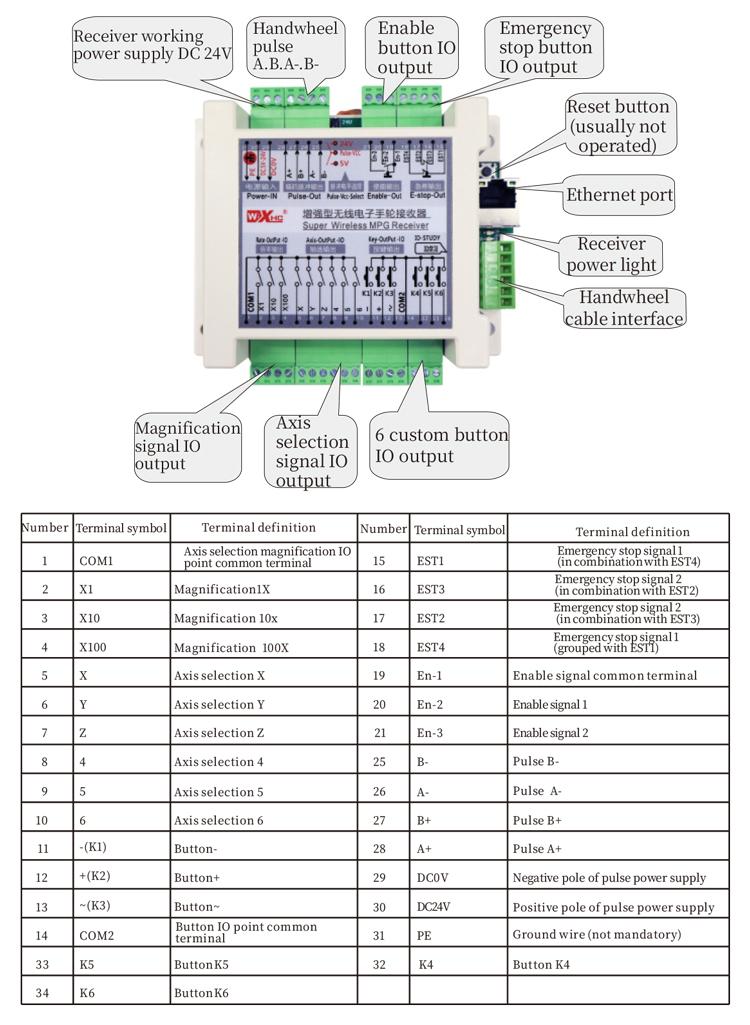
6.4 Receiver Wiring Reference Diagram
 7.Product Operation Instructions
7.Product Operation Instructions
1. When the receiver is powered on and the working indicator light of the receiver flashes, connect the receiver to the computer with a network cable, set the fixed IP address of the computer, and use the network configuration tool software to set the network parameters of the handwheel function. For specific setting methods, refer to the “LXWGP-ETS Wired Handwheel User Manual”.
2.After the receiver is set up, the system needs to program a PLC program. Please refer to the “LXWGP-ETS Different Siemens Numerical Control System Setting Methods” and PLC program routine materials for details.
3.After completing the above settings, take the receiver to the machine electrical cabinet and install it. Pull out the network cable from the computer and plug it into the X130 interface of the system.Connect the receiver power supply and pulse line.3.
4.After completing the above settings, take the receiver to the machine electrical cabinet and install it. Pull out the network cable from the computer and plug it into the X interface of the system. Connect the receiver power supply and pulse line.
5. Select axis selection: Switch the axis selection switch and select the axis you want to operate on.
6. Select magnification: Switch the magnification switch and select the magnification level you need.
7. Moving axis: o, select the axis selection switch, select the magnification switch, and then rotate the pulse encoder to rotate the positive moving axis clockwise and the negative moving axis counterclockwise.
8. Press and hold any custom button to turn on the IO output of the corresponding button in the receiver, and release the button to turn off the output.
9. Nias lub pob nres thaum muaj xwm ceev, the corresponding emergency stop IO output of the receiver will be disconnected, the handwheel function will be disabled, release the emergency stop button, the emergency stop IO output will be closed, and the handwheel function will be restored.
8.Cov Khoom Qauv Piav Qhia

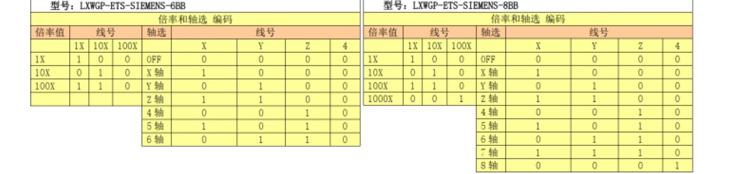
① LXWGP represents a wired appearance style, and the receiver communication interface
is an Ethernet interface.
② : Represents Siemens system specific.
③ : Sawv cev rau tus naj npawb ntawm axis xaiv hloov, represents axes, and represents
axes.
④ : represents the type of axis selection and magnification signal, A represents
point-to-point output signal, and B represents encoded output signal.
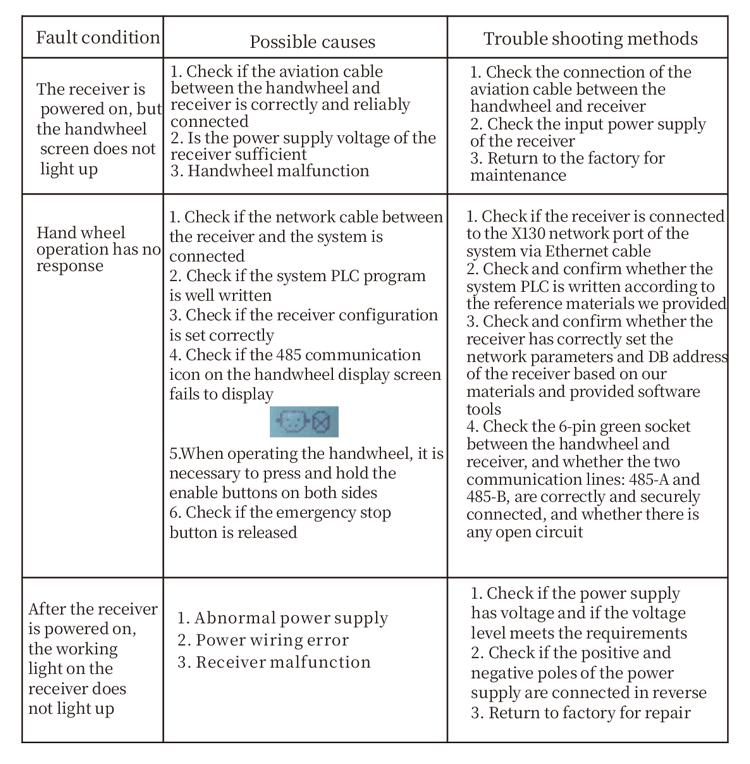
9.Product trouble shooting
10.Kev saib xyuas
1. Please use it in a dry environment at room temperature and pressure to extend its service life.
2. Please avoid using in abnormal environments such as rain and water bubbles to extend the service life.
3. Please keep the appearance of the handwheel clean to extend its service life.
4. Please avoid squeezing, falling, bumping, etc. to prevent damage to the precision components inside the handwheel or accuracy errors.
5. Yog tias cov chaw taws teeb tsis siv ntev, please store the handwheel in a clean and safe place.During storage and transportation, attention should be paid to moisture and shock resistance.
11. Safety Information
1. Please read the instructions carefully before use and prohibit non professionals from operating.
2. If any abnormal situation occurs with the handwheel, please stop using it immediately and troubleshoot. Before troubleshooting, it is forbidden to use the faulty handwheel again to avoid safety accidents caused by unknown handwheel faults;
3. If repair is required, please contact the manufacturer. If the damage is caused by self repair, the manufacturer will not provide warranty