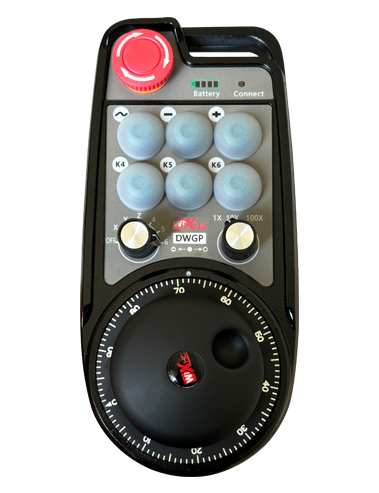
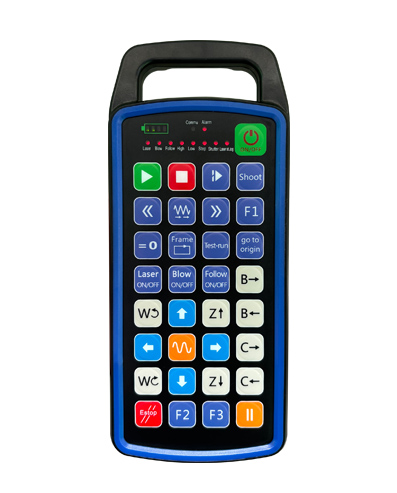
Apoyo 12 programashon di boton personalisá
Sostené pantaya di 2.8 inch, programashon personalisá di kontenido di mustra
Usando teknologia di komunikashon sin kabel di 433MHZ, e operashon sin kabel .
distansia 80 meternan

£300.00
Apoyo 12 programashon di boton personalisá
Sostené pantaya di 2.8 inch, programashon personalisá di kontenido di mustra
Usando teknologia di komunikashon sin kabel di 433MHZ, e operashon sin kabel .
distansia 80 meternan
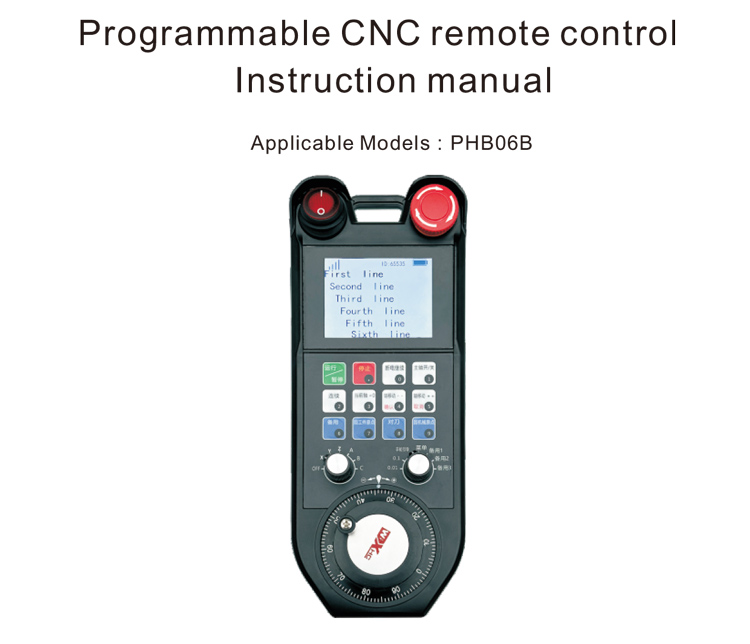
1.Introdukshon di produkto
E kòntròl remoto CNC programabel PHB06B ta adekuá pa wireless
operashon di kòntròl remoto di vários sistema CNC .. E ta sostené usuarionan pa
personalisá programashon i desaroyá funshonnan di boton pa realisá remoto
kontrol di vários funshon riba e sistema CNC; e ta sostené usuarionan pa
personalisá programashon i desaroyá kontenido di pantaya pa realisá dinámiko
muestra di estado di sistema; e kòntròl remoto ta bini ku un rekargabel
bateria i ta sostené kargamentu di interfase Tipo-C.
2.Rasgonan di produkto
1. Usando teknologia di komunikashon sin kabel di 433MHZ, e operashon sin kabel .
distansia 80 meternan;
2. Usando funshon di hopi frekuensha di frekuensha ., 32 setnan di remote sin kabel
controladornan por wordo uza na mes momento sin afecta otro .;
3. Apoyo 12 programashon di boton personalisá;
4. Sostené pantaya di 2.8 inch, programashon personalisá di kontenido di mustra;
5. Apoyo 1 6-switch di selekshon di as di velosidat, ku por wòrdu programá personalisá;
6. Apoyo 1 7-switch di magnifikashon di velosidat, ku por wòrdu programá personalisá;
7. Apoyo 1 wiel di man elektróniko, 100 pulsonan/turn;
8. Sostené kargamentu standart di Tipo-C; 5V-2A spesifikashon di kobransa; bateria
spesifikashon 18650/12580mWh bateria.
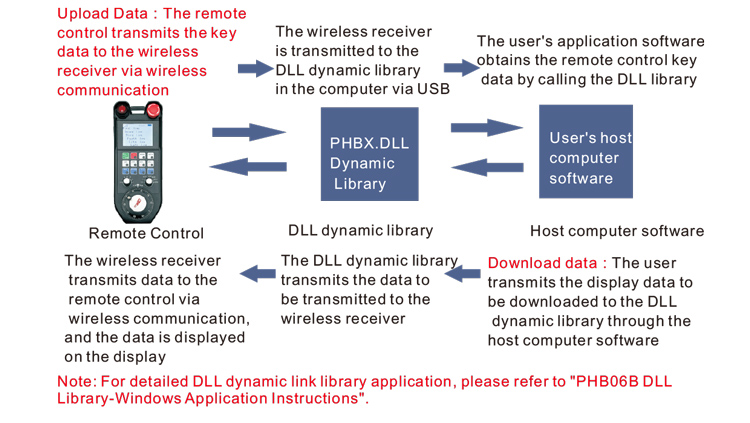
3.Prinsipio di trabou
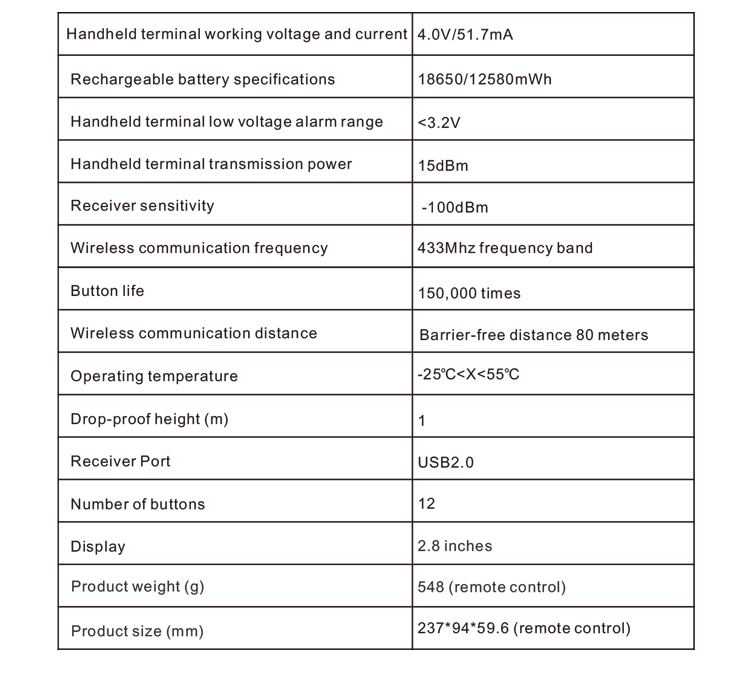
4. Spesifikashonnan di produkto
5.Introdukshon di funshon di produkto
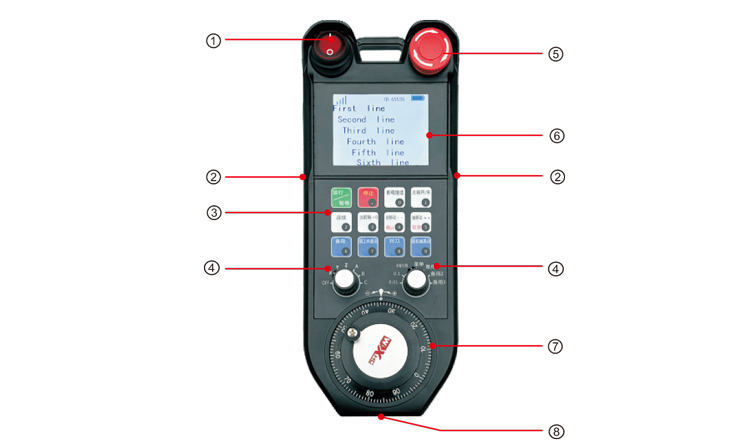
Notanan:
①Power switch:
Kontrolá wiel di man pa habri i sera
②Enable buttons on both sides:
E boton di habilitá mester wòrdu primi pa kore e wiel di man;
③Custom button area
12 botonan areglá den 3X4, programashon defini pa usuario;
④Axis selection, switch di magnifikashon
1 6-switch di selekshon di as di posishon, ku por wòrdu personalisá i programá;
1 7-kambio di relashon di posishon, ku por wòrdu personalisá i programá
⑤ Emergency stop switch:
Switch di stòp di emergensia di wiel di man;
⑥Display area:
Por mustra koriente aktual, señal, i kontenido di pantaya personalisá;
⑦Electronic hand wheel:
1 wiel di man elektróniko, 100 pulsonan/turn.
⑧Charging port:
Bateria rekargabel inkorporá, kargá usando un kargadó Tipo-C, voltahe di karga 5V .,
aktual 1A-2A; tempu di karga 7 oranan;
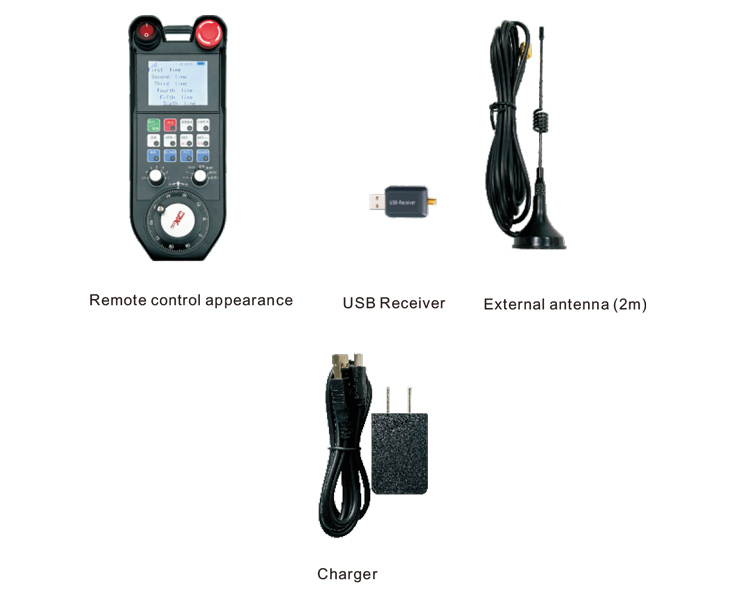
6.Diagram di asesorionan di produkto
7.Guia di Instalashon di Produkto
1. Insertá e risibí USB den e kòmpiuter, e kòmpiuter lo .
rekonosé i instalá e driver di aparato USB sin instalashon manual;
2. Insertá e kòntròl remoto den e kargadó .. Despues cu e bateria ta full carga ., bira
riba e switch di koriente, bira riba e kòntròl remoto ., i e pantaya ta mustra normal, kua
ta nifiká ku e power-on ta eksitoso;
3. Despues di power riba, bo por hasi kualke operashon di boton .. E kòntròl remoto por
sostené operashon di dos boton na mes momentu. Ora bo primi kualke boton ., un pretu
kuadra lo aparesé banda di e señal riba e kòntròl remoto, indikando ku e boton
ta bálido.
8.Instrukshonnan di Operashon di Produkto
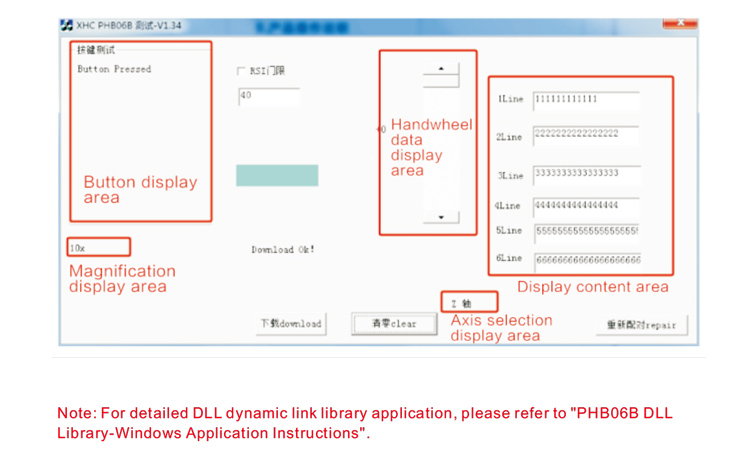
Promé ku desaroyo i uso di produkto ., bo por usa e software di Demo ku nos ta proveé pa tèst
e botonan i pantaya di e kòntròl remoto, òf usa e Demo komo un rutina di referensia pa
desaroyo di programashon den futuro;
Promé ku usa e software di Demo, por fabor plug e receiver USB den computer ., hasi
sigur ku e kòntròl remoto tin sufisiente koriente, bira riba e switch di koriente ., i despues us’é;
Ora kualke boton riba e kòntròl remoto ta wòrdu primi ., e software di prueba Demo lo mustra e
balor klave korespondiente. Despues di a lansa esaki ., e display di balor klave ta disparsé ., indikando ku
e boton di subi ta normal.
9.Produkto Produkto di Tipo
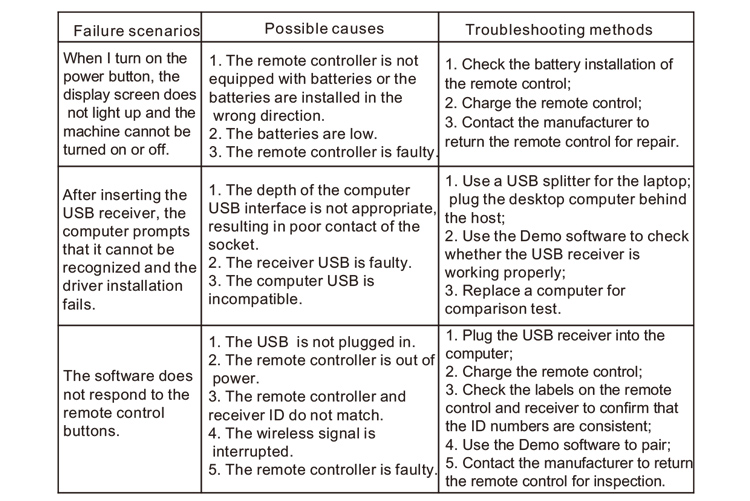
10. Mantenshon i kuido
1. Por fabor usa esaki den un ambiente seku ku temperatura normal i preshon pa ekstendé
e bida di servisio;
2. No usa ophetonan skerpi pa mishi ku e área klave pa ekstendé e bida di servisio di e yabi .;
3. Por fabor tene e area clave limpi pa reduci e desgaste clave .;
4. Evita di squeeze y cay pa causa daño na e control remoto .;
5. Si no ta usa pa hopi tempu ., por fabor kita e bateria i warda e kòntròl remoto i
bateria na un lugá limpi i seif;
6. Pone atencion na humedad-prueba durante almacenahe y transporte ..
11.Informashon di Seguridat
1. Por fabor lesa e instrukshonnan bon promé ku usa .. No-profeshonalnan ta prohibí
for di operashon.
2. Por fabor usa e kargadó original òf un kargadó produsí pa un fabrikante regular ku
e mesun spesifikashonnan.
3. Por fabor karga na tempu pa evitá operashon inkorekto debí na insufisiente koriente kousando
e kòntròl remoto no ta reakshoná.
4. Si ta rekeri reparacion ., tuma kontakto ku e fabrikante. Si e daño ta kousa pa
reparashon propio, e fabricante lo no duna garantia ..