Opis

1.Úvod výrobkov
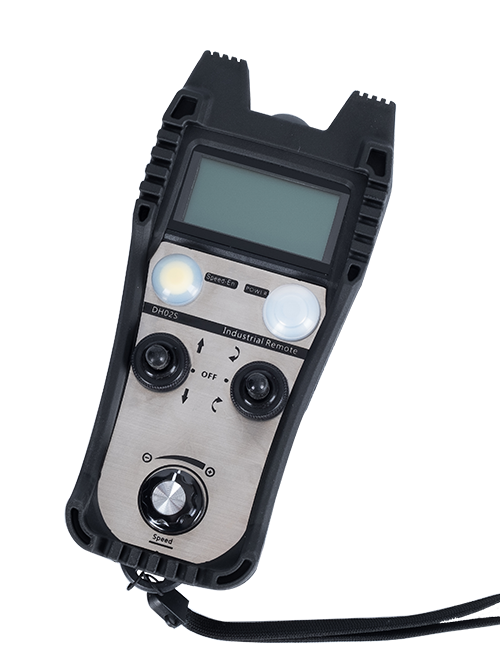
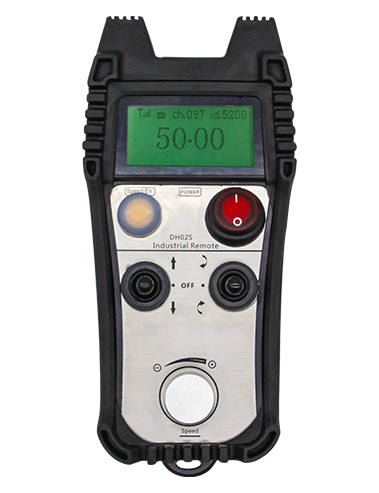
Wireless Remote Control is used for manual guidance, polohovanie, tool setting and other operations of CNC machine tools. Tento produkt využíva technológiu bezdrôtového prenosu, odstránenie tradičného spojenia pružinovým drôtom, zníženie porúch zariadení spôsobených káblami, odstránenie nevýhod ťahania káblov, olejové škvrny, atď., and is more convenient to operate.It is widely applicable to CNC machine tools such as gantry machining centers, gantry vertical lathes, and CNC gear processing machines, and is compatible with various mainstream CNC system brands on the market, including Siemens, Misubishi, Fanuk, Syntec and more.
2.Vlastnosti produktu
1. Prijíma 433MHz bezdrôtovú komunikačnú technológiu s bezdrôtovou prevádzkovou vzdialenosťou 20 meracie výrobky.
2.Adaptívne frekvenčné skákanie; 32 sady bezdrôtových diaľkových ovládačov je možné používať súčasne bez rušenia.
3.Supports the emergency stop button, and the emergency stop button remains effective even after the remote control is powered off.
4.Podpora 3 vlastné tlačidlá s prepínaním výstupu IO signálu.
5.Podporuje 6-osové ovládanie, a 7 až 12-osové ovládanie je prispôsobiteľné.
6. Podporuje 3-rýchlostné ovládanie zväčšenia, a 4-rýchlostné ovládanie zväčšenia je prispôsobiteľné.
7.podporuje funkciu aktivačného tlačidla, ktorý môže vydávať spínacie IO signály, a tiež výber riadiacej osi, zväčšenie a kodér.
8.Podporuje úpravu typu kódovania výberu a zväčšenia osi pomocou softvéru.
9. Supports pulse encoder with specification of 100 impulzov na otáčku.
10. Supports standard Type-C charging with 5V-2A charging specification; built-in battery
specification: 14500 / 1100mAh.
| Working Voltage and Current of Handheld Terminal |
3.7V/20.0mA |
| Charging Battery Specification |
3.7V/14500/1100mAh
|
| Low Voltage Alarm Range of Handheld Terminal |
<3.35Vložka |
| Receiver Power Supply Voltage |
DC5V-24V/1A |
| Receiver Emergency Stop Output Load Range |
AC125V-1A/DC30V-2A |
| Receiver Enable Output Load Range |
AC125V-1A/DC30V-2A |
| Receiver Custom Button Output Load Range |
DC 24V/50mA
|
| Receiver Axis Selection Output Load Range |
DC 24V/50mA |
| Receiver magnification Output Load Range |
DC 24V/50mA |
| Handheld Terminal Transmit Power |
15dBm
|
| Citlivosť príjmu prijímača |
-100dBm |
| Frekvencia bezdrôtovej komunikácie |
433MHz frekvenčné pásmo
|
| Wireless Communication Distance |
20 meters barrier-free distance
|
| Operating Temperature |
-25℃<X<55℃ |
| Safe drop height |
1 m
|
| Number of Custom Buttons |
3
|
| Product Weight |
546.86(g) |
| Product Dimensions |
200*87*72(mm) |
4. Funkcia produktu Úvod

Poznámky:
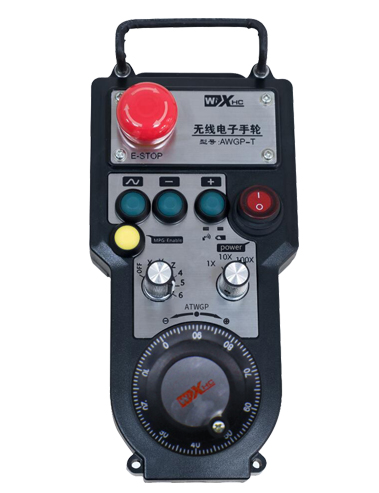
① Emergency Stop Button:
Stlačte tlačidlo núdzového zastavenia, the two groups of emergency stop IO outputs on the receiver will disconnect, and all remote control functions will be invalidated.Release the emergency stop button, the emergency stop IO outputs on the receiver will be closed, and all remote control functions will be restored. Okrem toho, even if the remote control is powered off, pressing the emergency stop button can still activate the emergency stop IO output of the receiver.
② Enable Button:
Press either enable button on both sides, the two sets of enable IO outputs on the receiver will conduct. Release the enable button, and the enable IO outputs will disconnect. It is necessary to press and hold the enable button before toggling axis selection, magnification or rotating the remote control for the operation to take effect.This function can be canceled through the configuration software.
③ Axis Selection Switch (Power Switch):
Stlačte a podržte tlačidlo aktivácie, then toggling the axis selection switch can control the movement of axis .Press and hold the enable button, then toggle the axis selection switch to switch the motion axis controlled by the remote control. Toggle the switch from the OFF position to any axis position, and the remote control will power on automatically.
④ Pulse Encoder:
Press and hold the enable button and rotate the pulse encoder, it will output pulse signals to control the movement of the machine axis.
⑤ LCD Display Screen:

5. Product Accessories Diagram

6. Sprievodca inštaláciou produktu
6.1 Kroky inštalácie produktu
1. Install the receiver in the electrical cabinet via the buckle on its back, or mount it inside the electrical cabinet through the screw holes at the four corners of the receiver.
2. Pozrite sa na náš diagram zapojenia prijímača, porovnajte ho s vybavením na mieste, and connect the equipment to the receiver with cables.
3. After the receiver is fixed in place, install the supporting antenna of the receiver properly. Mount or place the outer end of the antenna outside the electrical cabinet. It is recommended to place it on the top of the electrical cabinet for optimal signal performance. Do not leave the antenna uninstalled or place it inside the electrical cabinet; inak, signal failure may occur.
4. Konečne, turn on the remote control power switch, then you can remotely operate the machine via the remote control.
6.2 Receiver Installation Dimensions

6.3 Referenčná schéma zapojenia prijímača
7. Návod na obsluhu produktu
1. Zapnite stroj a prijímač. The receiver operation indicator flashes. After the wireless electronic remote control is fully charged, toggle it from the OFF gear to the X-axis gear, and the remote control display lights up.
2. Select the axis : Stlačte a podržte tlačidlo aktivácie, toggle the axis selection switch to select the axis to be operated.
3. Select the magnification: Stlačte a podržte tlačidlo aktivácie, toggle the magnification switch to select the required magnification gear.
4. Axis movement: Stlačte a podržte tlačidlo aktivácie, select the axis selection switch and the magnification switch, then rotate the pulse encoder. Rotate clockwise to move the axis in the positive direction, and rotate counterclockwise to move the axis in the negative direction.
5. Stlačte a podržte ľubovoľné vlastné tlačidlo, the corresponding button IO output of the receiver will turn on; release the button, and the output will turn off.
6. Stlačte tlačidlo núdzového zastavenia, the corresponding emergency stop IO output of the receiver disconnects and the remote control function becomes invalid. Release the emergency stop button, the emergency stop IO output closes and the remote control function is restored.
7. If the wireless remote control is not operated for a period of time, automaticky prejde do režimu spánku, aby sa znížila spotreba energie. It can be used normally again by pressing the enable button again.
8.If the wireless remote control is not used for a long time, turn the axis switch to OFF to turn off the power and extend battery life
①:UWGP stands for appearance style.
②:Pulse Output Parameters:
01: Označuje, že výstupný impulzný signál je A, B; Pulzné napätie 5V; pulzné množstvo 100PPR.
02: Označuje, že výstupný impulzný signál je A, B; Pulzné napätie 12V; pulse quantity 25PPR.
03: Označuje, že výstupný impulzný signál je A, B, A -, B -; Pulzné napätie 5V; pulzné množstvo 100PPR.
04: Označuje nízkoúrovňový výstup otvoreného obvodu NPN, s impulznými výstupnými signálmi A a B; The number of pulses is 100PPR.
05: Označuje výstup zdroja PNP na vysokej úrovni, s impulznými výstupnými signálmi A a B; Počet impulzov je 100 PPR.
③:Represents the axis selection switch quantity; 6 stands for 6 osi, 7 stands for 7 osi, and so on.
④: Represents the signal type of the axis selection switch.A stands for point-to-point output signal, and B stands for encoder output signal.
⑤: Represents the signal type of the magnification switch.A stands for point-to-point output signal, and B stands for encoder output signal.
⑥: Predstavuje počet vlastných tlačidiel; 3 corresponds to 6 vlastné tlačidlá.
⑦: Represents the power supply for the system remote control. 05 stands for 5V power supply, a 24 stands for 24V power supply.
⑧: Represents the contact charging mode. It starts charging automatically when placed back on the charging base.
9. Riešenie problémov s výrobkom

10. Maintenance and upkeep
1. Použite ho v suchom prostredí pri izbovej teplote a tlaku na predĺženie životnosti.
2. Please avoid using in abnormal environments such as rain and water to extend the service life.
3. Please keep the appearance of the remote control clean to extend its service life.
4. Please avoid crushing, dropping, or bumping, tam. to prevent damage to the precision components inside the remote control or accuracy errors.
5. Ak sa nepoužíva dlho, please store the remote control in a clean and safe place.
6. Avoid moisture and shock during storage and transportation.
11. Bezpečnostné informácie
1. Pred použitím si pozorne prečítajte pokyny a zakážte prevádzkovaniu odborníkov v prevádzke.
2. Please charge the remote control in a timely manner when the battery level is too low, to avoid malfunction and operational errors caused by insufficient power.
3. If you repair it yourself and cause damage, the warranty will be void.