Tlhaloso

1.Selelekela sa Product
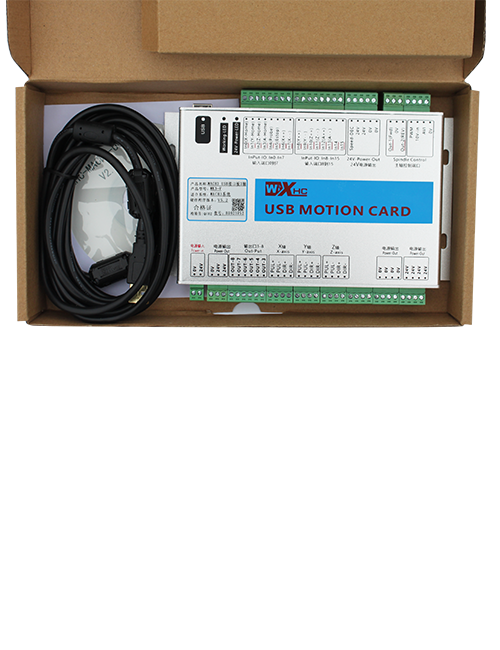
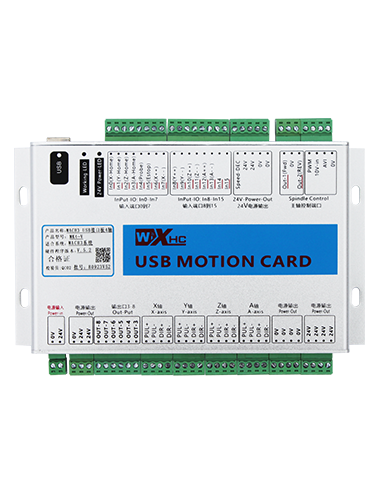
Wireless Remote Control e sebelisoa bakeng sa tataiso ea matsoho, Boemo, tlhophiso ea lisebelisoa le lits'ebetso tse ling tsa lisebelisoa tsa mochini oa CNC. Sehlahisoa sena se amohela theknoloji ea phetisetso e se nang mohala, Ho felisa khokahano ea terata ea setso ea selemo, Ho fokotsa liphoso tsa lisebelisoa tse bakoang ke likhoele, Ho felisa mathata a ho hula makhoaba a hulang, Lehlaba la Oli, jj., 'me e loketse haholoanyane ho sebetsa.E sebetsa haholo ho lisebelisoa tsa mochini oa CNC joalo ka litsi tsa machining tsa gantry, li-lathe tse otlolohileng tsa gantry, le mechini ea ho lokisa lisebelisoa tsa CNC, 'me e lumellana le mefuta e fapaneng ea mefuta e mengata ea CNC system' marakeng, ho akarelletsa le Siemens, Mitsubishi, FanUc, Syntec le tse ling.
2.Likarolo tsa sehlahisoa
1. E amohela theknoloji ea puisano ea waelese ea 433MHz e nang le sebaka sa ho sebetsa ka waelese sa 20 Metres.
2.Adaptive frequency hopping; 32 li-remote control tsa waelese li ka sebelisoa ka nako e le 'ngoe ntle le tšitiso.
3.E ts'ehetsa konopo ea ho emisa ts'ohanyetso, 'me konopo ea ho emisa ts'ohanyetso e lula e sebetsa le ka mor'a hore remote control e tima.
4.Ts'ehetso 3 likonopo tse ikhethileng tse nang le tlhahiso ea lets'oao la IO.
5.E tšehetsa taolo ea 6-axis, mme 7 ho 12-axis control is customizable.
6. E ts'ehetsa taolo ea ho holisa 3-lebelo, le taolo ea 4-speed magnification e ka etsoa ka mokhoa o ikhethileng.
7.e tshehetsa tshebetso ya konopo ya nolofalletsa, e ka hlahisang matšoao a switching IO, hape u laole khetho ea axis, kgolo le encoder.
8.E tšehetsa ho fetola mofuta oa khouto ea khetho ea axis le ho holisa ka software.
9. E tšehetsa pulse encoder ka litlhaloso tsa 100 pulses per phetohelo.
10. E ts'ehetsa tjhaja e tloaelehileng ea mofuta oa C e nang le lintlha tsa 5V-2A tsa ho tjhaja; betri e hahiloeng
tlhaloso: 14500 / 1100Mah.
3. Litlhaloso tsa Lihlahisoa
| Voltage e Sebetsang le Hona Joale ea Handheld Terminal |
3.7V/20.0mA |
| Litlhaloso tsa Battery ea ho tjhaja |
3.7V/14500/1100mAh
|
| Phaello ea Alamo e Tlase ea Motlakase oa Seteishene sa Handheld |
<3.35V |
| Motlakase oa Phepelo ea Motlakase oa Receiver |
DC5V-24V/1A |
| Receiver Emergency Stop Output Load Range |
AC125V-1A/DC30V-2A |
| Moamoheli Numella Output Load Range |
AC125V-1A/DC30V-2A |
| Receiver Custom Button Output Load Range |
DC24V/50mA
|
| Lethathamo la Meroalo ea Lits'oants'o tsa Moamoheli oa Axis |
DC24V/50mA |
| Phatlalatso ea Moamoheli oa Phatlalatso ea Litholoana |
DC24V/50mA |
| Motlakase oa ho fetisoa ka letsoho oa Terminal |
15dBm
|
| Moamoheli ea amohelang maikutlo |
-100dBm |
| Maqhubu a puisano a se nang mohala |
433Sehlopha sa maqhubu a MHz
|
| Bohole ba puisano e se nang mohala |
20 limithara mokoallo-mahala sebaka
|
| Mocheso oa ho sebetsa |
-25℃<X<55℃ |
| Bophahamo bo bolokehileng ba marotholi |
1 m
|
| Nomoro ea Likonopo tse Tloaelehileng |
3
|
| Boima ba Sehlahisoa |
546.86(g) |
| Litekanyo tsa Sehlahisoa |
200*87*72(mm) |
4. Selelekela sa Mosebetsi oa Sehlahisoa

Lintlha:
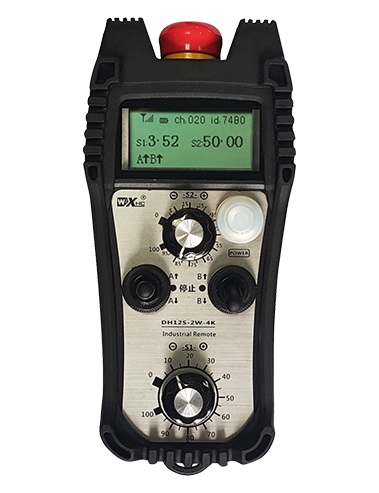
① Emergency Stop Button:
Tobetsa konopo ea STRED STORE, lihlopha tse peli tsa liphetho tsa IO tsa setopong sa tšohanyetso ho moamoheli li tla hakolla, mme ditshebetso tsohle tsa remoutu di tla fediswa.Tlosa konopo ya ho emisa tshohanyetso, liphetho tsa IO tsa setopong sa tšohanyetso ho moamoheli li tla koaloa, le mesebetsi eohle ea remote control e tla tsosolosoa. Holim'a moo, leha remoutu e tima, ho tobetsa konopo ea ho emisa ts'ohanyetso ho ntse ho ka kenya tšebetsong tlhahiso ea tšohanyetso ea IO ea moamoheli.
② Enable Button:
Tobetsa konopo efe kapa efe ea bulela mahlakoreng ka bobeli, lihlopha tse peli tsa ho nolofalletsa liphetho tsa IO ho moamoheli li tla tsamaisa. Tlosa konopo ea ho nolofalletsa, 'me liphetho tsa IO tse nolofalitsoeng li tla khaotsa. Hoa hlokahala ho tobetsa le ho tšoara konopo ea ho nolofalletsa pele o khetha khetho ea axis, ho holisa kapa ho potoloha remote control hore ts'ebetso e sebetse.Ts'ebetso ena e ka hlakoloa ka software ea tlhophiso..
③ Axis Selection Switch (Phetoho ea Matla):
Tobetsa le ho ts'oara konopo ea ho nolofalletsa, ebe o tobetsa konopo ea khetho ea axis ho ka laola motsamao oa axis .Tobetsa 'me u hatelle konopo ea bulela, ebe o totoba sesebelisoa sa khetho ea axis ho chencha axis e tsamaeang e laoloang ke remote control. Fetolela switjha ho tloha sebakeng sa OFF ho ea sebakeng sefe kapa sefe sa axis, 'me remoutu e tla sebetsa ka bo eona.
④ Pulse Encoder:
Tobetsa 'me u tšoare konopo ea ho bulela 'me u fetole sekh'outu sa pulse, e tla hlahisa matšoao a pulse ho laola motsamao oa mochini oa mochini.
⑤ LCD Display Screen:

5. Setšoantšo sa Lisebelisoa tsa Lihlahisoa

6. Tataiso ea ho kenya sehlahisoa
6.1 Mehato ea ho kenya sehlahisoa
1. Kenya mochine o amohelang motlakase ka har'a khabinete ea motlakase ka buckle mokokotlong oa eona, kapa o e kenye ka har'a khabinete ea motlakase ka masoba a screw a likhutlong tse 'ne tsa moamoheli.
2. Sheba setšoantšo sa rona sa ratoang, E bapisoa le eona le lisebelisoa tsa hau tsa marang-rang, ebe o hokela lisebelisoa ho moamoheli ka likhoele.
3. Kamora hore moamoheli a lokisoe sebakeng, kenya lenakana le tšehetsang la moamoheli hantle. Hloma kapa beha ntlha e ka ntle ea lenakana ka ntle ho khabinete ea motlakase. Ho khothalletsoa ho e beha ka holim'a khabinete ea motlakase bakeng sa ts'ebetso e nepahetseng ea matšoao. Se ke oa tlohela antenna e sa ntšoa kapa ua e beha ka har'a khabinete ea motlakase; ho seng joalo, ho hloleha ha lets'oao ho ka etsahala.
4. Qetellong, bulela sesebelisoa sa motlakase sa remote control, ka nako eo o ka sebelisa mochine o le hole ka remote control.
6.2 Litekanyo tsa ho kenya Moamoheli

7. Litaelo tsa ts'ebetso ea sehlahisoa
1. Matla ho mochini le moamoheli. Letšoao la ts'ebetso ea moamoheli lea benya. Kamora hore remoutu ea elektronike e se nang mohala e tjhaje ka botlalo, e fetole ho tloha ho OFF gear ho ea ho X-axis gear, mme pontsho ya remote control e kgantsha.
2. Khetha axis : Tobetsa le ho ts'oara konopo ea ho nolofalletsa, toggle switjha ya kgetho ya axis ho kgetha axis e tla sebetswa.
3. Khetha ho holisa: Tobetsa le ho ts'oara konopo ea ho nolofalletsa, fetola switjha ea ho holisa ho khetha lisebelisoa tse holisang tse hlokahalang.
4. Motsamao oa axis: Tobetsa le ho ts'oara konopo ea ho nolofalletsa, khetha sesebelisoa sa ho khetha axis le switch ea ho holisa, ebe u potoloha sekhouto sa pulse. Fetola ho ea ka nako ea oache ho tsamaisa axis ka tsela e nepahetseng, le ho bilika ka nqane ho kgutla ho isa nqa e mpe.
5. Tobetsa le ho tšoara konopo ea tloaelo, konopo e tsamaisanang le IO tlhahiso ea moamoheli e tla bulela; lokolla konopo, mme tlhahiso e tla tima.
6. Tobetsa konopo ea STRED STORE, setopo sa tshohanyetso se tsamaelanang sa IO sa moamohedi se a kgaola mme tshebetso ya remoutu e fetoha e sa sebetseng. Tlosa konopo ea ho emisa ts'ohanyetso, tlhahiso ea tšohanyetso ea IO e koala 'me ts'ebetso ea remote control e tsosolosoa.
7. Haeba remoutu ya waelese e sa sebetse ka nako e itseng, e tla kena ka mokhoa oa ho robala ho fokotsa tšebeliso ea matla. E ka sebelisoa ka mokhoa o tloaelehileng hape ka ho tobetsa konopo ea nolofalletsa hape.
8.Haeba remoutu ea waelese e sa sebelisoe nako e telele, tima axis switch ho tima ho tima matla le ho lelefatsa bophelo ba betri
8. Tlhaloso ea mohlala oa sehlahisoa
①:UWGP e emetse setaele sa chebahalo.
②:Mekhahlelo ea Pulse Output:
01: E bontša hore lets'oao la pulse output ke A, B; Volse voltage 5v; pulse quantity 100PPR.
02: E bontša hore lets'oao la pulse output ke A, B; Pulse voltage 12V; pulse quantity 25PPR.
03: E bontša hore lets'oao la pulse output ke A, B, A -, B -; Volse voltage 5v; pulse quantity 100PPR.
04: E supa tlhahiso e tlase ea potoloho e bulehileng, ka lipontšo tsa ho hlahisoa ha ho hlahisoa ha li-le b; Palo ea likhahla ke 100PPR.
05: E bonts'a tlhahiso e phahameng ea Pnp PRNP, ka lipontšo tsa ho hlahisoa ha ho hlahisoa ha li-le b; Palo ea likhahla ke 100PPR.
③:E emela palo ea switjha ea axis; 6 e emetse 6 Axes, 7 e emetse 7 Axes, joalo joalo.
④: E emela mofuta oa lets'oao la sesebelisoa sa khetho ea axis.A e emetse lets'oao la tlhahiso ea ntlha-to-ntlha, 'me B e emetse letšoao la tlhahiso ea encoder.
⑤: E emetse mofuta oa lets'oao la phetoho ea ho holisa, 'me B e emetse letšoao la tlhahiso ea encoder.
⑥: E emela palo ea likonopo tse ikhethileng; 3 e tsamaellana le 6 likonopo tsa moetlo.
⑦: E emela phepelo ea motlakase bakeng sa taolo ea remoutu ea sistimi. 05 e emetse matla a 5V, mme 24 e emetse matla a 24V.
⑧: E emela mokhoa oa ho tjhaja mabitso. E qala ho tjhaja ka boyona ha e behilwe morao hodima setsi sa ho tjhaja.
9. Product Harcomhootting

10. Tlhokomelo le tlhokomelo
1. Ka kopo e sebelise tikolohong e omeletseng ka mocheso oa kamore le khatello ea ho eketsa bophelo ba bona.
2. Ka kopo qoba ho sebelisa libakeng tse sa tloaelehang joalo ka pula le metsi ho lelefatsa bophelo ba ts'ebeletso.
3. Ka kopo boloka ponahalo ea remote control e hloekile ho lelefatsa bophelo ba eona ba ts'ebeletso.
4. Ka kopo, qoba ho sithabetsa, lahla, kapa ho thula, etc. ho thibela tšenyo ea likarolo tse nepahetseng ka har'a taolo ea hole kapa liphoso tsa ho nepahala.
5. Haeba e sa sebelisoe nako e telele, ka kopo boloka remote sebakeng se hloekileng le se sireletsehileng.
6. Qoba mongobo le ho makala nakong ea polokelo le lipalangoang.
11. Tlhahisoleseling ea polokeho
1. Ka kopo bala litaelo ka hloko pele li sebelisoa le ho thibela litsebi tse sa sebetseng.
2. Ka kopo, tjhaja remote ka nako ha boemo ba betri bo le tlase haholo, ho qoba ho se sebetse hantle le liphoso tsa ts'ebetso tse bakoang ke matla a sa lekaneng.
3. Haeba u ka e lokisa 'me u baka tšenyo, tiisetso e tla ba lefeela.