Maelezo

1.Utangulizi wa bidhaa
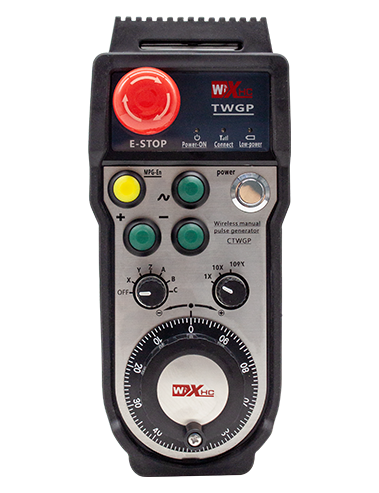
Wireless Remote Control is used for manual guidance, msimamo, tool setting and other operations of CNC machine tools. Bidhaa hii inachukua teknolojia ya maambukizi isiyo na waya, Kuondoa unganisho la waya wa jadi wa spring, Kupunguza kushindwa kwa vifaa vinavyosababishwa na nyaya, Kuondoa ubaya wa kuvuta kwa cable, Madoa ya mafuta, nk., and is more convenient to operate.It is widely applicable to CNC machine tools such as gantry machining centers, gantry vertical lathes, and CNC gear processing machines, and is compatible with various mainstream CNC system brands on the market, including Siemens, Mitsubishi, FANUC, Syntec and more.
2.Vipengele vya bidhaa
1. Inachukua teknolojia ya mawasiliano ya wireless ya 433MHz na umbali wa uendeshaji usio na waya wa 20 mita.
2.Adaptive frequency hopping; 32 seti za udhibiti wa kijijini zisizo na waya zinaweza kutumika wakati huo huo bila kuingiliwa.
3.Supports the emergency stop button, and the emergency stop button remains effective even after the remote control is powered off.
4.Inasaidia 3 vifungo maalum vilivyo na ubadilishaji wa pato la mawimbi ya IO.
5.Inasaidia udhibiti wa mhimili 6, na 7 kidhibiti cha mhimili-12 kinaweza kubinafsishwa.
6. Inaauni udhibiti wa ukuzaji wa kasi-3, na udhibiti wa ukuzaji wa kasi-4 unaweza kubinafsishwa.
7.inasaidia kazi ya kitufe cha kuwezesha, ambayo inaweza kutoa ubadilishaji wa ishara za IO, na pia kudhibiti uteuzi wa mhimili, ukuzaji na encoder.
8.Inaauni kurekebisha aina ya usimbaji wa uteuzi na ukuzaji wa mhimili kupitia programu.
9. Supports pulse encoder with specification of 100 mapigo kwa mapinduzi.
10. Supports standard Type-C charging with 5V-2A charging specification; built-in battery
specification: 14500 / 1100Mah.
| Working Voltage and Current of Handheld Terminal |
3.7V/20.0mA |
| Charging Battery Specification |
3.7V/14500/1100mAh
|
| Low Voltage Alarm Range of Handheld Terminal |
<3.35V |
| Receiver Power Supply Voltage |
DC5V-24V/1A |
| Receiver Emergency Stop Output Load Range |
AC125V-1A/DC30V-2A |
| Receiver Enable Output Load Range |
AC125V-1A/DC30V-2A |
| Receiver Custom Button Output Load Range |
DC24V/50MA
|
| Receiver Axis Selection Output Load Range |
DC24V/50MA |
| Receiver magnification Output Load Range |
DC24V/50MA |
| Handheld Terminal Transmit Power |
15DBM
|
| Mpokeaji akipokea usikivu |
-100DBM |
| Frequency ya mawasiliano ya waya |
433Bendi ya frequency ya MHz
|
| Wireless Communication Distance |
20 meters barrier-free distance
|
| Operating Temperature |
-25℃<X<55℃ |
| Safe drop height |
1 m
|
| Number of Custom Buttons |
3
|
| Product Weight |
546.86(g) |
| Product Dimensions |
200*87*72(mm) |
4. Utangulizi wa kazi ya bidhaa

Vidokezo:
① Emergency Stop Button:
Bonyeza kitufe cha dharura, the two groups of emergency stop IO outputs on the receiver will disconnect, and all remote control functions will be invalidated.Release the emergency stop button, the emergency stop IO outputs on the receiver will be closed, and all remote control functions will be restored. Kwa kuongeza, even if the remote control is powered off, pressing the emergency stop button can still activate the emergency stop IO output of the receiver.
② Enable Button:
Press either enable button on both sides, the two sets of enable IO outputs on the receiver will conduct. Release the enable button, and the enable IO outputs will disconnect. It is necessary to press and hold the enable button before toggling axis selection, magnification or rotating the remote control for the operation to take effect.This function can be canceled through the configuration software.
③ Axis Selection Switch (Power Switch):
Bonyeza na ushikilie kitufe cha Wezesha, then toggling the axis selection switch can control the movement of axis .Press and hold the enable button, then toggle the axis selection switch to switch the motion axis controlled by the remote control. Toggle the switch from the OFF position to any axis position, and the remote control will power on automatically.
④ Pulse Encoder:
Press and hold the enable button and rotate the pulse encoder, it will output pulse signals to control the movement of the machine axis.
⑤ LCD Display Screen:

5. Product Accessories Diagram

6. Mwongozo wa Ufungaji wa Bidhaa
6.1 Hatua za ufungaji wa bidhaa
1. Install the receiver in the electrical cabinet via the buckle on its back, or mount it inside the electrical cabinet through the screw holes at the four corners of the receiver.
2. Rejea mchoro wetu wa wiring wa mpokeaji, Linganisha na vifaa vyako vya tovuti, and connect the equipment to the receiver with cables.
3. After the receiver is fixed in place, install the supporting antenna of the receiver properly. Mount or place the outer end of the antenna outside the electrical cabinet. It is recommended to place it on the top of the electrical cabinet for optimal signal performance. Do not leave the antenna uninstalled or place it inside the electrical cabinet; vinginevyo, signal failure may occur.
4. Mwishowe, turn on the remote control power switch, then you can remotely operate the machine via the remote control.
6.2 Receiver Installation Dimensions

6.3 Mchoro wa kumbukumbu ya wiring
7. Maagizo ya Uendeshaji wa Bidhaa
1. Nguvu kwenye mashine na mpokeaji. The receiver operation indicator flashes. After the wireless electronic remote control is fully charged, toggle it from the OFF gear to the X-axis gear, and the remote control display lights up.
2. Select the axis : Bonyeza na ushikilie kitufe cha Wezesha, toggle the axis selection switch to select the axis to be operated.
3. Select the magnification: Bonyeza na ushikilie kitufe cha Wezesha, toggle the magnification switch to select the required magnification gear.
4. Axis movement: Bonyeza na ushikilie kitufe cha Wezesha, select the axis selection switch and the magnification switch, then rotate the pulse encoder. Rotate clockwise to move the axis in the positive direction, and rotate counterclockwise to move the axis in the negative direction.
5. Bonyeza na ushikilie kitufe chochote cha kawaida, the corresponding button IO output of the receiver will turn on; release the button, and the output will turn off.
6. Bonyeza kitufe cha dharura, the corresponding emergency stop IO output of the receiver disconnects and the remote control function becomes invalid. Release the emergency stop button, the emergency stop IO output closes and the remote control function is restored.
7. If the wireless remote control is not operated for a period of time, itaingiza kiotomati hali ya kulala ili kupunguza matumizi ya nguvu. It can be used normally again by pressing the enable button again.
8.If the wireless remote control is not used for a long time, turn the axis switch to OFF to turn off the power and extend battery life
8. Maelezo ya mfano wa bidhaa
①:UWGP stands for appearance style.
②:Pulse Output Parameters:
01: Inaonyesha kuwa ishara ya pato la mapigo ni, B; Pulse voltage 5V; Pulse Wingi 100ppr.
02: Inaonyesha kuwa ishara ya pato la mapigo ni, B; Pulse voltage 12V; pulse quantity 25PPR.
03: Inaonyesha kuwa ishara ya pato la mapigo ni, B, A -, B -; Pulse voltage 5V; Pulse Wingi 100ppr.
04: Inaonyesha kiwango cha chini cha NPN wazi cha mzunguko, na ishara za pato la mapigo ya A na b; The number of pulses is 100PPR.
05: Inaonyesha pato la kiwango cha juu cha PNP, na ishara za pato la mapigo ya A na b; Idadi ya pulses ni 100ppr.
③:Represents the axis selection switch quantity; 6 stands for 6 Axes, 7 stands for 7 Axes, and so on.
④: Represents the signal type of the axis selection switch.A stands for point-to-point output signal, and B stands for encoder output signal.
⑤: Represents the signal type of the magnification switch.A stands for point-to-point output signal, and B stands for encoder output signal.
⑥: Inawakilisha idadi ya vifungo maalum; 3 corresponds to 6 vifungo vya kawaida.
⑦: Represents the power supply for the system remote control. 05 stands for 5V power supply, na 24 stands for 24V power supply.
⑧: Represents the contact charging mode. It starts charging automatically when placed back on the charging base.
9. Utatuzi wa shida wa bidhaa

10. Maintenance and upkeep
1. Tafadhali tumia katika mazingira kavu kwa joto la kawaida na shinikizo kupanua maisha yake ya huduma.
2. Please avoid using in abnormal environments such as rain and water to extend the service life.
3. Please keep the appearance of the remote control clean to extend its service life.
4. Please avoid crushing, dropping, or bumping, nk. to prevent damage to the precision components inside the remote control or accuracy errors.
5. Ikiwa haitumiwi kwa muda mrefu, please store the remote control in a clean and safe place.
6. Avoid moisture and shock during storage and transportation.
11. Habari ya usalama
1. Tafadhali soma maagizo kwa uangalifu kabla ya matumizi na usikataze wataalamu wasiofanya kazi.
2. Please charge the remote control in a timely manner when the battery level is too low, to avoid malfunction and operational errors caused by insufficient power.
3. If you repair it yourself and cause damage, the warranty will be void.