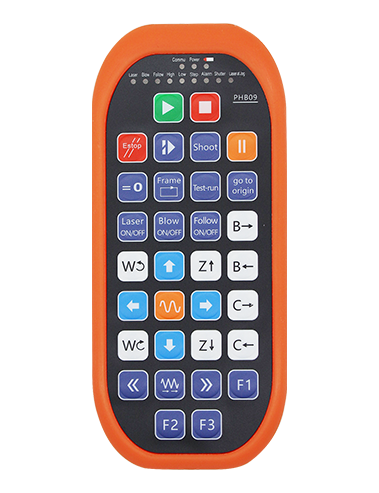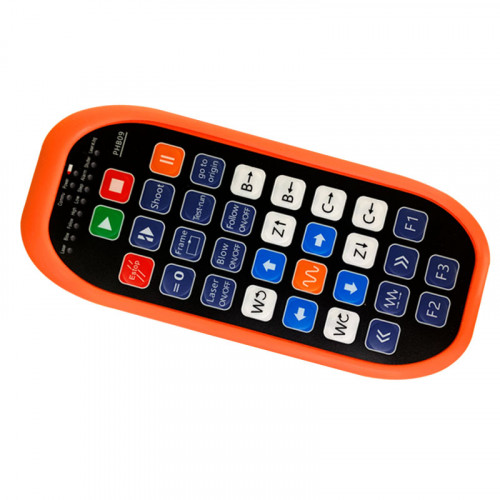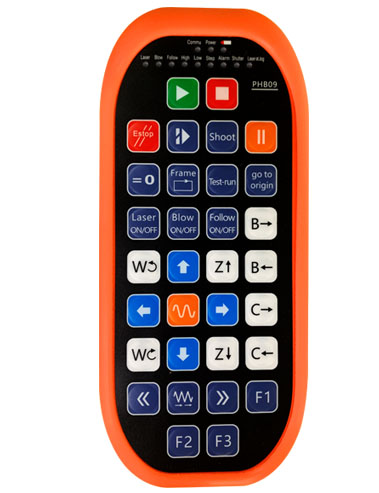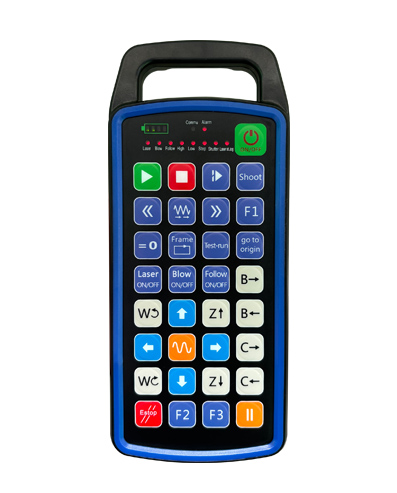
ஆதரவு 32 விருப்ப பொத்தான் நிரலாக்கம்
ஆதரவு 9 விருப்ப LED ஒளி காட்சி நிரலாக்க
433MHZ வயர்லெஸ் தகவல் தொடர்பு தொழில்நுட்பத்தைப் பயன்படுத்துகிறது, வயர்லெஸ் செயல்பாடு
தூரம் உள்ளது 80 மீட்டர்

£300.00
ஆதரவு 32 விருப்ப பொத்தான் நிரலாக்கம்
ஆதரவு 9 விருப்ப LED ஒளி காட்சி நிரலாக்க
433MHZ வயர்லெஸ் தகவல் தொடர்பு தொழில்நுட்பத்தைப் பயன்படுத்துகிறது, வயர்லெஸ் செயல்பாடு
தூரம் உள்ளது 80 மீட்டர்
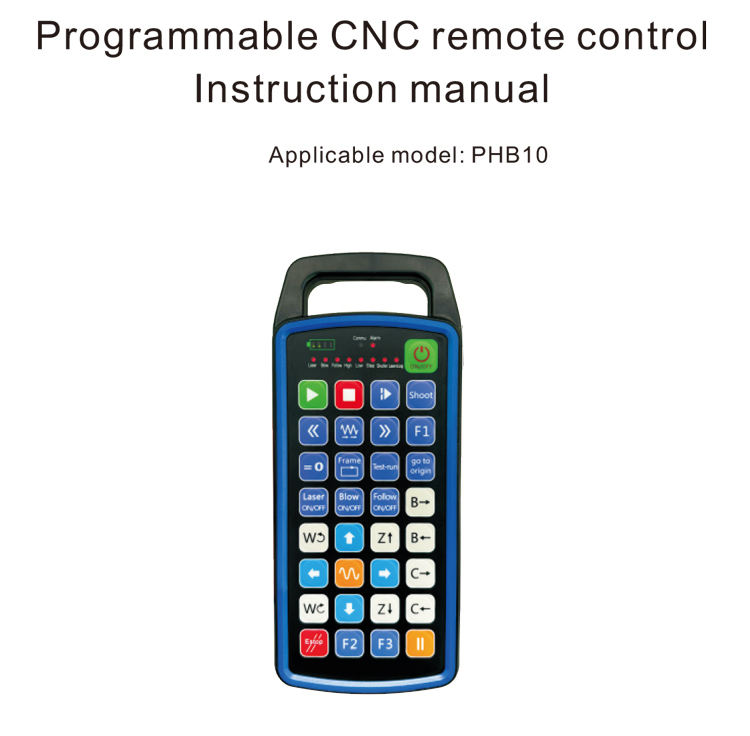
1.தயாரிப்பு அறிமுகம்
நிரல்படுத்தக்கூடிய CNC ரிமோட் கண்ட்ரோல் PHB10 வயர்லெஸுக்கு ஏற்றது
பல்வேறு CNC அமைப்புகளின் ரிமோட் கண்ட்ரோல் செயல்பாடு. இது பயனர் வரையறுக்கப்பட்டதை ஆதரிக்கிறது
பொத்தான் செயல்பாடுகளை உருவாக்க நிரலாக்கம், மற்றும் பல்வேறு ரிமோட் கண்ட்ரோலை உணரவும்
CNC அமைப்பில் செயல்படுகிறது; இது பயனர் வரையறுக்கப்பட்ட நிரலாக்கத்தை உருவாக்க ஆதரிக்கிறது
ஒளிரும் மற்றும் அணைக்க LED விளக்குகள், மற்றும் கணினி நிலையின் மாறும் காட்சியை உணரவும்;
ரிமோட் கண்ட்ரோல் ரிச்சார்ஜபிள் பேட்டரியுடன் வருகிறது மற்றும் டைப்-சியை ஆதரிக்கிறது
இடைமுகம் சார்ஜிங்.
2.தயாரிப்பு அம்சங்கள்
1. 433MHZ வயர்லெஸ் தகவல் தொடர்பு தொழில்நுட்பத்தைப் பயன்படுத்துகிறது, வயர்லெஸ் செயல்பாடு
தூரம் உள்ளது 80 மீட்டர்;
2.தானியங்கி அதிர்வெண் துள்ளல் செயல்பாட்டைப் பயன்படுத்துதல், 32 வயர்லெஸ் ரிமோட் தொகுப்புகள்
கட்டுப்படுத்திகள் ஒன்றையொன்று பாதிக்காமல் ஒரே நேரத்தில் பயன்படுத்த முடியும்;
3.ஆதரவு 32 விருப்ப பொத்தான் நிரலாக்கம்;
4.ஆதரவு 9 விருப்ப LED ஒளி காட்சி நிரலாக்க;
5.IP67 நீர்ப்புகா நிலை ஆதரவு;
6.நிலையான வகை-சி இடைமுக சார்ஜிங்கை ஆதரிக்கவும்; 5வி -2 ஏ சார்ஜிங் விவரக்குறிப்பு;
1100 mAh பெரிய திறன் கொண்ட பேட்டரி, தானியங்கி தூக்கம் காத்திருப்பு செயல்பாடு; உணருங்கள்
மிக நீண்ட குறைந்த சக்தி காத்திருப்பு;
7.சக்தியின் நிகழ்நேர காட்சியை ஆதரிக்கவும்.
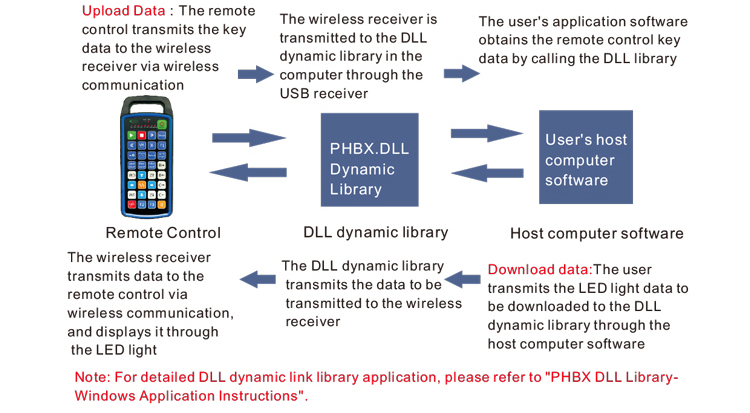
3.வேலை செய்யும் கொள்கை
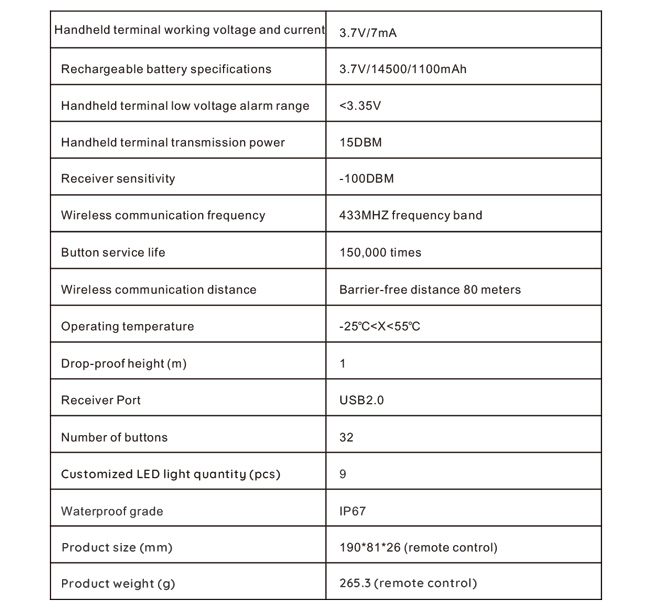
4. தயாரிப்பு விவரக்குறிப்புகள்
5.தயாரிப்பு செயல்பாடு அறிமுகம்
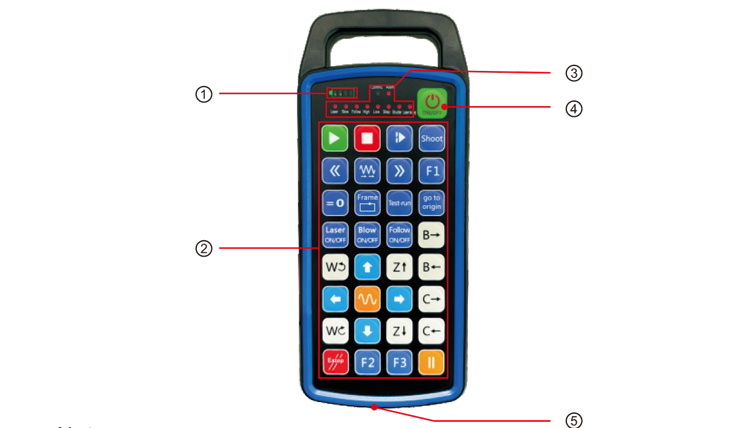
குறிப்புகள்:
①Battery level display:
பவர் ஆன் செய்த பிறகு ஒளிரும், மின்சாரம் நிறுத்தப்பட்ட பிறகு அணைக்கப்படும்;
பேட்டரி இன்டிகேட்டர் லைட் ஒரே ஒரு பட்டியில் மட்டும் ஒளிரும், அதன் அர்த்தம்
பேட்டரி மிகவும் குறைவாக உள்ளது. பேட்டரியை மாற்றவும்;
பேட்டரி இன்டிகேட்டர் விளக்குகள் அனைத்தும் ஆன் செய்யப்பட்டு மற்ற LED விளக்குகள் ப்ளாஷ் பேக் மற்றும்
முன்னோக்கி, பேட்டரி மிகவும் குறைவாக உள்ளது என்று அர்த்தம். பேட்டரியை மாற்றவும்;
பேட்டரி காட்டி ஒளிரவில்லை அல்லது வெளியே சென்றால், மற்றும் சாதனம் இருக்க முடியாது
ஆற்றல் பொத்தானை அழுத்திப் பிடிப்பதன் மூலம் தொடங்கப்பட்டது, தயவுசெய்து பேட்டரியை மாற்றவும்;
②Button area:32 பொத்தான்கள் 4X8 இல் அமைக்கப்பட்டன, பயனர் வரையறுக்கப்பட்ட நிரலாக்கம்;
③Status LED:
COMMU: பொத்தான் காட்டி விளக்கு, பொத்தானை அழுத்தி செல்லும் போது ஒளிரும்
பொத்தானை வெளியிடும் போது வெளியே; மற்ற விளக்குகள் தனிப்பயன் காட்சிகள்;
④Power switch:
நீண்ட நேரம் அழுத்தவும் 3 இயக்க வினாடிகள், நீண்ட நேரம் அழுத்தவும் 3 அணைக்க வினாடிகள்;
⑤Charging port:
சார்ஜ் செய்ய டைப்-சி சார்ஜரைப் பயன்படுத்தவும், சார்ஜிங் மின்னழுத்தம் 5V, தற்போதைய 1A-2A; சார்ஜ்
நேரம் 3-5 மணி;
சார்ஜ் செய்யும் போது, சக்தி காட்டி ஒளிரும், சார்ஜ் ஆகிறது என்பதைக் குறிக்கிறது. எப்போது
முழுமையாக சார்ஜ், ஆற்றல் காட்டி ஒளிரும் இல்லாமல் முழு பட்டியைக் காண்பிக்கும்.
6.தயாரிப்பு பாகங்கள் வரைபடம்
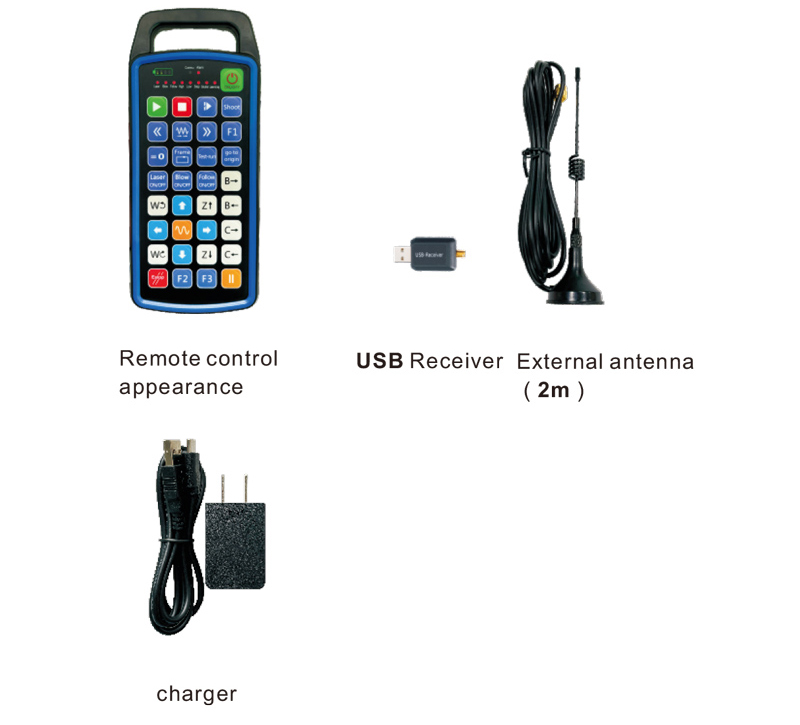
7.தயாரிப்பு நிறுவல் வழிகாட்டி
1 . நான் USB ரிசீவரை கணினியில் செருகுகிறேன், கணினி தானாகவே செய்யும்
கையேடு இல்லாமல் USB சாதன இயக்கியை அடையாளம் கண்டு நிறுவவும்
2. ரிமோட் கண்ட்ரோலை சார்ஜரில் செருகவும். பேட்டரி முழுமையாக சார்ஜ் செய்யப்பட்ட பிறகு, அழுத்தவும்
மற்றும் ஆற்றல் பொத்தானை அழுத்திப் பிடிக்கவும் 3 வினாடிகள். ரிமோட் கண்ட்ரோல் ஆன் மற்றும் பவர்
காட்டி ஒளிரும், பவர்-ஆன் வெற்றிகரமாக இருப்பதைக் குறிக்கிறது.
3. இயக்கிய பிறகு, நீங்கள் எந்த பொத்தான் செயல்பாட்டையும் செய்யலாம். ரிமோட் கண்ட்ரோல்
ஒரே நேரத்தில் இரட்டை பொத்தான் செயல்பாட்டை ஆதரிக்க முடியும். நீங்கள் எந்த பொத்தானை அழுத்தும்போது, தி
ரிமோட் கண்ட்ரோலில் COMMU விளக்கு ஒளிரும், இந்த பொத்தான் செல்லுபடியாகும் என்பதைக் குறிக்கிறது.
8.தயாரிப்பு செயல்பாட்டு வழிமுறைகள்
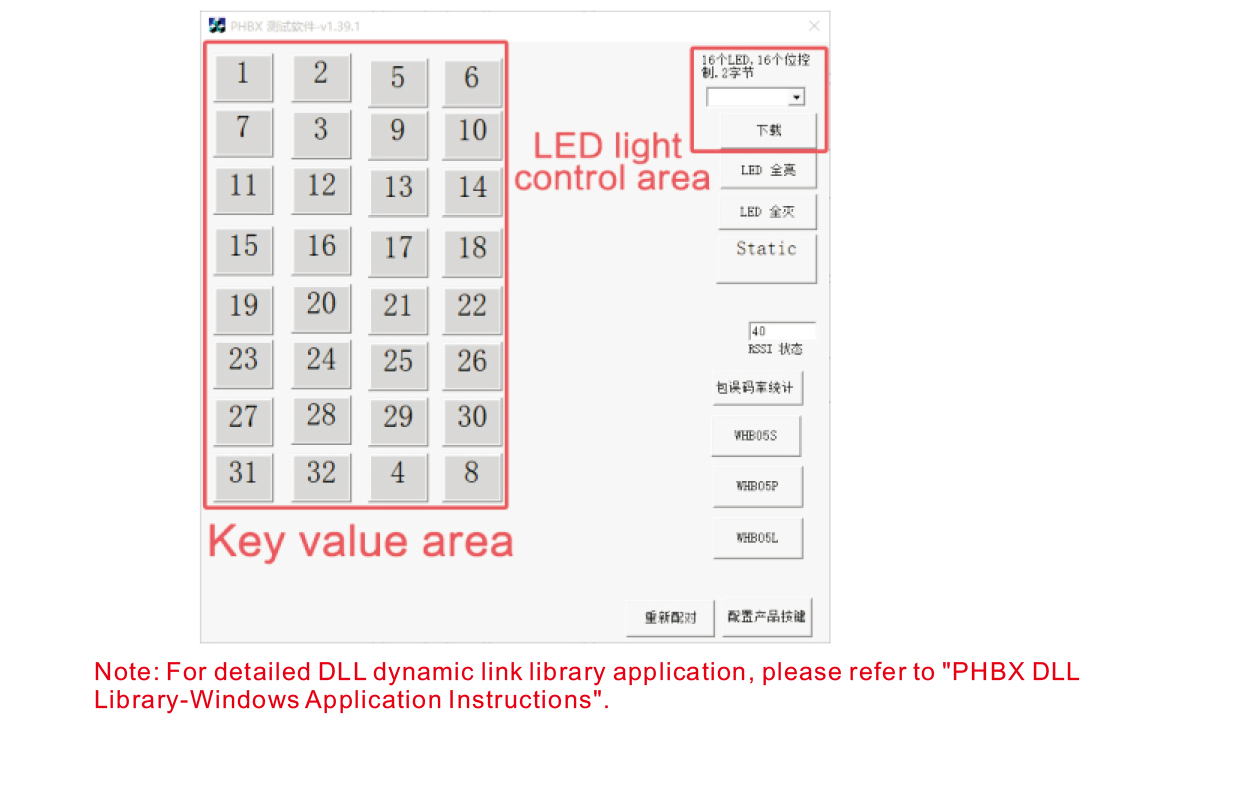
தயாரிப்பு வளர்ச்சி மற்றும் பயன்பாட்டிற்கு முன், நாங்கள் வழங்கும் டெமோ மென்பொருளை நீங்கள் பயன்படுத்தலாம்
ரிமோட் கண்ட்ரோலில் உள்ள பொத்தான்கள் மற்றும் ரிமோட் கண்ட்ரோலில் எல்இடி ஒளியை சோதிக்கவும். உங்களால் முடியும்
எதிர்கால நிரலாக்க மேம்பாட்டிற்கான ஒரு குறிப்பு வழக்கமாக டெமோவைப் பயன்படுத்தவும்.
டெமோ மென்பொருளைப் பயன்படுத்துவதற்கு முன், USB ரிசீவரை கணினியில் செருகவும்,
ரிமோட் கன்ட்ரோலருக்கு போதுமான சக்தி உள்ளதா என்பதை உறுதிப்படுத்தவும், பவர் பட்டனை அழுத்திப் பிடிக்கவும்
அதை இயக்கவும், பின்னர் அதைப் பயன்படுத்தவும்;
ரிமோட் கண்ட்ரோலில் ஏதேனும் பட்டனை அழுத்தினால், சோதனை மென்பொருள் டெமோ காண்பிக்கப்படும்
தொடர்புடைய முக்கிய மதிப்பு. அதை வெளியிட்ட பிறகு, முக்கிய மதிப்பு காட்சி மறைந்துவிடும்,
விசை பதிவேற்றம் இயல்பானது என்பதைக் குறிக்கிறது;
சோதனை மென்பொருள் டெமோவில் LED லைட் எண்ணையும் நீங்கள் தேர்ந்தெடுக்கலாம், பதிவிறக்க கிளிக் செய்யவும்,
மற்றும் ரிமோட் கண்ட்ரோலில் தொடர்புடைய ஒளி எண் ஒளிரும், என்பதை குறிக்கிறது
எல்இடி விளக்கு சாதாரணமாக பதிவிறக்கம் செய்யப்படுகிறது.
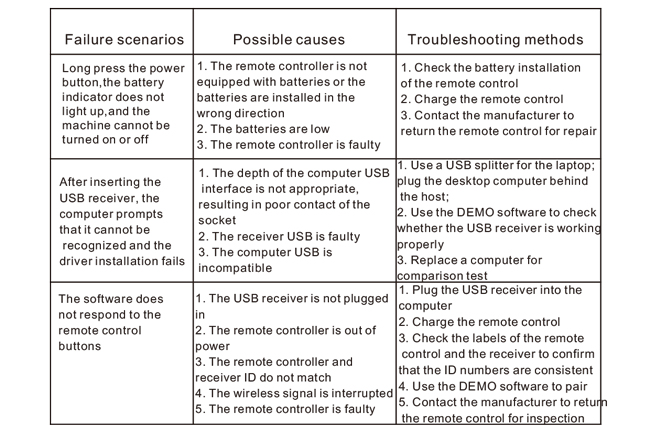
9.தயாரிப்பு சரிசெய்தல்
10. பராமரிப்பு மற்றும் கவனிப்பு
1. சாதாரண வெப்பநிலை மற்றும் அழுத்தத்துடன் வறண்ட சூழலில் இதைப் பயன்படுத்தவும்
சேவை வாழ்க்கை;
2. விசையின் சேவை வாழ்க்கையை நீட்டிக்க, முக்கிய பகுதியைத் தொடுவதற்கு கூர்மையான பொருட்களைப் பயன்படுத்த வேண்டாம்;
3. சாவி தேய்மானத்தை குறைக்க சாவி பகுதியை சுத்தமாக வைத்திருங்கள்;
4. ரிமோட் கண்ட்ரோலுக்கு சேதம் விளைவிக்க அழுத்துவது மற்றும் விழுவதைத் தவிர்க்கவும்;
5. நீண்ட நேரம் பயன்படுத்தப்படாவிட்டால், தயவு செய்து பேட்டரியை அகற்றி ரிமோட் கண்ட்ரோலை சேமிக்கவும்
மற்றும் பேட்டரி சுத்தமான மற்றும் பாதுகாப்பான இடத்தில்;
6. சேமிப்பு மற்றும் போக்குவரத்தின் போது ஈரப்பதம்-ஆதாரத்திற்கு கவனம் செலுத்துங்கள்.
11.பாதுகாப்பு தகவல்
1. பயன்படுத்துவதற்கு முன், வழிமுறைகளை கவனமாக படிக்கவும். தொழில் அல்லாதவர்கள் தடைசெய்யப்பட்டுள்ளனர்
செயல்படும்.
2. அசல் சார்ஜர் அல்லது வழக்கமான உற்பத்தியாளரால் தயாரிக்கப்பட்ட சார்ஜரைப் பயன்படுத்தவும்
அதே விவரக்குறிப்புகள்.
3. போதுமான மின்சாரம் இல்லாததால், தவறான செயல்பாட்டைத் தவிர்க்க, சரியான நேரத்தில் கட்டணம் வசூலிக்கவும்
ரிமோட் கண்ட்ரோல் பதிலளிக்காது.
4. பழுது தேவைப்பட்டால், உற்பத்தியாளரை தொடர்பு கொள்ளவும். சுய பழுது காரணமாக சேதம் ஏற்பட்டால்,
உற்பத்தியாளர் உத்தரவாதத்தை வழங்க மாட்டார்.