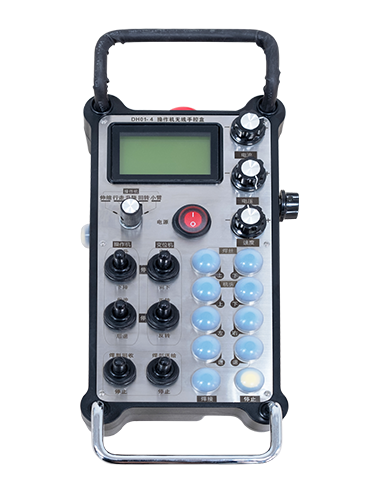
באַשרייַבונג

1.פּראָדוקט הקדמה
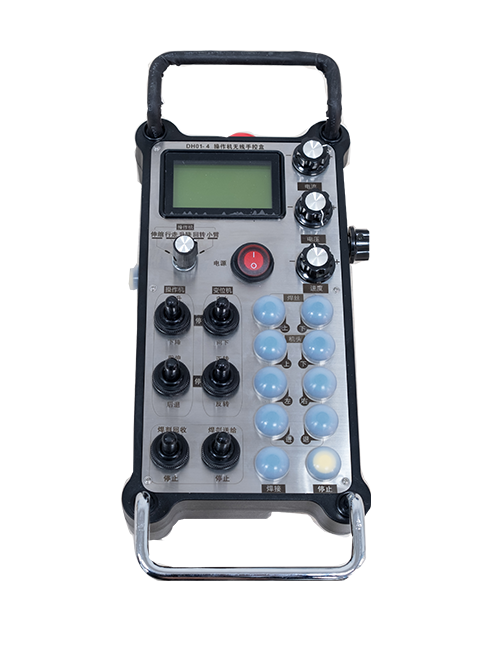
Wireless Remote Control is used for manual guidance, פּאַזישאַנינג, tool setting and other operations of CNC machine tools. דער פּראָדוקט אַדאַפּט ומיעסס טראַנסמיסיע טעכנאָלאָגיע, ילימאַנייטינג די טראדיציאנעלן פרילינג דראָט קשר, רידוסינג ויסריכט דורכפאַל געפֿירט דורך קייבאַלז, ילימאַנייטינג די דיסאַדוואַנטידזשיז פון קאַבלע דראַגינג, טיימל סטאַינס, עטק., and is more convenient to operate.It is widely applicable to CNC machine tools such as gantry machining centers, gantry vertical lathes, and CNC gear processing machines, and is compatible with various mainstream CNC system brands on the market, including Siemens, מיצובישי, פאָוקי, Syntec and more.
2.פּראָדוקט פֿעיִקייטן
1. אַדאַפּץ 433MHz וויירליס קאָמוניקאַציע טעכנאָלאָגיע מיט אַ וויירליס אַפּערייטינג ווייַטקייט פון 20 מעטער.
2.אַדאַפּטיוו אָפטקייַט כאַפּינג; 32 סעץ פון וויירליס ווייַט קאָנטראָלס קענען זיין געוויינט סיימאַלטייניאַסלי אָן ינטערפיראַנס.
3.Supports the emergency stop button, and the emergency stop button remains effective even after the remote control is powered off.
4.שטיצט 3 מנהג קנעפּלעך מיט סוויטשינג IO סיגנאַל רעזולטאַט.
5.שטיצט 6-אַקס קאָנטראָל, און 7 צו 12-אַקס קאָנטראָל איז קוסטאָמיזאַבלע.
6. שטיצט 3-גיכקייַט מאַגנאַפאַקיישאַן קאָנטראָל, און 4-גיכקייַט מאַגנאַפאַקיישאַן קאָנטראָל איז קוסטאָמיזאַבלע.
7.שטיצט די געבן קנעפּל פונקציע, וואָס קענען רעזולטאַט סוויטשינג יאָ סיגנאַלז, און אויך קאָנטראָל אַקס סעלעקציע, מאַגנאַפאַקיישאַן און ענקאָדער.
8.שטיצט מאַדאַפייינג די קאָדירונג טיפּ פון אַקס סעלעקציע און מאַגנאַפאַקיישאַן דורך ווייכווארג.
9. Supports pulse encoder with specification of 100 פּאַלסיז פּער רעוואָלוציע.
10. Supports standard Type-C charging with 5V-2A charging specification; built-in battery
specification: 14500 / 1100מאַה.
3. פּראָדוקט ספּעסאַפאַקיישאַנז
| Working Voltage and Current of Handheld Terminal |
3.7V/20.0mA |
| Charging Battery Specification |
3.7V/14500/1100mAh
|
| Low Voltage Alarm Range of Handheld Terminal |
<3.35V |
| Receiver Power Supply Voltage |
DC5V-24V/1A |
| Receiver Emergency Stop Output Load Range |
AC125V-1A/DC30V-2A |
| Receiver Enable Output Load Range |
AC125V-1A/DC30V-2A |
| Receiver Custom Button Output Load Range |
DC24V/50mA
|
| Receiver Axis Selection Output Load Range |
DC24V/50mA |
| Receiver magnification Output Load Range |
DC24V/50mA |
| Handheld Terminal Transmit Power |
15dBm
|
| ופנעמער באקומען סענסיטיוויטי |
-100dBm |
| ווירעלעסס קאָמוניקאַציע אָפטקייַט |
433MHz אָפטקייַט באַנד
|
| Wireless Communication Distance |
20 meters barrier-free distance
|
| Operating Temperature |
-25℃<רענטגענ<55℃ |
| Safe drop height |
1 m
|
| Number of Custom Buttons |
3
|
| Product Weight |
546.86(g) |
| Product Dimensions |
200*87*72(mm) |
4. פּראָדוקט פונקציע הקדמה

הערות:
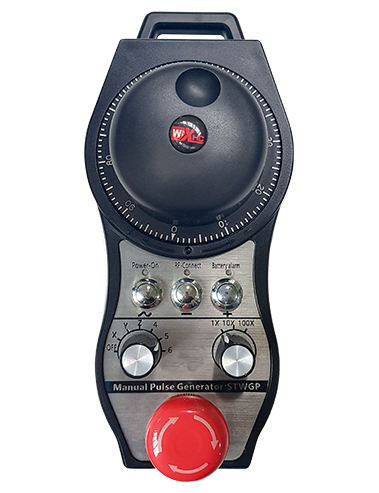
① Emergency Stop Button:
דרוק די נויטפאַל האַלטן קנעפּל, the two groups of emergency stop IO outputs on the receiver will disconnect, and all remote control functions will be invalidated.Release the emergency stop button, the emergency stop IO outputs on the receiver will be closed, and all remote control functions will be restored. אין דערצו, even if the remote control is powered off, pressing the emergency stop button can still activate the emergency stop IO output of the receiver.
② Enable Button:
Press either enable button on both sides, the two sets of enable IO outputs on the receiver will conduct. Release the enable button, and the enable IO outputs will disconnect. It is necessary to press and hold the enable button before toggling axis selection, magnification or rotating the remote control for the operation to take effect.This function can be canceled through the configuration software.
③ Axis Selection Switch (Power Switch):
דרוק און האַלטן די געבן קנעפּל, then toggling the axis selection switch can control the movement of axis .Press and hold the enable button, then toggle the axis selection switch to switch the motion axis controlled by the remote control. Toggle the switch from the OFF position to any axis position, and the remote control will power on automatically.
④ Pulse Encoder:
Press and hold the enable button and rotate the pulse encoder, it will output pulse signals to control the movement of the machine axis.
⑤ LCD Display Screen:

5. Product Accessories Diagram

6. פּראָדוקט ינסטאַלירונג
6.1 פּראָדוקט ינסטאַלירונג סטעפּס
1. Install the receiver in the electrical cabinet via the buckle on its back, or mount it inside the electrical cabinet through the screw holes at the four corners of the receiver.
2. אָפּשיקן צו אונדזער ופנעמער וויירינג דיאַגראַמע, פאַרגלייַכן עס מיט דיין אויף-פּלאַץ ויסריכט, and connect the equipment to the receiver with cables.
3. After the receiver is fixed in place, install the supporting antenna of the receiver properly. Mount or place the outer end of the antenna outside the electrical cabinet. It is recommended to place it on the top of the electrical cabinet for optimal signal performance. Do not leave the antenna uninstalled or place it inside the electrical cabinet; אַנדערש, signal failure may occur.
4. לעסאָף, turn on the remote control power switch, then you can remotely operate the machine via the remote control.
6.2 Receiver Installation Dimensions

6.3 ופנעמער וויירינג רעפֿערענץ דיאַגראַמע
7. ינסטרוקטיאָנס פון פּראָדוקט אָפּעראַציע
1. מאַכט אויף די מאַשין און די ופנעמער. The receiver operation indicator flashes. After the wireless electronic remote control is fully charged, toggle it from the OFF gear to the X-axis gear, and the remote control display lights up.
2. Select the axis : דרוק און האַלטן די געבן קנעפּל, toggle the axis selection switch to select the axis to be operated.
3. Select the magnification: דרוק און האַלטן די געבן קנעפּל, toggle the magnification switch to select the required magnification gear.
4. Axis movement: דרוק און האַלטן די געבן קנעפּל, select the axis selection switch and the magnification switch, then rotate the pulse encoder. Rotate clockwise to move the axis in the positive direction, and rotate counterclockwise to move the axis in the negative direction.
5. דריקן און האַלטן קיין מנהג קנעפּל, the corresponding button IO output of the receiver will turn on; release the button, and the output will turn off.
6. דרוק די נויטפאַל האַלטן קנעפּל, the corresponding emergency stop IO output of the receiver disconnects and the remote control function becomes invalid. Release the emergency stop button, the emergency stop IO output closes and the remote control function is restored.
7. If the wireless remote control is not operated for a period of time, עס וועט אויטאָמאַטיש אַרייַן שלאָפן מאָדע צו רעדוצירן מאַכט קאַנסאַמשאַן. It can be used normally again by pressing the enable button again.
8.If the wireless remote control is not used for a long time, turn the axis switch to OFF to turn off the power and extend battery life
8. פּראָדוקט מאָדעל באַשרייַבונג
①:UWGP stands for appearance style.
②:Pulse Output Parameters:
01: ינדיקייץ אַז די דויפעק רעזולטאַט סיגנאַל איז א, ב; דויפעק וואָולטידזש 5 וו; דויפעק קוואַנטיטי 100PPR.
02: ינדיקייץ אַז די דויפעק רעזולטאַט סיגנאַל איז א, ב; דויפעק וואָולטידזש 12 וו; pulse quantity 25PPR.
03: ינדיקייץ אַז די דויפעק רעזולטאַט סיגנאַל איז א, ב, א -, ב -; דויפעק וואָולטידזש 5 וו; דויפעק קוואַנטיטי 100PPR.
04: ינדיקייץ אַ נידעריק-מדרגה NPN עפענען קרייַז רעזולטאַט, מיט דויפעק רעזולטאַט סיגנאַלז פון אַ און ב; The number of pulses is 100PPR.
05: ינדיקייץ די נוצן פון די הויך-מדרגה PNP מקור, מיט דויפעק רעזולטאַט סיגנאַלז פון אַ און ב; די נומער פון פּאַלסיז איז 100PPR.
③:Represents the axis selection switch quantity; 6 stands for 6 אַקסן, 7 stands for 7 אַקסן, and so on.
④: Represents the signal type of the axis selection switch.A stands for point-to-point output signal, and B stands for encoder output signal.
⑤: Represents the signal type of the magnification switch.A stands for point-to-point output signal, and B stands for encoder output signal.
⑥: רעפּראַזענץ די נומער פון מנהג קנעפּלעך; 3 corresponds to 6 מנהג בוטטאָנס.
⑦: Represents the power supply for the system remote control. 05 stands for 5V power supply, און 24 stands for 24V power supply.
⑧: Represents the contact charging mode. It starts charging automatically when placed back on the charging base.
9. פּראָדוקט טראָובלעשאָאָטינג

10. Maintenance and upkeep
1. ביטע נוצן עס אין אַ טרוקן סוויווע אין צימער טעמפּעראַטור און דרוק צו פאַרברייטערן זייַן דינסט לעבן.
2. Please avoid using in abnormal environments such as rain and water to extend the service life.
3. Please keep the appearance of the remote control clean to extend its service life.
4. Please avoid crushing, dropping, or bumping, עטק. to prevent damage to the precision components inside the remote control or accuracy errors.
5. אויב נישט געניצט פֿאַר אַ לאַנג צייַט, please store the remote control in a clean and safe place.
6. Avoid moisture and shock during storage and transportation.
11. זיכערקייַט אינפֿאָרמאַציע
1. ביטע לייענען די ינסטראַקשאַנז קערפאַלי איידער נוצן און פאַרווערן ניט פּראָפעססיאָנאַלס פון אָפּערייטינג.
2. Please charge the remote control in a timely manner when the battery level is too low, to avoid malfunction and operational errors caused by insufficient power.
3. If you repair it yourself and cause damage, the warranty will be void.