وصف

1.مقدمة المنتج
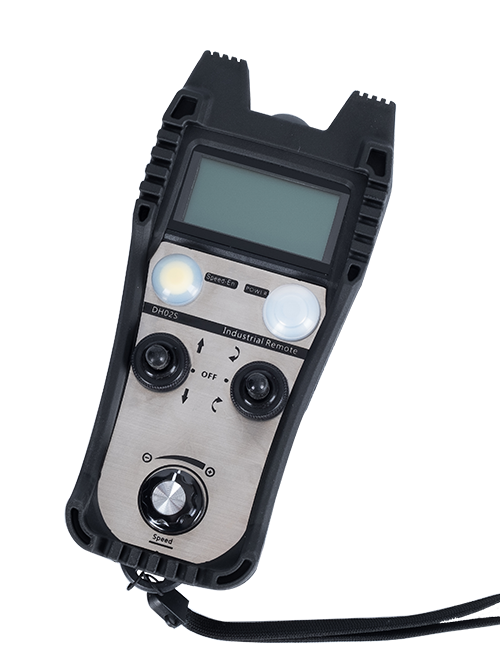
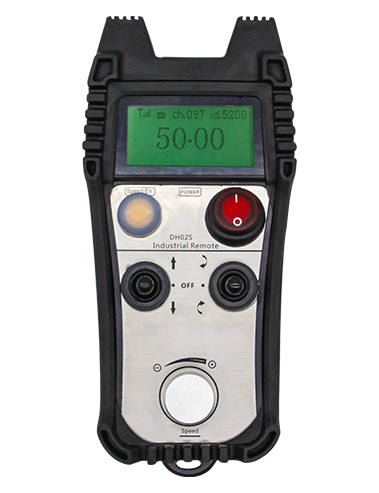
Wireless Remote Control is used for manual guidance, تحديد المواقع, tool setting and other operations of CNC machine tools. يتبنى هذا المنتج تقنية النقل اللاسلكية, القضاء على اتصال سلك الربيع التقليدي, تقليل فشل المعدات الناجمة عن الكابلات, القضاء على عيوب سحب الكابل, بقع الزيت, إلخ., and is more convenient to operate.It is widely applicable to CNC machine tools such as gantry machining centers, gantry vertical lathes, and CNC gear processing machines, and is compatible with various mainstream CNC system brands on the market, including Siemens, ميتسوبيشي, فانوك, Syntec and more.
2.ميزات المنتج
1. يعتمد تقنية الاتصال اللاسلكي 433 ميجاهرتز مع مسافة تشغيل لاسلكية 20 متر.
2.التنقل الترددي التكيفي; 32 يمكن استخدام مجموعات من أجهزة التحكم عن بعد اللاسلكية في وقت واحد دون أي تدخل.
3.Supports the emergency stop button, and the emergency stop button remains effective even after the remote control is powered off.
4.يدعم 3 أزرار مخصصة مع تبديل إخراج إشارة IO.
5.يدعم التحكم بـ 6 محاور, و 7 للتحكم في 12 محورًا قابل للتخصيص.
6. يدعم التحكم في التكبير بـ 3 سرعات, والتحكم في التكبير بـ 4 سرعات قابل للتخصيص.
7.يدعم وظيفة زر التمكين, والتي يمكن إخراج إشارات IO التبديل, وأيضا التحكم في اختيار المحور, التكبير والتشفير.
8.يدعم تعديل نوع التشفير لاختيار المحور والتكبير عبر البرنامج.
9. Supports pulse encoder with specification of 100 نبضات لكل ثورة.
10. Supports standard Type-C charging with 5V-2A charging specification; built-in battery
specification: 14500 / 1100ماه.
| Working Voltage and Current of Handheld Terminal |
3.7V/20.0mA |
| Charging Battery Specification |
3.7V/14500/1100mAh
|
| Low Voltage Alarm Range of Handheld Terminal |
<3.35الخامس |
| Receiver Power Supply Voltage |
DC5V-24V/1A |
| Receiver Emergency Stop Output Load Range |
AC125V-1A/DC30V-2A |
| Receiver Enable Output Load Range |
AC125V-1A/DC30V-2A |
| Receiver Custom Button Output Load Range |
DC24V/50MA
|
| Receiver Axis Selection Output Load Range |
DC24V/50MA |
| Receiver magnification Output Load Range |
DC24V/50MA |
| Handheld Terminal Transmit Power |
15DBM
|
| المتلقي يتلقى الحساسية |
-100DBM |
| تردد الاتصال اللاسلكي |
433نطاق تردد MHZ
|
| Wireless Communication Distance |
20 meters barrier-free distance
|
| Operating Temperature |
-25℃<X<55℃ |
| Safe drop height |
1 م
|
| Number of Custom Buttons |
3
|
| Product Weight |
546.86(g) |
| Product Dimensions |
200*87*72(مم) |
4. مقدمة وظيفة المنتج

ملحوظات:
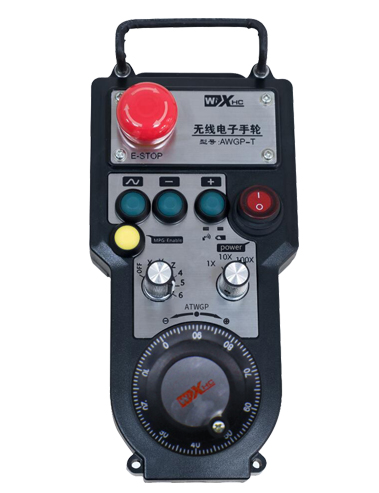
① Emergency Stop Button:
اضغط على زر إيقاف الطوارئ, the two groups of emergency stop IO outputs on the receiver will disconnect, and all remote control functions will be invalidated.Release the emergency stop button, the emergency stop IO outputs on the receiver will be closed, and all remote control functions will be restored. فضلاً عن ذلك, even if the remote control is powered off, pressing the emergency stop button can still activate the emergency stop IO output of the receiver.
② Enable Button:
Press either enable button on both sides, the two sets of enable IO outputs on the receiver will conduct. Release the enable button, and the enable IO outputs will disconnect. It is necessary to press and hold the enable button before toggling axis selection, magnification or rotating the remote control for the operation to take effect.This function can be canceled through the configuration software.
③ Axis Selection Switch (Power Switch):
اضغط مع الاستمرار على زر تمكين, then toggling the axis selection switch can control the movement of axis .Press and hold the enable button, then toggle the axis selection switch to switch the motion axis controlled by the remote control. Toggle the switch from the OFF position to any axis position, and the remote control will power on automatically.
④ Pulse Encoder:
Press and hold the enable button and rotate the pulse encoder, it will output pulse signals to control the movement of the machine axis.
⑤ LCD Display Screen:

5. Product Accessories Diagram

6. دليل تثبيت المنتج
6.1 خطوات تثبيت المنتج
1. Install the receiver in the electrical cabinet via the buckle on its back, or mount it inside the electrical cabinet through the screw holes at the four corners of the receiver.
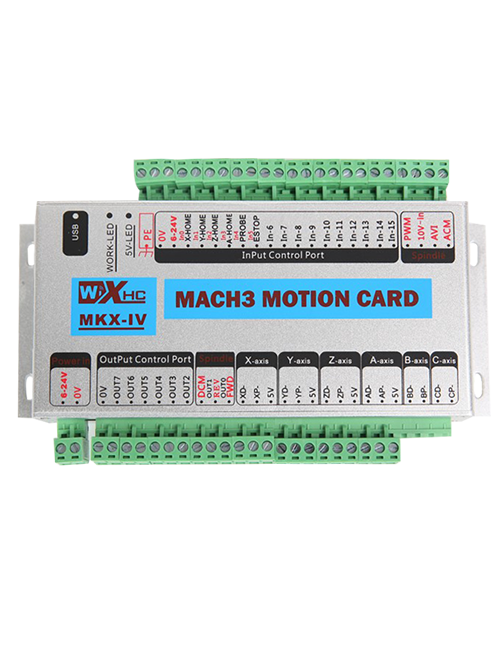
2. ارجع إلى مخطط الأسلاك الخاص بجهاز الاستقبال, قارنها بمعداتك الموجودة في الموقع, and connect the equipment to the receiver with cables.
3. After the receiver is fixed in place, install the supporting antenna of the receiver properly. Mount or place the outer end of the antenna outside the electrical cabinet. It is recommended to place it on the top of the electrical cabinet for optimal signal performance. Do not leave the antenna uninstalled or place it inside the electrical cabinet; otherwise, signal failure may occur.
4. أخيراً, turn on the remote control power switch, then you can remotely operate the machine via the remote control.
6.2 Receiver Installation Dimensions

6.3 مخطط مرجع الأسلاك المتلقي
7. تعليمات تشغيل المنتج
1. الطاقة على الجهاز والمستقبل. The receiver operation indicator flashes. After the wireless electronic remote control is fully charged, toggle it from the OFF gear to the X-axis gear, and the remote control display lights up.
2. Select the axis : اضغط مع الاستمرار على زر تمكين, toggle the axis selection switch to select the axis to be operated.
3. Select the magnification: اضغط مع الاستمرار على زر تمكين, toggle the magnification switch to select the required magnification gear.
4. Axis movement: اضغط مع الاستمرار على زر تمكين, select the axis selection switch and the magnification switch, then rotate the pulse encoder. Rotate clockwise to move the axis in the positive direction, and rotate counterclockwise to move the axis in the negative direction.
5. اضغط مع الاستمرار على أي زر مخصص, the corresponding button IO output of the receiver will turn on; release the button, and the output will turn off.
6. اضغط على زر إيقاف الطوارئ, the corresponding emergency stop IO output of the receiver disconnects and the remote control function becomes invalid. Release the emergency stop button, the emergency stop IO output closes and the remote control function is restored.
7. If the wireless remote control is not operated for a period of time, سوف يدخل وضع السكون تلقائيًا لتقليل استهلاك الطاقة. It can be used normally again by pressing the enable button again.
8.If the wireless remote control is not used for a long time, turn the axis switch to OFF to turn off the power and extend battery life
①:UWGP stands for appearance style.
②:Pulse Output Parameters:
01: يشير إلى أن إشارة خرج النبض هي, ب; جهد النبض 5V; كمية النبض 100PR.
02: يشير إلى أن إشارة خرج النبض هي, ب; جهد النبض 12V; pulse quantity 25PPR.
03: يشير إلى أن إشارة خرج النبض هي, ب, أ -, ب -; جهد النبض 5V; كمية النبض 100PR.
04: يشير إلى إخراج الدائرة المفتوحة NPN منخفض المستوى, مع إشارات نبض النبض من A و B.; The number of pulses is 100PPR.
05: يشير إلى إخراج مصدر PNP عالي المستوى, مع إشارات نبض النبض من A و B.; عدد البقول هو 100PR.
③:Represents the axis selection switch quantity; 6 stands for 6 محاور, 7 stands for 7 محاور, and so on.
④: Represents the signal type of the axis selection switch.A stands for point-to-point output signal, and B stands for encoder output signal.
⑤: Represents the signal type of the magnification switch.A stands for point-to-point output signal, and B stands for encoder output signal.
⑥: يمثل عدد الأزرار المخصصة; 3 corresponds to 6 أزرار مخصصة.
⑦: Represents the power supply for the system remote control. 05 stands for 5V power supply, و 24 stands for 24V power supply.
⑧: Represents the contact charging mode. It starts charging automatically when placed back on the charging base.
9. استكشاف أخطاء المنتج وإصلاحها

10. Maintenance and upkeep
1. يرجى استخدامه في بيئة جافة في درجة حرارة الغرفة والضغط لتمديد عمر خدمتها.
2. Please avoid using in abnormal environments such as rain and water to extend the service life.
3. Please keep the appearance of the remote control clean to extend its service life.
4. Please avoid crushing, dropping, or bumping, إلخ. to prevent damage to the precision components inside the remote control or accuracy errors.
5. إذا لم تستخدم لفترة طويلة, please store the remote control in a clean and safe place.
6. Avoid moisture and shock during storage and transportation.
11. معلومات السلامة
1. يرجى قراءة التعليمات بعناية قبل الاستخدام وحظر غير المحترفين من العمل.
2. Please charge the remote control in a timely manner when the battery level is too low, to avoid malfunction and operational errors caused by insufficient power.
3. If you repair it yourself and cause damage, the warranty will be void.