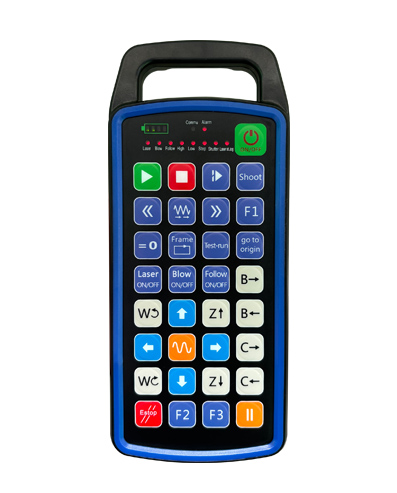
SUPPORTATU 32 prugrammazione di buttone persunalizata
SUPPORTATU 9 prugrammazione di visualizazione di luci LED persunalizata
Utilizendu a tecnulugia di cumunicazione wireless 433MHZ, u funziunamentu wireless
distanza hè 80 metri

£300.00
SUPPORTATU 32 prugrammazione di buttone persunalizata
SUPPORTATU 9 prugrammazione di visualizazione di luci LED persunalizata
Utilizendu a tecnulugia di cumunicazione wireless 433MHZ, u funziunamentu wireless
distanza hè 80 metri
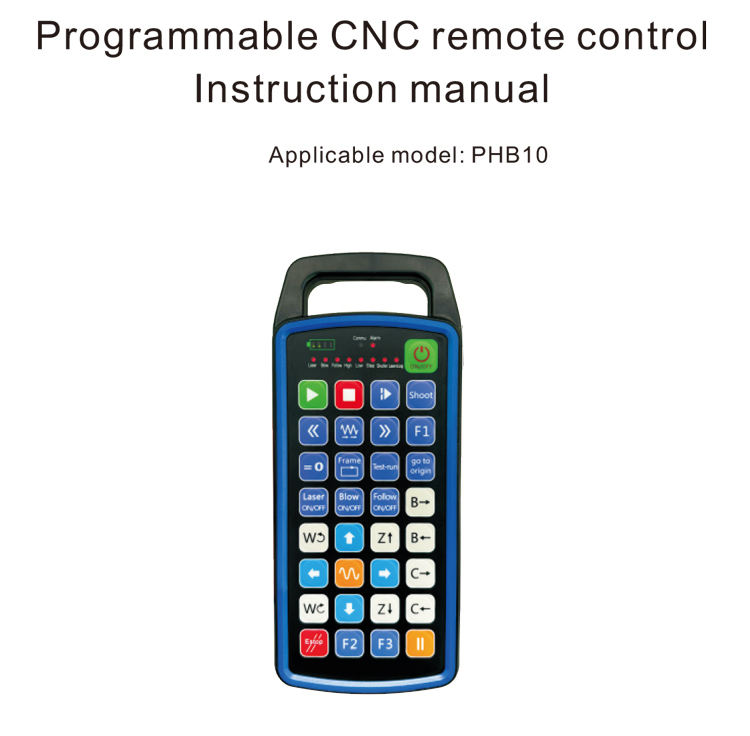
1.Introduzione di u Produttu
U telecomando programmabile CNC PHB10 hè adattatu per wireless
operazione di cuntrollu remota di vari sistemi CNC. U sustegnu definitu da l'utilizatori
prugrammazione per sviluppà funzioni di buttone, è realizà u cuntrollu remoto di varii
funzioni nantu à u sistema CNC; sustene a prugrammazione definita da l'utilizatori per sviluppà
Luci LED per accende è spegne, è realizà a visualizazione dinamica di u statu di u sistema;
u telecomando vene cun una bateria recargable è supporta Type-C
carica di l'interfaccia.
2.Funzioni di u produttu
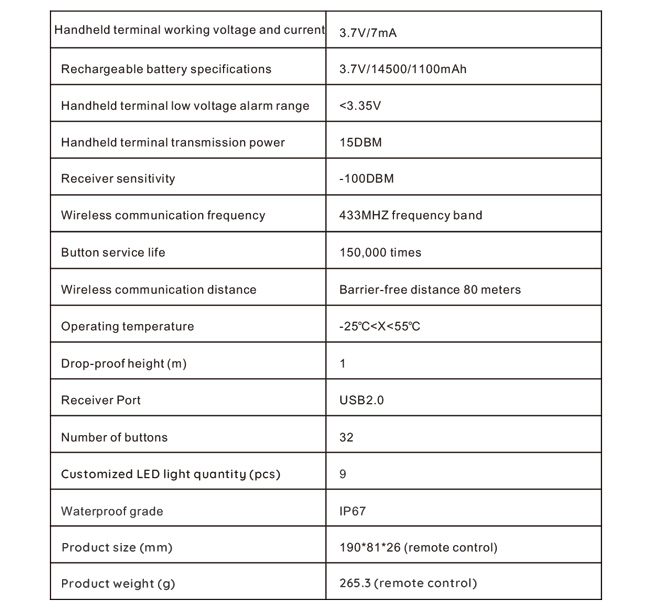
1. Utilizendu a tecnulugia di cumunicazione wireless 433MHZ, u funziunamentu wireless
distanza hè 80 metri;
2.Utilizà a funzione automatica di salti di frequenza, 32 set di telecomandi wireless
i cuntrolli ponu esse utilizati à u stessu tempu senza affettà l'altri;
3.SUPPORTATU 32 prugrammazione di buttone persunalizata;
4.SUPPORTATU 9 prugrammazione di visualizazione di luci LED persunalizata;
5.Supportu u nivellu di impermeabilità IP67;
6.Supporta a carica standard di l'interfaccia Type-C; 5Specificazione di carica V-2A;
1100 Batteria mAh di grande capacità, cù a funzione di standby di sonnu automaticu; capisce
standby ultra-longu di bassa putenza;
7.Supporta a visualizazione di u putere in tempu reale.
3.Principu di travagliu
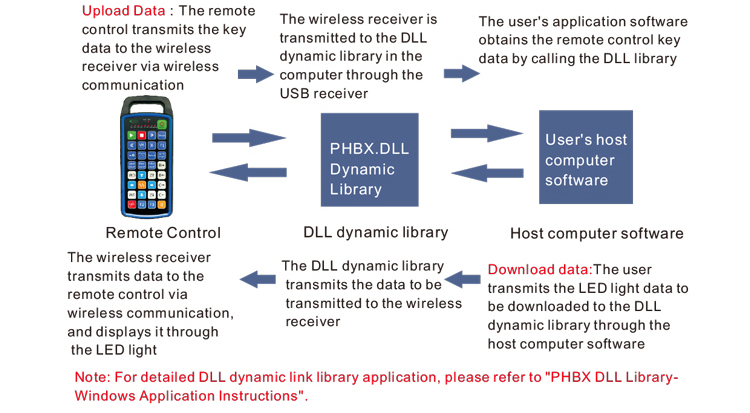
4. Specificazioni di u Produttu
5.Introduzione di a funzione di u produttu
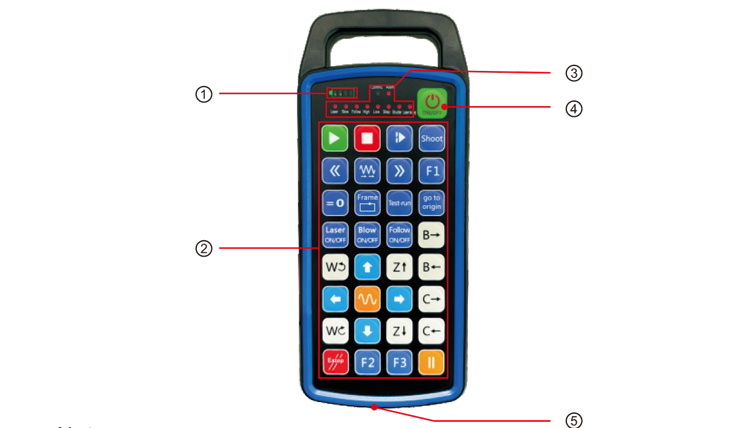
Note:
①Battery level display:
S'illumina dopu l'accensione, si spegne dopu a putenza;
Se l'indicatore luminoso di a batteria hè solu una barra è continua à lampà, significa u
a bateria hè troppu bassa. Per piacè rimpiazzà a bateria;
Sì i luci di l'indicatori di a batteria sò tutti accesi è l'altri luci LED lampanu torna è
avanti, significa chì a bateria hè assai bassa. Per piacè rimpiazzà a bateria;
Se l'indicatore di a batteria ùn si accende o si spegne, è u dispusitivu ùn pò esse
principiatu da pressu è mantene u buttone putenza, per piacè rimpiazzà a bateria;
②Button area:32 buttoni disposti in 4X8, prugrammazione definita da l'utilizatori;
③Status LED:
COMMU: Indicatore luminoso di buttone, s'illumina quandu u buttone hè premutu è va
fora quandu u buttone hè liberatu; altre luci sò display persunalizati;
④Power switch:
Press longa per 3 seconde per accende, pressa longa per 3 seconde per spegne;
⑤Charging port:
Aduprate u caricatore Type-C per carica, tensione di carica 5V, currente 1A-2A; carica
tempu 3-5 ore;
Quandu si carica, l'indicatore di putenza lampeggia, indicà chì hè in carica. Quandu
pienamente carica, l'indicatore di putenza mostrarà a barra piena senza lampeggiante.
6.Schema di l'accessori di u produttu
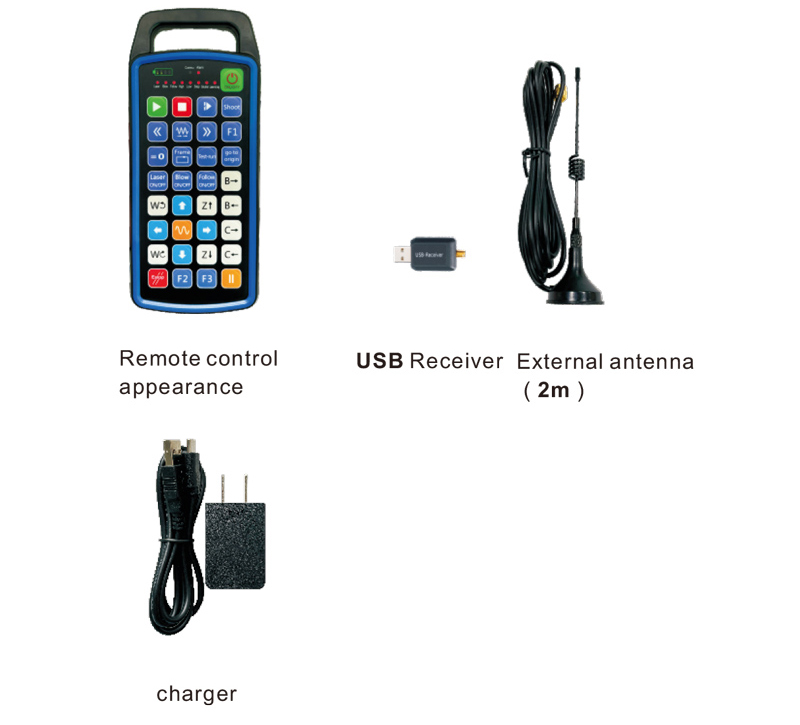
7.Guida di installazione di u produttu
1 . Inserisce u ricevitore USB in l'urdinatore, l'urdinatore sarà automaticamente
ricunnosce è stallà u driver di u dispusitivu USB senza manual
2. Inserite u telecomando in u caricatore. Dopu chì a bateria hè completamente carica, pressa
è tene u buttone di putenza per 3 seconde. U telecomando si accende è u putere
l'indicatore s'illuminerà, indicà chì u putere-on hè successu.
3. Dopu l'accensione, pudete fà qualsiasi operazione di buttone. U cuntrollu remoto
pò sustene u funziunamentu di u buttone duale à u stessu tempu. Quandu appughjà ogni buttone, lu
La lumière COMMU de la télécommande s'allumera, indicà chì stu buttone hè validu.
8.Istruzzioni per l'operazione di u produttu
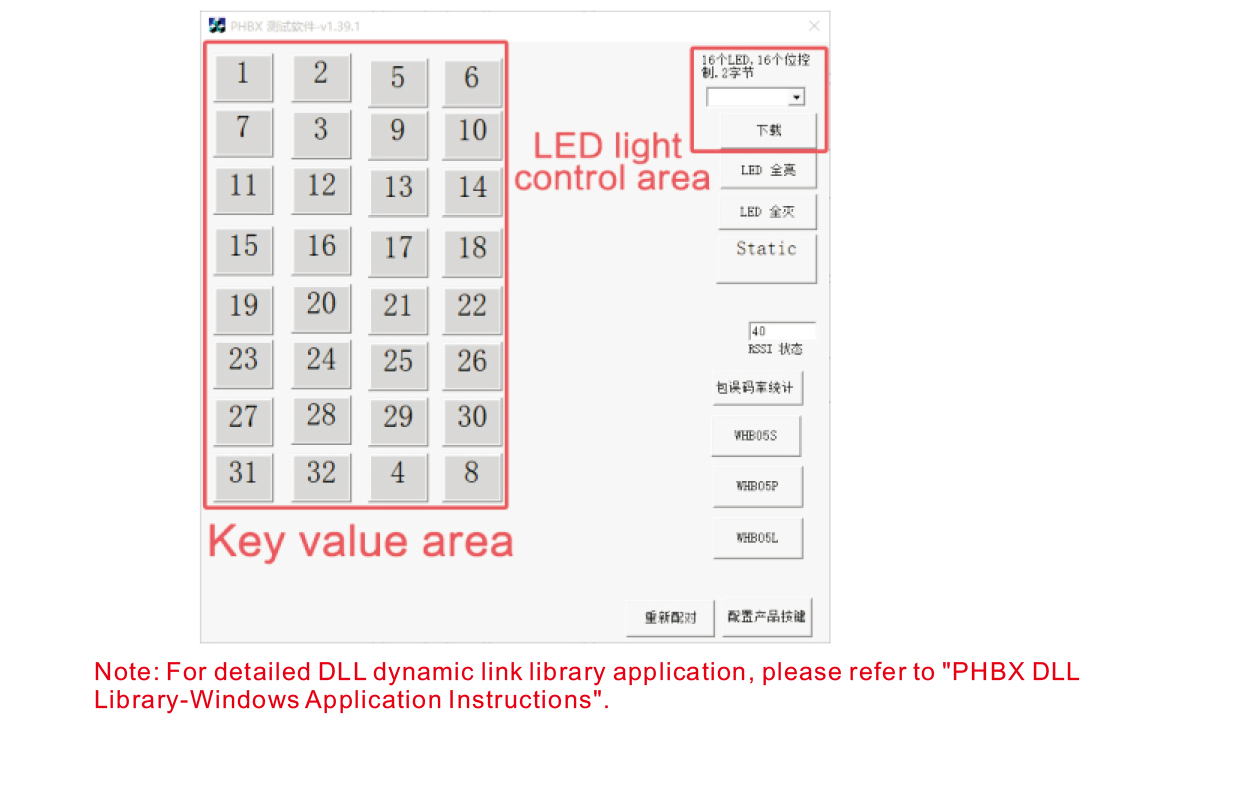
Prima di u sviluppu di u produttu è l'usu, pudete aduprà u software demo chì furnimu
pruvà i buttoni nantu à u telecomando è a luce LED nantu à u telecomando. Poi
aduprà ancu a demo cum'è una rutina di riferimentu per u sviluppu di prugrammazione futura.
Prima di utilizà u software Demo, per piacè inserisci u ricevitore USB in l'urdinatore,
assicuratevi chì u cuntrollu remoto hà una putenza abbastanza, appughjà è tene u buttone putenza à t
urne, è dopu aduprà;
Quandu ogni buttone nantu à u telecomando hè pressatu, a demo di u software di prova si mostrarà
u valore chjave currispundente. Dopu avè liberatu, a visualizazione di u valore chjave sparisce,
indicà chì a carica di chjave hè normale;
Pudete ancu selezziunate u numeru di luce LED nantu à a demo di u software di prova, cliccate scaricamentu,
è u numeru di luce currispundenti nantu à u telecomando si illumina, indicà chì u
A luce LED si scarica normalmente.
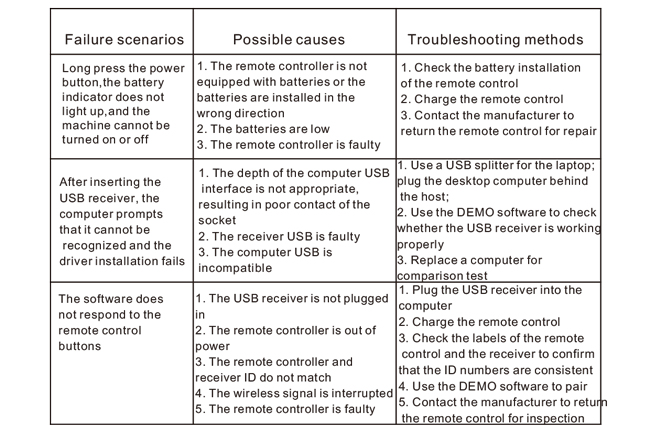
9.Soluzione di prublemi di u produttu
10. Mantenimentu è cura
1. Per piacè aduprate in un ambiente seccu cù a temperatura normale è a pressione per allargà
a vita di serviziu;
2. Ùn aduprate micca oggetti affilati per toccu l'area chjave per allargà a vita di serviziu di a chjave;
3. Per piacè mantene a zona chjave pulita per riduce l'usura di e chjave;
4. Evite squeezing and falling to cause danni à u telecomando;
5. Se ùn hè micca usatu per un bellu pezzu, per piacè sguassate a bateria è guarda u telecomando
è a batteria in un locu pulitu è sicuru;
6. Prestate attenzione à a prova di umidità durante u almacenamentu è u trasportu.
11.Infurmazione di sicurità
1. Leghjite attentamente l'istruzzioni prima di l'usu. I non prufessiunali sò pruibiti
funziunamentu.
2. Per piacè aduprate u caricatore originale o un caricatore pruduttu da un fabricatore regulare cù u
stissi specificazioni.
3. Per piacè caricate in tempu per evità un funziunamentu incorrectu per via di una putenza insufficiente chì causa u
u cuntrollu remota ùn hè micca rispostu.
4. Se hè necessariu a riparazione, per piacè cuntattate u fabricatore. Se u dannu hè causatu da l'autoreparazione,
U fabricatore ùn furnisce micca guaranzia.