Descrizzione

1.Introduzione di u Produttu
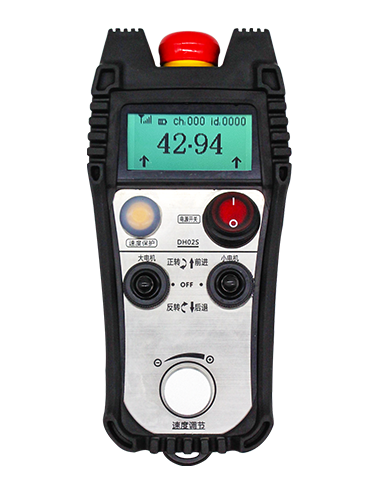
Wireless Remote Control is used for manual guidance, Pusizionamentu, tool setting and other operations of CNC machine tools. Stu pruduttu adopts tecnulugia di trasmissione wireless, eliminendu a cunnessione tradiziunale di filu di primavera, riduzzione fallimenti di equipaggiu causati da cavi, eliminendu i svantaghji di u trascinamentu di u cable, macchie d'oliu, etc., and is more convenient to operate.It is widely applicable to CNC machine tools such as gantry machining centers, gantry vertical lathes, and CNC gear processing machines, and is compatible with various mainstream CNC system brands on the market, including Siemens, Mitsubissi, Fanuc, Syntec and more.
2.Funzioni di u produttu
1. Adopta a tecnulugia di cumunicazione wireless 433MHz cù una distanza operativa wireless di 20 metri.
2.Salta di frequenza adattativa; 32 seti di cuntrolli remoti wireless pò esse usatu simultaneamente senza interferenza.
3.Supports the emergency stop button, and the emergency stop button remains effective even after the remote control is powered off.
4.SUPPORTI 3 buttoni persunalizati cù a commutazione di u signale IO.
5.Supporta u cuntrollu di 6 assi, è 7 à u cuntrollu di 12 assi hè persunalizabile.
6. Supporta u cuntrollu di ingrandimentu di 3 velocità, è u cuntrollu di l'ingrandimentu di 4 velocità hè persunalizabile.
7.supporta a funzione di buttone di attivazione, chì pò pruduce signali IO di commutazione, è ancu cuntrullà a selezzione di l'assi, ingrandimentu è codificatore.
8.Supporta a mudificazione di u tipu di codificazione di a selezzione di l'assi è l'ingrandimentu via software.
9. Supports pulse encoder with specification of 100 Ibi per a rivoluzione.
10. Supports standard Type-C charging with 5V-2A charging specification; built-in battery
specification: 14500 / 1100mAh.
3. Specificazioni di u produttu
| Working Voltage and Current of Handheld Terminal |
3.7V/20.0mA |
| Charging Battery Specification |
3.7V/14500/1100mAh
|
| Low Voltage Alarm Range of Handheld Terminal |
<3.35V |
| Receiver Power Supply Voltage |
DC5V-24V/1A |
| Receiver Emergency Stop Output Load Range |
AC125V - 1a / DC30v - 2a |
| Receiver Enable Output Load Range |
AC125V - 1a / DC30v - 2a |
| Receiver Custom Button Output Load Range |
DC24V / 50MA
|
| Receiver Axis Selection Output Load Range |
DC24V / 50MA |
| Receiver magnification Output Load Range |
DC24V / 50MA |
| Handheld Terminal Transmit Power |
15DBM
|
| U Ricevitore chì riceve sensibilità |
-100DBM |
| Frequenza di cumunicazione wireless |
433Banda di frequenza mhz
|
| Wireless Communication Distance |
20 meters barrier-free distance
|
| Operating Temperature |
-25℃<X<55℃ |
| Safe drop height |
1 m
|
| Number of Custom Buttons |
3
|
| Product Weight |
546.86(g) |
| Product Dimensions |
200*87*72(mm) |
4. Informazione di a Funzioni di u produttu

Note:
① Emergency Stop Button:
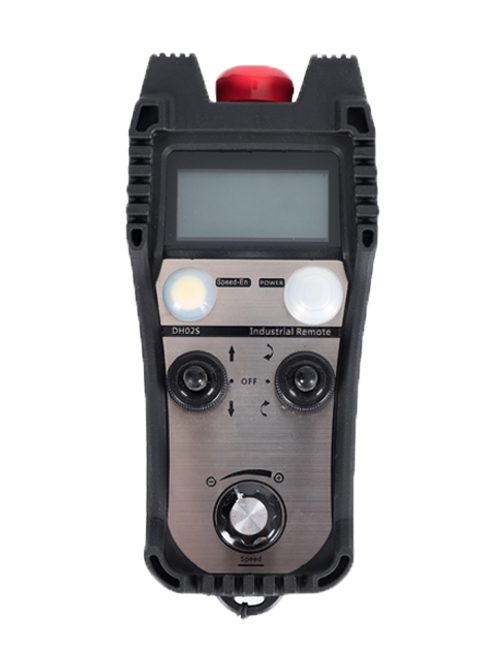
Pulse u buttone di stop d'emergenza, the two groups of emergency stop IO outputs on the receiver will disconnect, and all remote control functions will be invalidated.Release the emergency stop button, the emergency stop IO outputs on the receiver will be closed, and all remote control functions will be restored. In più, even if the remote control is powered off, pressing the emergency stop button can still activate the emergency stop IO output of the receiver.
② Enable Button:
Press either enable button on both sides, the two sets of enable IO outputs on the receiver will conduct. Release the enable button, and the enable IO outputs will disconnect. It is necessary to press and hold the enable button before toggling axis selection, magnification or rotating the remote control for the operation to take effect.This function can be canceled through the configuration software.
③ Axis Selection Switch (Power Switch):
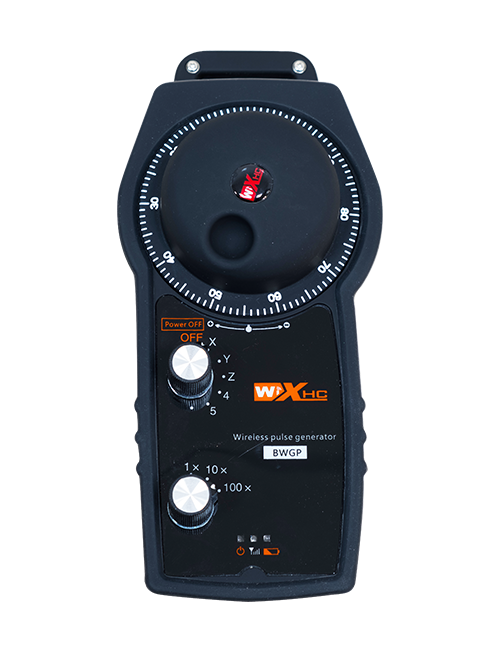
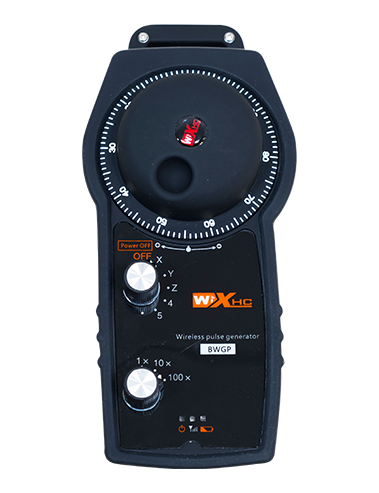
Pulse è mantene u buttone Attiva, then toggling the axis selection switch can control the movement of axis .Press and hold the enable button, then toggle the axis selection switch to switch the motion axis controlled by the remote control. Toggle the switch from the OFF position to any axis position, and the remote control will power on automatically.
④ Pulse Encoder:
Press and hold the enable button and rotate the pulse encoder, it will output pulse signals to control the movement of the machine axis.
⑤ LCD Display Screen:

5. Product Accessories Diagram

6. Guida di installazione di u produttu
6.1 Passi di stallazione di u produttu
1. Install the receiver in the electrical cabinet via the buckle on its back, or mount it inside the electrical cabinet through the screw holes at the four corners of the receiver.
2. Vede u nostru schema di cablaggio di u ricevitore, paragunate cù u vostru equipamentu in situ, and connect the equipment to the receiver with cables.
3. After the receiver is fixed in place, install the supporting antenna of the receiver properly. Mount or place the outer end of the antenna outside the electrical cabinet. It is recommended to place it on the top of the electrical cabinet for optimal signal performance. Do not leave the antenna uninstalled or place it inside the electrical cabinet; altrimenti, signal failure may occur.
4. Finalmente, turn on the remote control power switch, then you can remotely operate the machine via the remote control.
6.2 Receiver Installation Dimensions

6.3 Diractu di Referenza Ricevitore
7. Istruzzioni per l'operazione di u produttu
1. Putenza nantu à a macchina è u ricevitore. The receiver operation indicator flashes. After the wireless electronic remote control is fully charged, toggle it from the OFF gear to the X-axis gear, and the remote control display lights up.
2. Select the axis : Pulse è mantene u buttone Attiva, toggle the axis selection switch to select the axis to be operated.
3. Select the magnification: Pulse è mantene u buttone Attiva, toggle the magnification switch to select the required magnification gear.
4. Axis movement: Pulse è mantene u buttone Attiva, select the axis selection switch and the magnification switch, then rotate the pulse encoder. Rotate clockwise to move the axis in the positive direction, and rotate counterclockwise to move the axis in the negative direction.
5. Pulse è tene qualchì buttone persunalizatu, the corresponding button IO output of the receiver will turn on; release the button, and the output will turn off.
6. Pulse u buttone di stop d'emergenza, the corresponding emergency stop IO output of the receiver disconnects and the remote control function becomes invalid. Release the emergency stop button, the emergency stop IO output closes and the remote control function is restored.
7. If the wireless remote control is not operated for a period of time, Scrive automaticamente u modalità di sonnu per riduce u cunsumu di energia. It can be used normally again by pressing the enable button again.
8.If the wireless remote control is not used for a long time, turn the axis switch to OFF to turn off the power and extend battery life
8. Descrizzione di u mudellu di produttu
①:UWGP stands for appearance style.
②:Pulse Output Parameters:
01: Indica chì u segnu di a pruduzzione di u polse hè a, B; Tecnula di fiorsa 5v; pulizza quantità 100price.
02: Indica chì u segnu di a pruduzzione di u polse hè a, B; TUCHTICA PULSE 12v; pulse quantity 25PPR.
03: Indica chì u segnu di a pruduzzione di u polse hè a, B, A -, B -; Tecnula di fiorsa 5v; pulizza quantità 100price.
04: Indica un output di circuitu di circuitu apertu di u livellu di livellu npn, cù segni di pruduzzione pulse di A è B; The number of pulses is 100PPR.
05: Indica un output di fonte di altu livellu pnp, cù segni di pruduzzione pulse di A è B; U numaru di legumi hè 100pront.
③:Represents the axis selection switch quantity; 6 stands for 6 AXES, 7 stands for 7 AXES, and so on.
④: Represents the signal type of the axis selection switch.A stands for point-to-point output signal, and B stands for encoder output signal.
⑤: Represents the signal type of the magnification switch.A stands for point-to-point output signal, and B stands for encoder output signal.
⑥: Rapprisenta u numeru di buttoni persunalizati; 3 corresponds to 6 buttone persunalizati.
⑦: Represents the power supply for the system remote control. 05 stands for 5V power supply, è 24 stands for 24V power supply.
⑧: Represents the contact charging mode. It starts charging automatically when placed back on the charging base.
9. Prodotto di prublemi di prublemi

10. Maintenance and upkeep
1. Aduprate lu in un ambiente seccu à a temperatura è a pressione di l'ambienti per allargà a so vita di serviziu.
2. Please avoid using in abnormal environments such as rain and water to extend the service life.
3. Please keep the appearance of the remote control clean to extend its service life.
4. Please avoid crushing, dropping, or bumping, ecc. to prevent damage to the precision components inside the remote control or accuracy errors.
5. Se ùn hè micca usatu per un bellu pezzu, please store the remote control in a clean and safe place.
6. Avoid moisture and shock during storage and transportation.
11. Infurmazione di sicurità
1. Leghjite puru i struzzioni prima di utilizà è pruibisce micca i prufessiunali di l'operazione.
2. Please charge the remote control in a timely manner when the battery level is too low, to avoid malfunction and operational errors caused by insufficient power.
3. If you repair it yourself and cause damage, the warranty will be void.