תֵאוּר

1.מבוא מוצר
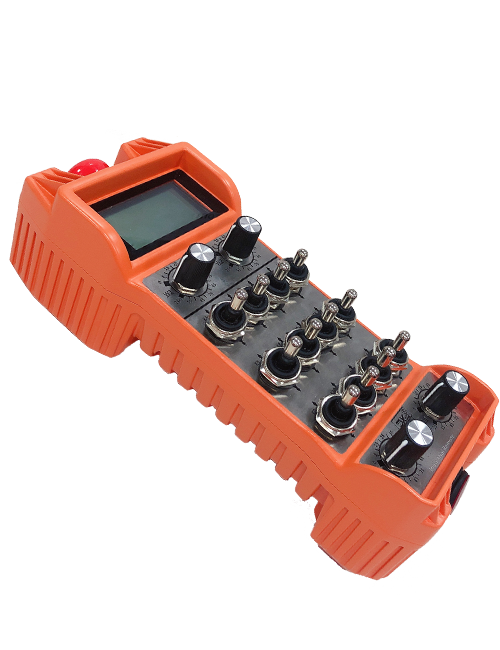
Wireless Remote Control is used for manual guidance, מיקום, tool setting and other operations of CNC machine tools. מוצר זה מאמץ טכנולוגיית שידור אלחוטי, ביטול חיבור חוט הקפיץ המסורתי, הפחתת כשלים בציוד שנגרמו על ידי כבלים, ביטול החסרונות של גרירת כבלים, כתמי שמן, וכו', and is more convenient to operate.It is widely applicable to CNC machine tools such as gantry machining centers, gantry vertical lathes, and CNC gear processing machines, and is compatible with various mainstream CNC system brands on the market, including Siemens, מיצובישי, FANUC, Syntec and more.
2.תכונות המוצר
1. מאמצת טכנולוגיית תקשורת אלחוטית 433MHz עם מרחק פעולה אלחוטי של 20 מטרים.
2.קפיצת תדר אדפטיבית; 32 ניתן להשתמש בסט של שלטים אלחוטיים בו זמנית ללא הפרעות.
3.Supports the emergency stop button, and the emergency stop button remains effective even after the remote control is powered off.
4.תומך 3 לחצנים מותאמים אישית עם מיתוג פלט אות IO.
5.תומך בבקרת 6 צירים, ו 7 בקרת 12 צירים ניתנת להתאמה אישית.
6. תומך בקרת הגדלה של 3 מהירויות, ובקרת הגדלה של 4 מהירויות ניתנת להתאמה אישית.
7.תומך בפונקציית לחצן ההפעלה, אשר יכול להוציא אותות IO מיתוג, וגם לשלוט בבחירת הציר, הגדלה ומקודד.
8.תומך בשינוי סוג הקידוד של בחירת הציר וההגדלה באמצעות תוכנה.
9. Supports pulse encoder with specification of 100 פולסים לכל סיבוב.
10. Supports standard Type-C charging with 5V-2A charging specification; built-in battery
specification: 14500 / 1100mAh.
| Working Voltage and Current of Handheld Terminal |
3.7V/20.0mA |
| Charging Battery Specification |
3.7V/14500/1100mAh
|
| Low Voltage Alarm Range of Handheld Terminal |
<3.35V |
| Receiver Power Supply Voltage |
DC5V-24V/1A |
| Receiver Emergency Stop Output Load Range |
AC125V-1A/DC30V-2A |
| Receiver Enable Output Load Range |
AC125V-1A/DC30V-2A |
| Receiver Custom Button Output Load Range |
DC24V/50mA
|
| Receiver Axis Selection Output Load Range |
DC24V/50mA |
| Receiver magnification Output Load Range |
DC24V/50mA |
| Handheld Terminal Transmit Power |
15dBm
|
| מקלט מקבל רגישות |
-100dBm |
| תדר תקשורת אלחוטי |
433פס תדרים מגה-הרץ
|
| Wireless Communication Distance |
20 meters barrier-free distance
|
| Operating Temperature |
-25℃<X<55℃ |
| Safe drop height |
1 מ '
|
| Number of Custom Buttons |
3
|
| Product Weight |
546.86(g) |
| Product Dimensions |
200*87*72(mm) |
4. מבוא פונקציית המוצר

הערות:
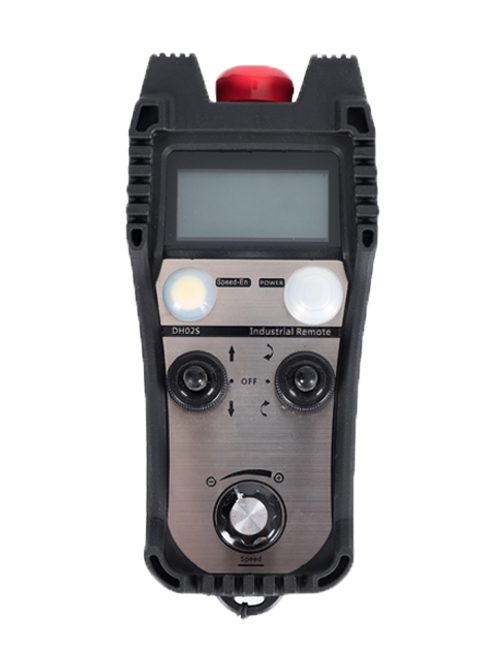
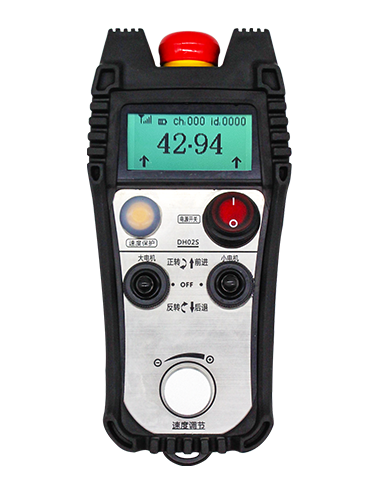
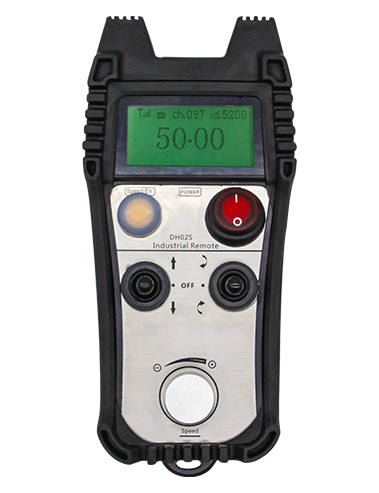
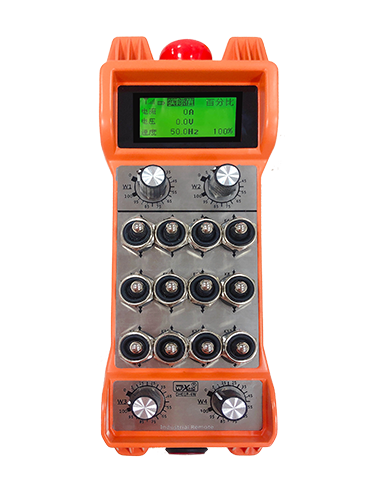
① Emergency Stop Button:
לחץ על לחצן עצירת החירום, the two groups of emergency stop IO outputs on the receiver will disconnect, and all remote control functions will be invalidated.Release the emergency stop button, the emergency stop IO outputs on the receiver will be closed, and all remote control functions will be restored. בנוסף, even if the remote control is powered off, pressing the emergency stop button can still activate the emergency stop IO output of the receiver.
② Enable Button:
Press either enable button on both sides, the two sets of enable IO outputs on the receiver will conduct. Release the enable button, and the enable IO outputs will disconnect. It is necessary to press and hold the enable button before toggling axis selection, magnification or rotating the remote control for the operation to take effect.This function can be canceled through the configuration software.
③ Axis Selection Switch (Power Switch):
לחץ והחזק את לחצן ההפעלה, then toggling the axis selection switch can control the movement of axis .Press and hold the enable button, then toggle the axis selection switch to switch the motion axis controlled by the remote control. Toggle the switch from the OFF position to any axis position, and the remote control will power on automatically.
④ Pulse Encoder:
Press and hold the enable button and rotate the pulse encoder, it will output pulse signals to control the movement of the machine axis.
⑤ LCD Display Screen:

5. Product Accessories Diagram

6. מדריך התקנת המוצר
6.1 שלבי התקנת המוצר
1. Install the receiver in the electrical cabinet via the buckle on its back, or mount it inside the electrical cabinet through the screw holes at the four corners of the receiver.
2. עיין בתרשים החיווט של המקלט שלנו, השוו אותו עם הציוד שבאתר שלכם, and connect the equipment to the receiver with cables.
3. After the receiver is fixed in place, install the supporting antenna of the receiver properly. Mount or place the outer end of the antenna outside the electrical cabinet. It is recommended to place it on the top of the electrical cabinet for optimal signal performance. Do not leave the antenna uninstalled or place it inside the electrical cabinet; אַחֶרֶת, signal failure may occur.
4. לְבָסוֹף, turn on the remote control power switch, then you can remotely operate the machine via the remote control.
6.2 Receiver Installation Dimensions

6.3 תרשים התייחסות לחיווט מקלט
7. הוראות תפעול המוצר
1. הפעל את המכונה ואת המקלט. The receiver operation indicator flashes. After the wireless electronic remote control is fully charged, toggle it from the OFF gear to the X-axis gear, and the remote control display lights up.
2. Select the axis : לחץ והחזק את לחצן ההפעלה, toggle the axis selection switch to select the axis to be operated.
3. Select the magnification: לחץ והחזק את לחצן ההפעלה, toggle the magnification switch to select the required magnification gear.
4. Axis movement: לחץ והחזק את לחצן ההפעלה, select the axis selection switch and the magnification switch, then rotate the pulse encoder. Rotate clockwise to move the axis in the positive direction, and rotate counterclockwise to move the axis in the negative direction.
5. לחץ והחזק כל לחצן מותאם אישית, the corresponding button IO output of the receiver will turn on; release the button, and the output will turn off.
6. לחץ על לחצן עצירת החירום, the corresponding emergency stop IO output of the receiver disconnects and the remote control function becomes invalid. Release the emergency stop button, the emergency stop IO output closes and the remote control function is restored.
7. If the wireless remote control is not operated for a period of time, הוא יכנס אוטומטית למצב שינה כדי להפחית את צריכת החשמל. It can be used normally again by pressing the enable button again.
8.If the wireless remote control is not used for a long time, turn the axis switch to OFF to turn off the power and extend battery life
①:UWGP stands for appearance style.
②:Pulse Output Parameters:
01: מציין שאות מוצא הדופק הוא A, ב; מתח דופק 5V; כמות דופק 100PPR.
02: מציין שאות מוצא הדופק הוא A, ב; מתח דופק 12V; pulse quantity 25PPR.
03: מציין שאות מוצא הדופק הוא A, ב, א -, ב -; מתח דופק 5V; כמות דופק 100PPR.
04: מציין פלט מעגל פתוח NPN ברמה נמוכה, עם אותות פלט פולסים של A ו-B; The number of pulses is 100PPR.
05: מציין פלט מקור PNP ברמה גבוהה, עם אותות פלט פולסים של A ו-B; מספר הפולסים הוא 100PPR.
③:Represents the axis selection switch quantity; 6 stands for 6 צירים, 7 stands for 7 צירים, and so on.
④: Represents the signal type of the axis selection switch.A stands for point-to-point output signal, and B stands for encoder output signal.
⑤: Represents the signal type of the magnification switch.A stands for point-to-point output signal, and B stands for encoder output signal.
⑥: מייצג את מספר הלחצנים המותאמים אישית; 3 corresponds to 6 כפתורים בהתאמה אישית.
⑦: Represents the power supply for the system remote control. 05 stands for 5V power supply, ו 24 stands for 24V power supply.
⑧: Represents the contact charging mode. It starts charging automatically when placed back on the charging base.
9. פתרון בעיות במוצר

10. Maintenance and upkeep
1. אנא השתמש בו בסביבה יבשה בטמפרטורת החדר ובלחץ כדי להאריך את חיי השירות שלו.
2. Please avoid using in abnormal environments such as rain and water to extend the service life.
3. Please keep the appearance of the remote control clean to extend its service life.
4. Please avoid crushing, dropping, or bumping, וכו. to prevent damage to the precision components inside the remote control or accuracy errors.
5. אם לא נעשה בו שימוש במשך זמן רב, please store the remote control in a clean and safe place.
6. Avoid moisture and shock during storage and transportation.
11. מידע בטיחות
1. אנא קרא את ההוראות בעיון לפני השימוש ואסר על אנשים שאינם מקצוענים לפעול.
2. Please charge the remote control in a timely manner when the battery level is too low, to avoid malfunction and operational errors caused by insufficient power.
3. If you repair it yourself and cause damage, the warranty will be void.