Ev 12 CENYUAM KAWCH CANGENCING
Txhawb 2.8-nti npo, tso saib cov ntsiab lus kev cai programming
Siv 433MHz Wireless Sib Txuas Txuj Ci Technology, Lub wireless kev ua haujlwm
nrug yog 80 meters

£300.00
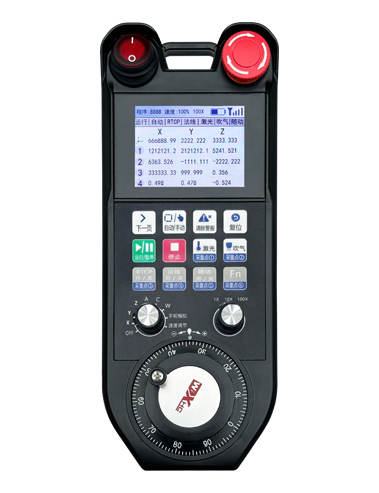
Ev 12 CENYUAM KAWCH CANGENCING
Txhawb 2.8-nti npo, tso saib cov ntsiab lus kev cai programming
Siv 433MHz Wireless Sib Txuas Txuj Ci Technology, Lub wireless kev ua haujlwm
nrug yog 80 meters
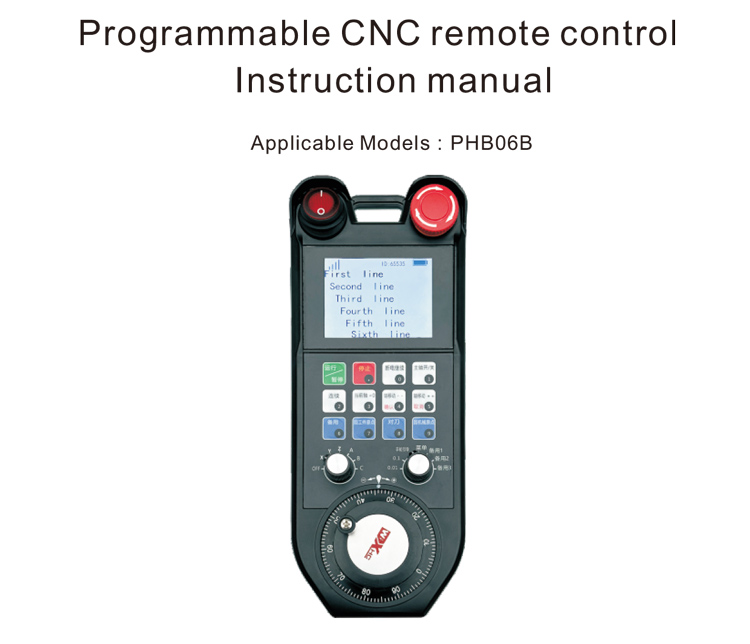
1.Khoom Taw Qhia
Lub programmable CNC chaw taws teeb tswj PHB06B yog tsim rau wireless
Kev tswj chaw taws teeb tswj cov lag luam ntawm ntau lub tshuab CNC. Nws txhawb cov neeg siv
customize programming thiab txhim kho khawm ua haujlwm kom paub cov chaw taws teeb
tswj ntau yam haujlwm ntawm CNC system; nws txhawb cov neeg siv
customize programming thiab tsim cov ntsiab lus tso saib kom paub dynamic
tso saib qhov system xwm txheej; lub chaw taws teeb tswj los nrog ib tug rechargeable
roj teeb thiab txhawb Type-C interface them.
2.Khoom nta
1. Siv 433MHz Wireless Sib Txuas Txuj Ci Technology, Lub wireless kev ua haujlwm
nrug yog 80 meters;
2. Siv Tsis Siv Neeg Zaus Hoppical Ua Haujlwm, 32 teeb ntawm wireless tej thaj chaw deb
Cov tswj tau tuaj yeem siv rau tib lub sijhawm yam tsis muaj kev cuam tshuam rau ib leeg;
3. Ev 12 CENYUAM KAWCH CANGENCING;
4. Txhawb 2.8-nti npo, tso saib cov ntsiab lus kev cai programming;
5. Ev 1 6-ceev axis xaiv hloov, uas tuaj yeem ua kev cai programmed;
6. Ev 1 7-ceev magnification hloov, uas tuaj yeem ua kev cai programmed;
7. Ev 1 Hluav Taws Xob, 100 pulses / tig;
8. Txhawb hom qauv-C them; 5V-2a them cov lus qhia tshwj xeeb; roj teeb
specification 18650/12580mWh roj teeb.
3.Ua Haujlwm Cov Ntsiab Cai
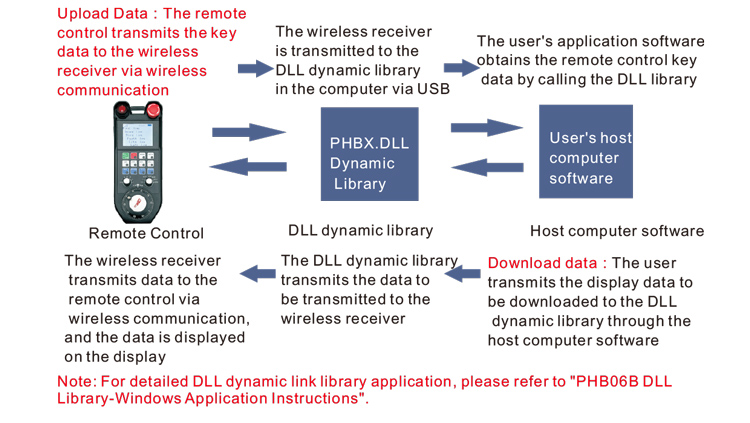
4. Cov Khoom Qhia Khoom Khoom
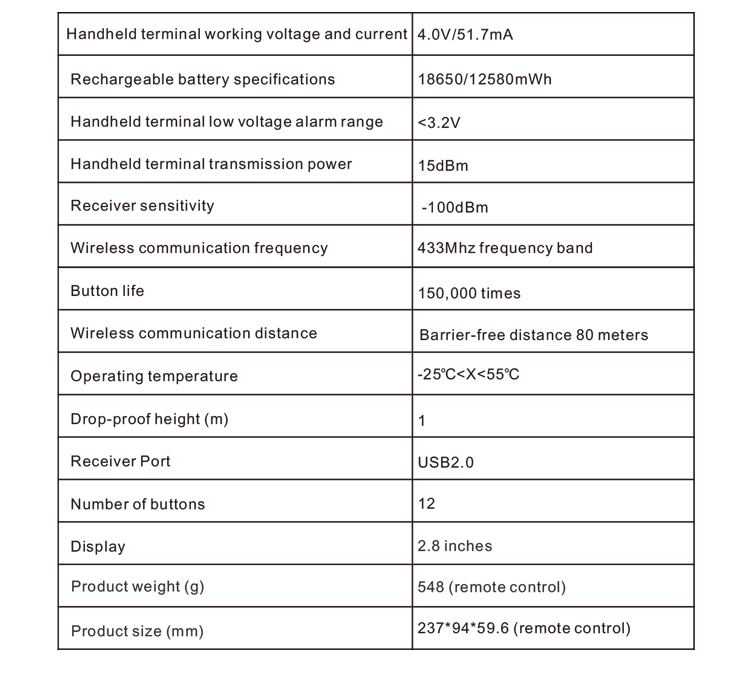
5.Khoom tau ua haujlwm qhia tau
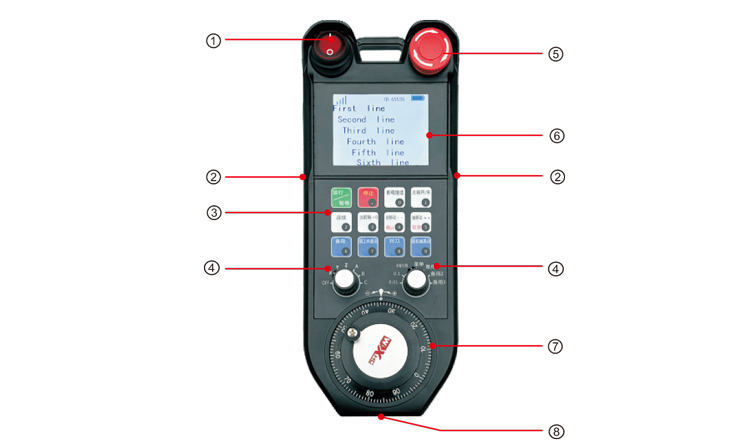
Sau ntawv:
①Power switch:
Tswj tes log kom qhib thiab kaw
②Enable buttons on both sides:
Lub khawm enabling yuav tsum tau nias kom crank lub tes log;
③Custom button area
12 nyees khawm nyob rau hauv 3X4, Tus neeg siv khoom siv txhais tau hais tias;
④Axis selection, magnification hloov
1 6-txoj hauj lwm axis xaiv hloov, uas tuaj yeem hloov kho thiab programmed;
1 7-txoj hauj lwm ratio hloov, uas tuaj yeem hloov kho thiab programmed
⑤ Emergency stop switch:
Handwheel thaum muaj xwm ceev nres hloov;
⑥Display area:
tuaj yeem tso saib lub zog tam sim no, teeb liab, thiab customized zaub cov ntsiab lus;
⑦Electronic hand wheel:
1 Hluav Taws Xob, 100 pulses / tig.
⑧Charging port:
Built-in rechargeable roj teeb, them nrog Type-C charger, Them Se Voltage 5V,
Tam sim no 1A-2A; them lub sij hawm 7 xuabita;
6.Daim Duab
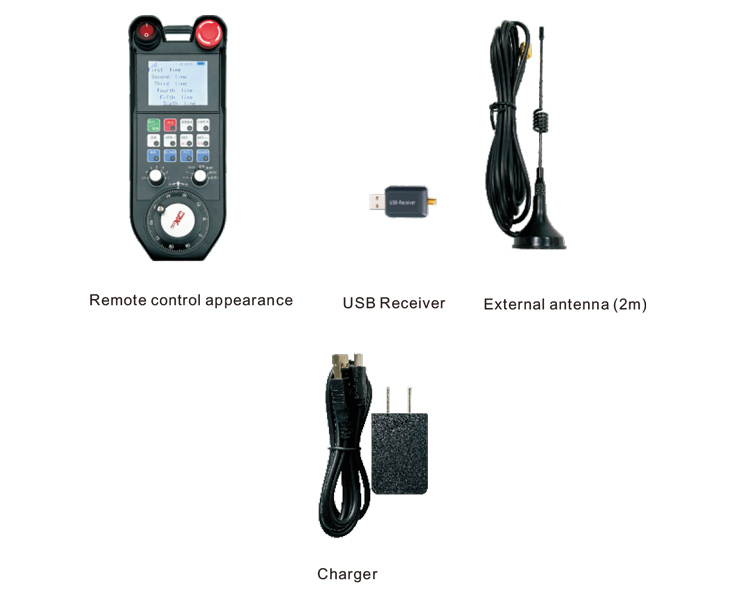
7.Cov Khoom Qhia Cov Khoom Siv Installation
1. Ntxig USB receiver rau hauv lub computer, Lub computer yuav cia li
lees paub thiab nruab tus tsav tsheb USB yam tsis muaj kev teeb tsa;
2. Ntxig cov chaw taws teeb tswj mus rau lub charger. Tom qab lub roj teeb tau them tag nrho, tig
ntawm lub hwj chim hloov, tig rau ntawm cov chaw taws teeb tswj, thiab cov zaub qhia ib txwm, uas
txhais tau hais tias lub hwj chim-on ua tiav;
3. Tom qab muaj hwj chim rau, Koj tuaj yeem ua txhua yam kev ua haujlwm. Cov chaw taws teeb tswj tau
txhawb nqa dual khawm ua haujlwm tib lub sijhawm. Thaum koj nias lub pob, ib dub
square yuav tshwm nyob ib sab ntawm lub teeb liab ntawm lub chaw taws teeb tswj, qhia tias khawm
yog siv tau.
8.Cov Lus Qhia Khoom Lag Luam
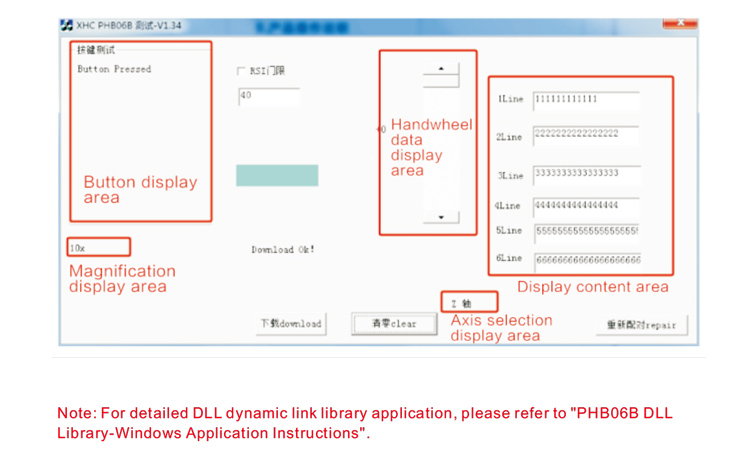
Ua ntej tsim khoom thiab siv, koj tuaj yeem siv Demo software peb muab los kuaj
cov nyees khawm thiab tso saib ntawm cov chaw taws teeb tswj, los yog siv Demo raws li kev siv niaj hnub rau
kev txhim kho yav tom ntej programming;
Ua ntej siv cov software demo, Thov ntsaws USB tau txais rau hauv lub computer, ua
paub meej tias cov chaw taws teeb tswj muaj lub zog txaus, Qhib lub hwj chim hloov, thiab tom qab ntawd siv nws;
Thaum twg lub pob ntawm cov chaw taws teeb tswj tau nias, lub xeem software Demo yuav tso saib cov
coj tus nqi tseem ceeb. Tom qab tso nws, Tus tseem ceeb tus nqi tso tawm, qhia tias
khawm upload yog qhov qub.
9.Cov Khoom Uas Muaj Khoom Siv
10. Kev Txij Nkawm thiab Kev Saib Xyuas
1. Thov siv nws rau hauv ib puag ncig qhuav nrog qhov ntsuas kub qub thiab siab kom txuas ntxiv
Qhov Kev Pabcuam Lub Neej;
2. Tsis txhob siv cov khoom ntse kom kov tau thaj chaw tseem ceeb kom txuas txoj haujlwm lub neej ntawm tus yuam sij;
3. Thov khaws cov chaw siab muag kom txo qis kev hnav;
4. Zam kev nyem thiab poob rau kev puas tsuaj rau cov chaw taws teeb tswj;
5. Yog tias tsis siv sijhawm ntev, thov tshem lub roj teeb thiab khaws cov chaw taws teeb tswj thiab
roj teeb nyob rau hauv qhov chaw huv si thiab nyab xeeb;
6. Them sai sai rau cov dej noo-pov thawj thaum lub sijhawm khaws cia thiab tsheb thauj mus los.
11.Cov Ntaub Ntawv Kev Nyab Xeeb
1. Thov nyeem cov lus qhia kom zoo zoo ua ntej siv. Txwv tsis pub cov kws tshaj lij
los ntawm kev ua haujlwm.
2. Thov siv tus thawj charger los yog lub charger uas tsim los ntawm ib lub chaw tsim tshuaj paus nrog
tib yam specifications.
3. Thov them nyiaj rau lub sijhawm kom tsis txhob ua haujlwm tsis raug vim lub zog tsis txaus ua rau
lub chaw taws teeb tswj kom tsis txhob teb.
4. Yog tias yuav tsum tau kho kho, Thov hu rau cov chaw tsim khoom. Yog kev puas tsuaj los ntawm
kho tus kheej, Cov chaw tsim khoom yuav tsis muaj kev tiv thaiv.