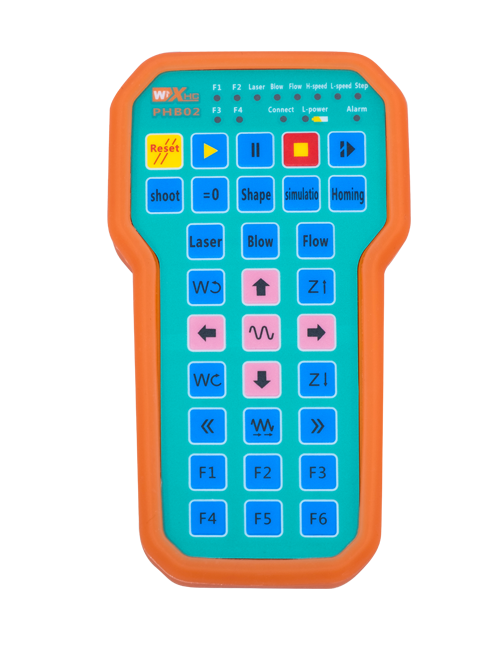
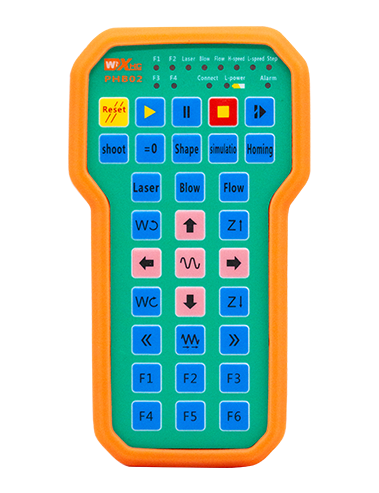
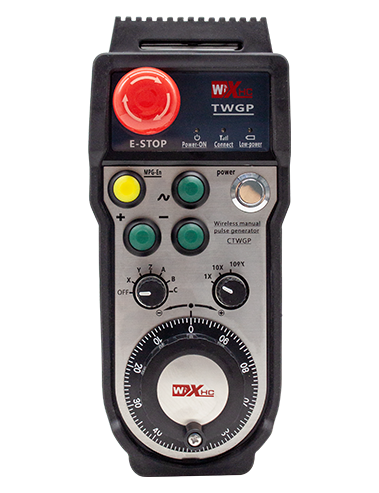
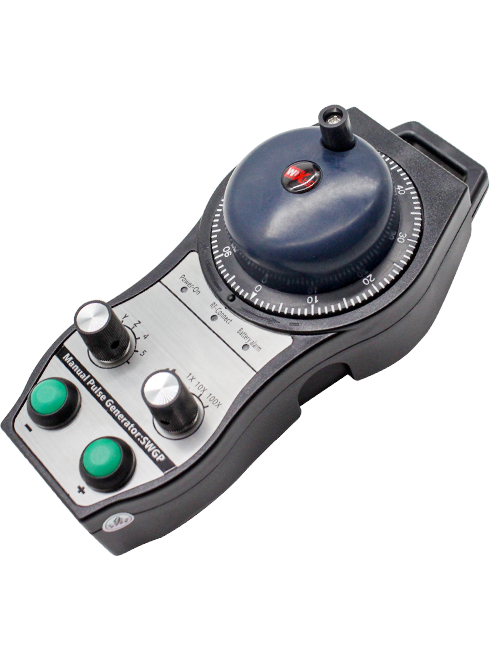
Nkowa

1.Nmkpọ Okwu mmalite
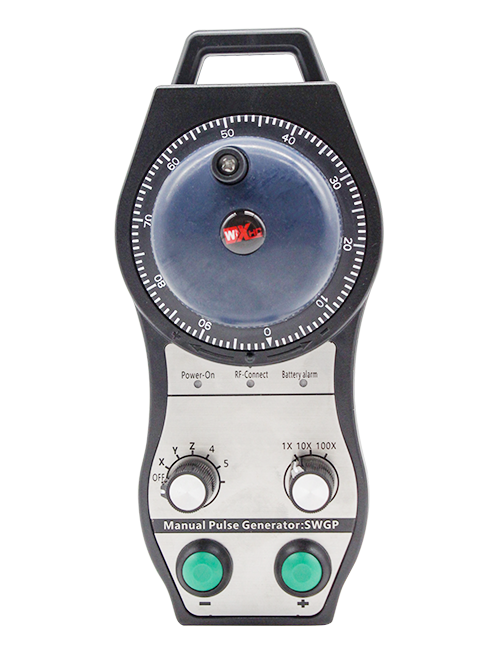
A na-eji njikwa ime ikuku ikuku maka ntụzịaka aka, Iche, ntọala ngwá ọrụ na ọrụ ndị ọzọ nke CNC igwe ngwaọrụ. Ngwaahịa a na-eme teknụzụ nnyefe ikuku ikuku, na-ewepụ njikọ ọdịnala nke usoro ọdịnala, na -ebelata ọdịda akụrụngwa kpatara, Iwepu ọghọm nke eriri USB, Mmanụ Ala, wdg, ọ dịkwa mfe iji rụọ ọrụ. Ọ na-adaba na ngwa igwe CNC dị ka ụlọ ọrụ gantry machining, gantry vetikal lathes, na CNC gia nhazi igwe, ma dakọtara na ụdị usoro CNC dị iche iche na ahịa, gụnyere Siemens, Mitsubishi, Gopia, Syntec na ndị ọzọ.
2.Ngosipụta ngwaahịa
1. Na-enweta teknụzụ nzikọrịta ozi ikuku 433MHz site na iji ogologo ọrụ ikuku 20 mize.
2.Ntugharị ugboro ugboro na-agbanwe agbanwe; 32 Enwere ike iji setịpụ njikwa ikuku ikuku n'otu oge na-enweghị nnyonye anya.
3.Na-akwado bọtịnụ nkwụsị ihe mberede, na bọtịnụ nkwụsị ihe mberede na-anọgide na-arụ ọrụ ọbụlagodi mgbe agbanyụrụ ihe njikwa anya.
4.Na-akwado 3 bọtịnụ omenala nwere ngbanwe akara ngosi IO.
5.Na-akwado njikwa 6-axis, na 7 na 12-axis njikwa bụ customizable.
6. Na-akwado njikwa mmụba 3 ọsọ, na 4-ọsọ njikwa nkwalite bụ customizable.
7.na-akwado ọrụ bọtịnụ ike, nke nwere ike wepụta mgbanaka IO, ma jikwaa nhọrọ axis, nkwalite na encoder.
8.Na-akwado imegharị ụdị ngbanwe nke nhọrọ axis na mmụba site na ngwanrọ.
9. Na-akwado koodu pulse na nkọwapụta nke 100 Pulses kwa mgbanwe.
10. Na-akwado chaja ụdị-C ọkọlọtọ na nkọwa chaja 5V-2A; batrị arụnyere n'ime ya
nkọwapụta: 14500 / 1100mah.
| Voltaji na-arụ ọrụ na ọdụ ọdụ aka ugbu a |
3.7V/20.0mA |
| Nchaji nkọwapụta batrị |
3.7V/14500/1100mAh
|
| Ogologo Oti mkpu Volta dị ala nke ọdụ aka ejiri |
<3.35V |
| Voltaji na-ebunye ike nnata |
DC5V-24V/1A |
| Oke Mbupu Mpụpụta Mberede Nnata |
Ac125v-1A / DC30V-2A |
| Onye nnata Kwado oke ibu nrụpụta |
Ac125v-1A / DC30V-2A |
| Oke Mbupute bọtịnụ omenala nnata |
Dc24v / 50ma
|
| Oke nsonye axis nhọrọ nnabata nnata |
Dc24v / 50ma |
| Oke ibu mbupute nnabata nnata |
Dc24v / 50ma |
| Ike nfefe ọdụ ejiri aka |
15dum
|
| Nnata na-anata uche |
-100dum |
| Nkwukọrịta nkwukọrịta ikuku |
433Mhz ugboro ugboro
|
| Ogologo nkwukọrịta ikuku |
20 mita anya na-enweghị mgbochi
|
| Okpomọkụ na-arụ ọrụ |
-25℃<Nke X<55℃ |
| Ogologo dobe dị mma |
1 m
|
| Ọnụọgụ bọtịnụ omenala |
3
|
| Ibu ngwaahịa |
546.86(g) |
| Akụkụ ngwaahịa |
200*87*72(mm) |
4. Mmepe mmeghe nke ngwaahịa

Ndetu:
① Emergency Stop Button:
Pịa bọtịnụ Mkpuchi mberede, otu abụọ nke nkwụsị mberede nkwụsị IO na nnata ga-akwụsị, a ga-emebikwa ọrụ njikwa ime obodo niile. Hapụ bọtịnụ nkwụsị ihe mberede, a ga-emechi ihe nkwụsị mberede IO na nnata, a ga-eweghachikwa ọrụ njikwa ime obodo niile. Na mgbakwunye, ọ bụrụgodị na agbanyụrụ remote control, ịpị bọtịnụ nkwụsị ihe mberede ka nwere ike ịgbalite ihe nkwụsị mberede IO nke nnata.
② Enable Button:
Pịa bọtịnụ ike n'akụkụ abụọ, Usoro abụọ nke mee ka IO pụta na onye nata ga-eduzi. Hapụ bọtịnụ ike, na ntinye aka IO ga-akwụsị. Ọ dị mkpa ka ịpịa ma jide bọtịnụ ike tupu ịgbanye nhọrọ axis, ịdị ukwuu ma ọ bụ na-atụgharị anya njikwa maka ọrụ ahụ ka ọ rụọ ọrụ. Enwere ike ịkagbu ọrụ a site na ngwanrọ nhazi..
③ Axis Selection Switch (Mgbanwe ọkụ):
Pịa ma jide bọtịnụ Kwado, mgbe ahụ, ịgbanye mgba ọkụ nhọrọ axis nwere ike ijikwa mmegharị nke axis .Pịa ma jide bọtịnụ nwee ike, wee gbanye mgba ọkụ nhọrọ axis ka ịgbanwee axis ngagharị nke njikwa anya na-achịkwa. Gbanwee mgba ọkụ site na ọnọdụ gbanyụọ gaa n'ọnọdụ axis ọ bụla, na remote control ga-agbanye na-akpaghị aka.
④ Pulse Encoder:
Pịa ma jituo bọtịnụ mee ka ọ tụgharịa pulse encoder, ọ ga-emepụta akara usu iji chịkwaa mmegharị nke axis igwe.
⑤ LCD Display Screen:

5. Eserese Ngwa Ngwa

6. Ntuziaka nrụnye ngwaahịa
6.1 Nzọụkwụ nrụnye Ngwaahịa
1. Wụnye ihe nnata n'ime kabinet eletrik site na eriri dị n'azụ ya, ma ọ bụ tinye ya n'ime ụlọ ọkụ eletrik site na oghere ịghasa na nkuku anọ nke nnata.
2. Na-ezo aka na eserese na-anabata ihe, Jiri ya tụnyere akụrụngwa saịtị gị, ma jikọọ akụrụngwa na ihe nnata na eriri.
3. Mgbe emechara onye nnata na ebe, tinye antenna nkwado nke nnata nke ọma. Malite ma ọ bụ dobe nsọtụ elu nke antenna na mpụga kabinet eletriki. A na-atụ aro ka itinye ya n'elu ụlọ ọkụ eletrik maka ịrụ ọrụ mgbaàmà kachasị mma. Ahapụla antenna arụnyere ma ọ bụ tinye ya n'ime kabinet eletriki; ma obughi otua, ọdịda mgbaàmà nwere ike ime.
4. N'ikpaazu, gbanye ngbanwe ike njikwa anya, Mgbe ahụ ị nwere ike rụọ ọrụ igwe site na njikwa anya.
6.2 Akụkụ nwụnye nke nnata

6.3 Onye na-anabata onyinye
7. Ntuziaka Ọrụ Ọrụ
1. Ike na igwe na onye nata ya. Ihe ngosi ọrụ nnata na-enwu. Ka chajịchara njikwa ikuku eletrọnịkị ikuku nke ọma, tụgharịa ya site na mgbanyụ ọkụ gaa na gia X-axis, na ihe ngosi njikwa anya na-enwu ọkụ.
2. Họrọ axis : Pịa ma jide bọtịnụ Kwado, gbanye mgba ọkụ nhọrọ axis ka ịhọrọ axis a ga-arụ ọrụ.
3. Họrọ nkwalite ahụ: Pịa ma jide bọtịnụ Kwado, gbanye mgba ọkụ nkwalite ka ịhọrọ ngwa nkwalite achọrọ.
4. Axis ije: Pịa ma jide bọtịnụ Kwado, họrọ ngbanwe nhọrọ axis na mgba ọkụ na-ebuwanye ibu, wee tụgharịa koodu usu. Tụgharịa n'akụkụ elekere ka ịkwaga axis n'ụzọ dị mma, ma tụgharịa gaa n'aka elekere ọzọ iji mee ka axis dị n'ụzọ ọjọọ.
5. Pịa ma jide bọtịnụ omenala ọ bụla, bọtịnụ kwekọrọ IO mmepụta nke nnata ga-agbanye; hapụ bọtịnụ, na mmepụta ga-agbanyụ.
6. Pịa bọtịnụ Mkpuchi mberede, Nkwụsị mberede mberede kwekọrọ IO nke nnata kwụsịrị na ọrụ njikwa anya na-aghọ ihe na-adịghị mma. Hapụ bọtịnụ nkwụsị ihe mberede, ihe nkwụsị mberede IO na-emechi ma weghachite ọrụ njikwa anya.
7. Ọ bụrụ na anaghị arụ ọrụ njikwa ikuku ikuku ruo oge ụfọdụ, Ọ ga-abanye na-ehi ụra na-akpaghị aka iji belata oriri ike. Enwere ike iji ya mee ihe ọzọ site na ịpị bọtịnụ gbanye ọzọ.
8.Ọ bụrụ na anaghị eji eriri ikuku ikuku mee ogologo oge, gbanyụọ axis ịgbanwee ka gbanyụọ ike na ịgbatị ndụ batrị
8. Nkọwapụta Ngwaahịa Ngwaahịa
①:UWGP na-anọchi anya ụdị ọdịdị.
②:Oke Mmepụta Pulse:
01: Na-egosi na mgbama nrụpụta bụ, B; Pount voltaji 5v; Onu ogugu 100PPR.
02: Na-egosi na mgbama nrụpụta bụ, B; Pult voltava 12v; ọnụọgụ pulse 25PPR.
03: Na-egosi na mgbama nrụpụta bụ, B, A -, B -; Pount voltaji 5v; Onu ogugu 100PPR.
04: Na-egosiputa ngbanye NPN dị ala, ya na mgbaàmà mmepụta nke a na b; Ọnụ ọgụgụ nke pulses bụ 100PPR.
05: Na-egosiputa ihe ngosi pnp dị elu, ya na mgbaàmà mmepụta nke a na b; Ọnụ ọgụgụ Pulses bụ 100PPR.
③:Na-anọchi anya ọnụọgụ mgbanwe nhọrọ axis; 6 na-anọchi anya 6 axes, 7 na-anọchi anya 7 axes, were gabazie.
④: Na-anọchi anya ụdị mgbaama nke ngbanwe nhọrọ axis. A na-anọchi anya mgbama mmepụta n'isi ruo n'isi, na B na-anọchi anya mgbama mmepụta koodu.
⑤: Na-anọchi anya ụdị mgbaama nke mgba ọkụ na-ebuwanye ibu.A na-anọchi anya mgbama mmepụta n'ókè-na-atụ, na B na-anọchi anya mgbama mmepụta koodu.
⑥: Na-anọchite anya ọnụọgụ nke bọtịnụ ọdịnala; 3 kwekọrọ na 6 bọtịnụ omenala.
⑦: Na-anọchite anya ọkọnọ ike maka njikwa ime sistemụ. 05 na-anọchi anya 5V ike ọkọnọ, na 24 na-anọchi anya 24V ike ọkọnọ.
⑧: Na-anọchi anya ọnọdụ nchaji kọntaktị. Ọ na-amalite chajị na-akpaghị aka ma etinyeghachi ya na ntọala nchaji.
9. Nchọpụta ngwa agha

10. Nlekọta na nlekọta
1. Biko jiri ya na akọrọ gburugburu ebe obibi na ọnọdụ okpomọkụ na nrụgide ịgbatị ndụ ọrụ ya.
2. Biko zere iji na gburugburu adịghị mma dị ka mmiri ozuzo na mmiri ịgbatị ndụ ọrụ.
3. Biko debe ọdịdị nke remote control ka ọ gbatịa ndụ ọrụ ya.
4. Biko zere ịzọpịa, idobe, ma ọ bụ bumping, wdg. iji gbochie mmebi nke ihe mejupụtara nkenke n'ime njikwa anya ma ọ bụ njehie ziri ezi.
5. Ọ bụrụ na ejighi ya ogologo oge, biko chekwaa ihe njikwa anya n'ebe dị ọcha na nchekwa.
6. Zere mmiri na ujo n'oge nchekwa na njem.
11. Ozi Nchedo
1. Biko gụọ ntuziaka ahụ nke ọma tupu iji ya ma gbochie ndị ọkachamara na-abụghị ndị ọrụ.
2. Biko chajịa njikwa anya n'oge ọ bụla mgbe ọkwa batrị dị ala, iji zere arụrụ arụ na mmejọ arụ ọrụ nke ike na-ezughị ezu kpatara.
3. Ọ bụrụ na ị rụkwaa ya n'onwe gị wee mebie ya, akwụkwọ ikike ahụ ga-abụ ihe efu.