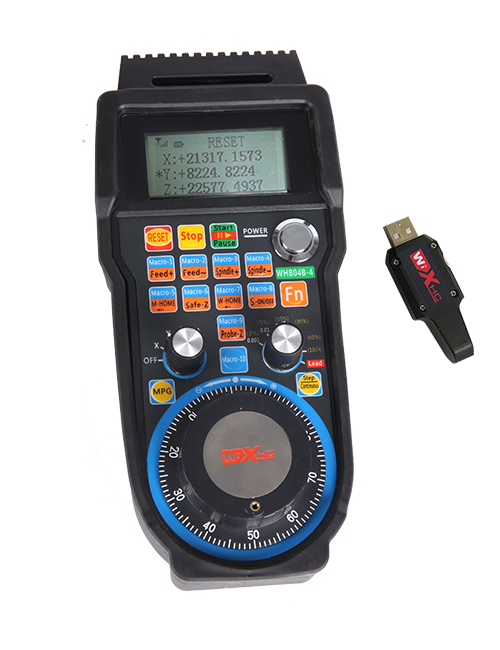
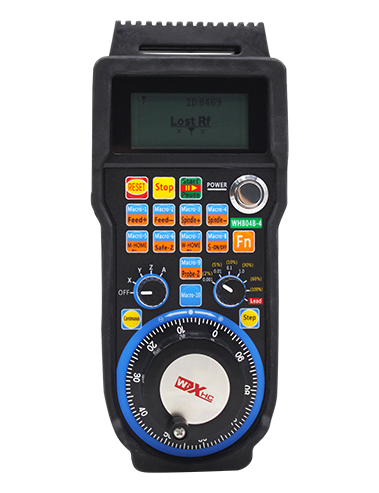
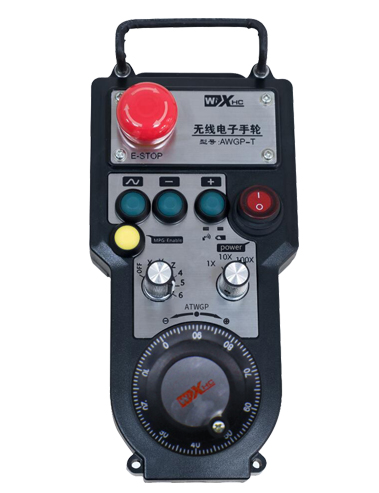
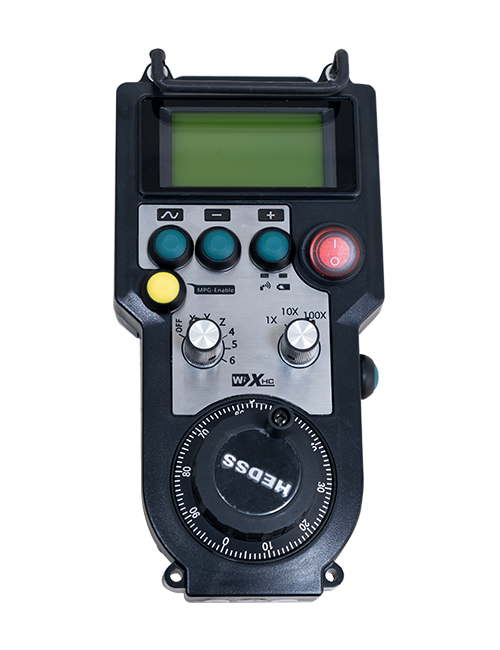
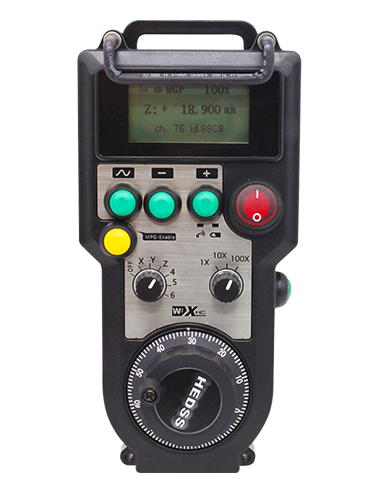
ಬೆಂಬಲಿಸು 2 ಗ್ರಾಹಕೀಯಗೊಳಿಸಬಹುದಾದ ಗುಂಡಿಗಳು, ಸ್ವಿಚ್-ಟೈಪ್ IO ಸಿಗ್ನಲ್ ಔಟ್ಪುಟ್ನೊಂದಿಗೆ;
ಬೆಂಬಲಿಸು -2 ಅಕ್ಷದ ನಿಯಂತ್ರಣ;
3-ಹಂತದ ವರ್ಧನ ನಿಯಂತ್ರಣವನ್ನು ಬೆಂಬಲಿಸುತ್ತದೆ;


1.ಉತ್ಪನ್ನ ಪರಿಚಯ
2. ಉತ್ಪನ್ನದ ಕ್ರಿಯಾತ್ಮಕ ವೈಶಿಷ್ಟ್ಯಗಳು
| ವೈರ್ಲೆಸ್ ರಿಮೋಟ್ನ ಆಪರೇಟಿಂಗ್ ವೋಲ್ಟೇಜ್ ಮತ್ತು ಕರೆಂಟ್ |
3V/14MA
|
| ಬ್ಯಾಟರಿ ವಿಶೇಷಣಗಳು | 2 ಎಎ ಕ್ಷಾರೀಯ ಬ್ಯಾಟರಿಗಳು, ಗಾತ್ರ 5 |
| ವೈರ್ಲೆಸ್ ರಿಮೋಟ್ನ ಕಡಿಮೆ ವೋಲ್ಟೇಜ್ ಎಚ್ಚರಿಕೆಯ ಶ್ರೇಣಿ | < 2.3ವಿ |
| ರಿಸೀವರ್ ವಿದ್ಯುತ್ ಸರಬರಾಜು ವೋಲ್ಟೇಜ್ | DC5V-24V/A |
| ರಿಸೀವರ್ ತುರ್ತು ನಿಲುಗಡೆ ಔಟ್ಪುಟ್ ಲೋಡ್ ಶ್ರೇಣಿ | AC125V-1A/DC30V-2A |
| ರಿಸೀವರ್ ಔಟ್ಪುಟ್ ಲೋಡ್ ಶ್ರೇಣಿಯನ್ನು ಸಕ್ರಿಯಗೊಳಿಸುತ್ತದೆ |
AC125V-1A/DC30V-2A
|
| ರಿಸೀವರ್ ಕಸ್ಟಮ್ ಬಟನ್ ಔಟ್ಪುಟ್ ಲೋಡ್ ಶ್ರೇಣಿ | DC24V/50mA |
| ರಿಸೀವರ್ ಅಕ್ಷದ ಆಯ್ಕೆಯ ಔಟ್ಪುಟ್ ಲೋಡ್ ಶ್ರೇಣಿ | DC24V/50mA |
| ರಿಸೀವರ್ ವರ್ಧನೆ ಔಟ್ಪುಟ್ ಲೋಡ್ ಶ್ರೇಣಿ | DC24V/50mA |
| ಹ್ಯಾಂಡ್ಹೆಲ್ಡ್ ಟರ್ಮಿನಲ್ನ ಪ್ರಸರಣ ಶಕ್ತಿ |
15dBm
|
| ಸ್ವೀಕರಿಸುವವರು ಸೂಕ್ಷ್ಮತೆಯನ್ನು ಸ್ವೀಕರಿಸುತ್ತಾರೆ | -100dBm |
| ವೈರ್ಲೆಸ್ ಸಂವಹನ ಆವರ್ತನ | 433MHz ಆವರ್ತನ ಬ್ಯಾಂಡ್ |
| ವೈರ್ಲೆಸ್ ಸಂವಹನ ದೂರ | ತಡೆಗೋಡೆ ಮುಕ್ತ ದೂರ 40 ಮೀಟರ್ |
| ಕಾರ್ಯಾಚರಣೆಯ ತಾಪಮಾನ | -25℃ < X < 55℃ |
| ವಿರೋಧಿ ಪತನದ ಎತ್ತರ | 1 (ಮೀಟರ್) |
| ಕಸ್ಟಮ್ ಬಟನ್ ಪ್ರಮಾಣ | 2 |


① Pulse encoder:
ಸಕ್ರಿಯಗೊಳಿಸು ಬಟನ್ ಅನ್ನು ಒತ್ತಿ ಮತ್ತು ಹಿಡಿದುಕೊಳ್ಳಿ, ಪಲ್ಸ್ ಎನ್ಕೋಡರ್ ಅನ್ನು ಅಲ್ಲಾಡಿಸಿ, ನಾಡಿ ಸಂಕೇತವನ್ನು ಹೊರಸೂಸುತ್ತವೆ,ಮತ್ತು ಯಂತ್ರದ ಅಕ್ಷದ ಚಲನೆಯನ್ನು ನಿಯಂತ್ರಿಸಿ.
② Enable button:
ಎರಡೂ ಬದಿಗಳಲ್ಲಿ ಸಕ್ರಿಯಗೊಳಿಸು ಬಟನ್ ಅನ್ನು ಒತ್ತಿರಿ, ಮತ್ತು ರಿಸೀವರ್ನಲ್ಲಿ ಸಕ್ರಿಯಗೊಳಿಸುವ IO ಔಟ್ಪುಟ್ಗಳ ಎರಡು ಸೆಟ್ಗಳು ನಡೆಸುತ್ತವೆ. IO ಔಟ್ಪುಟ್ ಅನ್ನು ಸಕ್ರಿಯಗೊಳಿಸಲು ಸಂಪರ್ಕ ಕಡಿತಗೊಳಿಸಲು ಸಕ್ರಿಯಗೊಳಿಸು ಬಟನ್ ಅನ್ನು ಬಿಡುಗಡೆ ಮಾಡಿ; ಮತ್ತು ಅಕ್ಷದ ಆಯ್ಕೆಯ ವರ್ಧನೆಯನ್ನು ಬದಲಾಯಿಸುವ ಮೊದಲು ಮತ್ತು ಹ್ಯಾಂಡ್ವೀಲ್ ಅನ್ನು ಅಲುಗಾಡಿಸುವ ಮೊದಲು,ಪರಿಣಾಮಕಾರಿಯಾಗಲು ಸಕ್ರಿಯಗೊಳಿಸು ಬಟನ್ ಅನ್ನು ಹಿಡಿದಿಟ್ಟುಕೊಳ್ಳಬೇಕು; ಕಾನ್ಫಿಗರೇಶನ್ ಸಾಫ್ಟ್ವೇರ್ ಮೂಲಕ ಈ ಕಾರ್ಯವನ್ನು ರದ್ದುಗೊಳಿಸಬಹುದು.
③ Indicator lights:
ಎಡಭಾಗದ ಬೆಳಕು: ಬೆಳಕಿನ ಮೇಲೆ ಶಕ್ತಿ,ಹ್ಯಾಂಡ್ವೀಲ್ ಪವರ್ ಆನ್ ಮಾಡಲು ಆಫ್ ಆಯ್ಕೆ ಮಾಡಲು ಅಕ್ಷವನ್ನು ಬಳಸುತ್ತದೆ, ಮತ್ತು ಪವರ್ ಆನ್ ಆದ ನಂತರ ಈ ಲೈಟ್ ಆನ್ ಆಗಿರುತ್ತದೆ;
ಮಧ್ಯಮ ಬೆಳಕು: ಹ್ಯಾಂಡ್ವೀಲ್ನ ಯಾವುದೇ ಕಾರ್ಯವನ್ನು ನಿರ್ವಹಿಸುವಾಗ ಬೆಳಗುವ ಸಿಗ್ನಲ್ ಲೈಟ್, ಮತ್ತು ಯಾವುದೇ ಕಾರ್ಯಾಚರಣೆ ಇಲ್ಲದಿದ್ದಾಗ ಬೆಳಗುವುದಿಲ್ಲ;
ಬಲಭಾಗದ ಬೆಳಕು: ಕಡಿಮೆ ವೋಲ್ಟೇಜ್ ಎಚ್ಚರಿಕೆಯ ಬೆಳಕು, ಕಡಿಮೆ ಬ್ಯಾಟರಿ ಮಟ್ಟ,ಇದು ಬೆಳಕು ಚೆಲ್ಲುತ್ತದೆ ಅಥವಾ ಆನ್ ಆಗಿರುತ್ತದೆ, ಬ್ಯಾಟರಿಯನ್ನು ಬದಲಾಯಿಸಬೇಕಾಗಿದೆ.
④ Emergency stop button:
ತುರ್ತು ನಿಲುಗಡೆ ಬಟನ್ ಒತ್ತಿರಿ, ಮತ್ತು ರಿಸೀವರ್ನಲ್ಲಿ ಎರಡು ಸೆಟ್ಗಳ ತುರ್ತು ನಿಲುಗಡೆ IO ಔಟ್ಪುಟ್ಗಳನ್ನು ಸಂಪರ್ಕ ಕಡಿತಗೊಳಿಸಲಾಗುತ್ತದೆ, ಮತ್ತು ಹ್ಯಾಂಡ್ವೀಲ್ನ ಎಲ್ಲಾ ಕಾರ್ಯಗಳು ಅಮಾನ್ಯವಾಗಿರುತ್ತವೆ.
⑤ Magnification switch:
ವರ್ಧನ ಸ್ವಿಚ್ ಅನ್ನು ಬದಲಾಯಿಸಲು ಸಕ್ರಿಯಗೊಳಿಸು ಬಟನ್ ಅನ್ನು ಒತ್ತಿ ಮತ್ತು ಹಿಡಿದುಕೊಳ್ಳಿ, ಇದು ಹ್ಯಾಂಡ್ವೀಲ್ನಿಂದ ನಿಯಂತ್ರಿಸಲ್ಪಡುವ ವರ್ಧನೆಯನ್ನು ಬದಲಾಯಿಸಬಹುದು.
⑥ Axis selection switch (ವಿದ್ಯುತ್ ಸ್ವಿಚ್):
ಅಕ್ಷದ ಆಯ್ಕೆ ಸ್ವಿಚ್ ಅನ್ನು ಬದಲಾಯಿಸಲು ಸಕ್ರಿಯಗೊಳಿಸು ಬಟನ್ ಅನ್ನು ಒತ್ತಿ ಮತ್ತು ಹಿಡಿದುಕೊಳ್ಳಿ, ಇದು ಹ್ಯಾಂಡ್ವೀಲ್ನಿಂದ ನಿಯಂತ್ರಿಸಲ್ಪಡುವ ಚಲನೆಯ ಅಕ್ಷವನ್ನು ಬದಲಾಯಿಸಬಹುದು. ಈ ಸ್ವಿಚ್ ಅನ್ನು ಆಫ್ನಿಂದ ಯಾವುದೇ ಅಕ್ಷಕ್ಕೆ ಬದಲಾಯಿಸಿ ಮತ್ತು ಹ್ಯಾಂಡ್ವೀಲ್ ಪವರ್ ಅನ್ನು ಆನ್ ಮಾಡಿ.
⑦ Custom button:
ಎರಡು ಕಸ್ಟಮ್ ಬಟನ್ಗಳು, ಪ್ರತಿಯೊಂದೂ ರಿಸೀವರ್ನಲ್ಲಿನ IO ಔಟ್ಪುಟ್ ಪಾಯಿಂಟ್ಗೆ ಅನುರೂಪವಾಗಿದೆ.

1. ಹಿಂಭಾಗದಲ್ಲಿ ಬಕಲ್ ಮೂಲಕ ವಿದ್ಯುತ್ ಕ್ಯಾಬಿನೆಟ್ಗೆ ರಿಸೀವರ್ ಅನ್ನು ಸ್ಥಾಪಿಸಿ, ಅಥವಾ ರಿಸೀವರ್ನ ನಾಲ್ಕು ಮೂಲೆಗಳಲ್ಲಿ ಸ್ಕ್ರೂ ರಂಧ್ರಗಳ ಮೂಲಕ ಕ್ಯಾಬಿನೆಟ್ಗೆ ಅದನ್ನು ಸ್ಥಾಪಿಸಿ.
2. ನಮ್ಮ ರಿಸೀವರ್ ವೈರಿಂಗ್ ರೇಖಾಚಿತ್ರವನ್ನು ನೋಡಿ ಮತ್ತು ಅದನ್ನು ನಿಮ್ಮ ಆನ್-ಸೈಟ್ ಉಪಕರಣದೊಂದಿಗೆ ಹೋಲಿಕೆ ಮಾಡಿ. ಕೇಬಲ್ಗಳ ಮೂಲಕ ರಿಸೀವರ್ಗೆ ಉಪಕರಣವನ್ನು ಸಂಪರ್ಕಿಸಿ.
3.ರಿಸೀವರ್ ಅನ್ನು ಸರಿಯಾಗಿ ಸರಿಪಡಿಸಿದ ನಂತರ, ರಿಸೀವರ್ ಹೊಂದಿರುವ ಆಂಟೆನಾವನ್ನು ಸಂಪರ್ಕಿಸಬೇಕು, ಮತ್ತು ಆಂಟೆನಾದ ಹೊರ ತುದಿಯನ್ನು ಸ್ಥಾಪಿಸಬೇಕು ಅಥವಾ ವಿದ್ಯುತ್ ಕ್ಯಾಬಿನೆಟ್ ಹೊರಗೆ ಇಡಬೇಕು. ಉತ್ತಮ ಸಿಗ್ನಲ್ ಪರಿಣಾಮಕ್ಕಾಗಿ ವಿದ್ಯುತ್ ಕ್ಯಾಬಿನೆಟ್ನ ಮೇಲ್ಭಾಗದಲ್ಲಿ ಇರಿಸಲು ಶಿಫಾರಸು ಮಾಡಲಾಗಿದೆ. ಆಂಟೆನಾವನ್ನು ಸಂಪರ್ಕವಿಲ್ಲದೆ ಬಿಡಲು ಅಥವಾ ವಿದ್ಯುತ್ ಕ್ಯಾಬಿನೆಟ್ ಒಳಗೆ ಇರಿಸಲು ಇದನ್ನು ನಿಷೇಧಿಸಲಾಗಿದೆ, ಇದು ಸಿಗ್ನಲ್ ನಿಷ್ಪ್ರಯೋಜಕವಾಗಲು ಕಾರಣವಾಗಬಹುದು.
4. ಅಂತಿಮವಾಗಿ, ಹ್ಯಾಂಡ್ವೀಲ್ನ ಪವರ್ ಸ್ವಿಚ್ ಆನ್ ಮಾಡಿ, ಮತ್ತು ಹ್ಯಾಂಡ್ವೀಲ್ ಅನ್ನು ಬಳಸಿಕೊಂಡು ನೀವು ಯಂತ್ರವನ್ನು ದೂರದಿಂದಲೇ ನಿರ್ವಹಿಸಬಹುದು.
6.2 ರಿಸೀವರ್ ಅನುಸ್ಥಾಪನೆಯ ಆಯಾಮಗಳು

6.3 ರಿಸೀವರ್ ವೈರಿಂಗ್ ಉಲ್ಲೇಖ ರೇಖಾಚಿತ್ರ

7. ಉತ್ಪನ್ನ ಕಾರ್ಯಾಚರಣೆಯ ಸೂಚನೆಗಳು
1. ಯಂತ್ರ ಮತ್ತು ರಿಸೀವರ್ ಅನ್ನು ಆನ್ ಮಾಡಿ. The receiver’s working indicator light flashes. ವೈರ್ಲೆಸ್ ಎಲೆಕ್ಟ್ರಾನಿಕ್ ಹ್ಯಾಂಡ್ವೀಲ್ನಲ್ಲಿ ಬ್ಯಾಟರಿಯನ್ನು ಸ್ಥಾಪಿಸಿ, ಬ್ಯಾಟರಿ ಕವರ್ ಅನ್ನು ಸುರಕ್ಷಿತಗೊಳಿಸಿ, ಮತ್ತು
ವೈರ್ಲೆಸ್ ಎಲೆಕ್ಟ್ರಾನಿಕ್ ಹ್ಯಾಂಡ್ವೀಲ್ನ ಪವರ್ ಸ್ವಿಚ್ ಆನ್ ಮಾಡಿ. The handwheel’s battery level indicator light is on.
2. ನಿರ್ದೇಶಾಂಕ ಅಕ್ಷವನ್ನು ಆಯ್ಕೆಮಾಡಿ: ಸಕ್ರಿಯಗೊಳಿಸು ಬಟನ್ ಅನ್ನು ಒತ್ತಿ ಮತ್ತು ಹಿಡಿದುಕೊಳ್ಳಿ, ಅಕ್ಷದ ಆಯ್ಕೆ ಸ್ವಿಚ್ ಅನ್ನು ಟಾಗಲ್ ಮಾಡಿ, ಮತ್ತು ನೀವು ಕಾರ್ಯನಿರ್ವಹಿಸಲು ಬಯಸುವ ಅಕ್ಷವನ್ನು ಆಯ್ಕೆಮಾಡಿ.
3. ವರ್ಧನೆಯನ್ನು ಆಯ್ಕೆಮಾಡಿ: ಸಕ್ರಿಯಗೊಳಿಸು ಬಟನ್ ಅನ್ನು ಒತ್ತಿ ಮತ್ತು ಹಿಡಿದುಕೊಳ್ಳಿ, ವರ್ಧನ ಸ್ವಿಚ್ ಅನ್ನು ಟಾಗಲ್ ಮಾಡಿ,ಮತ್ತು ಬಯಸಿದ ವರ್ಧನ ಮಟ್ಟವನ್ನು ಆಯ್ಕೆಮಾಡಿ.
4. ಚಲಿಸುವ ಅಕ್ಷ: ಸಕ್ರಿಯಗೊಳಿಸು ಬಟನ್ ಅನ್ನು ಒತ್ತಿ ಮತ್ತು ಹಿಡಿದುಕೊಳ್ಳಿ, ಅಕ್ಷದ ಆಯ್ಕೆ ಸ್ವಿಚ್ ಅನ್ನು ಆಯ್ಕೆಮಾಡಿ, ವರ್ಧಕ ಸ್ವಿಚ್ ಆಯ್ಕೆಮಾಡಿ, ತದನಂತರ ಪಲ್ಸ್ ಎನ್ಕೋಡರ್ ಅನ್ನು ತಿರುಗಿಸಿ. ಸರಿಸಲು ಪ್ರದಕ್ಷಿಣಾಕಾರವಾಗಿ ತಿರುಗಿಸಿ
ಧನಾತ್ಮಕ ಅಕ್ಷ ಮತ್ತು ಋಣಾತ್ಮಕ ಅಕ್ಷವನ್ನು ಸರಿಸಲು ಅಪ್ರದಕ್ಷಿಣಾಕಾರವಾಗಿ.
5. ಯಾವುದೇ ಕಸ್ಟಮ್ ಬಟನ್ ಅನ್ನು ಒತ್ತಿ ಮತ್ತು ಹಿಡಿದುಕೊಳ್ಳಿ, ಮತ್ತು ರಿಸೀವರ್ನ ಅನುಗುಣವಾದ ಬಟನ್ IO ಔಟ್ಪುಟ್ ಅನ್ನು ಆನ್ ಮಾಡಲಾಗುತ್ತದೆ. ಗುಂಡಿಯನ್ನು ಬಿಡುಗಡೆ ಮಾಡಿ, ಮತ್ತು ಔಟ್ಪುಟ್ ಅನ್ನು ಆಫ್ ಮಾಡಲಾಗುತ್ತದೆ.
6. ತುರ್ತು ನಿಲುಗಡೆ ಬಟನ್ ಒತ್ತಿರಿ, ರಿಸೀವರ್ನ ಅನುಗುಣವಾದ ತುರ್ತು ನಿಲುಗಡೆ IO ಔಟ್ಪುಟ್ ಸಂಪರ್ಕ ಕಡಿತಗೊಳ್ಳುತ್ತದೆ, ಹ್ಯಾಂಡ್ವೀಲ್ ಕಾರ್ಯವನ್ನು ನಿಷ್ಕ್ರಿಯಗೊಳಿಸಲಾಗುತ್ತದೆ,ತುರ್ತು ನಿಲುಗಡೆ ಬಟನ್ ಅನ್ನು ಬಿಡುಗಡೆ ಮಾಡಿ, ತುರ್ತು ನಿಲುಗಡೆ IO ಔಟ್ಪುಟ್ ಅನ್ನು ಮುಚ್ಚಲಾಗುತ್ತದೆ, ಮತ್ತು ಹ್ಯಾಂಡ್ವೀಲ್ ಕಾರ್ಯವನ್ನು ಪುನಃಸ್ಥಾಪಿಸಲಾಗುತ್ತದೆ.
7. ಹ್ಯಾಂಡ್ವೀಲ್ ಅನ್ನು ಸಮಯದವರೆಗೆ ಕಾರ್ಯನಿರ್ವಹಿಸದಿದ್ದರೆ, ವಿದ್ಯುತ್ ಬಳಕೆಯನ್ನು ಕಡಿಮೆ ಮಾಡಲು ಇದು ಸ್ವಯಂಚಾಲಿತವಾಗಿ ಸ್ಲೀಪ್ ಮೋಡ್ ಅನ್ನು ಪ್ರವೇಶಿಸುತ್ತದೆ. ಅದನ್ನು ಮತ್ತೆ ಬಳಸಿದಾಗ, ಸಕ್ರಿಯಗೊಳಿಸು ಬಟನ್ ಅನ್ನು ಒತ್ತುವ ಮೂಲಕ ಹ್ಯಾಂಡ್ವೀಲ್ ಅನ್ನು ಸಕ್ರಿಯಗೊಳಿಸಬಹುದು.
8. ಹ್ಯಾಂಡ್ವೀಲ್ ಅನ್ನು ದೀರ್ಘಕಾಲದವರೆಗೆ ಬಳಸದಿದ್ದರೆ, ಹ್ಯಾಂಡ್ವೀಲ್ ಶಾಫ್ಟ್ ಅನ್ನು ಆಫ್ ಸ್ಥಾನಕ್ಕೆ ಬದಲಾಯಿಸಲು ಶಿಫಾರಸು ಮಾಡಲಾಗಿದೆ, ಹ್ಯಾಂಡ್ವೀಲ್ ಶಕ್ತಿಯನ್ನು ಆಫ್ ಮಾಡಿ, ಮತ್ತು ಬ್ಯಾಟರಿ ಅವಧಿಯನ್ನು ವಿಸ್ತರಿಸಿ.
8. ಉತ್ಪನ್ನ ಮಾದರಿ ವಿವರಣೆ

① :ZTWGP ಗೋಚರ ಶೈಲಿಯನ್ನು ಪ್ರತಿನಿಧಿಸುತ್ತದೆ
②:ಪಲ್ಸ್ ಔಟ್ಪುಟ್ ನಿಯತಾಂಕಗಳು:
01: ಪಲ್ಸ್ ಔಟ್ಪುಟ್ ಸಿಗ್ನಲ್ ಎ ಎಂದು ಸೂಚಿಸುತ್ತದೆ, ಬಿ; ಪಲ್ಸ್ ವೋಲ್ಟೇಜ್ 5 ವಿ; ನಾಡಿ ಪ್ರಮಾಣ 100PPR.
02:ಪಲ್ಸ್ ಔಟ್ಪುಟ್ ಸಿಗ್ನಲ್ಗಳು ಎ ಮತ್ತು ಬಿ ಎಂದು ಸೂಚಿಸುತ್ತದೆ; ಪಲ್ಸ್ ವೋಲ್ಟೇಜ್ 12 ವಿ; ನಾಡಿ ಪ್ರಮಾಣ 100PPR.
03:ಪಲ್ಸ್ ಔಟ್ಪುಟ್ ಸಿಗ್ನಲ್ಗಳು ಎ ಎಂದು ಸೂಚಿಸುತ್ತದೆ, ಬಿ, ಎ -, ಬಿ -; ಪಲ್ಸ್ ವೋಲ್ಟೇಜ್ 5 ವಿ; ನಾಡಿ ಪ್ರಮಾಣ 100PPR.
04:ಕಡಿಮೆ ಮಟ್ಟದ NPN ಓಪನ್ ಸರ್ಕ್ಯೂಟ್ ಔಟ್ಪುಟ್ ಅನ್ನು ಸೂಚಿಸುತ್ತದೆ, A ಮತ್ತು B ಯ ಪಲ್ಸ್ ಔಟ್ಪುಟ್ ಸಂಕೇತಗಳೊಂದಿಗೆ;ಬೇಳೆಕಾಳುಗಳ ಸಂಖ್ಯೆ 100PPR ಆಗಿದೆ.
05:ಉನ್ನತ ಮಟ್ಟದ PNP ಮೂಲ ಔಟ್ಪುಟ್ ಅನ್ನು ಸೂಚಿಸುತ್ತದೆ, A ಮತ್ತು B ಯ ಪಲ್ಸ್ ಔಟ್ಪುಟ್ ಸಂಕೇತಗಳೊಂದಿಗೆ; ಬೇಳೆಕಾಳುಗಳ ಸಂಖ್ಯೆ 100PPR ಆಗಿದೆ.
③:ಅಕ್ಷದ ಆಯ್ಕೆ ಸ್ವಿಚ್ಗಳ ಸಂಖ್ಯೆಯನ್ನು ಪ್ರತಿನಿಧಿಸುತ್ತದೆ, 2 ಪ್ರತಿನಿಧಿಸುತ್ತದೆ 2 ಅಕ್ಷಗಳು.
④:ಅಕ್ಷದ ಆಯ್ಕೆ ಸ್ವಿಚ್ ಸಿಗ್ನಲ್ ಪ್ರಕಾರವನ್ನು ಪ್ರತಿನಿಧಿಸುತ್ತದೆ, ಎ ಪಾಯಿಂಟ್-ಟು-ಪಾಯಿಂಟ್ ಔಟ್ಪುಟ್ ಸಿಗ್ನಲ್ ಅನ್ನು ಪ್ರತಿನಿಧಿಸುತ್ತದೆ, ಮತ್ತು ಬಿ ಎನ್ಕೋಡ್ ಮಾಡಿದ ಔಟ್ಪುಟ್ ಸಿಗ್ನಲ್ ಅನ್ನು ಪ್ರತಿನಿಧಿಸುತ್ತದೆ.
⑤:ಗುಣಾಕಾರ ಸ್ವಿಚ್ ಸಿಗ್ನಲ್ ಪ್ರಕಾರವನ್ನು ಪ್ರತಿನಿಧಿಸುತ್ತದೆ, ಎ ಪಾಯಿಂಟ್-ಟು-ಪಾಯಿಂಟ್ ಔಟ್ಪುಟ್ ಸಿಗ್ನಲ್ ಅನ್ನು ಪ್ರತಿನಿಧಿಸುತ್ತದೆ, ಮತ್ತು ಬಿ ಎನ್ಕೋಡ್ ಮಾಡಿದ ಔಟ್ಪುಟ್ ಸಿಗ್ನಲ್ ಅನ್ನು ಪ್ರತಿನಿಧಿಸುತ್ತದೆ.
⑥:ಕಸ್ಟಮ್ ಬಟನ್ಗಳ ಸಂಖ್ಯೆಯನ್ನು ಪ್ರತಿನಿಧಿಸುತ್ತದೆ, 2 ಪ್ರತಿನಿಧಿಸುತ್ತದೆ 2 ಕಸ್ಟಮ್ ಗುಂಡಿಗಳು.
⑦:ಸಿಸ್ಟಮ್ ಹ್ಯಾಂಡ್ವೀಲ್ಗೆ ವಿದ್ಯುತ್ ಸರಬರಾಜನ್ನು ಪ್ರತಿನಿಧಿಸುತ್ತದೆ, ಮತ್ತು 05 5V ವಿದ್ಯುತ್ ಸರಬರಾಜನ್ನು ಪ್ರತಿನಿಧಿಸುತ್ತದೆ.
⑧:L ಎಡ ಕಾಲಮ್ ಅನ್ನು ಪ್ರತಿನಿಧಿಸುತ್ತದೆ (ಎಡ ಚಾಕು ಹೋಲ್ಡರ್), ಮತ್ತು R ಬಲ ಕಾಲಮ್ ಅನ್ನು ಪ್ರತಿನಿಧಿಸುತ್ತದೆ (ಬಲ ಚಾಕು ಹೋಲ್ಡರ್).
9.ಉತ್ಪನ್ನ ಅಸಮರ್ಪಕ ಕಾರ್ಯಗಳಿಗೆ ಪರಿಹಾರ

1. ದಯವಿಟ್ಟು ಅದರ ಸೇವಾ ಜೀವನವನ್ನು ವಿಸ್ತರಿಸಲು ಕೋಣೆಯ ಉಷ್ಣಾಂಶ ಮತ್ತು ಒತ್ತಡದಲ್ಲಿ ಶುಷ್ಕ ವಾತಾವರಣದಲ್ಲಿ ಬಳಸಿ.
2. ಸೇವಾ ಜೀವನವನ್ನು ವಿಸ್ತರಿಸಲು ದಯವಿಟ್ಟು ಮಳೆ ಮತ್ತು ನೀರಿನ ಗುಳ್ಳೆಗಳಂತಹ ಅಸಹಜ ಪರಿಸರದಲ್ಲಿ ಬಳಸುವುದನ್ನು ತಪ್ಪಿಸಿ.
3. ದಯವಿಟ್ಟು ಅದರ ಸೇವಾ ಜೀವನವನ್ನು ವಿಸ್ತರಿಸಲು ಹ್ಯಾಂಡ್ವೀಲ್ನ ನೋಟವನ್ನು ಸ್ವಚ್ಛವಾಗಿಡಿ.
4. ದಯವಿಟ್ಟು ಹಿಸುಕುವುದನ್ನು ತಪ್ಪಿಸಿ, ಬೀಳುತ್ತಿದೆ, ಬಡಿದುಕೊಳ್ಳುವುದು, ಇತ್ಯಾದಿ. ಹ್ಯಾಂಡ್ವೀಲ್ ಅಥವಾ ನಿಖರತೆಯ ದೋಷಗಳ ಒಳಗಿನ ನಿಖರವಾದ ಘಟಕಗಳಿಗೆ ಹಾನಿಯಾಗದಂತೆ ತಡೆಯಲು.
5. ದೀರ್ಘಕಾಲ ಬಳಸದಿದ್ದರೆ, ದಯವಿಟ್ಟು ಹ್ಯಾಂಡ್ವೀಲ್ ಅನ್ನು ಸ್ವಚ್ಛ ಮತ್ತು ಸುರಕ್ಷಿತ ಸ್ಥಳದಲ್ಲಿ ಸಂಗ್ರಹಿಸಿ. ಸಂಗ್ರಹಣೆ ಮತ್ತು ಸಾಗಣೆಯ ಸಮಯದಲ್ಲಿ, ತೇವಾಂಶ ಮತ್ತು ಆಘಾತ ನಿರೋಧಕತೆಗೆ ಗಮನ ನೀಡಬೇಕು.
11. ಸುರಕ್ಷತಾ ಮಾಹಿತಿ
1. ದಯವಿಟ್ಟು ಬಳಸುವ ಮೊದಲು ಸೂಚನೆಗಳನ್ನು ಎಚ್ಚರಿಕೆಯಿಂದ ಓದಿ ಮತ್ತು ವೃತ್ತಿಪರರಲ್ಲದವರು ಕಾರ್ಯನಿರ್ವಹಿಸುವುದನ್ನು ನಿಷೇಧಿಸಿ.
2. ಸಾಕಷ್ಟು ಬ್ಯಾಟರಿ ಪವರ್ ಮತ್ತು ಹ್ಯಾಂಡ್ವೀಲ್ ಕಾರ್ಯನಿರ್ವಹಿಸಲು ಅಸಮರ್ಥತೆಯಿಂದ ಉಂಟಾಗುವ ದೋಷಗಳನ್ನು ತಪ್ಪಿಸಲು ಬ್ಯಾಟರಿ ಮಟ್ಟವು ತುಂಬಾ ಕಡಿಮೆಯಾದಾಗ ದಯವಿಟ್ಟು ಸಮಯಕ್ಕೆ ಸರಿಯಾಗಿ ಬ್ಯಾಟರಿಯನ್ನು ಬದಲಾಯಿಸಿ.
3. ದುರಸ್ತಿ ಅಗತ್ಯವಿದ್ದರೆ, ದಯವಿಟ್ಟು ತಯಾರಕರನ್ನು ಸಂಪರ್ಕಿಸಿ. ಸ್ವಯಂ ದುರಸ್ತಿಯಿಂದ ಹಾನಿ ಉಂಟಾದರೆ, ತಯಾರಕರು ಖಾತರಿ ನೀಡುವುದಿಲ್ಲ