Piştgirî dike 2 Bişkokên xwerû, bi derketina nîşana nîşankirinê ya guhêrbar;
Piştgirî dike -2 Kontrola Axis;
Kontrola mezinahiya 3-asta piştgirî dike;


1.Nasandina Hilberê
2. Taybetmendiyên fonksiyonel ên hilberê
| Voltaya xebitandinê û niha ya dûrahiya wireless |
3V/14MA
|
| Taybetmendiyên pîlê | 2 bataryayên alkaline AA, mezinayî 5 |
| Rêzeya alarmê ya voltaja kêm a dûrahiya wireless | < 2.3V |
| voltaja dabînkirina hêzê ya wergir | DC5V-24V/A |
| Rêzeya barkirina derana rawestandina acîl ya wergir | AC125V-1A/DC30V-2A |
| Receiver range load encam çalak bike |
AC125V-1A/DC30V-2A
|
| Rêzeya barkirina bişkojka xwerû ya wergir | DC24V/50mA |
| Rêzeya barkirina hilanîna hilbijartî ya eksê wergir | DC24V/50mA |
| Rêjeya barkirina derana mezinbûna wergirê | DC24V/50mA |
| Hêza veguhestinê ya termînalê destî |
15dBm
|
| Receiver wergirtina hestiyariyê | -100dBm |
| Frekansa pêwendiya Wireless | 433Bandora frekansa MHz |
| Dûr ragihandina Wireless | Dûrbûna bê astengî ya 40 metre |
| Germahiya operasyonê | -25℃ < X < 55℃ |
| Bilindahiya li dijî hilweşînê | 1 (jimarvan) |
| Hejmara bişkojka Custom | 2 |


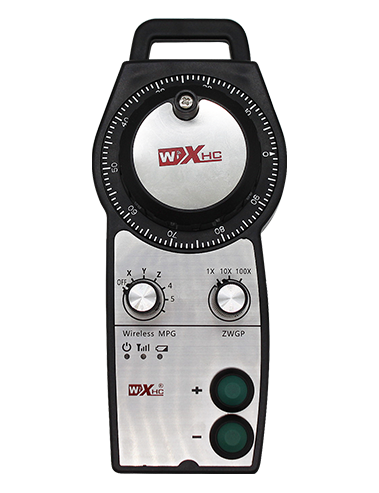
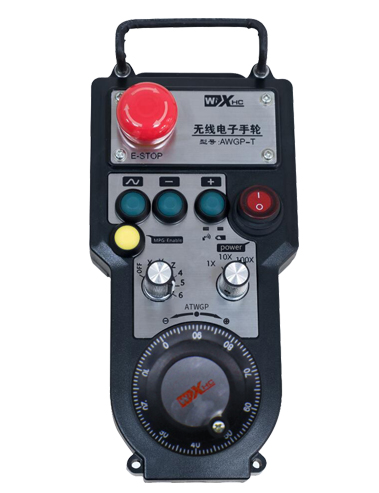
① Pulse encoder:
Bişkojka çalak bikirtînin û bigirin, şîfreya nebşê bihejînin, sînyalek pêlê derdixin,û tevgera eksê makîneyê kontrol bikin.
② Enable button:
Bişkojka çalakkirinê li her du aliyan bikirtînin, û du komên çalakkirina IO-ê li ser wergirê dê rêve bibin. Bişkojka çalakkirinê berdin da ku derketina IO-ya çalak veqetînin; Û berî guheztina mezinkirina bijartina eksê û hejandina destikê,pêdivî ye ku bişkoja çalakkirinê were girtin da ku bi bandor be; Ev fonksiyon dikare bi navgîniya nermalava veavakirinê were betal kirin.
③ Indicator lights:
Ronahiya milê çepê: hêza li ser ronahiyê,handwheel eksê ji bo hilbijartina OFF ji bo hêza li ser bi kar tîne, û ev ronahiyê piştî ku desthilatdariyê vekin dimîne;
Ronahiya navîn: ronahiya îşaretê ya ku dema ku her fonksiyonek çerxa destan dixebitîne ronî dibe, û dema ku operasyon tune be ronî nabe;
Ronahiya aliyê rastê: Ronahiya alarmê ya voltaja kêm, asta pîlê kêm,ev çira dibiriqe yan jî pêde dimîne, pîlê divê bê guhertin.
④ Emergency stop button:
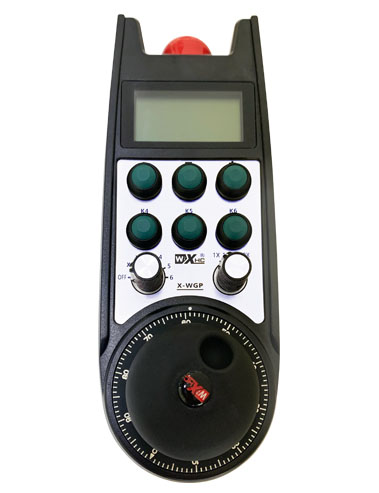
Bişkojka rawestandina acîl bikirtînin, û du komên IO yên rawestana awarte yên li ser wergirê dê bêne qut kirin, û hemî fonksiyonên destikê dê nederbasdar bin.
⑤ Magnification switch:
Bişkojka çalakkirinê bikirtînin û bihêlin da ku guheztina mezinkirinê biguhezînin, ku dikare mezinahiya ku ji hêla çerxa destan ve tê kontrol kirin veguherîne.
⑥ Axis selection switch (guhêrbar hêza):
Bişkojka çalakkirinê bikirtînin û bihêlin da ku guheztina hilbijartina eksê biguherînin, ku dikare eksena tevgerê ya ku ji hêla çerxa destan ve tê kontrol kirin biguhezîne. Vê veguheztinê ji OFF berbi her eksê ve biguherînin û hêza çerxa destan vekin.
⑦ Custom button:
Du bişkokên xwerû, her yek bi xalek derana IO ya li ser wergirê re têkildar e.

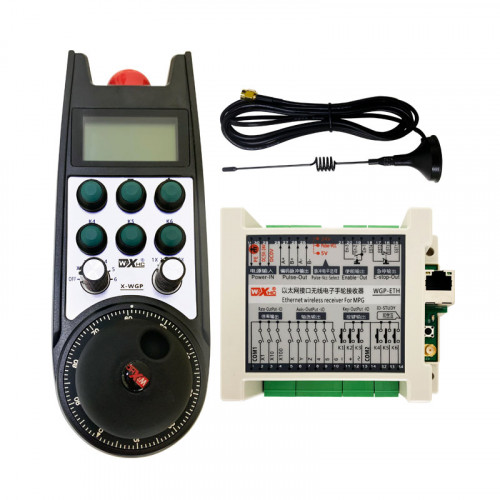
1. Wesif di nav kabîneya elektrîkê de bi navika li ser piştê ve saz bikin, an jî wê di nav kunên pêça li çar kujên wergirê de di kabîneyê de saz bikin.
2. Li diyagrama têlgirêdana wergirê me binihêrin û wê bi alavên xweya cîhê re bidin ber hev. Amûran bi kabloyan bi wergirê ve girêdin.
3.Piştî ku wergirê bi rêkûpêk hatî rast kirin, divê antenna ku bi wergirê ve girêdayî ye were girêdan, û dawiya derveyî antenna divê li derveyî kabîneya elektrîkê were saz kirin an danîn. Tête pêşniyar kirin ku ew li ser jorê kabîneya elektrîkê ji bo bandora herî baş a nîşanê were danîn. Qedexe ye ku antenna bê girêdan an jî di hundurê kabîneya elektrîkê de were danîn, ji ber ku ev dibe ku bibe sedema ku sînyala nayê bikar anîn.
4. Paşan, guhertoya hêzê ya destikê vekin, û hûn dikarin makîneyê ji dûr ve bi karanîna destikê bixebitînin.
6.2 Pîvanên sazkirinê yên wergirê

6.3 Receiver Wiring Reference Diagram

7. talîmatên operasyona Product
1. Hêza li ser makîne û wergirê. The receiver’s working indicator light flashes. Pîlê di destikê elektronîkî ya bêtêlê de saz bikin, qapaxa pîlê ewle bikin, û
veguherîna hêzê ya desta elektronîkî ya bêtêl vekin. The handwheel’s battery level indicator light is on.
2. Bingeha hevrêziyê hilbijêrin: Bişkojka çalak bikirtînin û bigirin, guhertoya hilbijartina eksê biguherîne, û eksê ku hûn dixwazin bixebitin hilbijêrin.
3. Mezinkirina hilbijêre: Bişkojka çalak bikirtînin û bigirin, guhertoya mezinkirinê biguherîne,û asta mezinkirina xwestinê hilbijêrin.
4. Tevgera eksê: Bişkojka çalak bikirtînin û bigirin, guhêrbar hilbijartina eksê hilbijêre, guhertoya mezinbûnê hilbijêrin, û dûv re şîfreya pêlê bizivirîne. Li milê demjimêrê bizivirînin da ku pê bixin
eksê pozîtîf û berevajiyê saetê ji bo ku eksena neyînî biguhezîne.
5. Bişkojkek xwerû bikirtînin û bigirin, û bişkoja têkildar a IO-ya wergirê dê were vemirandin. Bişkojkê berdin, û encam dê bête girtin.
6. Bişkojka rawestandina acîl bikirtînin, Dê derketina IO ya rawestana acîl ya têkildar a wergirê were qut kirin, fonksiyona destikê dê bête neçalak kirin,bişkoka rawestandina acîl berdin, derketina IO ya rawestandina acîl dê were girtin, û fonksiyona destikê dê were vegerandin.
7. Ger çerxa destan ji bo demekê neyê xebitandin, ew ê bixweber bikeve moda xewê da ku xerckirina hêzê kêm bike. Dema ku ew dîsa tê bikaranîn, çerxa destan bi tikandina bişkoja çalakkirinê dikare were çalak kirin.
8. Ger çerxa destan ji bo demek dirêj neyê bikar anîn, tê pêşnîyar kirin ku mîlîra çerxa destan biguhezîne rewşa OFF, hêza handwheel vekin, û jiyana pîlê dirêj bikin.
8. Danasîna Modela Hilberê

① :ZTWGP şêwaza xuyangê temsîl dike
②:Parametreyên deranîna Pulse:
01: Nîşan dide ku sînyala derana pêlê A ye, B; Pulse voltaja 5V; mîqdara nebza 100PPR.
02:Nîşan dide ku sînyalên derana pêlê A û B in; Pulse voltaja 12V; mîqdara nebza 100PPR.
03:Nîşan dide ku sînyalên derketina pêlê A ne, B, YEK -, B -; Pulse voltaja 5V; mîqdara nebza 100PPR.
04:NPN-a-asta nizm derketinek dorhêla vekirî nîşan dide, bi sînyalên derana nebza A û B;Hejmara pêlan 100PPR e.
05:Derketina çavkaniya PNP-a asta bilind destnîşan dike, bi sînyalên derana nebza A û B; Hejmara pêlan 100PPR e.
③:Nûnertiya hejmara guheztinên hilbijartina eksê, 2 temsîl dike 2 eksê.
④:Tîpa sînyala guheztina hilbijartina eksê nîşan dide, A nîşana derana xal-bi-xala temsîl dike, û B sînyala derana kodkirî temsîl dike.
⑤:Tîpa sînyala guheztina pirjimariyê nîşan dide, A nîşana derana xal-bi-xala temsîl dike, û B sînyala derana kodkirî temsîl dike.
⑥:Hejmara bişkokên xwerû destnîşan dike, 2 temsîl dike 2 Bişkojkên xwerû.
⑦:Nûnertiya dabînkirina hêzê ya ji bo destwerdana pergalê destnîşan dike, û 05 dabînkirina hêzê ya 5V temsîl dike.
⑧:L stûna çepê nîşan dide (kêrê çepê), û R stûna rastê temsîl dike (xwediyê kêrê rast).
9.Çareseriya Nexweşiyên Hilberê

1. Ji kerema xwe wê li hawîrdorek hişk di germahiya odeyê û zextê de bikar bînin da ku jiyana karûbarê wê dirêj bikin.
2. Ji kerema xwe ji karanîna li hawîrdorên nenormal ên wekî baran û pêlên avê dûr bixin da ku jiyana karûbarê dirêj bikin.
3. Ji kerema xwe xuyangê çerxa destan paqij bihêlin da ku jiyana karûbarê wê dirêj bikin.
4. Ji kerema xwe ji çewisandinê dûr bikevin, dikeve, bumping, hwd. ji bo pêşîgirtina zirarê li hêmanên rast ên di hundurê destikê an xeletiyên rastbûnê de.
5. Heke ji bo demek dirêj neyê bikaranîn, ji kerema xwe çerxa destan li cîhek paqij û ewle hilînin. Di dema hilanînê û veguhestinê de, divê baldarî li berxwedana şil û şokê bê dayîn.
11. Agahiyên Ewlekariyê
1. Ji kerema xwe berî ku bikar bînin rêwerzan bi baldarî bixwînin û ne pisporan ji xebatê qedexe bikin.
2. Ji kerema xwe dema ku asta batterê pir kêm be bataryayê di wextê xwe de biguhezînin da ku ji xeletiyên ku ji ber kêmbûna hêza pîlê û nekaribûna çerxa destan çêdibin dûr nekevin..
3. Heke tamîr hewce ye, ji kerema xwe bi çêker re têkilî daynin. Ger zerar ji hêla xwe tamîrkirinê ve çêbibe, çêker dê garantiyê nede