ລາຍລະອຽດ

1.ການແນະນໍາກ່ຽວກັບຜະລິດຕະພັນ
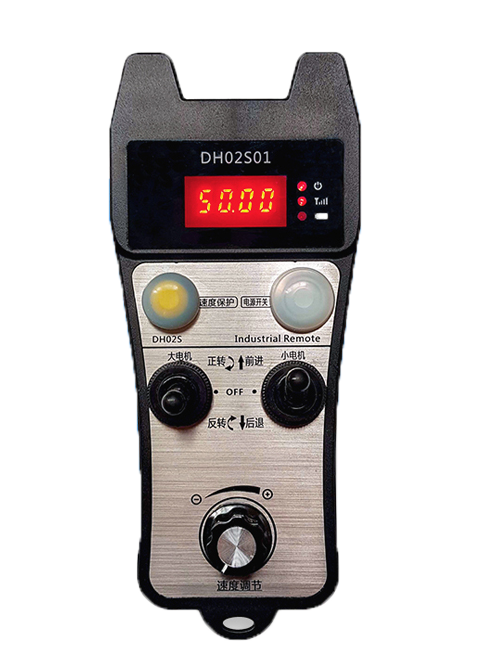
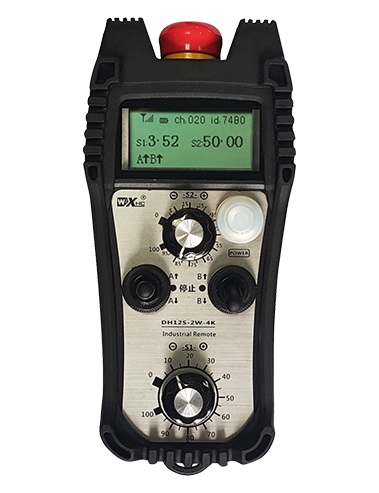
Wireless Remote Control is used for manual guidance, ການຈັດຕໍາແຫນ່ງ, tool setting and other operations of CNC machine tools. ຜະລິດຕະພັນນີ້ຮັບຮອງເອົາເຕັກໂນໂລຢີການສົ່ງແບບໄຮ້ສາຍ, ການລົບລ້າງການເຊື່ອມຕໍ່ສາຍໃນພາກຮຽນ spring ແບບດັ້ງເດີມ, ການຫຼຸດຜ່ອນຄວາມລົ້ມເຫຼວຂອງອຸປະກອນທີ່ເກີດຈາກສາຍໄຟ, ການລົບລ້າງຂໍ້ເສຍປຽບຂອງການລາກສາຍ, ນ້ໍາມັນ, ແລະອື່ນໆ, and is more convenient to operate.It is widely applicable to CNC machine tools such as gantry machining centers, gantry vertical lathes, and CNC gear processing machines, and is compatible with various mainstream CNC system brands on the market, including Siemens, Mitsubishi, fanuc, Syntec and more.
2.ຄຸນນະສົມບັດຜະລິດຕະພັນ
1. ຮັບຮອງເອົາເຕັກໂນໂລຊີການສື່ສານໄຮ້ສາຍ 433MHz ກັບໄລຍະການດໍາເນີນການໄຮ້ສາຍຂອງ 20 ປະມານ.
2.hopping ຄວາມຖີ່ຂອງການປັບຕົວ; 32 ຊຸດຂອງການຄວບຄຸມໄລຍະໄກໄຮ້ສາຍສາມາດໃຊ້ໄດ້ພ້ອມໆກັນໂດຍບໍ່ມີການແຊກແຊງ.
3.Supports the emergency stop button, and the emergency stop button remains effective even after the remote control is powered off.
4.ອະນຸຍາດ 3 ປຸ່ມກຳນົດເອງດ້ວຍການປ່ຽນສັນຍານ IO ອອກ.
5.ຮອງຮັບການຄວບຄຸມ 6 ແກນ, ແລະ 7 ການຄວບຄຸມ 12 ແກນແມ່ນສາມາດປັບແຕ່ງໄດ້.
6. ຮອງຮັບການຄວບຄຸມການຂະຫຍາຍ 3 ຄວາມໄວ, ແລະການຄວບຄຸມການຂະຫຍາຍ 4 ຄວາມໄວແມ່ນສາມາດປັບແຕ່ງໄດ້.
7.ສະຫນັບສະຫນູນການທໍາງານຂອງປຸ່ມເປີດ, ເຊິ່ງສາມາດສົ່ງສັນຍານ IO ສະຫຼັບໄດ້, ແລະຍັງຄວບຄຸມການເລືອກແກນ, ການຂະຫຍາຍ ແລະຕົວເຂົ້າລະຫັດ.
8.ສະຫນັບສະຫນູນການດັດແກ້ປະເພດການເຂົ້າລະຫັດຂອງການຄັດເລືອກແກນແລະການຂະຫຍາຍໂດຍຜ່ານຊອບແວ.
9. Supports pulse encoder with specification of 100 pulses ຕໍ່ການປະຕິວັດ.
10. Supports standard Type-C charging with 5V-2A charging specification; built-in battery
specification: 14500 / 1100mah.
3. ຂໍ້ມູນສະເພາະຂອງຜະລິດຕະພັນ
| Working Voltage and Current of Handheld Terminal |
3.7V/20.0mA |
| Charging Battery Specification |
3.7V/14500/1100mAh
|
| Low Voltage Alarm Range of Handheld Terminal |
<3.35ວິທີ |
| Receiver Power Supply Voltage |
DC5V-24V/1A |
| Receiver Emergency Stop Output Load Range |
AC125V-1A/DC30V-2A |
| Receiver Enable Output Load Range |
AC125V-1A/DC30V-2A |
| Receiver Custom Button Output Load Range |
DC24V/50mA
|
| Receiver Axis Selection Output Load Range |
DC24V/50mA |
| Receiver magnification Output Load Range |
DC24V/50mA |
| Handheld Terminal Transmit Power |
15dBm
|
| ຜູ້ຮັບຄວາມອ່ອນໄຫວ |
-100dBm |
| ຄວາມຖີ່ການສື່ສານໄຮ້ສາຍ |
433ຄື້ນຄວາມຖີ່ MHz
|
| Wireless Communication Distance |
20 meters barrier-free distance
|
| Operating Temperature |
-25℃<ສະຖາວັນ<55℃ |
| Safe drop height |
1 ມ
|
| Number of Custom Buttons |
3
|
| Product Weight |
546.86(g) |
| Product Dimensions |
200*87*72(mm) |
4. ການແນະນໍາການທໍາງານຂອງຜະລິດຕະພັນ

ບັນທຶກ:
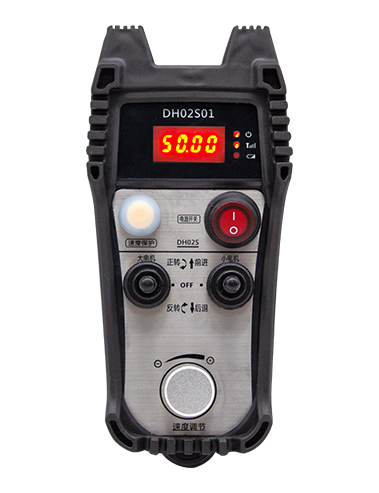
① Emergency Stop Button:
ກົດປຸ່ມຢຸດສຸກເສີນ, the two groups of emergency stop IO outputs on the receiver will disconnect, and all remote control functions will be invalidated.Release the emergency stop button, the emergency stop IO outputs on the receiver will be closed, and all remote control functions will be restored. ເພີ່ມເຕີມ, even if the remote control is powered off, pressing the emergency stop button can still activate the emergency stop IO output of the receiver.
② Enable Button:
Press either enable button on both sides, the two sets of enable IO outputs on the receiver will conduct. Release the enable button, and the enable IO outputs will disconnect. It is necessary to press and hold the enable button before toggling axis selection, magnification or rotating the remote control for the operation to take effect.This function can be canceled through the configuration software.
③ Axis Selection Switch (Power Switch):
ກົດປຸ່ມແລະກົດປຸ່ມ Enable, then toggling the axis selection switch can control the movement of axis .Press and hold the enable button, then toggle the axis selection switch to switch the motion axis controlled by the remote control. Toggle the switch from the OFF position to any axis position, and the remote control will power on automatically.
④ Pulse Encoder:
Press and hold the enable button and rotate the pulse encoder, it will output pulse signals to control the movement of the machine axis.
⑤ LCD Display Screen:

5. Product Accessories Diagram

6. ຄູ່ມືການຕິດຕັ້ງຜະລິດຕະພັນ
6.1 ຂັ້ນຕອນການຕິດຕັ້ງຜະລິດຕະພັນ
1. Install the receiver in the electrical cabinet via the buckle on its back, or mount it inside the electrical cabinet through the screw holes at the four corners of the receiver.
2. ອ້າງເຖິງແຜນວາດສາຍໄຟຂອງພວກເຮົາ, ສົມທຽບມັນກັບອຸປະກອນທີ່ຢູ່ໃນສະຖານທີ່ຂອງທ່ານ, and connect the equipment to the receiver with cables.
3. After the receiver is fixed in place, install the supporting antenna of the receiver properly. Mount or place the outer end of the antenna outside the electrical cabinet. It is recommended to place it on the top of the electrical cabinet for optimal signal performance. Do not leave the antenna uninstalled or place it inside the electrical cabinet; ດັ່ງນັ້ນ, signal failure may occur.
4. ທີ່ສຸດ, turn on the remote control power switch, then you can remotely operate the machine via the remote control.
6.2 Receiver Installation Dimensions

7. ຄໍາແນະນໍາກ່ຽວກັບການປະຕິບັດງານຜະລິດຕະພັນ
1. ພະລັງງານຢູ່ໃນເຄື່ອງແລະເຄື່ອງຮັບ. The receiver operation indicator flashes. After the wireless electronic remote control is fully charged, toggle it from the OFF gear to the X-axis gear, and the remote control display lights up.
2. Select the axis : ກົດປຸ່ມແລະກົດປຸ່ມ Enable, toggle the axis selection switch to select the axis to be operated.
3. Select the magnification: ກົດປຸ່ມແລະກົດປຸ່ມ Enable, toggle the magnification switch to select the required magnification gear.
4. Axis movement: ກົດປຸ່ມແລະກົດປຸ່ມ Enable, select the axis selection switch and the magnification switch, then rotate the pulse encoder. Rotate clockwise to move the axis in the positive direction, and rotate counterclockwise to move the axis in the negative direction.
5. ກົດປຸ່ມແລະກົດປຸ່ມ Custom ໃດໆ, the corresponding button IO output of the receiver will turn on; release the button, and the output will turn off.
6. ກົດປຸ່ມຢຸດສຸກເສີນ, the corresponding emergency stop IO output of the receiver disconnects and the remote control function becomes invalid. Release the emergency stop button, the emergency stop IO output closes and the remote control function is restored.
7. If the wireless remote control is not operated for a period of time, ມັນຈະເຂົ້າສູ່ໂໝດນອນໂດຍອັດຕະໂນມັດເພື່ອຫຼຸດການໃຊ້ພະລັງງານ. It can be used normally again by pressing the enable button again.
8.If the wireless remote control is not used for a long time, turn the axis switch to OFF to turn off the power and extend battery life
①:UWGP stands for appearance style.
②:Pulse Output Parameters:
01: ຊີ້ບອກວ່າສັນຍານອອກກຳມະຈອນແມ່ນ A, ຂ; ແຮງດັນກໍາຈັດກໍາມະຈອນ 5V; ປະລິມານກໍາມະຈອນ 100 PPR.
02: ຊີ້ບອກວ່າສັນຍານອອກກຳມະຈອນແມ່ນ A, ຂ; ແຮງດັນໄຟຟ້າ 12V; pulse quantity 25PPR.
03: ຊີ້ບອກວ່າສັນຍານອອກກຳມະຈອນແມ່ນ A, ຂ, ກ -, ຂ -; ແຮງດັນກໍາຈັດກໍາມະຈອນ 5V; ປະລິມານກໍາມະຈອນ 100 PPR.
04: ສະແດງເຖິງການຜະລິດວົງຈອນ NPN ທີ່ມີລະດັບຕໍ່າ, ກັບສັນຍານຜົນຜະລິດກໍາມະຈອນຂອງ A ແລະ B; The number of pulses is 100PPR.
05: ສະແດງໃຫ້ເຫັນຜົນຜະລິດແຫຼ່ງ PNP ໃນລະດັບສູງ, ກັບສັນຍານຜົນຜະລິດກໍາມະຈອນຂອງ A ແລະ B; ຈໍານວນຂອງກໍາມະຈອນແມ່ນ 100PPR.
③:Represents the axis selection switch quantity; 6 stands for 6 ຂວອນ, 7 stands for 7 ຂວອນ, and so on.
④: Represents the signal type of the axis selection switch.A stands for point-to-point output signal, and B stands for encoder output signal.
⑤: Represents the signal type of the magnification switch.A stands for point-to-point output signal, and B stands for encoder output signal.
⑥: ເປັນຕົວແທນຂອງຈໍານວນປຸ່ມທີ່ກໍາຫນົດເອງ; 3 corresponds to 6 ປຸ່ມປະເພນີ.
⑦: Represents the power supply for the system remote control. 05 stands for 5V power supply, ແລະ 24 stands for 24V power supply.
⑧: Represents the contact charging mode. It starts charging automatically when placed back on the charging base.
9. ການແກ້ໄຂບັນຫາຜະລິດຕະພັນ

10. Maintenance and upkeep
1. ກະລຸນາໃຊ້ມັນໃນສະພາບແວດລ້ອມແຫ້ງໃນອຸນຫະພູມໃນຫ້ອງແລະຄວາມກົດດັນເພື່ອຂະຫຍາຍຊີວິດການບໍລິການຂອງຕົນ.
2. Please avoid using in abnormal environments such as rain and water to extend the service life.
3. Please keep the appearance of the remote control clean to extend its service life.
4. Please avoid crushing, dropping, or bumping, ປົງຄາຍ. to prevent damage to the precision components inside the remote control or accuracy errors.
5. ຖ້າບໍ່ໃຊ້ເປັນເວລາດົນນານ, please store the remote control in a clean and safe place.
6. Avoid moisture and shock during storage and transportation.
11. ຂໍ້ມູນຄວາມປອດໄພ
1. ກະລຸນາອ່ານຄໍາແນະນໍາຢ່າງລະມັດລະວັງກ່ອນທີ່ຈະໃຊ້ແລະຫ້າມຜູ້ຊ່ຽວຊານຈາກການປະຕິບັດງານ.
2. Please charge the remote control in a timely manner when the battery level is too low, to avoid malfunction and operational errors caused by insufficient power.
3. If you repair it yourself and cause damage, the warranty will be void.