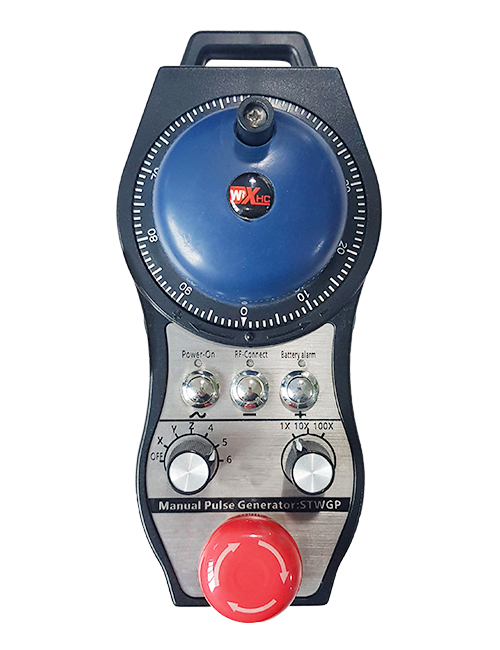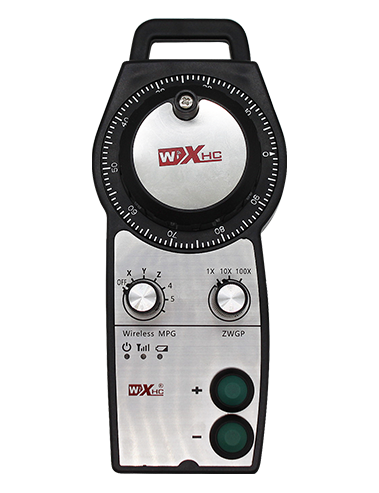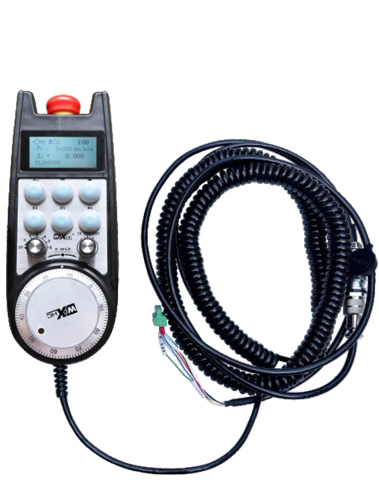
1. Mampiasà tariby misy marika 6-core ho an'ny fifandraisana, miaraka amin'ny tariby tariby 10 metatra.
2. Ny efijery vita amin'ny tanana dia afaka mampiseho ny mpandrindra ny rafitra miasa, Coordinates mekanika,Famahanana, Safidy Axis, fampihebana, ary fampahalalana hafa.
3. Tohanana ny bokotra fiatoana vonjy maika, Famokarana famantarana IO, Ary ny kodiarana fanakatonana ny kodiarana dia mbola manan-kery.
4. fanohanana 6 bokotra mahazatra, Switch IO famantarana, ary afaka manome famantarana ny rafitra amin'ny rafitra amin'ny alàlan'ny tariby na serasera io.
Torolàlana fampianarana elektronika
Description
1. Fampidirana vokatra
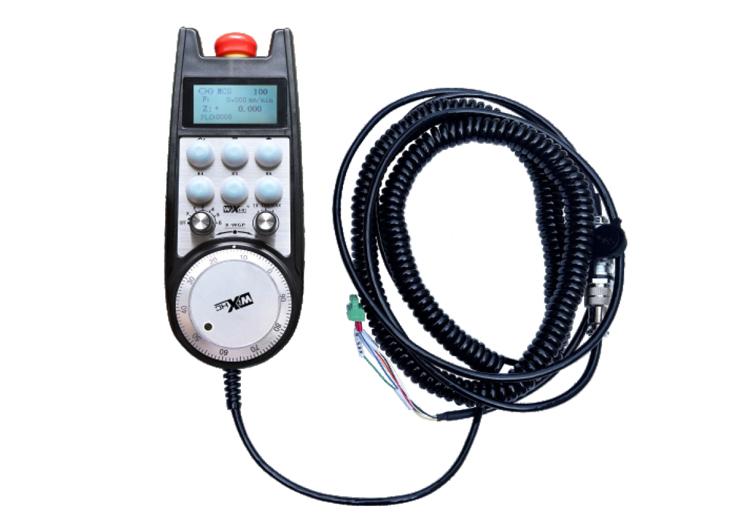
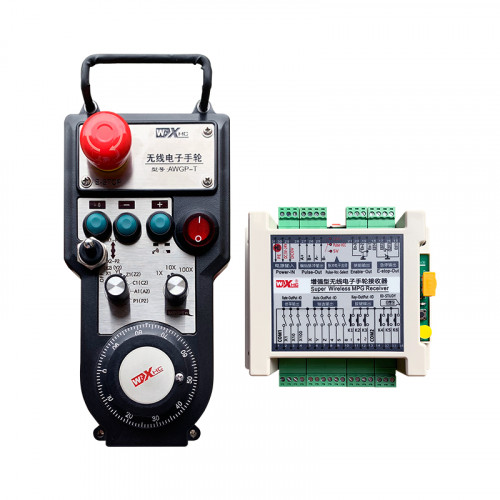
Ny kodiaran-tanana elektronika dia ampiasaina amin'ny fitarihana tanana, toerany, Fitaovana fitaovana, sy ny fandidiana hafa amin'ny fitaovana milina CNC. Ity maodelin'ny kodiaran-tanana elektronika ity dia kodiaran-tanana elektronika misy tariby tena misy an'i Siemens. Ny kodiaran-tanana dia mifandray amin'ny interface X130 amin'ny rafitra Siemens amin'ny alalan'ny tariby tambajotra, ary ny fandrindrana ny rafitra dia vakiana sy aseho eo amin'ny efijery LCD amin'ny kodiaran-tanana amin'ny alàlan'ny fifandraisana protocol S7. Ny kodiaran-tanana ihany koa dia afaka mifehy ny fifantenana ny axis system, fampihebana, bokotra, sy famantarana hafa amin'ny alalan'ny fifandraisana.
2.Endri-javatra miasa ny vokatra
1. Mampiasà tariby misy marika 6-core ho an'ny fifandraisana, miaraka amin'ny tariby tariby 10 metatra.
2. Ny efijery vita amin'ny tanana dia afaka mampiseho ny mpandrindra ny rafitra miasa, Coordinates mekanika,Famahanana, Safidy Axis, fampihebana, ary fampahalalana hafa.
3. Tohanana ny bokotra fiatoana vonjy maika, Famokarana famantarana IO, Ary ny kodiarana fanakatonana ny kodiarana dia mbola manan-kery.
4. fanohanana 6 bokotra mahazatra, Switch IO famantarana, ary afaka manome famantarana ny rafitra amin'ny rafitra amin'ny alàlan'ny tariby na serasera io.
5. fanohanana 6 na 8 Fanaraha-maso Axis, Miaraka amin'ny famantarana IO IO izay mety hivoaka amin'ny rafitra amin'ny alàlan'ny tariby amin'ny alàlan'ny IANAO na serasera.
6. fanohanana 3 na 4 haavon'ny fanaraha-maso magnification, Miaraka amin'ny famantarana IO IO izay mety hivoaka amin'ny rafitra amin'ny alàlan'ny tariby amin'ny alàlan'ny IANAO na serasera.
7. Manohana encoder pulsa, 100 pulses / turn, dia afaka mamoaka famantarana amin'ny rafitra amin'ny alàlan'ny tariby pulse AB.
8. Manohana ny protocol Siemens S7 sy ny Siemens 828D, 840DSL, ONE sy rafitra modely hafa.
3. Famaritana momba ny vokatra
| Handwheel miasa famatsiana herinaratra malefaka | DC24V/1A |
| Voltage famatsiana herinaratra | DC24V/1A |
| Receiver IO vokatra entana isan-karazany | DC24V |
| halavan'ny tariby faran'ny kodia tanana | 10m |
| halavan'ny tariby faran'ny mpandray | 1m |
| Receiver faran'ny tariby ny halavan'ny tariby | 3m |
| Temperature miasa | -25℃<X<55℃ |
| Haavo manohitra ny fianjerana | 1m |
| Bokotra manokana | 6 |
| Ny refin'ny vokatra | 233*90.7*77.4(mm) |
4.Fampidirana ny vokatra fampidirana
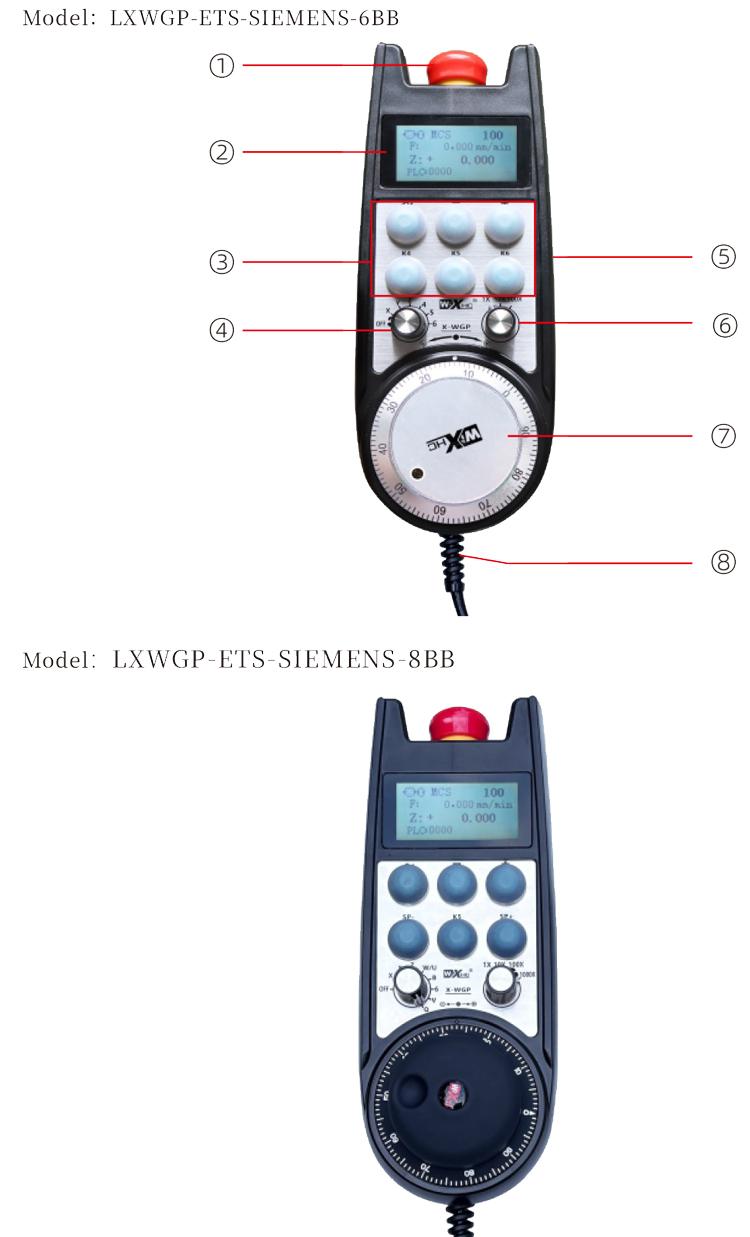
Fanamarihana:
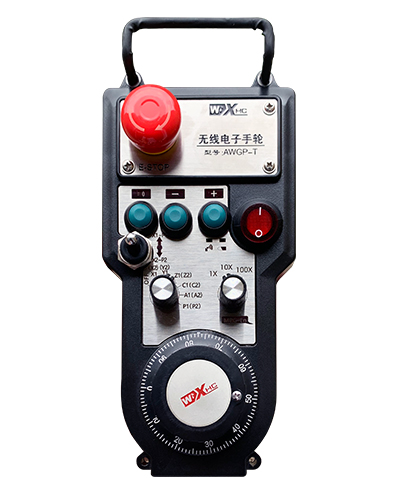
bokotra fiatoana vonjy maika:
Tsindrio ny bokotra fiatoana vonjy maika, ary ny andiana roa vonjy maika eo ambonin'io opa dia hofongorana, ary tsy mety ny fiasa rehetra amin'ny tanana.
Taorian'ny famoahana ny fiatoana vonjy maika, Ny famoahana vonjy maika momba ny famoaham-bola amin'ny mpandray dia mihidy, ary miverina amin'ny laoniny ny fiasan'ny kodiaran-tanana rehetra.
② Fampisehoana efijery:
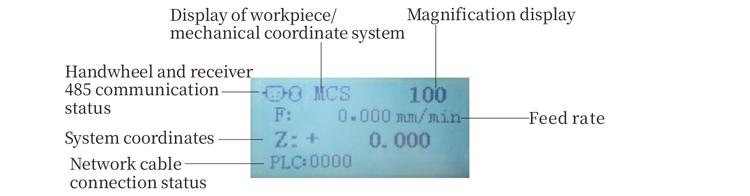
PLC: 0000 manondro fa tsy mifandray ny tariby tambajotra, PLC: 1010 dia manondro fa ny tariby tambajotra dia mifandray tsara amin'ny rafitra PLC.
PLC: 1110 maneho fahombiazana amin'ny fanoratana ny angona rafitra amin'ny kodiaran-tanana, PLC: 0001 maneho fifandraisana mahomby amin'ny solosaina.
③ bokotra manokana:
6 bokotra mahazatra, isaky ny mifanandrify amin'ny teboka output ao amin'ny mpandray, mifandray amin'ny rafitra ihany koa amin'ny alàlan'ny fifandraisana.
④ Axis fifantenana switch:
Ny axis fifantenana switch dia afaka manova ny hetsika axis fehezin'ny handwheel.
⑤ bokotra Enable:
Tsindrio ary hazòny ny bokotra enable eo amin'ny andaniny roa mba hampavitrika ny encoder pulse amin'ny fanozongozonana azy. Ary ny vondrona roa eo amin'ny resevera dia mamela ny famoahana IO hitarika, Alefaso ny bokotra enable mba ahafahan'ny IO mivoaka ny fifandraisana.
⑥ Fanovana fanitarana:Ny switch magnification dia afaka manova ny magnification
fehezin'ny kodiaran-tanana.
⑦ Pulse encoder:
Tsindrio ary hazony ny bokotra, Aforeto ny encoder pulsa, mamoaka famantarana pulse, ary mifehy ny fihetsiky ny milina.
⑧ Cable kodiaran-tanana:
Cable mampifandray ny kodiaran-tanana sy ny mpandray, aviation plug, ampiasaina amin'ny famatsiana herinaratra sy fifandraisana amin'ny kodiaran-tanana.
5. Kianjanika vokatra
6. Guide fametrahana vokatra
6.1 Dingana fametrahana vokatra
6.1 Dingana fametrahana vokatra
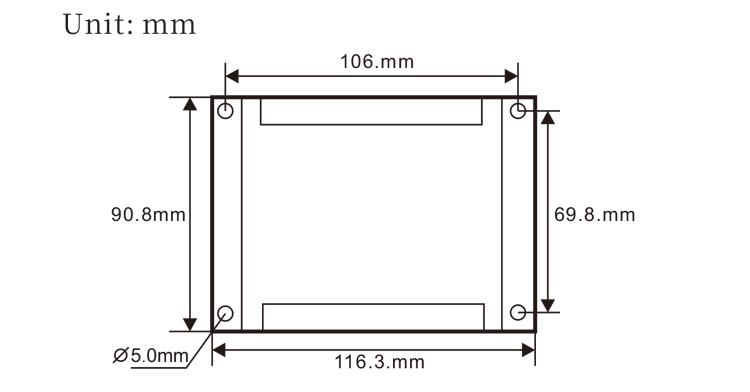
1. Apetraho ao amin'ny kabinetra elektrika amin'ny alàlan'ny lavaka visy eo amin'ny zorony efatra ny mpandray.
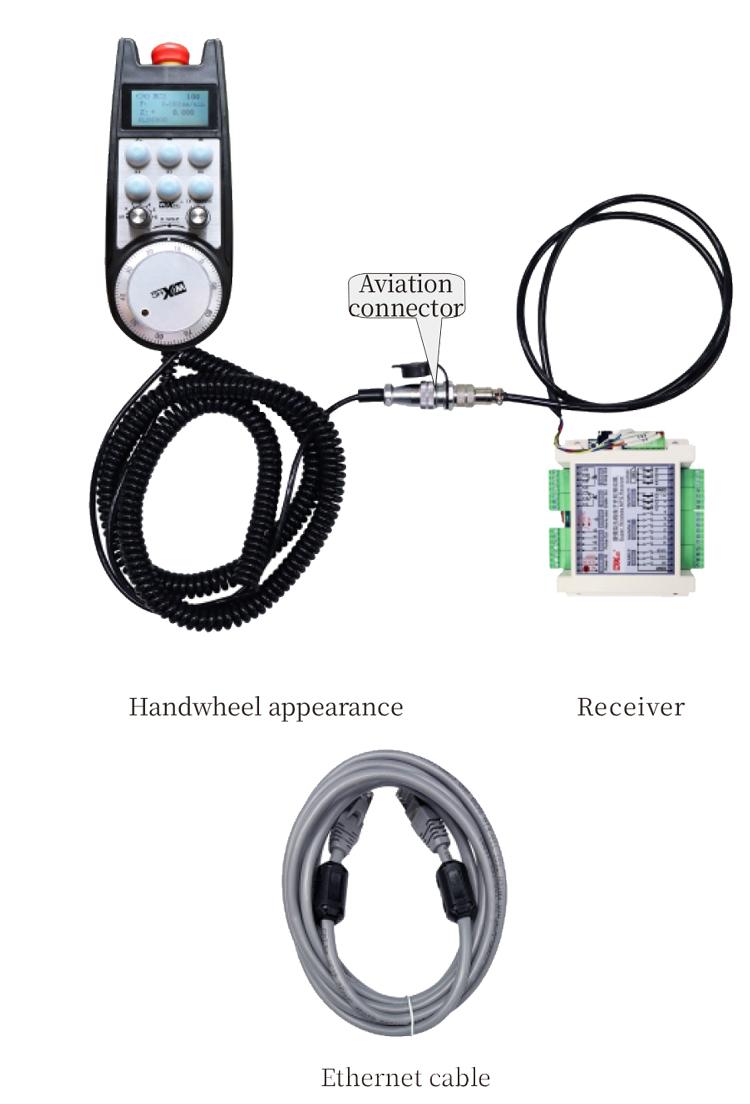
2. Jereo ny sary an-tsokosoko mpizara ary ampitahao amin'ny fitaovana an-toerana. Ampifandraiso amin'ny tariby ny fitaovana ary ampifandraiso amin'ny tariby X130 ny rafitra amin'ny alàlan'ny tariby Ethernet..
3. Taorian'ny fanamboarana ny mpandray, apetraho eo amin'ny toeran'ny fanokafana kodiaran-tanana eo amin'ny tontonana ny fototry ny plug aviation, ary ampidiro ao amin'ny rindran-damina eo amin'ny mpandray ny faran'ny fotony. Avy eo dia ampidiro ao amin'ny fotony ny plug-n'ny tariby an'ny kodiaran-tanana ary henjana ny fitaovana fanamboarana.
6.2 Famaranana fametrahana refesina
6.3 Ny haben'ny fametrahana ny plugs aviation
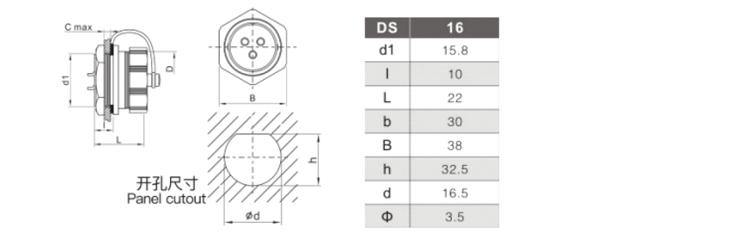
6.4 Kisary referengar
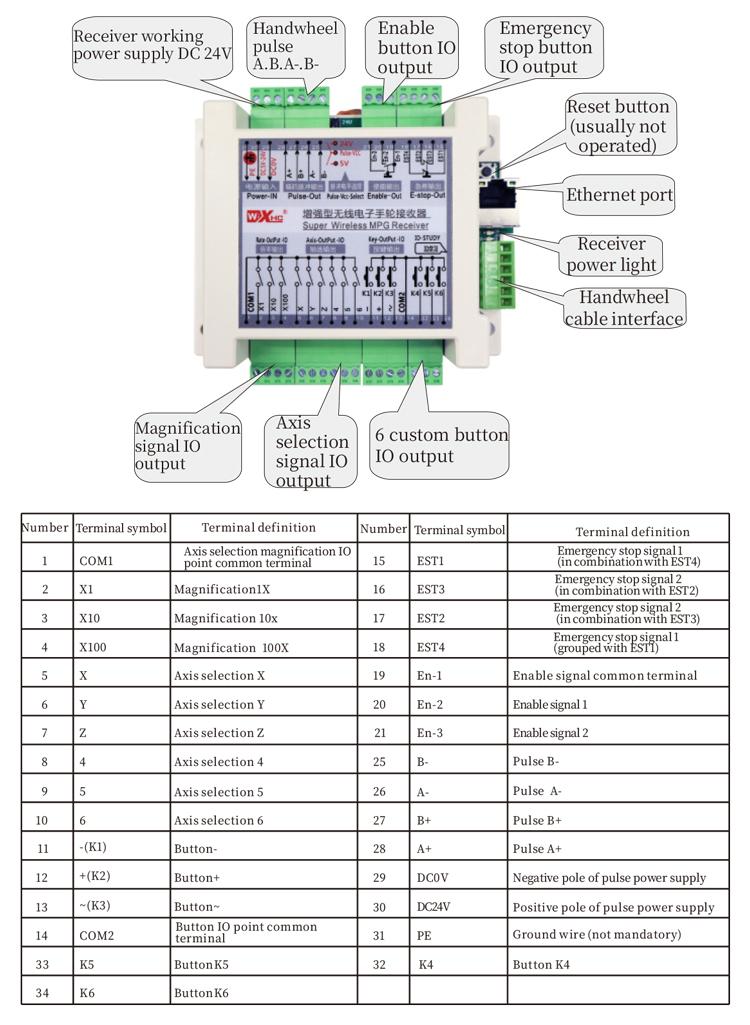 7.Torolàlana momba ny asa
7.Torolàlana momba ny asa
1. Rehefa mandeha ny receiver ary mirehitra ny jiro famantarana miasa amin'ny receiver, mampifandray ny mpandray amin'ny solosaina amin'ny tariby tambajotra, mametraka ny adiresy IP raikitra ny solosaina, ary ampiasao ny rindrankajy fitaovana fanefena tambazotra mba hametrahana ny masontsivana tambajotran'ny fiasan'ny kodiaran-tanana. Ho an'ny fomba fametrahana manokana, manondro ny “LXWGP-ETS Wired Handwheel User Manual”.
2.Aorian'ny fametrahana ny mpandray, mila programa programa PLC ny rafitra. Mba jereo ny “LXWGP-ETS samy hafa Siemens Numerical Control System fomba fametrahana” ary fitaovana mahazatra fandaharana PLC ho an'ny antsipiriany.
3.Rehefa vita ireo fanovana etsy ambony, ento any amin'ny kabinetra elektrika ny mpandray ary apetraho. Esory ny tariby tambajotra avy amin'ny solosaina ary ampidiro ao amin'ny interface X130 amin'ny rafitra..
4.Rehefa vita ireo fanovana etsy ambony, ento any amin'ny kabinetra elektrika ny mpandray ary apetraho. Esory ny tariby tambajotra amin'ny solosaina ary ampidiro ao amin'ny interface X an'ny rafitra. Ampifandraiso ny famatsiana herinaratra sy ny tsipika pulse.
5. Safidio ny safidy axis: Ampifamadiho ny axis Selection ary safidio ny axis tianao hampiasaina.
6. Safidio ny fanitarana: Ampifamadiho ny fanalahidin'ny fanamafisam-peo ary safidio ny haavon'ny fampitomboana ilainao.
7. Mifindra Axis: Tsindrio ary hazony ny bokotra, Safidio ny switch sifection axis, Safidio ny switch switch, ary avy eo ahodina ny pulse encoder mba hanodina ny tsara mihetsika axis araka ny famantaranandro sy ny ratsy mihetsika axe counterclockwise.
8. Tsindrio ary hazòny ny bokotra mahazatra rehetra hamelomana ny famoahana IO amin'ny bokotra mifanandrify amin'ny mpandray, ary avelao ny bokotra hamono ny vokatra.
9. Tsindrio ny bokotra fiatoana vonjy maika, Ny famoahana vonjy maika momba ny vonjy taitra amin'ny mpandray dia hofongorana, Ny fiasan'ny tanana dia tsy ho sembana, Avoahy ny bokotra fiatoana vonjy maika, Ny fivoaran'ny vonjy maika dia hikatona, ary haverina amin'ny laoniny ny asan'ny tanana.
8.Famaritana modely vokatra

① LXWGP dia maneho fomba fijery tariby, ary ny fifandraisana amin'ny mpandray
dia interface tsara Ethernet.
② : Misolo tena manokana ny rafitra Siemens.
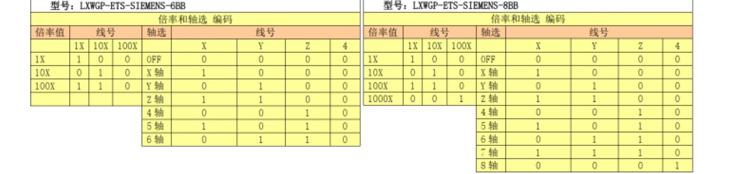
③ : maneho ny isan'ny switch squitches axis, maneho famaky, ary misolo tena
famaky.
④ : maneho ny karazana fifantenana axe sy famantarana fanalefahana, A misolo tena
famantarana vokatra point-to-point, ary B dia misolo tena ny famantarana famoaham-bokatra.
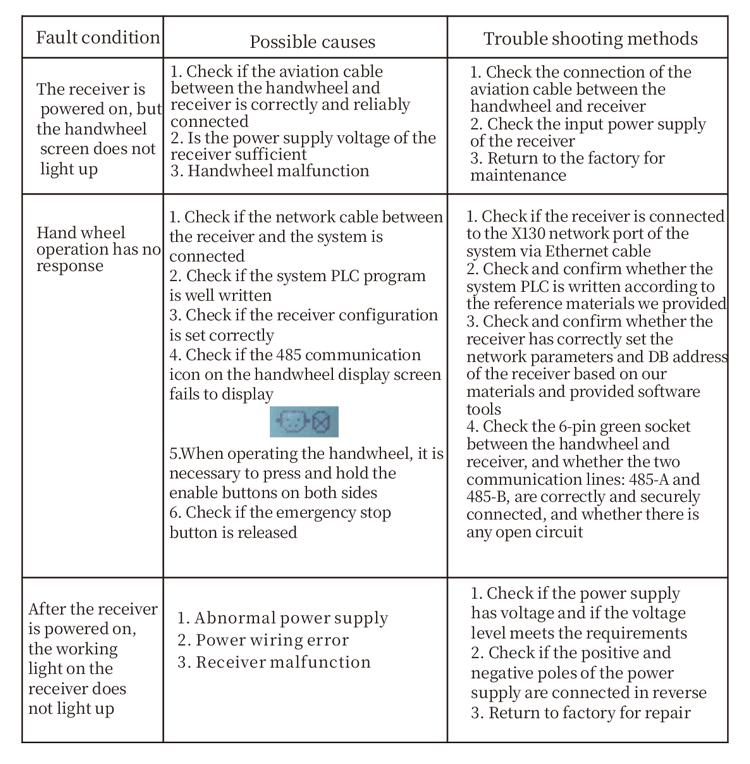
9.Famahana olana amin'ny vokatra
10.fikarakarana
1. Azafady mba ampiasao amin'ny tontolo maina amin'ny mari-pana sy ny fanerena hanitatra ny fiainany.
2. Azafady azafady azafady ampiasaina amin'ny tontolo tsy mahazatra toy ny orana sy ny ranonorana rano mba hanitarana ny fiainana fanompoana.
3. Azafady mba avelao hadio ny fisehoan'ny tanana mba hanitarana ny fiainany.
4. Alao azafady azafady, mianjera, sumping, sns. Mba hisorohana ny fahasimbana amin'ny singa voafaritra ao anaty ny helony na ny hadisoana marina.
5. Raha tsy ampiasaina mandritra ny fotoana maharitra, azafady tehirizo amin'ny toerana madio sy azo antoka ny kodiaran-tanana.Mandritra ny fitahirizana sy ny fitaterana, Tokony haloa amin'ny fanoherana ny hamandoana sy ny fanoherana ny saina ny saina.
11. Fampahalalana momba ny fiarovana
1. Azafady vakio tsara ny torolàlana alohan'ny fampiasana sy mandrara ny tsy matihanina tsy miasa.
2. Raha misy toe-javatra tsy mety mitranga amin'ny kodiaran-tanana, azafady atsaharo avy hatrany ny fampiasana azy ary asio olana. Alohan'ny famahana olana, fady ny fampiasana indray ny kodiaran-tanana diso mba hialana amin'ny lozam-piarovana vokatry ny tsy fahampian'ny kodiaran-tanana tsy fantatra.;
3. Raha ilaina ny fanamboarana, Azafady mba mifandraisa amin'ny mpanamboatra. Raha ny fahasimbana dia vokatry ny fanamboarana tena, Ny mpanamboatra dia tsy hanome warranty
-500x650.png)