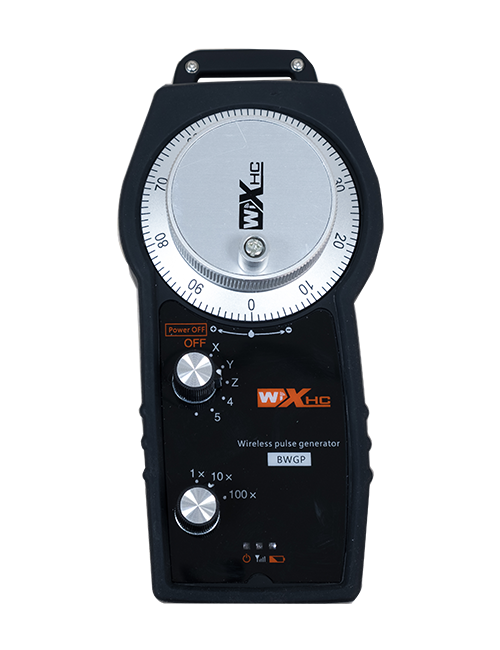
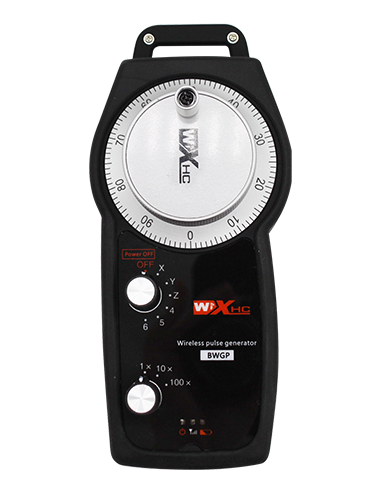
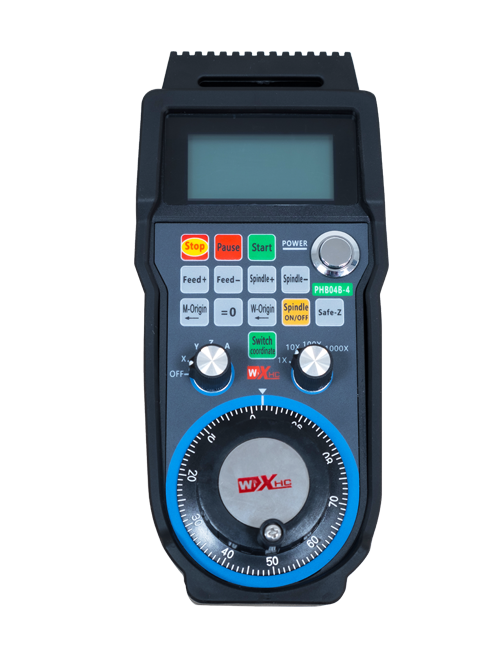
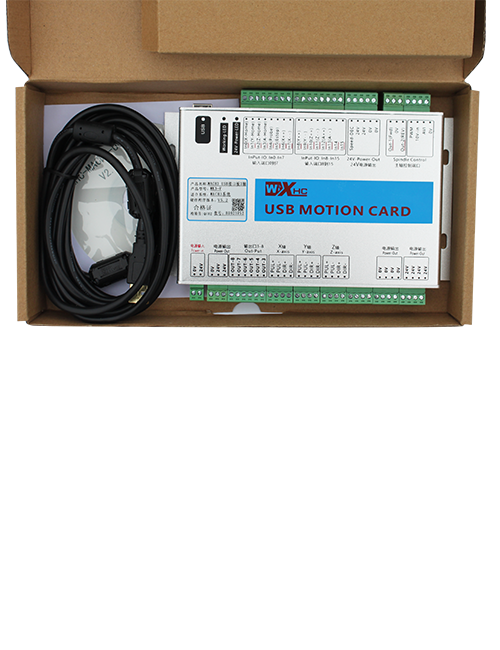
Whakaaturanga

1.Kupu whakataki
Ka whakamahia te Mana Mamao Ahokore mo te arahi a-ringa, tūranga, tautuhinga taputapu me etahi atu mahi o nga taputapu miihini CNC. Ko tenei hua ka tango i te hangarau whakawhiti ahokore, Te whakakore i te hononga waea waea tuku iho, te whakaiti i nga taputapu whakaheke i puta mai i nga taura, te whakakore i nga ngoikoretanga o te toia taura, Nga otaota hinu, etc., a he pai ake te whakahaere.He whanui te whakamahi ki nga taputapu miihini CNC penei i nga pokapu miihini gantry, miro poutū gantry, me nga miihini tukatuka taputapu CNC, a he hototahi ki nga momo rama punaha CNC auraki kei te maakete, tae atu ki a Siemens, Mitsubishi, Kiriweti iri, Syntec me etahi atu.
2.Nga waahanga Hua
1. Ka whakamahi i te hangarau whakawhitiwhiti ahokore 433MHz me te tawhiti mahi ahokore o 20 mita.
2.Te peke auau urutau; 32 ka taea te whakamahi i nga huinga mana mamao ahokore i te wa kotahi me te kore pokanoa.
3.Ka tautoko i te paatene mutu ohorere, a ka whai hua tonu te patene whakamutu ohorere ahakoa ka weto te mana mamao.
4.Tautoko 3 nga paatene ritenga me te huri i te putanga tohu IO.
5.E tautoko ana i te mana tuaka 6, me 7 ki te mana tuaka 12 ka taea te whakarite.
6. E tautoko ana i te mana whakanui 3-tere, me te mana whakanui 4-tere he mea whakarite.
7.e tautoko ana i te mahi paatene whakahohe, ka taea te whakaputa i nga tohu IO whakawhiti, me te whakahaere hoki i te kowhiringa tuaka, te whakanui me te encoder.
8.Ka tautokohia te whakarereke i te momo whakawaehere o te kowhiringa tuaka me te whakanui ma te rorohiko.
9. E tautoko ana i te encoder pulse me te whakatakotoranga o 100 nga pupuhi mo ia hurihanga.
10. E tautoko ana i te utu Momo-C paerewa me te 5V-2A te whakatakotoranga utu; pūhiko hanga-i roto
whakaritenga: 14500 / 1100whatae.
| Ngaohiko Mahi me te Naianei o te Kapeka Pukoro |
3.7V/20.0mA |
| Whakatakotoranga Pūhiko |
3.7V/14500/1100mAh
|
| Awhe Whakaoho Ngaohiko Iti o te Pupuri Pupuri |
<3.35K |
| Ngaohiko Whakawhiwhi Hiko Kaiwhiwhi |
DC5V-24V/1A |
| Awhe Utaina Putanga Putanga Whakawhiwhinga ohorere |
AC125V-1A/DC30V-2A |
| Kaiwhiwhi Whakahohe Awhe Uta Putanga |
AC125V-1A/DC30V-2A |
| Awhe Uta Putanga Whakaputa Patene Kaiwhiwhi |
DC24V/50mA
|
| Awhe Uta Putanga Tuaka Kaiwhiwhi Tohu |
DC24V/50mA |
| Whakanui Kaiwhiwhi Awhe Uta Putanga |
DC24V/50mA |
| Te Mana Tuku Kapeka Torima |
15dBm
|
| Kaiwhiwhi whiwhi tairongo |
-100dBm |
| Te auau whakawhitiwhiti ahokore |
433MHz roopu auau
|
| Tawhiti Whakawhitiwhiti Ahokore |
20 mita te tawhiti arai-kore
|
| Te Waahi Mahi |
-25℃<Whakaahua x<55℃ |
| teitei taka haumaru |
1 m
|
| Te maha o nga Patene Ritenga |
3
|
| Taumaha Hua |
546.86(g) |
| Hunga Hua |
200*87*72(mm) |
4. He kupu whakataki hua

Pukapuka:
① Emergency Stop Button:
Pēhi i te pātene aukati ohorere, ka momotuhia nga roopu e rua o nga putanga ohorere IO i runga i te kaiwhiwhi, a ka whakakorehia nga mahi mana mamao katoa.Tukuhia te paatene mutu ohorere, ka kati nga putanga ohorere IO i runga i te kaiwhiwhi, a ka whakahokia katoatia nga mahi mana mamao. Hei taapiri, ahakoa ka weto te mana mamao, te pehi i te paatene mutu ohorere ka taea tonu te whakahohe i te putanga ohorere IO o te kaiwhiwhi.
② Enable Button:
Patohia te paatene whakahohe i nga taha e rua, ko nga huinga e rua o nga putanga IO i runga i te kaiwhiwhi ka whakahaere. Tukua te paatene whakahohe, ka momotuhia nga putanga IO whakahohea. Me pehi me te pupuri i te paatene whakahohe i mua i te takahuri i te kowhiringa tuaka, te whakanui, te hurihuri ranei i te mana mamao mo te mahi kia whai mana.Ka taea te whakakore i tenei mahi ma te rorohiko whirihoranga.
③ Axis Selection Switch (Whakawhiti Mana):
Pēhi me te pupuri i te pātene Whakahohe, ka huri i te whakakā whiriwhiri tuaka ka taea te whakahaere i te nekehanga o te tuaka .Pēhia me te pupuri i te paatene whakahohe, kātahi ka takahurihia te whakakā whiriwhiri tuaka hei huri i te tuaka nekehanga e whakahaerehia ana e te mana mamao. Takahurihia te pana mai i te tuunga OFF ki tetahi tuunga tuaka, a ka hiko aunoa te mana mamao.
④ Pulse Encoder:
Patohia me te pupuri i te paatene whakahohe ka huri i te encoder pulse, ka whakaputa i nga tohu pupuhi hei whakahaere i te nekehanga o te tuaka miihini.
⑤ LCD Display Screen:

5. Hoahoa Taonga Hua

6. Aratohu Whakauru Hua
6.1 Tikanga whakaurunga Hua
1. Tāutahia te kaikawe ki roto i te rūnanga hiko mā te mata o tōna tuara, whakairihia ranei ki roto i te rūnanga hiko ma roto i nga kohao wiri i nga kokonga e wha o te kaiwhiwhi.
2. Tirohia ki to maatau Kaipupuri Kaihoko, Whakatauritea me o taputapu taputapu, me te hono i nga taputapu ki te kaiwhiwhi me nga taura.
3. I muri i te whakapumautanga o te kaiwhiwhi ki te waahi, tāuta tika te pūihi tautoko o te kaiwhiwhi. Whakanohoia te pito o waho o te antenna ki waho o te rūnanga hiko. E taunaki ana kia tuu ki runga ake o te rūnanga hiko mo te mahi tohu tino pai. Kaua e waiho te antenna kia wetewetehia, ka waiho ranei ki roto i te rūnanga hiko; rerekē, ka paheke pea te tohu.
4. Rawa, whakakāhia te pana mana mamao, ka taea e koe te whakahaere mamao i te miihini ma te mana mamao.
6.2 Ahu Tāuta Kaiwhiwhi

6.3 He hoahoa tohutoro a te kaiwhiwhi
7. Tohutohu Mahi Hua
1. Te hiko i runga i te miihini me te kaiwhiwhi. Ka whiti te tohu mahi a te kaiwhiwhi. I muri i te mana mamao hiko ahokore kua oti te utu, takahurihia mai i te taputapu OFF ki te taputapu tuaka-X, ka rama te whakaaturanga mana mamao.
2. Tīpakohia te tuaka : Pēhi me te pupuri i te pātene Whakahohe, takahurihia te whakakā whiriwhiri tuaka hei kowhiri i te tuaka hei whakahaere.
3. Tīpakohia te whakanui: Pēhi me te pupuri i te pātene Whakahohe, takahurihia te pana whakanui hei whiriwhiri i te taputapu whakanui e hiahiatia ana.
4. Te nekehanga tuaka: Pēhi me te pupuri i te pātene Whakahohe, tīpakohia te whakakā kōwhiringa tuaka me te whakakā whakanui, ka huri i te encoder pulse. Huri karaka hei neke i te tuaka ki te ahunga pai, ka huri i te taha karaka kia neke te tuaka ki te ahunga kino.
5. Pēhi me te pupuri i tetahi pātene ritenga, ka huri te paatene IO putanga o te kaiwhiwhi; tukuna te paatene, ka mutu te putanga.
6. Pēhi i te pātene aukati ohorere, ka momotu te putanga ohorere IO o te kaiwhiwhi, ka muhu te mahi mana mamao. Tukuna te paatene mutu ohorere, ka kati te putanga ohorere IO ka whakahokia te mahi mana mamao.
7. Ki te kore te mana mamao ahokore e whakahaere mo tetahi wa, ka uru aunoa ki te aratau moe hei whakaiti i te kohi hiko. Ka taea te whakamahi ano ma te pehi ano i te paatene whakahohe.
8.Mena kaore e whakamahia te mana mamao ahokore mo te wa roa, tahuri te whakakā tuaka ki OFF hei whakaweto i te hiko me te whakaroa i te ora o te pākahiko
8. Whakaahuatanga Tauira Hua
①:Ko te UWGP te ahua o te ahua.
②:Tawhā Huaputa Pulse:
01: E tohu ana ko te tohu whakaputa ko te A, B; Pulse Lolgal 5V; te nui o te pupuhi 100PPR.
02: E tohu ana ko te tohu whakaputa ko te A, B; Ngaohiko Pulse 12V; te nui o te pupuhi 25PPR.
03: E tohu ana ko te tohu whakaputa ko te A, B, A -, B -; Pulse Lolgal 5V; te nui o te pupuhi 100PPR.
04: E whakaatu ana i te putanga-tuwhera o te Taumata Taumata-iti, me nga tohu putanga Pulse o A me B; Ko te maha o nga pire he 100PPR.
05: E whakaatu ana i te putanga PNP nui-taumata, me nga tohu putanga Pulse o A me B; Ko te maha o nga pire he 100PPR.
③:He tohu i te rahinga whakakā whiriwhiri tuaka; 6 e tu ana mo 6 oka, 7 e tu ana mo 7 oka, me etahi atu.
④: E tohu ana i te momo tohu o te whakaka whiriwhiri tuaka.A e tu ana mo te tohu whakaputa tohu-ki-ira, ko B te tohu whakaputa encoder.
⑤: E tohu ana i te momo tohu o te whakahuri whakanui.A e tu ana mo te tohu whakaputa tohu-ki-ira, ko B te tohu whakaputa encoder.
⑥: He tohu i te maha o nga paatene ritenga; 3 e hāngai ana ki 6 pātene ritenga.
⑦: He tohu i te tuku hiko mo te mana mamao o te punaha. 05 e tu ana mo te tuku hiko 5V, me 24 e tu ana mo te tuku hiko 24V.
⑧: He tohu i te aratau utu whakapiri. Ka tiimata te utu aunoa ina whakahokia ana ki te turanga utu.
9. Nga Whakawhiwhinga Hua

10. Te tiaki me te tiaki
1. Whakamahia koa ki te taiao maroke i te pāmahana o te rūma me te pehanga kia whakawhānuitia tana mahi ratonga.
2. Tena koa karohia te whakamahi i nga waahi rereke penei i te ua me te wai hei whakaroa i te oranga o te ratonga.
3. Tena koa kia ma te ahua o te mana mamao kia roa ake ai tona oranga.
4. Tena koa karohia te kuru, whakaheke, tukituki ranei, take. hei aukati i te kino o nga waahanga tika i roto i te mana mamao, i nga hapa tika ranei.
5. Mena kaore i whakamahia mo te wa roa, penapena koa te mana mamao ki te waahi ma me te haumaru.
6. A ape i te makuku me te ohorere i te wa e rokiroki ana me te kawe.
11. Nga korero mo te Haumaru
1. Tena panuihia nga tohutohu i mua i te whakamahi me te aukati i nga umanga kore ngaio mai i te mahi.
2. Tena koa ki te utu i te mana mamao i te wa e iti ana te taumata o te pākahiko, hei karo i nga hapa mahi me nga hapa whakahaere na te iti o te mana.
3. Mena ka whakatika koe i a koe ano ka pakaru, ka kore te whakamana.