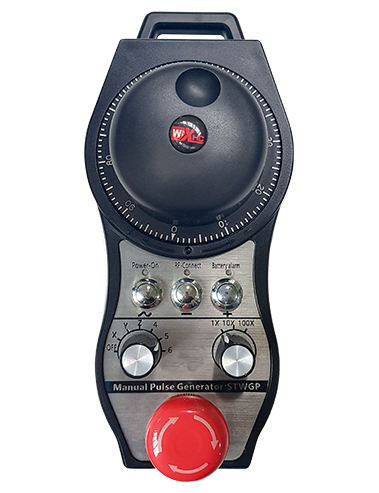
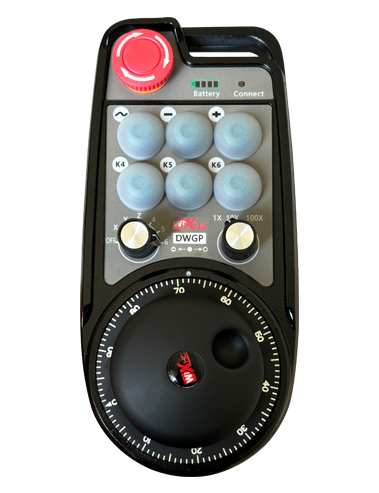
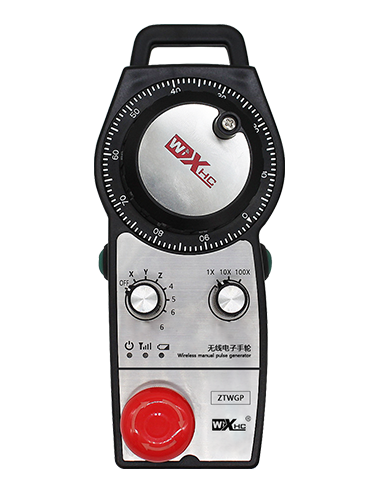
Поддржува 2 приспособливи копчиња, со излез на IO сигнал од типот на прекинувач;
Поддржува -2 контрола на оската;
Поддржува контрола на зголемување од 3 нивоа;


1.Вовед во производ
2. Функционални карактеристики на производот
| Работен напон и струја на безжичниот далечински управувач |
3V/14MA
|
| Спецификации за батерии | 2 АА алкални батерии, големина 5 |
| Нисконапонски аларм опсег на безжичен далечински управувач | < 2.3V |
| Напон на напојување на ресиверот | DC5V-24V/A |
| Опсег на оптоварување на излезното запирање на ресиверот | AC125V-1A/DC30V-2A |
| Ресиверот овозможува опсег на излезно оптоварување |
AC125V-1A/DC30V-2A
|
| Опсег на оптоварување на излезното копче на ресиверот | DC24V/50mA |
| Опсег на излезно оптоварување за избор на оската на приемникот | DC24V/50mA |
| Опсег на излезно оптоварување со зголемување на ресиверот | DC24V/50mA |
| Преносната моќност на рачниот терминал |
15dBm
|
| Чувствителност на приемот на ресиверот | -100dBm |
| Фреквенција на безжична комуникација | 433Фреквентен опсег MHz |
| Далечина за безжична комуникација | Растојанието без бариери на 40 метри |
| Работна температура | -25℃ < X < 55℃ |
| Висина против паѓање | 1 (метар) |
| Прилагодена количина на копчиња | 2 |


① Pulse encoder:
Притиснете и задржете го копчето за овозможување, протресете го енкодерот за пулсот, емитуваат пулсен сигнал,и контролирајте го движењето на оската на машината.
② Enable button:
Притиснете кое било копче за овозможување од двете страни, и двете групи на овозможување IO излези на ресиверот ќе спроведат. Ослободете го копчето за овозможување за да го исклучите излезот за овозможување IO; И пред да го префрлите зголемувањето на изборот на оската и да го тресете рачното тркало,копчето за овозможување треба да се држи притиснато за да биде ефективно; Оваа функција може да се откаже преку софтвер за конфигурација.
③ Indicator lights:
Лево странично светло: напојување на светлината,рачното тркало ја користи оската за да избере OFF за вклучување, и ова светло останува вклучено по вклучувањето;
Средно светло: сигнално светло кое се пали при ракување со која било функција на рачното тркало, и не свети кога нема операција;
Светло од десната страна: Нисконапонско алармно светло, ниско ниво на батерија,ова светло трепка или останува вклучено, батеријата треба да се замени.
④ Emergency stop button:
Притиснете го копчето за итно стопирање, и двете групи на IO излези за итно запирање на ресиверот ќе се исклучат, и сите функции на рачното тркало ќе бидат неважечки.
⑤ Magnification switch:
Притиснете и задржете го копчето за овозможување за да го префрлите прекинувачот за зголемување, што може да го префрли зголемувањето контролирано со рачното тркало.
⑥ Axis selection switch (прекинувач за напојување):
Притиснете и задржете го копчето за овозможување за да го префрлите прекинувачот за избор на оска, што може да ја префрли оската на движење контролирана од рачното тркало. Префрлете го овој прекинувач од ИСКЛУЧЕНО на која било оска и вклучете го напојувањето на рачното тркало.
⑦ Custom button:
Две сопствени копчиња, секоја од нив одговара на излезна IO точка на приемникот.

1. Инсталирајте го ресиверот во електричниот кабинет преку бравата на задната страна, или инсталирајте го во кабинетот преку отворите за завртките на четирите агли на ресиверот.
2. Погледнете го нашиот дијаграм за поврзување на приемникот и споредете го со вашата опрема на лице место. Поврзете ја опремата со ресиверот преку кабли.
3.Откако ресиверот е правилно фиксиран, мора да биде поврзана антената опремена со ресиверот, а надворешниот крај на антената треба да се инсталира или постави надвор од електричниот кабинет. Се препорачува да го поставите на горниот дел од електричниот кабинет за најдобар сигнален ефект. Забрането е да ја оставите антената неповрзана или да ја ставите внатре во електричниот кабинет, бидејќи тоа може да доведе до тоа сигналот да биде неупотреблив.
4. Конечно, вклучете го прекинувачот за напојување на рачното тркало, и можете да ракувате со машината далечински користејќи го рачното тркало.
6.2 Димензии на инсталација на ресивер

6.3 Референтен дијаграм за поврзување на ресиверот

7. Инструкции за работа на производот
1. Вклучете ја машината и ресиверот. The receiver’s working indicator light flashes. Инсталирајте ја батеријата во безжичното електронско рачно тркало, прицврстете го капакот на батеријата, и
вклучете го прекинувачот за напојување на безжичното електронско рачно тркало. The handwheel’s battery level indicator light is on.
2. Изберете ја координатната оска: Притиснете и задржете го копчето за овозможување, префрлете го прекинувачот за избор на оска, и изберете ја оската со која сакате да управувате.
3. Изберете зголемување: Притиснете и задржете го копчето за овозможување, вклучете го прекинувачот за зголемување,и изберете го саканото ниво на зголемување.
4. Подвижна оска: Притиснете и задржете го копчето за овозможување, изберете го прекинувачот за избор на оска, изберете го прекинувачот за зголемување, а потоа ротирајте го енкодерот за пулсот. Ротирајте во насока на стрелките на часовникот за да го поместите
позитивна оска и спротивно од стрелките на часовникот за поместување на негативната оска.
5. Притиснете и задржете кое било прилагодено копче, и ќе се вклучи соодветното копче IO излез на ресиверот. Ослободете го копчето, и излезот ќе се исклучи.
6. Притиснете го копчето за итно стопирање, ќе се исклучи соодветниот IO излез за итен прекин на ресиверот, функцијата на рачното тркало ќе биде оневозможена,отпуштете го копчето за итно стопирање, излезот IO за запирање за итни случаи ќе се затвори, и функцијата на рачното тркало ќе се врати.
7. Ако рачното тркало не се ракува одредено време, автоматски ќе влезе во режим на мирување за да ја намали потрошувачката на енергија. Кога повторно ќе се употреби, рачното тркало може да се активира со притискање на копчето за овозможување.
8. Ако рачното тркало не се користи долго време, се препорачува да се префрли вратилото на рачното тркало во положба OFF, исклучете го напојувањето на рачното тркало, и да го продолжите траењето на батеријата.
8. Опис на моделот на производот

① :ZTWGP го претставува стилот на изгледот
②:Параметри за излез на пулсот:
01: Покажува дека излезниот пулсен сигнал е А, Б; Импулсен напон 5V; количина на пулс 100PPR.
02:Што покажува дека излезните импулсни сигнали се А и Б; Пулсен напон 12V; количина на пулс 100PPR.
03:Што покажува дека излезните импулсни сигнали се А, Б, А -, Б -; Импулсен напон 5V; количина на пулс 100PPR.
04:Покажува излез на отворено коло NPN на ниско ниво, со излезни импулсни сигнали од А и Б;Бројот на импулси е 100 PPR.
05:Покажува излез на PNP извор на високо ниво, со излезни импулсни сигнали од А и Б; Бројот на импулси е 100 PPR.
③:Претставување на бројот на прекинувачи за избор на оски, 2 претставува 2 секири.
④:Го претставува типот на сигналот на прекинувачот за избор на оска, A претставува излезен сигнал од точка до точка, и B претставува кодиран излезен сигнал.
⑤:Го претставува типот на сигналот на прекинувачот за множење, A претставува излезен сигнал од точка до точка, и B претставува кодиран излезен сигнал.
⑥:Го претставува бројот на сопствени копчиња, 2 претставува 2 Прилагодени копчиња.
⑦:Го претставува напојувањето за рачното тркало на системот, и 05 претставува 5V напојување.
⑧:L ја претставува левата колона (лев држач за нож), а R ја претставува десната колона (десен држач за нож).
9.Решение за дефекти на производот

1. Ве молиме користете го во сува средина на собна температура и притисок за да го продолжите работниот век.
2. Ве молиме избегнувајте користење во ненормални средини како што се дожд и водени меури за да го продолжите работниот век.
3. Ве молиме чувајте го изгледот на рачното тркало чист за да го продолжите неговиот животен век.
4. Ве молиме избегнувајте стискање, паѓање, удирање, итн. за да се спречи оштетување на прецизните компоненти во внатрешноста на рачното тркало или грешки во прецизноста.
5. Ако не се користи долго време, ве молиме чувајте го рачното тркало на чисто и безбедно место. За време на складирањето и транспортот, треба да се обрне внимание на отпорноста на влага и удари.
11. Информации за безбедност
1. Ве молиме внимателно прочитајте ги упатствата пред употреба и забранете непрофесионалци да работат.
2. Ве молиме заменете ја батеријата навремено кога нивото на батеријата е премногу ниско за да избегнете грешки предизвикани од недоволна моќност на батеријата и неможност за ракување со рачното тркало.
3. Ако е потребна поправка, ве молиме контактирајте го производителот. Ако штетата е предизвикана од самопоправка, производителот нема да обезбеди гаранција