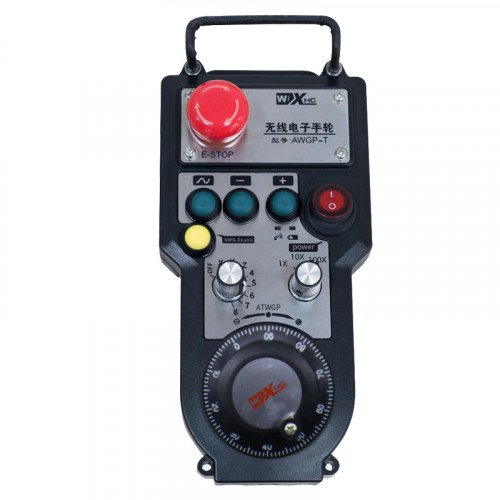
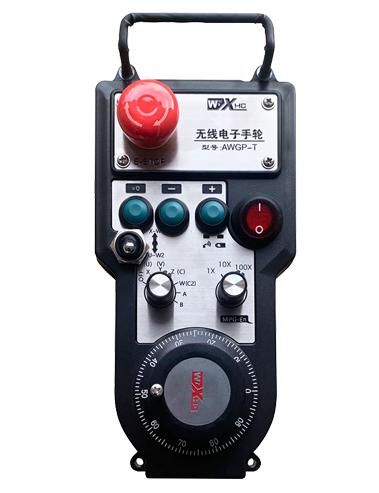
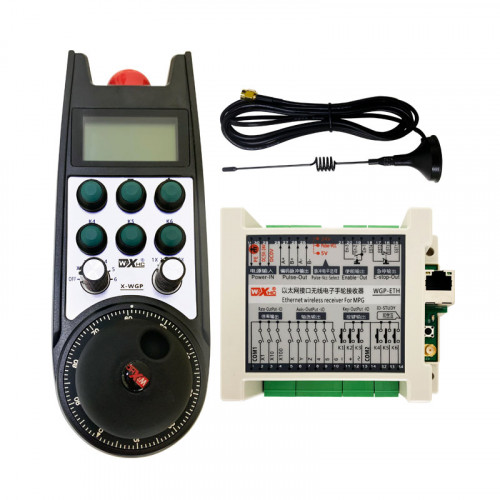
समर्थन 2 सानुकूलित बटणे, स्विच-प्रकार आयओ सिग्नल आउटपुटसह;
समर्थन -2 अक्ष नियंत्रण;
3-स्तरीय भिंग नियंत्रणास समर्थन देते;


1.उत्पादन परिचय
2. उत्पादन कार्यात्मक वैशिष्ट्ये
| वायरलेस रिमोटचे ऑपरेटिंग व्होल्टेज आणि वर्तमान |
3V/14MA
|
| बॅटरी तपशील | 2 AA अल्कधर्मी बॅटरी, आकार 5 |
| वायरलेस रिमोटची कमी व्होल्टेज अलार्म श्रेणी | < 2.3व्ही |
| रिसीव्हर वीज पुरवठा व्होल्टेज | DC5V-24V/A |
| प्राप्तकर्ता आणीबाणी स्टॉप आउटपुट लोड श्रेणी | AC125V-1A/DC30V-2A |
| प्राप्तकर्ता आउटपुट लोड श्रेणी सक्षम करतो |
AC125V-1A/DC30V-2A
|
| रिसीव्हर कस्टम बटण आउटपुट लोड श्रेणी | DC24V/50mA |
| प्राप्तकर्ता अक्ष निवड आउटपुट लोड श्रेणी | DC24V/50mA |
| रिसीव्हर मॅग्निफिकेशन आउटपुट लोड श्रेणी | DC24V/50mA |
| हँडहेल्ड टर्मिनलची ट्रान्समिशन पॉवर |
15dBm
|
| प्राप्तकर्ता प्राप्त संवेदनशीलता | -100dBm |
| वायरलेस संप्रेषण वारंवारता | 433MHz वारंवारता बँड |
| वायरलेस संप्रेषण अंतर | च्या अडथळा मुक्त अंतर 40 मीटर |
| ऑपरेशन तापमान | -25℃ < एक्स < 55℃ |
| अँटी फॉल उंची | 1 (मीटर) |
| सानुकूल बटण प्रमाण | 2 |


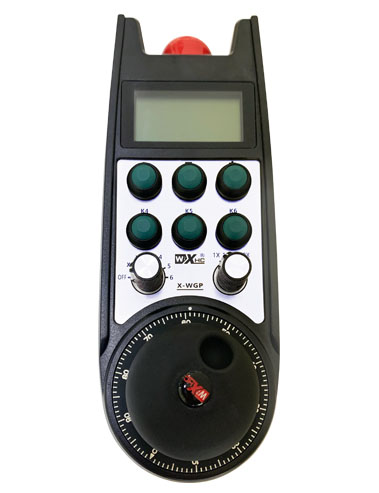
① Pulse encoder:
सक्षम बटण दाबा आणि धरून ठेवा, पल्स एन्कोडर हलवा, एक नाडी सिग्नल उत्सर्जित करा,आणि मशीनच्या अक्षाच्या हालचाली नियंत्रित करा.
② Enable button:
दोन्ही बाजूला सक्षम बटण दाबा, आणि रिसीव्हरवर सक्षम IO आउटपुटचे दोन संच चालतील. सक्षम IO आउटपुट डिस्कनेक्ट करण्यासाठी सक्षम बटण सोडा; आणि अक्ष निवड वाढविण्याआधी आणि हँडव्हील हलवण्याआधी,सक्षम बटण प्रभावी होण्यासाठी दाबून ठेवणे आवश्यक आहे; हे कार्य कॉन्फिगरेशन सॉफ्टवेअरद्वारे रद्द केले जाऊ शकते.
③ Indicator lights:
डाव्या बाजूचा प्रकाश: प्रकाशावर शक्ती,हँडव्हील पॉवर चालू करण्यासाठी बंद निवडण्यासाठी अक्ष वापरते, आणि हा दिवा पॉवर ऑन केल्यानंतर चालू राहतो;
मधला प्रकाश: एक सिग्नल लाइट जो हँडव्हीलचे कोणतेही कार्य चालवताना उजळतो, आणि ऑपरेशन नसताना उजळत नाही;
उजव्या बाजूचा प्रकाश: कमी व्होल्टेज अलार्म लाइट, कमी बॅटरी पातळी,हा लाइट फ्लॅश होतो किंवा चालू राहतो, बॅटरी बदलणे आवश्यक आहे.
④ Emergency stop button:
आपत्कालीन स्टॉप बटण दाबा, आणि रिसीव्हरवरील आपत्कालीन स्टॉप IO आउटपुटचे दोन संच डिस्कनेक्ट केले जातील, आणि हँडव्हीलची सर्व कार्ये अवैध असतील.
⑤ Magnification switch:
मॅग्निफिकेशन स्विच स्विच करण्यासाठी सक्षम बटण दाबा आणि धरून ठेवा, जे हँडव्हीलद्वारे नियंत्रित मॅग्निफिकेशन स्विच करू शकते.
⑥ Axis selection switch (पॉवर स्विच):
अक्ष निवड स्विच स्विच करण्यासाठी सक्षम बटण दाबा आणि धरून ठेवा, जे हँडव्हीलद्वारे नियंत्रित हालचालीचा अक्ष बदलू शकते. हा स्विच बंद वरून कोणत्याही अक्षावर स्विच करा आणि हँडव्हील पॉवर चालू करा.
⑦ Custom button:
दोन सानुकूल बटणे, प्रत्येक रिसीव्हरवरील IO आउटपुट बिंदूशी संबंधित आहे.

1. मागील बाजूस असलेल्या बकलद्वारे इलेक्ट्रिकल कॅबिनेटमध्ये रिसीव्हर स्थापित करा, किंवा रिसीव्हरच्या चार कोपऱ्यांवर असलेल्या स्क्रू छिद्रांद्वारे कॅबिनेटमध्ये स्थापित करा.
2. आमच्या रिसीव्हर वायरिंग आकृतीचा संदर्भ घ्या आणि त्याची तुमच्या ऑन-साइट उपकरणांशी तुलना करा. केबल्सद्वारे उपकरणे रिसीव्हरशी जोडा.
3.रिसीव्हर योग्यरित्या निश्चित केल्यानंतर, रिसीव्हरसह सुसज्ज अँटेना कनेक्ट करणे आवश्यक आहे, आणि अँटेनाचे बाह्य टोक विद्युत कॅबिनेटच्या बाहेर स्थापित किंवा ठेवले पाहिजे. सर्वोत्तम सिग्नल इफेक्टसाठी ते इलेक्ट्रिकल कॅबिनेटच्या शीर्षस्थानी ठेवण्याची शिफारस केली जाते. अँटेना कनेक्ट न करता सोडणे किंवा इलेक्ट्रिकल कॅबिनेटमध्ये ठेवणे प्रतिबंधित आहे, कारण यामुळे सिग्नल निरुपयोगी होऊ शकतो.
4. शेवटी, हँडव्हीलचा पॉवर स्विच चालू करा, आणि तुम्ही हँडव्हील वापरून मशीन दूरस्थपणे ऑपरेट करू शकता.
6.2 प्राप्तकर्ता स्थापना परिमाणे

6.3 रिसीव्हर वायरिंग संदर्भ आकृती

7. उत्पादन ऑपरेशन सूचना
1. मशीन आणि रिसीव्हरवर पॉवर. The receiver’s working indicator light flashes. वायरलेस इलेक्ट्रॉनिक हँडव्हीलमध्ये बॅटरी स्थापित करा, बॅटरी कव्हर सुरक्षित करा, आणि
वायरलेस इलेक्ट्रॉनिक हँडव्हीलचा पॉवर स्विच चालू करा. The handwheel’s battery level indicator light is on.
2. समन्वय अक्ष निवडा: सक्षम बटण दाबा आणि धरून ठेवा, अक्ष निवड स्विच टॉगल करा, आणि आपण ऑपरेट करू इच्छित अक्ष निवडा.
3. मॅग्निफिकेशन निवडा: सक्षम बटण दाबा आणि धरून ठेवा, मॅग्निफिकेशन स्विच टॉगल करा,आणि इच्छित विस्तार पातळी निवडा.
4. हलवत अक्ष: सक्षम बटण दाबा आणि धरून ठेवा, अक्ष निवड स्विच निवडा, मॅग्निफिकेशन स्विच निवडा, आणि नंतर पल्स एन्कोडर फिरवा. हलविण्यासाठी घड्याळाच्या दिशेने फिरवा
ऋण अक्ष हलविण्यासाठी सकारात्मक अक्ष आणि घड्याळाच्या उलट दिशेने.
5. कोणतेही सानुकूल बटण दाबा आणि धरून ठेवा, आणि रिसीव्हरचे संबंधित बटण IO आउटपुट चालू केले जाईल. बटण सोडा, आणि आउटपुट बंद होईल.
6. आपत्कालीन स्टॉप बटण दाबा, रिसीव्हरचे संबंधित आपत्कालीन स्टॉप IO आउटपुट डिस्कनेक्ट केले जाईल, हँडव्हील फंक्शन अक्षम केले जाईल,आपत्कालीन स्टॉप बटण सोडा, आपत्कालीन स्टॉप IO आउटपुट बंद होईल, आणि हँडव्हील कार्य पुनर्संचयित केले जाईल.
7. जर हँडव्हील ठराविक कालावधीसाठी चालू नसेल, वीज वापर कमी करण्यासाठी ते आपोआप स्लीप मोडमध्ये प्रवेश करेल. जेव्हा ते पुन्हा वापरले जाते, सक्षम बटण दाबून हँडव्हील सक्रिय केले जाऊ शकते.
8. हँडव्हील बराच वेळ वापरत नसल्यास, हँडव्हील शाफ्ट बंद स्थितीवर स्विच करण्याची शिफारस केली जाते, हँडव्हील पॉवर बंद करा, आणि बॅटरीचे आयुष्य वाढवते.
8. उत्पादन मॉडेल वर्णन

① :ZTWGP देखावा शैली दर्शवते
②:पल्स आउटपुट पॅरामीटर्स:
01: पल्स आउटपुट सिग्नल A असल्याचे दर्शवते, बी; पल्स व्होल्टेज 5V; नाडीचे प्रमाण 100PPR.
02:पल्स आउटपुट सिग्नल A आणि B आहेत हे दर्शवितात; पल्स व्होल्टेज 12V; नाडीचे प्रमाण 100PPR.
03:पल्स आउटपुट सिग्नल A आहेत हे दर्शविते, बी, ए -, बी -; पल्स व्होल्टेज 5V; नाडीचे प्रमाण 100PPR.
04:निम्न-स्तरीय NPN ओपन सर्किट आउटपुट दर्शवते, A आणि B च्या पल्स आउटपुट सिग्नलसह;डाळींची संख्या 100PPR आहे.
05:उच्च-स्तरीय PNP स्त्रोत आउटपुट दर्शवते, A आणि B च्या पल्स आउटपुट सिग्नलसह; डाळींची संख्या 100PPR आहे.
③:अक्ष निवड स्विचची संख्या दर्शवित आहे, 2 प्रतिनिधित्व करते 2 अक्ष.
④:अक्ष निवड स्विच सिग्नलचा प्रकार दर्शवतो, A पॉइंट-टू-पॉइंट आउटपुट सिग्नल दर्शवतो, आणि B एन्कोडेड आउटपुट सिग्नलचे प्रतिनिधित्व करतो.
⑤:गुणाकार स्विच सिग्नलचा प्रकार दर्शवतो, A पॉइंट-टू-पॉइंट आउटपुट सिग्नल दर्शवतो, आणि B एन्कोडेड आउटपुट सिग्नलचे प्रतिनिधित्व करतो.
⑥:सानुकूल बटणांची संख्या दर्शवते, 2 प्रतिनिधित्व करते 2 सानुकूल बटणे.
⑦:सिस्टम हँडव्हीलसाठी वीज पुरवठ्याचे प्रतिनिधित्व करते, आणि 05 5V वीज पुरवठ्याचे प्रतिनिधित्व करते.
⑧:L हा डावा स्तंभ दर्शवतो (डावा चाकू धारक), आणि R उजव्या स्तंभाचे प्रतिनिधित्व करतो (उजवा चाकू धारक).
9.उत्पादनातील खराबींवर उपाय

1. कृपया खोलीच्या तपमानावर कोरड्या वातावरणात वापरा आणि त्याची सेवा आयुष्य वाढवण्यासाठी दबाव ठेवा.
2. कृपया सेवा आयुष्य वाढवण्यासाठी पाऊस आणि पाण्याचे बुडबुडे यासारख्या असामान्य वातावरणात वापरणे टाळा.
3. कृपया हँडव्हीलचे सेवा आयुष्य वाढवण्यासाठी त्याचे स्वरूप स्वच्छ ठेवा.
4. कृपया पिळणे टाळा, पडणे, बम्पिंग, इ. हँडव्हीलमधील अचूक घटकांचे नुकसान टाळण्यासाठी किंवा अचूकतेच्या त्रुटी टाळण्यासाठी.
5. बराच वेळ वापरला नाही तर, कृपया हँडव्हील स्वच्छ आणि सुरक्षित ठिकाणी ठेवा. स्टोरेज आणि वाहतूक दरम्यान, आर्द्रता आणि शॉक प्रतिरोधनाकडे लक्ष दिले पाहिजे.
11. सुरक्षितता माहिती
1. कृपया वापरण्यापूर्वी सूचना काळजीपूर्वक वाचा आणि गैर-व्यावसायिकांना ऑपरेट करण्यास मनाई करा.
2. बॅटरीची अपुरी उर्जा आणि हँडव्हील चालविण्यास असमर्थतेमुळे होणाऱ्या त्रुटी टाळण्यासाठी कृपया बॅटरीची पातळी खूप कमी असताना वेळेवर बॅटरी बदला..
3. दुरुस्ती आवश्यक असल्यास, कृपया निर्मात्याशी संपर्क साधा. स्वत: च्या दुरुस्तीमुळे नुकसान झाल्यास, निर्माता हमी देणार नाही