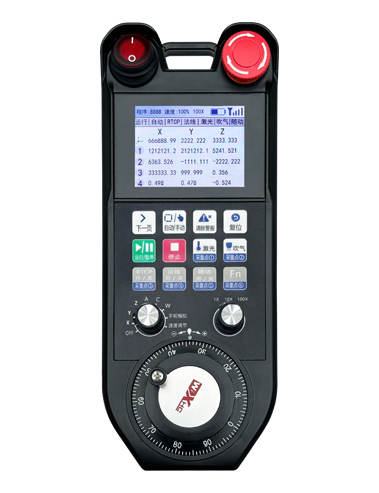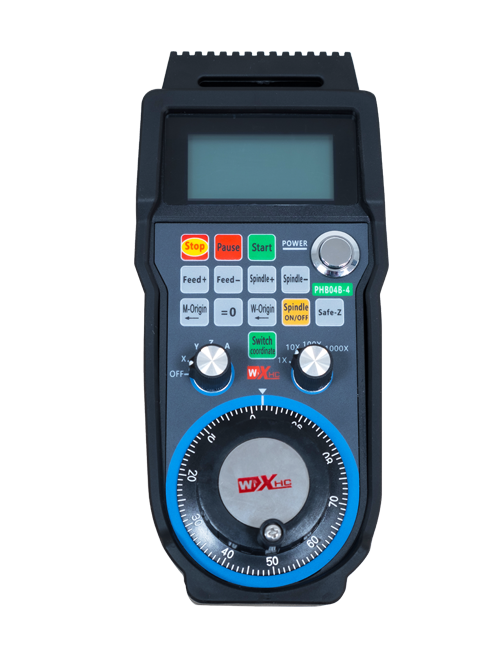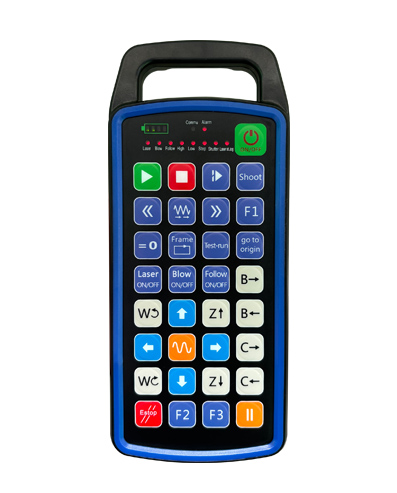
Lagolago 32 fa'apolokalame fa'amau fa'amau
Lagolago 9 polokalame fa'aaliga moli fa'ale-aganu'u
Fa'aaogaina 433MHZ feso'ota'iga fa'atekonolosi uaealesi, le faagaoioiga uaealesi
mamao e 80 mita

£300.00
Lagolago 32 fa'apolokalame fa'amau fa'amau
Lagolago 9 polokalame fa'aaliga moli fa'ale-aganu'u
Fa'aaogaina 433MHZ feso'ota'iga fa'atekonolosi uaealesi, le faagaoioiga uaealesi
mamao e 80 mita
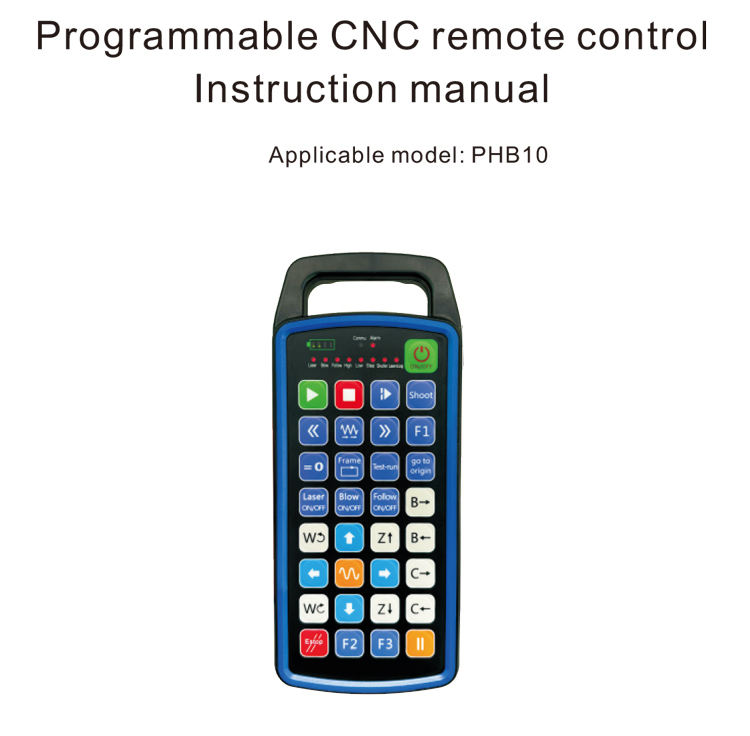
1.Oloa Folasaga
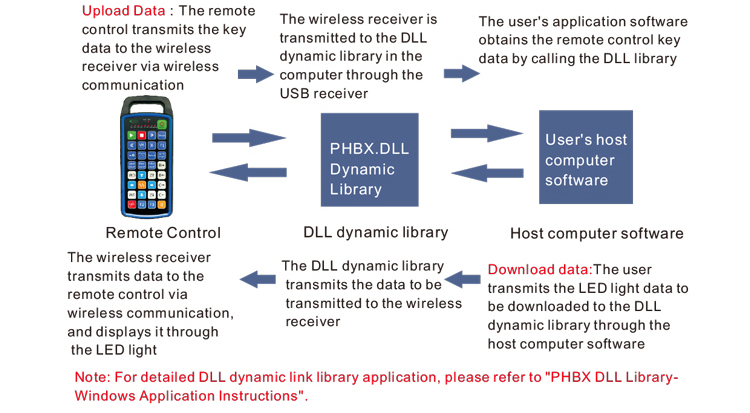
O le fa'atonuga mamao ole CNC PHB10 e talafeagai mo le uaea
fa'atonuga mamao o faiga CNC eseese. E lagolagoina le faʻamalamalamaina e le tagata faʻaoga
polokalame e atia'e ai galuega fa'amau, ma iloa le pulea mamao o eseese
galuega i luga ole faiga CNC; e lagolagoina le fa'aogaina o polokalame e fa'atupuina
moli LED e moli ma tape, ma iloa le faʻaalia malosi o le tulaga o le faiga;
o le pule mamao e sau ma se maa toe faʻaaogaina ma lagolagoina le Type-C
fa'atonuga o feso'ota'iga.
2.Oloa Vaega
1. Fa'aaogaina 433MHZ feso'ota'iga fa'atekonolosi uaealesi, le faagaoioiga uaealesi
mamao e 80 mita;
2.Fa'aaogāina otometi fa'aoso fa'asolo galuega, 32 seti o le mamao uaealesi
e mafai ona fa'aoga i le taimi e tasi e aunoa ma le afaina o le tasi i le isi;
3.Lagolago 32 fa'apolokalame fa'amau fa'amau;
4.Lagolago 9 polokalame fa'aaliga moli fa'ale-aganu'u;
5.Lagolago IP67 tulaga susu;
6.Lagolago tulaga masani Type-C le faʻaogaina o fesoʻotaʻiga; 5V-2A faʻamatalaga faʻatonuga;
1100 mAh tele gafatia maa, fa'atasi ai ma galuega fa'atali moe otometi; iloa
ultra-umi maualalo le malosi standby;
7.Lagolago fa'aalia taimi moni o le mana.
3.Mataupu Manuia
4. Oloa Faapitoa
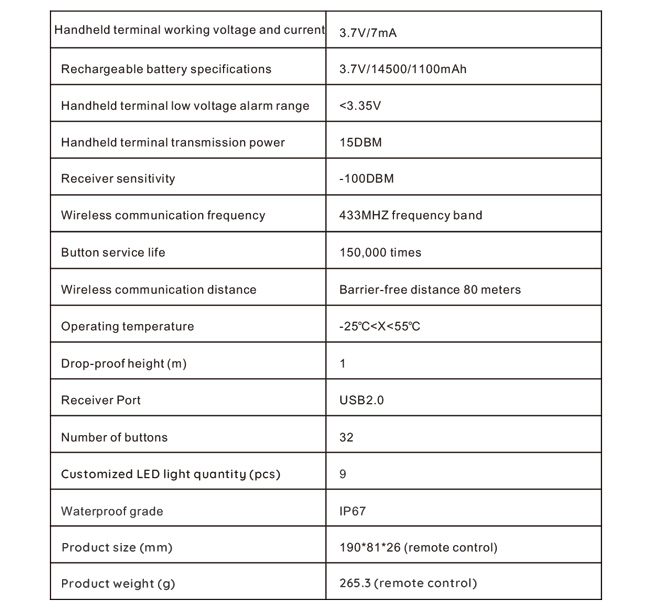
5.Oloa Galuega Folasaga
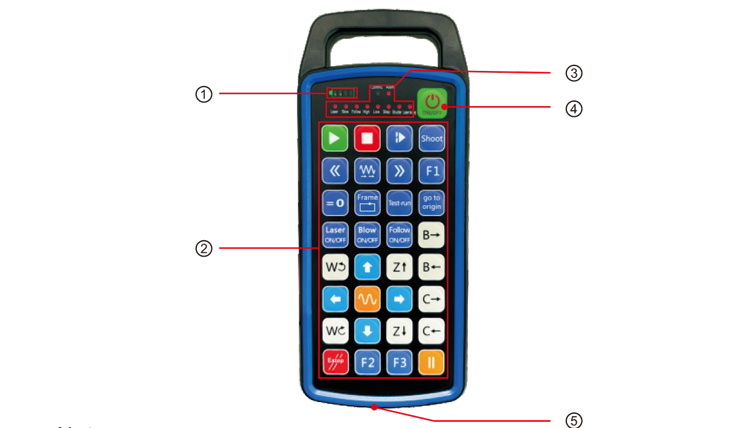
Faamatalaga:
①Battery level display:
E moli pe a uma le eletise, tape pe a uma le paoa;
Afai o le moli faailoilo o le maa e na o le tasi le pa ma o loʻo emo pea, o lona uiga o le
ua maualalo tele le maa. Faamolemole sui le maa;
Afai o lo'o ola uma moli fa'ailoga o le maa ae emo i tua isi moli LED ma
i luma, o lona uiga e matua maualalo le maa. Faamolemole sui le maa;
Afai e le mu pe alu ese le faailo o le maa, ma le masini e le mafai
amata i le oomi ma uu le faamau o le mana, Faʻamolemole sui le maʻa;
②Button area:32 fa'amau fa'amau i le 4X8, polokalame fa'auigaina e tagata fa'aoga;
③Status LED:
COMMU: Malamalama fa'ailoga ki, e moli pe a oomi le faamau ma alu
i fafo pe a tatala le faamau; o isi moli o fa'aaliga masani;
④Power switch:
Oomi umi mo 3 sekone e ki ai, lolomi umi mo 3 sekone e tape ai;
⑤Charging port:
Fa'aaoga le uta Type-C e totogi ai, fa'atonuga voltage 5V, 1A-2A nei; molia
taimi 3-5 itula;
Pe a molia, emo le faailo o le eletise, o lo'o fa'ailoa mai o lo'o totogi. O afea
fa'atumu atoa, o le a fa'aalia ai le fa'ailoga o le mana atoa e aunoa ma le emo.
6.Oloa oloa
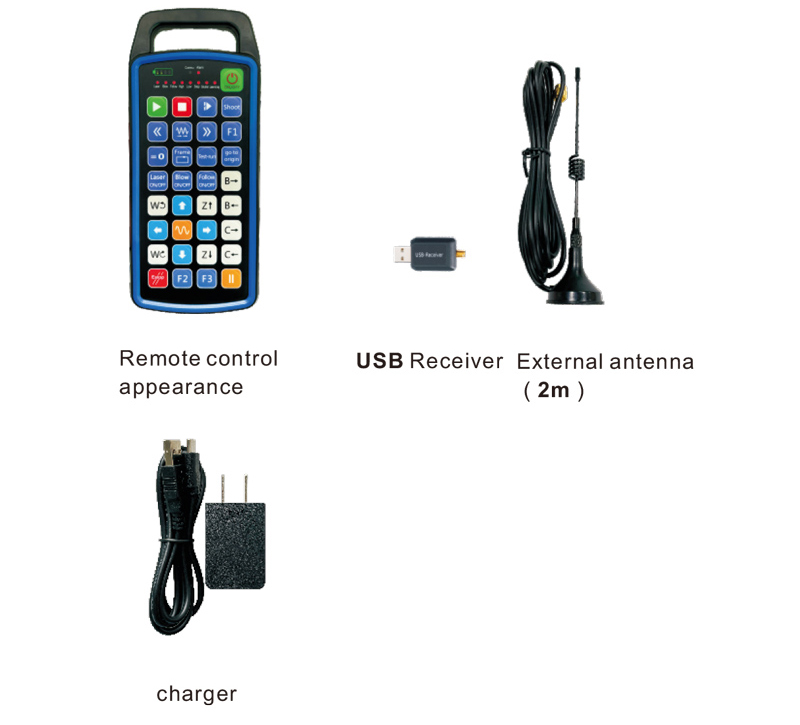
7.Oloa faapipiiina taiala
1 . Ou te faʻapipiʻi le USB receiver i totonu o le komepiuta, e otometi lava le komepiuta
iloa ma faapipii le avetaavale masini USB e aunoa ma le tusi lesona
2. Fa'aofi le fa'atonu mamao i totonu o le uta. A uma ona fa'atumu atoa le maa, lolomi
ma uu le faamau mana mo 3 sekone. O le a fa'aola le pule mamao ma le mana
o le a moli le faailo, e fa'ailoa mai ai ua manuia le fa'aola.
3. A mae'a ona ola, e mafai ona e faia soo se faagaioiga faamau. Le pule mamao
e mafai ona lagolagoina fa'agaioiga fa'amau lua i le taimi e tasi. A e oomi soo se faamau, le
O le a moli le moli COMMU i luga o le pule mamao, e ta'u mai ai e aoga lenei faamau.
8.Mea gaosiga o mea
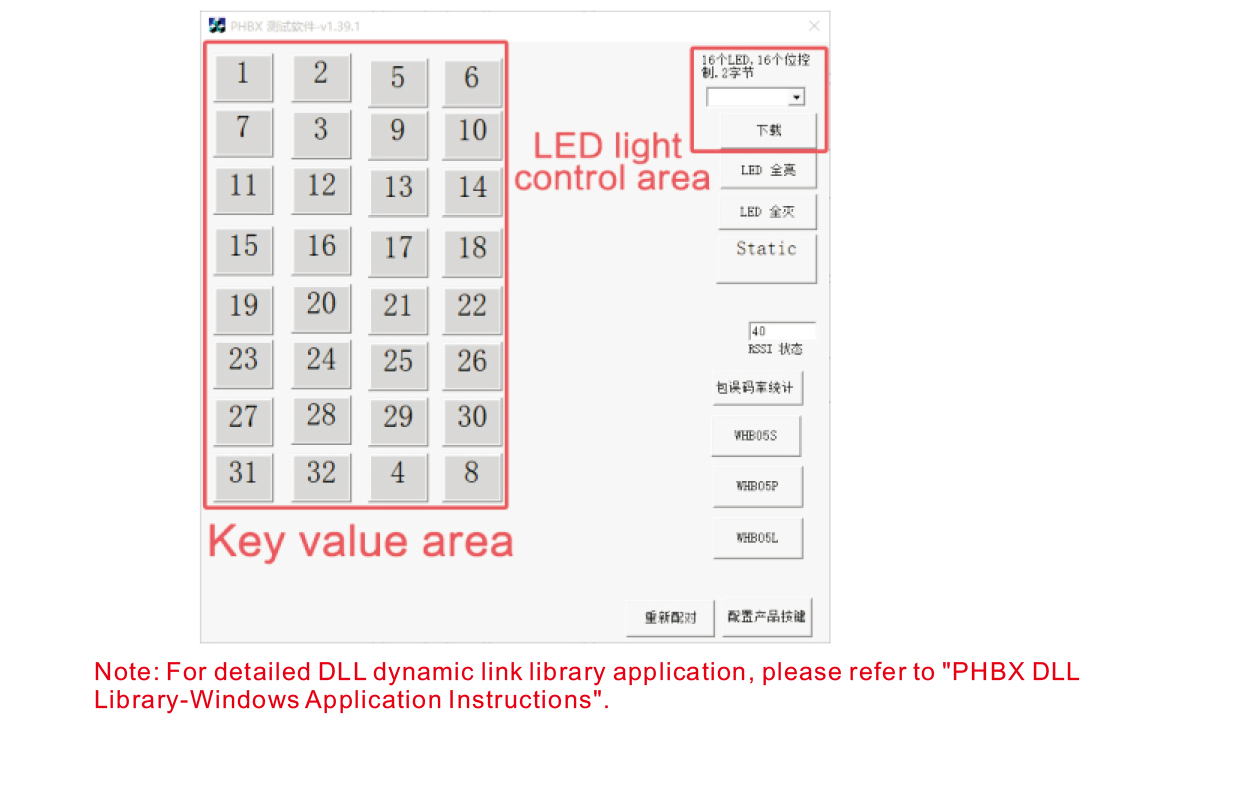
A'o le'i atina'e ma fa'aoga oloa, e mafai ona e faʻaogaina le polokalama faʻataʻitaʻiga matou te tuʻuina atu i ai
fa'ata'ita'i fa'amau i luga o le ta'avale mamao ma le moli LED i luga o le ta'avale mamao. E te mafaia
fa'aaoga fo'i le demo e fai ma fa'amatalaga masani mo le atina'eina o polokalame i le lumana'i.
A'o le'i fa'aogaina le polokalama fa'apitoa, fa'amolemole fa'apipi'i le USB receiver i le komepiuta,
ia mautinoa ua lava le mana o le masini mamao, fetaomi ma uu le faamau o le mana i le t
urna i luga, ona faaaoga lea;
Pe a oomi so o se faamau i luga o le pulea mamao, o le a faʻaalia le faʻataʻitaʻiga polokalama suʻega
o le tau autu tutusa. Ina ua uma ona tatalaina, ua mou atu le fa'aaliga taua taua,
e fa'ailoa mai ai o le fa'apipi'i ki e masani lava;
E mafai foi ona e filifilia le numera moli LED i luga o le su'ega polokalama faakomepiuta demo, kiliki download,
ma o le numera moli tutusa i luga o le pule mamao o le a moli, e faailoa mai ai o le
O lo'o la'uina i lalo le moli o le LED.
9.Fa'afitauli Fa'afitauli
10. Tausiga ma le tausiga
1. Fa'amolemole fa'aaoga i totonu o se si'osi'omaga mago ma le vevela masani ma le mamafa e fa'alautele
Le Olaga Tautua;
2. Aua le fa'aogaina mea ma'ai e pa'i i le vaega autu e fa'alautele ai le ola tautua o le ki;
3. Fa'amolemole fa'amama le vaega autu e fa'aitiitia ai le ofuina o ki;
4. Aloese mai le oomi ma pa'ū e faʻaleagaina ai le masini mamao;
5. A le faaaogaina mo se taimi umi, fa'amolemole aveese le maa ma teu le fa'atonu mamao
ma le maa i se nofoaga mama ma saogalemu;
6. Faʻalogo lelei ile susu-faʻamaonia ile teuina ma felauaiga.
11.Faamatalaga saogalemu
1. Faʻamolemole faitau ma le faaeteete le faʻaeteete aʻo le i faʻaaogaina. E le-polofesa e faasaina mai
faagaoioiga.
2. Fa'amolemole fa'aaoga le uta muamua po'o se uta na gaosia e se tagata gaosi masani ma le
fa'amatalaga tutusa.
3. Fa'amolemole totogi i le taimi e aloese ai mai le le sa'o le fa'agaioiga ona o le le lava o le malosi e mafua ai le
fa'atonu mamao e le tali mai.
4. Afai o le toe faaleleia e manaomia, Faʻamolemole faʻafesoʻotaʻi le gaosi oloa. Afai o le leaga e mafua mai i le toe faaleleia o le tagata lava ia,
O le tagata gaosi oloa o le a le tuuina atu se tuutuuga.