వివరణ
1. ఉత్పత్తి పరిచయం
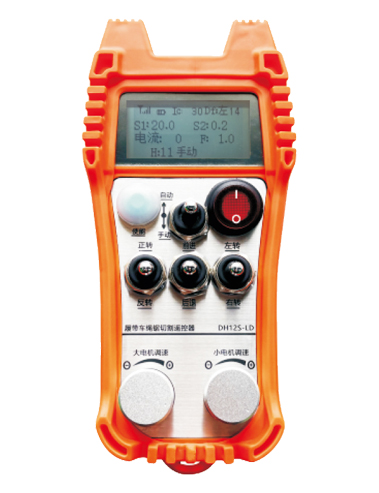
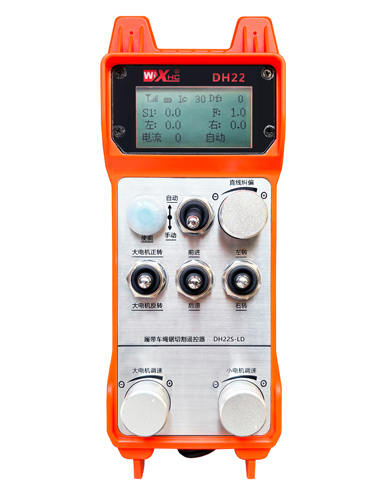
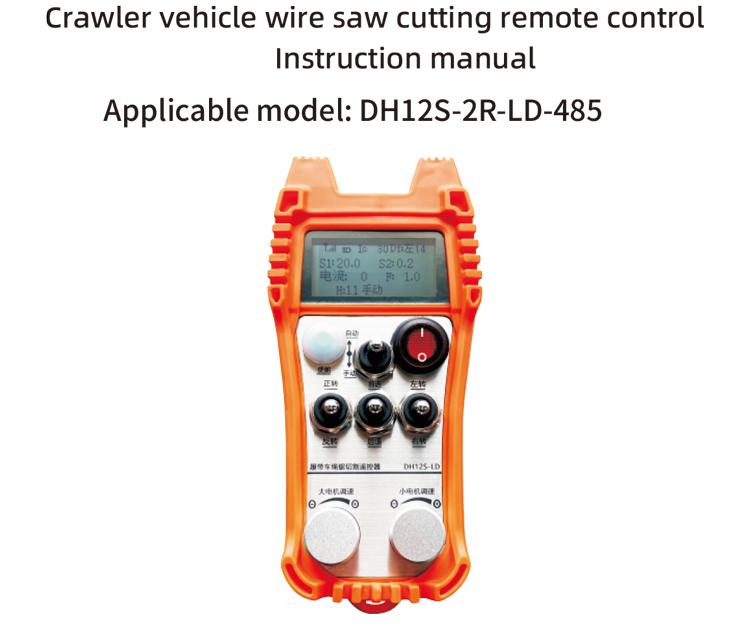
క్రాలర్ వెహికల్ రోప్ సా ఆటోమేటిక్ కటింగ్ రిమోట్ కంట్రోల్ క్రాలర్ రోప్ సా కట్టింగ్ మెషీన్లకు అనుకూలంగా ఉంటుంది. ఇది ఎడమ మరియు కుడి క్రాలర్ ఇన్వర్టర్ల వేగం ప్రారంభం మరియు ముందు మరియు వెనుక ఎడమ మరియు కుడి దిశ నియంత్రణను నియంత్రించడానికి 485ModbusRTU ప్రోటోకాల్ను స్వీకరించింది., అలాగే ఎడమ మరియు కుడి క్రాలర్ ఇన్వర్టర్ల వేగం ప్రారంభం మరియు ముందు మరియు వెనుక ఎడమ మరియు కుడి దిశ నియంత్రణను నియంత్రించడానికి పెద్ద మోటారు ఫ్రీక్వెన్సీ మార్పిడి RTU ప్రోటోకాల్, మరియు పెద్ద మోటార్ ఫ్రీక్వెన్సీ మార్పిడి ఓవర్-కరెంట్ విశ్లేషణ మరియు పోలిక, ఆటోమేటిక్ కట్టింగ్ ఫంక్షన్ను సాధించడానికి నిజ సమయంలో ఎడమ మరియు కుడి క్రాలర్ వేగాన్ని స్వయంచాలకంగా సర్దుబాటు చేయండి.
2. ఉత్పత్తి లక్షణాలు
1. 433MHZ వైర్లెస్ కమ్యూనికేషన్ టెక్నాలజీని స్వీకరించండి, వైర్లెస్ ఆపరేషన్ దూరం 100 మీటర్లు.
2. ఆటోమేటిక్ ఫ్రీక్వెన్సీ హోపింగ్ ఫంక్షన్ను స్వీకరించండి, ఉపయోగించండి 32 అదే సమయంలో వైర్లెస్ రిమోట్ కంట్రోలర్ల సెట్లు, ఒకరినొకరు ప్రభావితం చేయకుండా.
3. 485-Modbus RTU ప్రోటోకాల్తో అన్ని ఇన్వర్టర్లకు మద్దతు ఇవ్వండి. స్వీకరించబడిన ఇన్వర్టర్ బ్రాండ్లు ఉన్నాయి:షాంఘై Xielin, ఫుజి, ఆవిష్కరణ, జాంగ్చెన్, INVT, అంచుఅంద. బ్రాండ్ అడా కాకపోతే దయచేసి అనుకూలీకరణ కోసం మమ్మల్ని సంప్రదించండి.
4. పెద్ద మోటార్ ఇన్వర్టర్ ప్రారంభానికి మద్దతు ఇవ్వండి, వేగం నియంత్రణ, మరియు ప్రస్తుత పఠనం.
5. ఎడమ మరియు కుడి క్రాలర్ ఇన్వర్టర్ స్పీడ్ రెగ్యులేషన్కు మద్దతు ఇవ్వండి, ప్రారంభించండి, ముందు మరియు వెనుక ఎడమ మరియు కుడి నియంత్రణ.
6. మెషీన్ను సరళ రేఖలో కదలకుండా ఉంచడానికి ఎడమ మరియు కుడి క్రాలర్ ఇన్వర్టర్ స్ట్రెయిట్ లైన్ కరెక్షన్కు మద్దతు ఇవ్వండి.
7. మద్దతు తాడు ఆటోమేటిక్ కట్టింగ్ ఫంక్షన్ చూసింది, పెద్ద మోటారు ప్రస్తుత సమాచారం ప్రకారం నిజ సమయంలో ఎడమ మరియు కుడి క్రాలర్ వేగాన్ని స్వయంచాలకంగా సర్దుబాటు చేస్తుంది.
8. అదే సమయంలో, మోటారు యొక్క ప్రారంభం మరియు స్టాప్ను నియంత్రించడానికి ఇది డైరెక్ట్ IO అవుట్పుట్తో అనుకూలంగా ఉంటుంది, మరియు మోటారు వేగాన్ని నియంత్రించడానికి అనలాగ్ వోల్టేజ్ అవుట్పుట్.
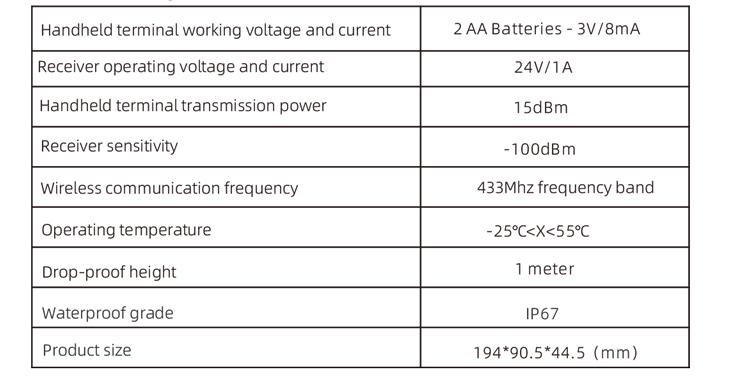
3. ఉత్పత్తి లక్షణాలు
4. ఉత్పత్తి ఫంక్షన్ పరిచయం
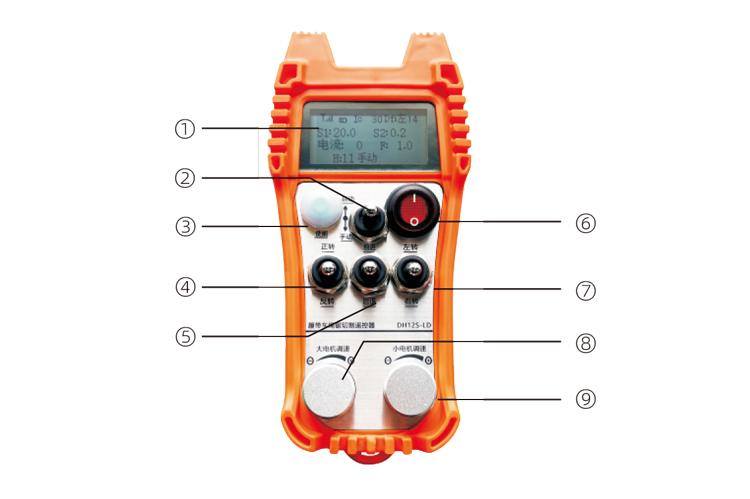
గమనికలు:
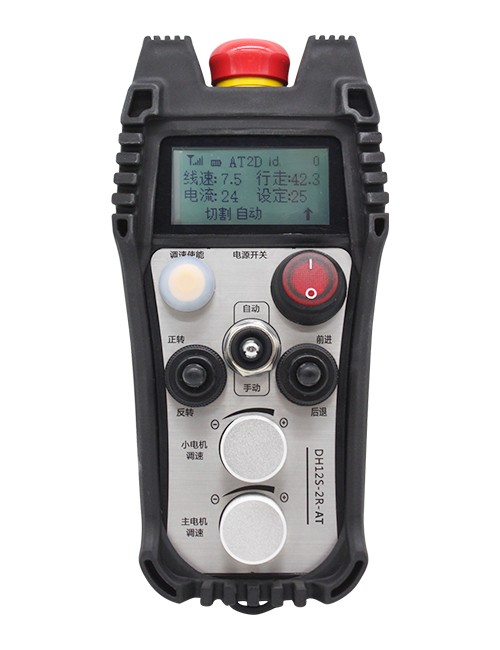
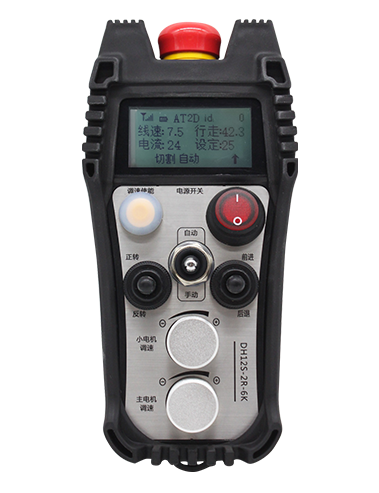
①Screen display:

②Mode switch:
2-స్థాయి స్విచ్ని ఉపయోగించడం, ఆటోమేటిక్ మరియు మాన్యువల్ మోడ్ల మధ్య మారడం సాధ్యమవుతుంది, మరియు స్విచ్చింగ్ కోసం సంబంధిత మోడ్ స్క్రీన్పై ప్రదర్శించబడుతుంది.
③ Enable:
కలయిక బటన్లు, కొన్ని కార్యకలాపాలకు ఆపరేషన్ కోసం ఎనేబుల్ బటన్ను నొక్కి ఉంచడం అవసరం, దయచేసి వివరాల కోసం ప్రతి స్విచ్ కోసం సూచనలను చూడండి.
④ Large motor switch:
3-స్పీడ్ రీసెట్ స్విచ్ని ఉపయోగించడం, ఈ స్విచ్ని లాగడం ద్వారా పెద్ద మోటారు యొక్క ముందుకు మరియు రివర్స్ భ్రమణాన్ని నియంత్రించవచ్చు. విడుదల చేసిన తరువాత, రాష్ట్రం అలాగే ఉంటుంది, మరియు స్క్రీన్పై సంబంధిత డిస్ప్లేలు ఉంటాయి. t బాణం ముందుకు భ్రమణాన్ని సూచిస్తుంది, మరియు y బాణం రివర్స్ భ్రమణాన్ని సూచిస్తుంది.
⑤Small motor forward/reverse switch:
3-స్పీడ్ స్వీయ-లాకింగ్ స్విచ్ని ఉపయోగించడం, ఈ స్విచ్ని లాగడం ద్వారా చిన్న మోటారును ముందుకు మరియు వెనుకకు తరలించడానికి నియంత్రించవచ్చు. సంబంధిత ప్రదర్శన స్క్రీన్పై చూపబడుతుంది, with the t arrow indicating forward and the ↓ arrow indicating backward.
⑥Remote control power switch:
రిమోట్ కంట్రోల్ డిస్ప్లే స్క్రీన్ ఆన్ చేయబడింది.
⑦ small motor turning switch:
3-స్పీడ్ రీసెట్ స్విచ్ని ఉపయోగించడం, మానవీయంగా ఆపరేట్ చేసినప్పుడు, చిన్న మోటారును ఎడమ లేదా కుడి వైపుకు తిప్పడానికి నియంత్రించవచ్చు. ఒకసారి విడుదలైంది, రిమోట్ కంట్రోల్ ఈ చర్యను స్వయంచాలకంగా ఆపివేస్తుంది. ఫార్వర్డ్ స్టేట్లో ఉన్నప్పుడు, ఈ స్విచ్ని తిప్పండి మరియు సంబంధిత డిస్ప్లే స్క్రీన్పై కనిపిస్తుంది + బాణం ఎడమ మలుపును సూచిస్తుంది, మరియు ది – బాణం కుడి మలుపును సూచిస్తుంది. రివర్స్ మోడ్లో ఉన్నప్పుడు, ఈ స్విచ్ని తిప్పండి మరియు సంబంధిత డిస్ప్లే స్క్రీన్పై కనిపిస్తుంది + బాణం ఎడమ మలుపును సూచిస్తుంది, మరియు ది – బాణం కుడి మలుపును సూచిస్తుంది. ఎనేబుల్ బటన్ను నొక్కి పట్టుకోండి, స్థిరమైన టర్నింగ్ ఫంక్షన్ని నిర్వహించడానికి ఈ స్విచ్ని తిరగండి, మలుపును వేగవంతం చేస్తుంది.
⑧ Large motor speed regulation:
మల్టీ టర్న్ ఎన్కోడర్ నాబ్ని ఉపయోగించడం, ప్రతిదానికీ పెద్ద మోటారు యొక్క S1 వేగాన్ని సర్దుబాటు చేయడానికి నాబ్ను తిప్పండి 1 గ్రిడ్ భ్రమణం, పెద్ద మోటారు యొక్క వేగం విలువ సుమారుగా మారుతుంది 0.2 యూనిట్లు, మరియు వేగవంతమైన భ్రమణం పెద్ద మోటారు యొక్క వేగ విలువను త్వరగా సవరించగలదు.
9 చిన్న మోటార్ వేగం నియంత్రణ (సరళ దిద్దుబాటు):మల్టీ టర్న్ ఎన్కోడర్ నాబ్ని ఉపయోగించడానికి, మాన్యువల్ మోడ్లో, ప్రతి కోసం 1 నాబ్ యొక్క మలుపు, చిన్న మోటారు యొక్క వేగం విలువ సుమారుగా మారుతుంది 0.1 యూనిట్లు. వేగవంతమైన భ్రమణం చిన్న మోటారు యొక్క వేగ విలువను త్వరగా సవరించగలదు.
ఆటోమేటిక్ మోడ్లో, ప్రారంభించు బటన్ను నొక్కండి మరియు తిప్పండి 1 గ్రిడ్ ప్రతిసారీ. చిన్న మోటారు యొక్క వేగ పరిమితి విలువ F సుమారుగా మారుతుంది 0.1 యూనిట్లు. వేగవంతమైన భ్రమణం చిన్న మోటార్ యొక్క వేగ పరిమితి విలువను త్వరగా సవరించగలదు. ప్రారంభించు బటన్ను నొక్కండి, నాబ్ను కుడివైపుకు తిప్పండి, మరియు సరళ రేఖ దిద్దుబాటు ప్రదర్శన D fని చూపుతుంది: ఎడమ. నాబ్ యొక్క ప్రతి భ్రమణం పెరుగుతుంది 1 యూనిట్; ఎడమ నాబ్ తిరగండి, సరళ రేఖ దిద్దుబాటు ప్రదర్శన: Df: కుడి. నాబ్ యొక్క ప్రతి భ్రమణం పెరుగుతుంది 1 యూనిట్, మరియు ప్రతి దిద్దుబాటు యూనిట్ గురించి మోటార్ వేగం నియంత్రణ AVI వోల్టేజ్ అనుగుణంగా 0.02 V.
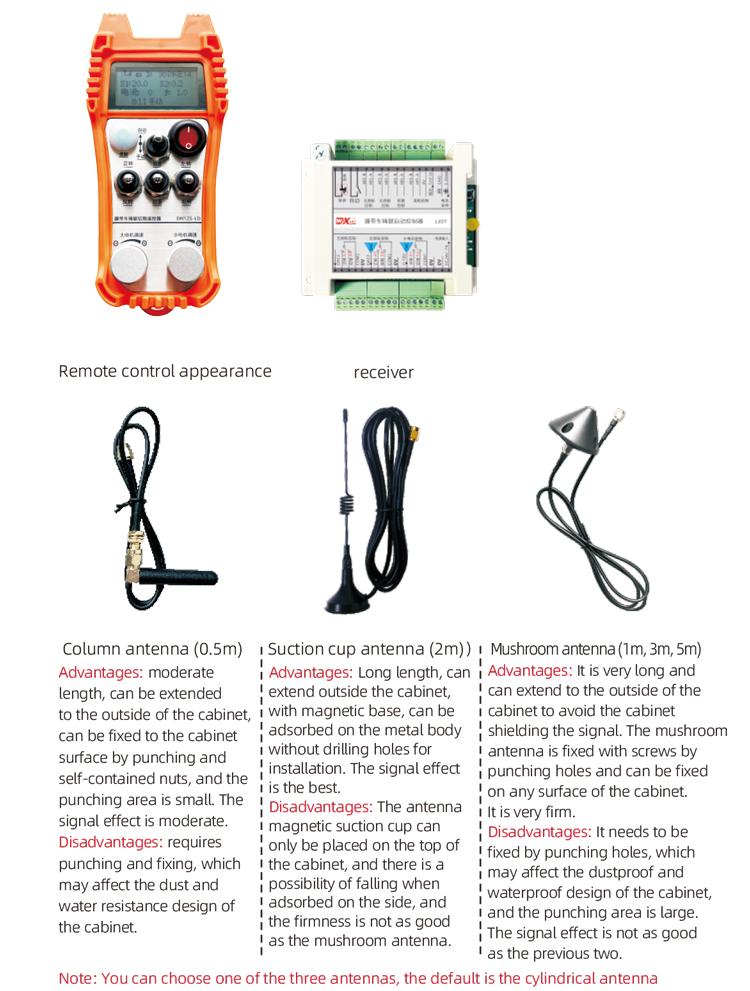
5. ఉత్పత్తి అనుబంధ రేఖాచిత్రం
6. ఉత్పత్తి సంస్థాపనా గైడ్
6.1 ఉత్పత్తి ఇన్స్టాలేషన్ దశలు
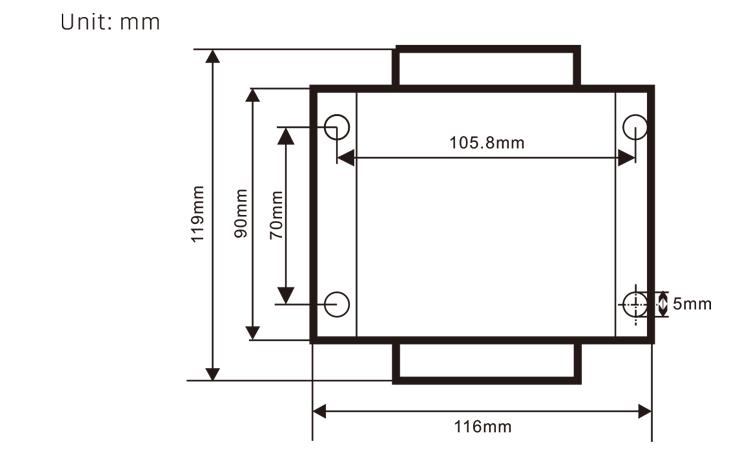
1. వెనుకవైపు ఉన్న కట్టు ద్వారా ఎలక్ట్రికల్ క్యాబినెట్లో రిసీవర్ను ఇన్స్టాల్ చేయండి, లేదా రిసీవర్ యొక్క నాలుగు మూలల్లోని స్క్రూ రంధ్రాల ద్వారా ఎలక్ట్రికల్ క్యాబినెట్లో దాన్ని ఇన్స్టాల్ చేయండి.
2. మా రిసీవర్ వైరింగ్ రేఖాచిత్రాన్ని చూడండి, మీ ఆన్-సైట్ పరికరాలను సరిపోల్చండి, మరియు వైర్ల ద్వారా పరికరాలను రిసీవర్కు కనెక్ట్ చేయండి.
3. రిసీవర్ పరిష్కరించబడిన తర్వాత, రిసీవర్తో కూడిన యాంటెన్నా తప్పనిసరిగా కనెక్ట్ చేయబడాలి, మరియు యాంటెన్నా యొక్క బయటి ముగింపు తప్పనిసరిగా ఇన్స్టాల్ చేయబడాలి లేదా విద్యుత్ క్యాబినెట్ వెలుపల ఉంచాలి. ఉత్తమ సిగ్నల్ ప్రభావం కోసం ఎలక్ట్రికల్ క్యాబినెట్ పైభాగంలో ఉంచడానికి ఇది సిఫార్సు చేయబడింది. యాంటెన్నాను కనెక్ట్ చేయకుండా వదిలివేయడం లేదా ఎలక్ట్రికల్ క్యాబినెట్ లోపల యాంటెన్నాను ఉంచడం నిషేధించబడింది, ఇది పేలవమైన సిగ్నల్ మరియు ఉపయోగించలేనిది కావచ్చు.
4. చివరగా, రిమోట్ కంట్రోల్లో బ్యాటరీని ఇన్స్టాల్ చేయండి, బ్యాటరీ కవర్ను బిగించండి, ఆపై రిమోట్ కంట్రోల్ యొక్క పవర్ స్విచ్ను ఆన్ చేయండి. రిమోట్ కంట్రోల్ డిస్ప్లే సాధారణ పని ఇంటర్ఫేస్ను చూపిన తర్వాత, మీరు రిమోట్ కంట్రోల్ ఆపరేషన్ చేయవచ్చు.
6.2 రిసీవర్ సంస్థాపన కొలతలు
6.3 రిసీవర్ వైరింగ్ సూచన రేఖాచిత్రం

7. ఉత్పత్తి ఆపరేషన్ సూచనలు
7.1 రిమోట్ కంట్రోల్ పారామీటర్ సెట్టింగులు
రిమోట్ కంట్రోలర్ యొక్క నేపథ్య పారామితులను ఎలా నమోదు చేయాలి: మోడ్ స్విచ్ను మాన్యువల్ మోడ్కి మార్చండి, చిన్న మోటారు వేగాన్ని సర్దుబాటు చేయండి 25, లేదా 0, 10, 20, 40, 50, మరియు పెద్ద మోటారు యొక్క ఫార్వర్డ్ స్విచ్ని పైకి తిప్పండి 3 సార్లు మరియు క్రిందికి 3 సార్లు;
ఉపయోగించండి “చిన్న మోటార్ స్పీడ్ కంట్రోల్” పేజీని తిప్పడానికి నాబ్, పారామితులను సవరించడానికి ఎనేబుల్ నొక్కండి మరియు చిన్న మోటార్ స్పీడ్ కంట్రోల్ నాబ్ను తిరగండి; సవరణ తర్వాత, పేజీని చివరి వరకు తిప్పండి, సేవ్ మరియు నిష్క్రమించు ఎంచుకోండి, మరియు మెను నుండి నిష్క్రమించడానికి ప్రారంభించు బటన్ను నొక్కండి;
పారామితులు క్రింది విధంగా ఉన్నాయి:గరిష్ట కరెంట్: పెద్ద మోటార్ కరెంట్ ఫీడ్బ్యాక్ విలువ పరిధి, సెట్టింగ్ పరిధి 15-200A, డిఫాల్ట్ 60;
వేగ నియంత్రణ పారామితులు: ఆటోమేటిక్ మోడ్ చిన్న మోటార్ ఆటోమేటిక్ త్వరణం వేగం, చిన్నది వేగంగా, సెట్టింగ్ పరిధి 200-1500, డిఫాల్ట్ 1000;
క్షీణత పరామితి: అనుమతించబడిన మోటారు వేగం మార్పు యొక్క ఎగువ పరిమితిని సెట్ చేయండి. ఈ విలువకు మించి కరెంట్ మారినప్పుడు, అది మందగిస్తుంది. అది చిన్నది, ఎడమ మరియు కుడి మోటార్లు ఎంత వేగంగా తగ్గుతాయి. పరిధి ఉంది 05-12, మరియు డిఫాల్ట్ 06;
త్వరణం a1: పెద్ద విలువ, ఎంత వేగంగా మోటారు వేగం పెరుగుతుంది, పరిధి 00-06, డిఫాల్ట్ 01; క్షీణత a2: పెద్ద విలువ, ఎంత వేగంగా మోటారు వేగం తగ్గుతుంది, పరిధి 00-06, డిఫాల్ట్ 02;
వేగ నియంత్రణను ప్రారంభించండి: చిన్న మోటార్ స్పీడ్ రెగ్యులేషన్ని ప్రారంభించాల్సిన అవసరం ఉందా, 00 ప్రారంభించబడలేదు, 01 ప్రారంభించబడింది, డిఫాల్ట్ 01;
ప్రారంభ స్వీయ-లాకింగ్: ఫార్వార్డ్ మరియు రివర్స్ స్విచ్ విడుదలైన తర్వాత పెద్ద మోటారు స్వయంచాలకంగా స్వీయ-లాకింగ్ను ఉంచుతుందా, 00 నిర్వహించబడదు, 01 నిర్వహించబడుతుంది, డిఫాల్ట్ 01;
గరిష్ట ప్రయాణం: ఎడమ మరియు కుడి మోటార్లు గరిష్ట వేగం, పరిధి 10-100, డిఫాల్ట్ 50;
కటింగ్ కరెంట్: గరిష్ట కట్టింగ్ కరెంట్, స్క్రీన్ IC విలువను ప్రదర్శిస్తుంది, పరిధి 15-160, డిఫాల్ట్ 30, స్క్రీన్ IC ని ప్రదర్శిస్తుంది: 30. ఈ పరామితి యొక్క ఎగువ పరిమితి = గరిష్ట కరెంట్ x 80%;
డిఫాల్ట్ వేగ పరిమితి: ప్రారంభంలో డిఫాల్ట్ చిన్న మోటార్ ఆటోమేటిక్ కట్టింగ్ వేగం, పరిధి 00-100, డిఫాల్ట్ 10, స్క్రీన్ F1.0ని ప్రదర్శిస్తుంది, గరిష్ట ప్రయాణాన్ని సెట్ చేసినప్పుడు మాత్రమే ఈ పరామితి ఖచ్చితమైనది 50.
వైర్లెస్ ఛానల్: డిఫాల్ట్ 10. రిమోట్ కంట్రోల్ సిగ్నల్ అస్థిరంగా ఉన్నప్పుడు లేదా సైట్లో సిగ్నల్ జోక్యం ఉన్నప్పుడు, మీరు జోక్యాన్ని నివారించడానికి ఛానెల్లను మార్చడానికి ఈ పరామితిని సవరించవచ్చు;
వేగ పరిమితి ఆఫ్సెట్: చిన్న మోటార్ యొక్క ఆటోమేటిక్ కట్టింగ్ వేగం యొక్క ఎగువ పరిమితి,పరిధి 00-200, డిఫాల్ట్ 60, స్క్రీన్ డిస్ప్లేలు 6.0; Display value upper limit = speed limit offset × 0.1;
గరిష్ట హోస్ట్: పెద్ద మోటార్ గరిష్ట వేగం, పరిధి 10-100, డిఫాల్ట్ 50;
Mbus పరికరం ( తప్పనిసరి ): పెద్ద మోటార్ ఇన్వర్టర్ మోడల్ ఎంపిక, పరిధి 00-03, డిఫాల్ట్ 03;
00- షాంఘై Xielin 01 ఫుజి
02- INVT 03 Inovance(Zhongchen, Robicon)
SBUS పరికరాలు (తప్పనిసరి): చిన్న మోటార్ ఫ్రీక్వెన్సీ కన్వర్టర్ మోడల్ ఎంపిక, పరిధి 00-05, డిఫాల్ట్ 03;
00- షాంఘై Xielin 01 ఫుజి
02- INVT 03 Inovance(Zhongchen, Robicon)
04-అంచుఅండ 05-ఏదీ లేదు
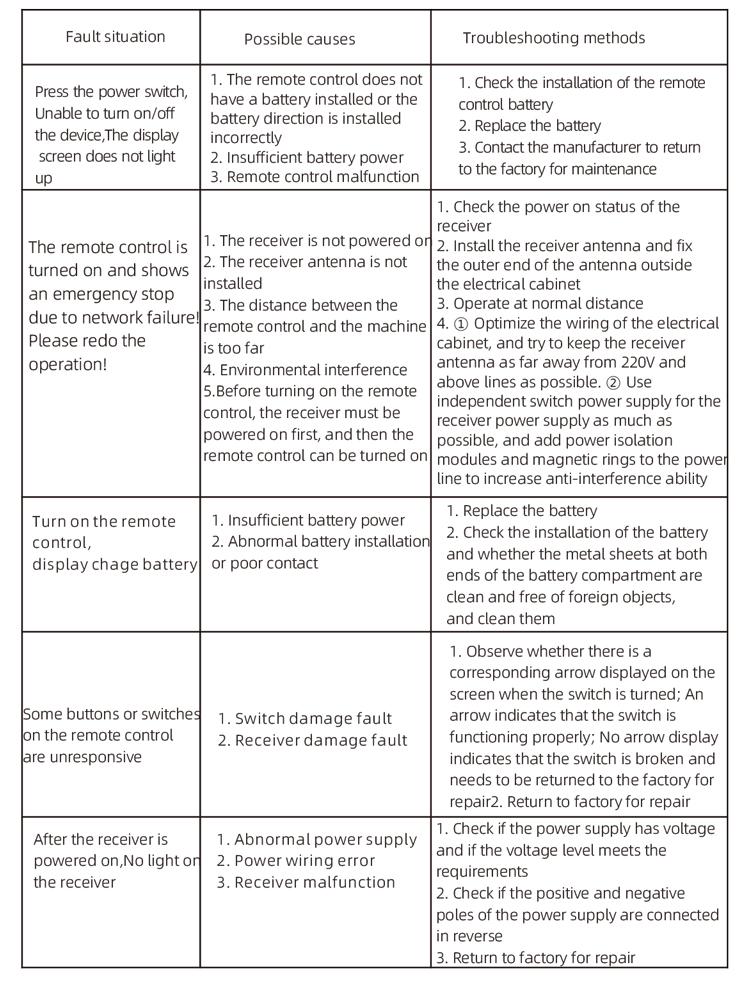
8. ఉత్పత్తి ట్రబుల్షూటింగ్
7.2 ఫ్రీక్వెన్సీ కన్వర్టర్ యొక్క పారామీటర్ సెట్టింగ్
1. కమాండ్ సోర్స్ ఎంపిక: కమ్యూనికేషన్ కమాండ్ ఛానెల్
2. ప్రధాన ఫ్రీక్వెన్సీ సోర్స్ ఎంపిక: కమ్యూనికేషన్ ఇవ్వబడింది
3. బాడ్ రేటు: 19200
4. డేటా ఫార్మాట్: ధృవీకరణ లేదు, డేటా ఫార్మాట్<8-N-1>
5. స్థానిక చిరునామా: ఎడమ ఫ్రీక్వెన్సీ కన్వర్టర్ని సెట్ చేయండి 1, సరైన ఫ్రీక్వెన్సీ కన్వర్టర్ 2, మరియు పెద్ద మోటార్ ఫ్రీక్వెన్సీ కన్వర్టర్ 3
7.3 రిమోట్ కంట్రోల్ ఆపరేషన్ సూచనలు
1. యంత్రాన్ని ఆన్ చేయండి, రిమోట్ కంట్రోల్ ఆన్ చేయండి, రిమోట్ కంట్రోల్ నేపథ్యాన్ని నమోదు చేయండి, రిమోట్ కంట్రోల్ నేపథ్య పారామితులను సెట్ చేయండి, ప్రధానంగా ఇది చిన్న మరియు పెద్ద మోటార్ ఫ్రీక్వెన్సీ కన్వర్టర్ల నమూనాలను సెట్ చేయడం (యంత్ర తయారీదారు ఇప్పటికే వాటిని సెట్ చేసి ఉంటే ఈ దశను దాటవేయి);
2. ఫ్రీక్వెన్సీ కన్వర్టర్ యొక్క పారామితులను సెట్ చేయండి (యంత్ర తయారీదారు ఇప్పటికే సెట్ చేసి ఉంటే ఈ దశను దాటవేయి);
3. రిమోట్ కంట్రోల్ను మాన్యువల్ మోడ్కు సెట్ చేయండి, ఆపై యంత్రాన్ని పని స్థానానికి తరలించడానికి రిమోట్ కంట్రోల్ ఉపయోగించండి;
4. మాన్యువల్ మోడ్లో, పెద్ద మోటారు యొక్క కట్టింగ్ కరెంట్ మరియు పెద్ద మోటారు వేగం కోసం IC విలువను సెట్ చేయండి;
5. ఆటోమేటిక్ మోడ్కి మారండి మరియు చిన్న మోటారు కోసం కట్టింగ్ వేగ పరిమితి F విలువను సెట్ చేయండి;
6. ఆటోమేటిక్ మోడ్లో, పెద్ద మోటారును ప్రారంభించడానికి పెద్ద మోటారు స్విచ్ని ముందుకు తిప్పండి, ఆపై చిన్న మోటారు స్విచ్ని ముందుకు లేదా రివర్స్కి మార్చండి. రిమోట్ కంట్రోల్ ఆటోమేటిక్ కట్టింగ్ మోడ్లోకి ప్రవేశించి, కత్తిరించడం ప్రారంభిస్తుంది.
9.నిర్వహణ
1. దయచేసి దాని సేవా జీవితాన్ని పొడిగించడానికి గది ఉష్ణోగ్రత మరియు పీడనం వద్ద పొడి వాతావరణంలో దీన్ని ఉపయోగించండి.
2. దయచేసి సేవా జీవితాన్ని పొడిగించడానికి వర్షం మరియు నీటి బుడగలు వంటి అసాధారణ వాతావరణాలలో ఉపయోగించకుండా ఉండండి.
3. దయచేసి బ్యాటరీ కంపార్ట్మెంట్ మరియు మెటల్ ష్రాప్నల్ ప్రాంతాన్ని శుభ్రంగా ఉంచండి.
4. దయచేసి స్క్వీజింగ్ మరియు పడిపోవడం వల్ల రిమోట్ కంట్రోల్ దెబ్బతినకుండా ఉండండి.
5. ఎక్కువ కాలం ఉపయోగించకపోతే, దయచేసి బ్యాటరీని తీసివేసి, రిమోట్ కంట్రోల్ మరియు బ్యాటరీని శుభ్రమైన మరియు సురక్షితమైన స్థలంలో నిల్వ చేయండి.
6.నిల్వ మరియు రవాణా సమయంలో, శ్రద్ధ తేమ మరియు షాక్ నిరోధకతకు చెల్లించాలి.
10. భద్రతా సమాచారం
1. దయచేసి ఉపయోగించే ముందు సూచనలను జాగ్రత్తగా చదవండి మరియు నిపుణులు కానివారిని ఆపరేట్ చేయకుండా నిషేధించండి.
2. తగినంత శక్తి లేకపోవడం వల్ల ఏర్పడే లోపాలను నివారించడానికి, బ్యాటరీ చాలా తక్కువగా ఉన్నప్పుడు, దయచేసి బ్యాటరీని సకాలంలో భర్తీ చేయండి, ఇది రిమోట్ కంట్రోల్ ఆపరేట్ చేయలేకపోవడానికి దారితీయవచ్చు.
3. మరమ్మత్తు అవసరమైతే, దయచేసి తయారీదారుని సంప్రదించండి. స్వీయ మరమ్మత్తు వలన నష్టం సంభవించినట్లయితే, తయారీదారు వారంటీని అందించడు