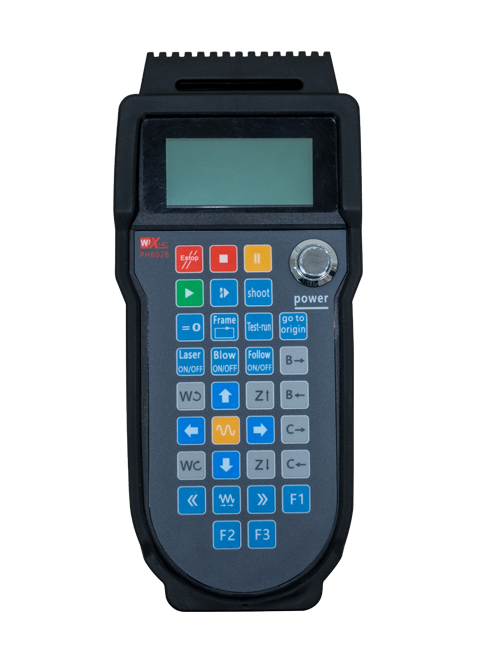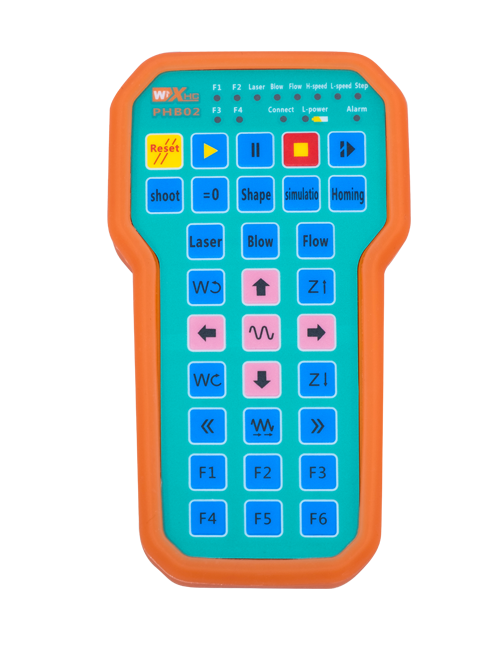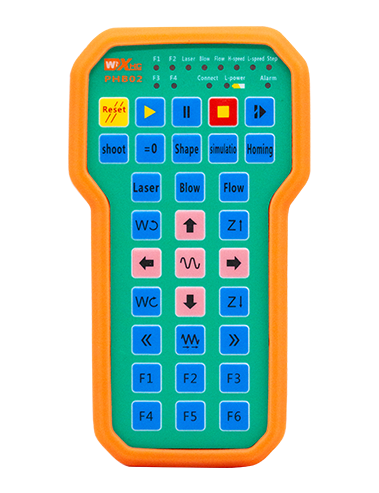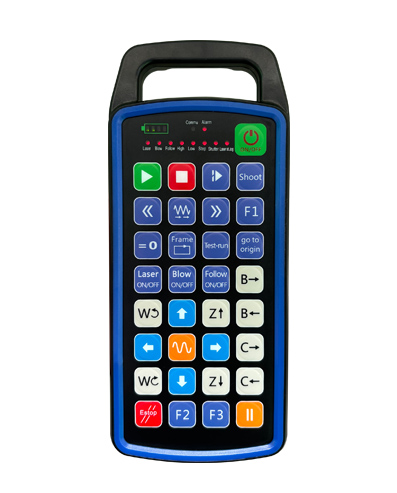
Ёрӣ расондан 32 барномасозии тугмаҳои фармоишӣ
Ёрӣ расондан 9 барномасозии намоиши нури фармоишии LED
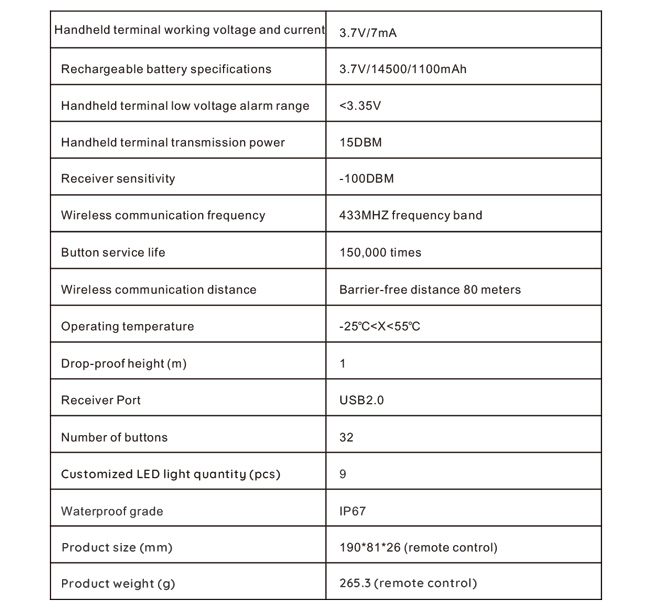
Истифодаи технологияи алоқаи бесими 433MHZ, амалиёти бесим
масофа аст 80 метр

£300.00
Ёрӣ расондан 32 барномасозии тугмаҳои фармоишӣ
Ёрӣ расондан 9 барномасозии намоиши нури фармоишии LED
Истифодаи технологияи алоқаи бесими 433MHZ, амалиёти бесим
масофа аст 80 метр
1.Муқаддима
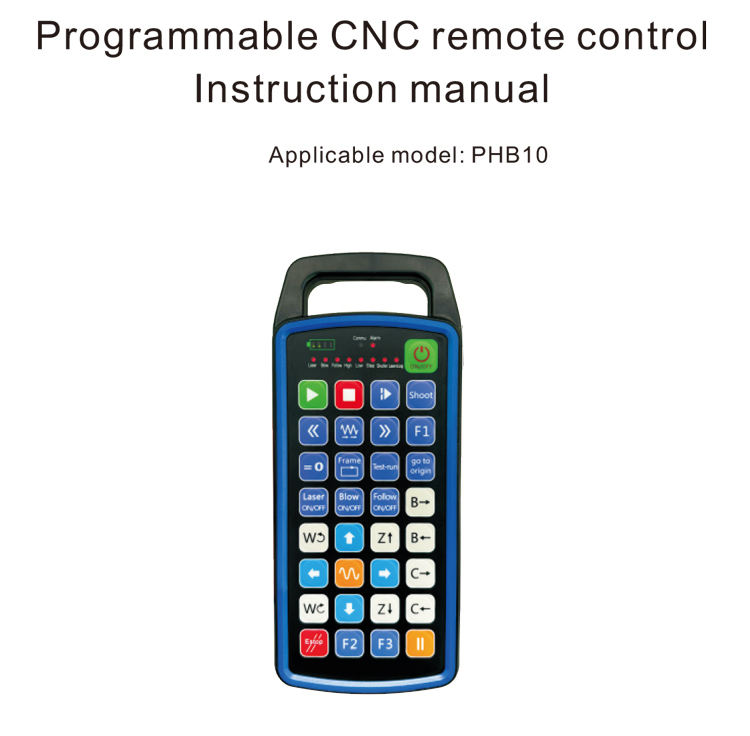
Назорати дурдасти CNC барномарезишавандаи PHB10 барои бесим мувофиқ аст
амалиёти идоракунии дурдаст системаҳои гуногуни CNC. Он аз ҷониби корбар муайяншударо дастгирӣ мекунад
барномасозӣ барои таҳияи функсияҳои тугмаҳо, ва идоракунии дурдасти гуногунро амалӣ созед
функсияҳо дар системаи CNC; он барои таҳияи барномасозии аз ҷониби корбар муайяншуда дастгирӣ мекунад
Чароғҳои LED барои фурӯзон ва хомӯш, ва намоиши динамикии ҳолати системаро амалӣ кунед;
идоракунии дурдаст бо батареяи барқгиранда меояд ва Type-C-ро дастгирӣ мекунад
пуркунии интерфейс.
2.Хусусиятҳои маҳсулот
1. Истифодаи технологияи алоқаи бесими 433MHZ, амалиёти бесим
масофа аст 80 метр;
2.Бо истифода аз функсияи худкори басомад, 32 маҷмӯи дурдаст бесим
контроллерҳоро дар як вақт бидуни таъсир ба ҳамдигар истифода бурдан мумкин аст;
3.Ёрӣ расондан 32 барномасозии тугмаҳои фармоишӣ;
4.Ёрӣ расондан 9 барномасозии намоиши нури фармоишии LED;
5.Дастгирии сатҳи обногузар IP67;
6.Пуркунии интерфейси стандартии Type-C -ро дастгирӣ кунед; 5Мушаххасоти пуркунии V-2A;
1100 батареяи иқтидори мАч калон, бо функсияи интизории хоби худкор; дарк кунанд
интизории қувваи ками ултра дароз;
7.Дастгирии намоиши қудрат дар вақти воқеӣ.
3.Принсипи корӣ
4. Тавсифоти маҳсулот
5.Муқаддимаи функсияи маҳсулот
Киштиҳо:
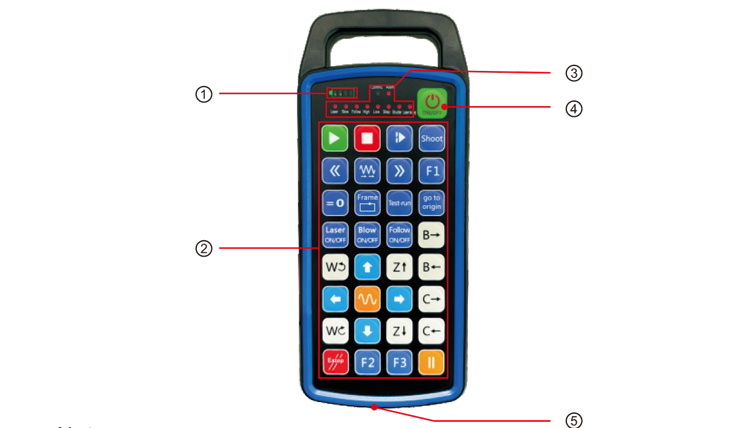
①Battery level display:
Пас аз фурӯзон кардани барқ фурӯзон мешавад, пас аз хомӯш кардани барқ хомӯш мешавад;
Агар чароғаки нишондиҳандаи батарея танҳо як сатр бошад ва дурахшанда бошад, маънои онро дорад
батарея хеле кам аст. Лутфан батареяро иваз кунед;
Агар чароғҳои индикатори батарея ҳама фурӯзон бошанд ва дигар чароғҳои LED дурахш кунанд ва
ба пеш, ин маънои онро дорад, ки батарея хеле кам аст. Лутфан батареяро иваз кунед;
Агар индикатори батарея фурӯзон нашавад ё хомӯш нашавад, ва дастгоҳ шуда наметавонад
бо пахш ва нигоҳ доштани тугмаи барқ оғоз, Лутфан батареяро иваз кунед;
②Button area:32 тугмаҳои дар 4X8 ташкил карда шудаанд, барномасозии аз ҷониби корбар муайяншуда;
③Status LED:
КОММУ: Чароғаки нишондиҳандаи тугма, хангоми пахш кардани тугма равшан мешавад ва меравад
вақте ки тугма озод карда мешавад; чароғҳои дигар намоишҳои фармоишӣ мебошанд;
④Power switch:
Барои 3 сония барои фаъол кардан, барои дароз пахш кунед 3 сония барои хомӯш кардан;
⑤Charging port:
Барои пур кардани пуркунандаи барқ аз Type-C истифода баред, шиддати барқ 5V, ҷорӣ 1A-2A; пур кардан
вақт 3-5 соат;
Ҳангоми пур кардан, индикатори кувват медурахшад, нишон медиҳад, ки он пур карда мешавад. Кай
пурра пур карда шудааст, нишондиҳандаи қувваи барқ бари пурраро бидуни дурахш нишон медиҳад.
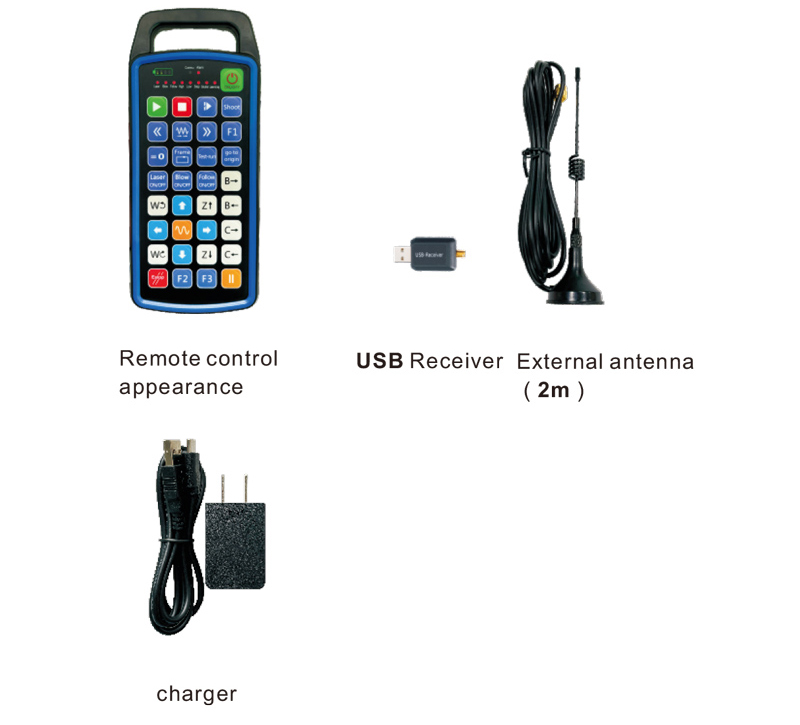
6.Диаграммаи варақаҳои маҳсулот
7.Дастури насбкунии маҳсулот
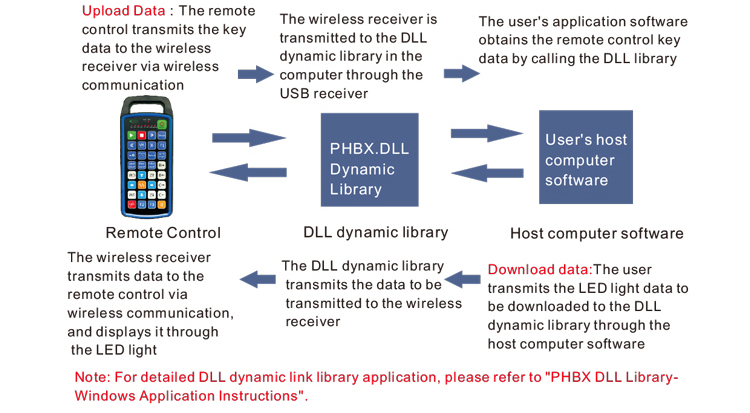
1 . Ман қабулкунаки USB-ро ба компютер ворид мекунам, компютер ба таври худкор хоҳад буд
ронандаи дастгоҳи USB-ро бидуни дастӣ эътироф ва насб кунед
2. Правленияи дурдастро ба пуркунандаи барқ гузоред. Пас аз пур кардани батарея, пахш кунед
ва тугмаи барқро нигоҳ доред 3 сония. Пульти дурдаст фаъол мешавад ва барқ
индикатор фурузон мешавад, ки бомуваффакият ба кор андохтани кувваи электр нишон медихад.
3. Пас аз фурӯзон, шумо метавонед ҳама гуна амалиёти тугмаро иҷро кунед. Назорати дурдаст
метавонад дар як вақт амалиёти тугмаи дугонаро дастгирӣ кунад. Вақте ки шумо ягон тугмаро пахш мекунед, пашна
Чароги COMMU дар пульти пульт фурузон мешавад, нишон медиҳад, ки ин тугма дуруст аст.
8.Дастурҳои истифодаи маҳсулот
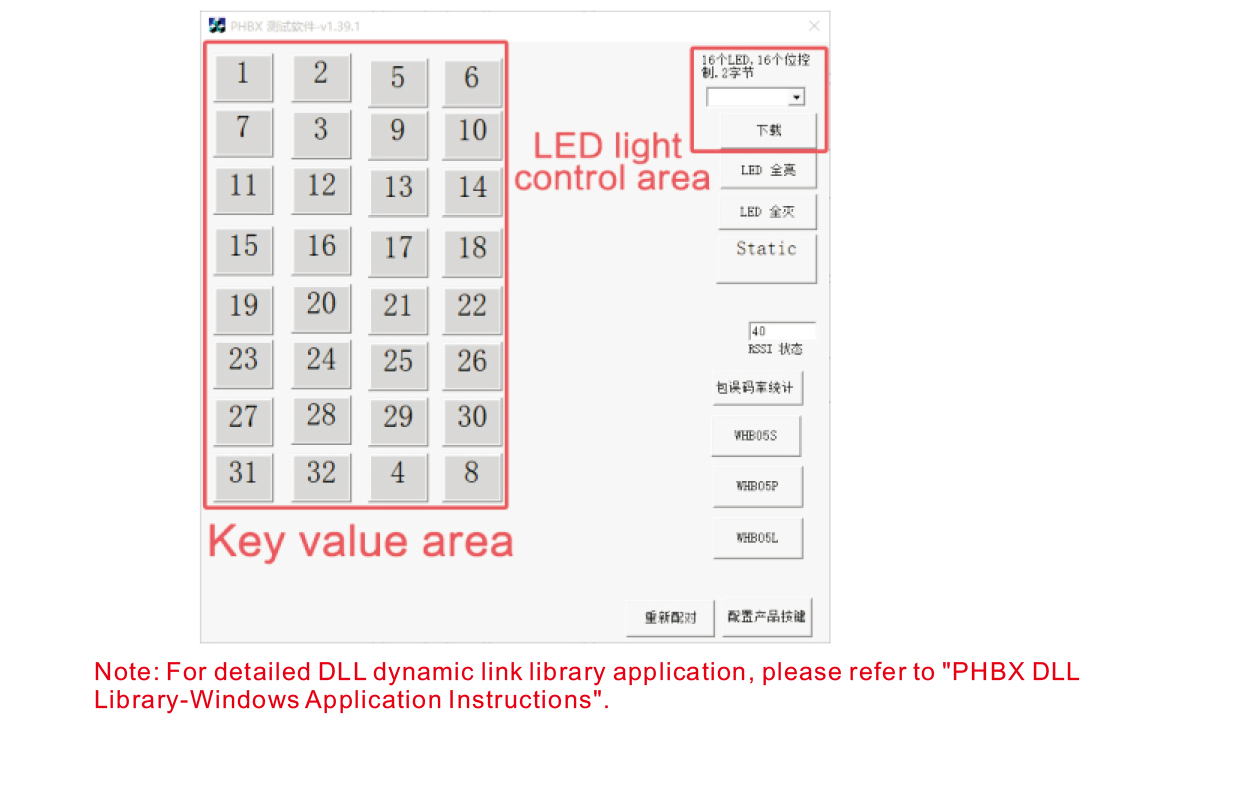
Пеш аз таҳия ва истифодаи маҳсулот, шумо метавонед аз нармафзори намоишии мо истифода баред
тугмаҳои пулти дурдаст ва чароғҳои LED-ро дар пулти фосилавӣ санҷед. Ту метавонӣ
инчунин намоишро ҳамчун реҷаи истинод барои таҳияи барномасозии оянда истифода баред.
Пеш аз истифодаи нармафзори намоишӣ, лутфан қабулкунаки USB-ро ба компютер пайваст кунед,
боварӣ ҳосил кунед, ки контроли дурдаст қувваи кофӣ дорад, тугмаи барқро то t пахш карда нигоҳ доред
даргиронед, ва баъд аз он истифода баред;
Вакте ки ягон тугмаи пульти дурдаст пахш карда мешавад, намоиши нармафзори санҷишӣ намоиш дода мешавад
арзиши калиди мувофиқ. Пас аз озод кардани он, намоиши арзиши калидӣ нопадид мешавад,
нишон медиҳад, ки боркунии калид муқаррарӣ аст;
Шумо инчунин метавонед рақами нури LED-ро дар намоиши нармафзори санҷишӣ интихоб кунед, зеркаширо пахш кунед,
ва рақами нури мувофиқи пулти пульт фурӯзон мешавад, нишон медихад, ки
Нури LED ба таври муқаррарӣ зеркашӣ карда мешавад.
9.Бартараф кардани мушкилоти маҳсулот
10. Нигоҳдорӣ ва нигоҳубин
1. Лутфан онро дар муҳити хушк бо ҳарорати муқаррарӣ ва фишор барои дароз кардан истифода баред
мӯҳлати хидмат;
2. Барои дароз кардани мӯҳлати хизмати калид барои ламс кардани майдони калид ашёҳои тезро истифода набаред;
3. Лутфан майдони калидро тоза нигоҳ доред, то фарсудашавии калидҳоро кам кунед;
4. Аз фишурдан ва афтидан худдорӣ намоед, то ки пулти пультро вайрон кунад;
5. Агар муддати дароз истифода нашавад, лутфан батареяро хориҷ кунед ва пулти дурдастро нигоҳ доред
ва батареяро дар ҷои тоза ва бехатар нигоҳ доред;
6. Ҳангоми нигоҳдорӣ ва интиқол ба намнокӣ диққат диҳед.
11.Маълумоти бехатарӣ
1. Лутфан пеш аз истифода дастурҳоро бодиққат хонед. Ба шахсони ғайрикасбӣ манъ аст
амалкунанда.
2. Лутфан пуркунандаи аслӣ ё пуркунандаи барқро, ки истеҳсолкунандаи муқаррарӣ бо он истеҳсол кардааст, истифода баред
ҳамон мушаххасот.
3. Лутфан барқро сари вақт пур кунед, то аз кори нодуруст аз сабаби нокифоя будани қувваи барқ, ки боиси сар задани он мегардад, пешгирӣ кунед
пульти дурдаст бе чавобгарй.
4. Агар таъмир бошад, Лутфан бо истеҳсолкунанда тамос гиред. Агар зарар аз хисоби худтаъмиркунй,
истеҳсолкунанда кафолат намедиҳад.