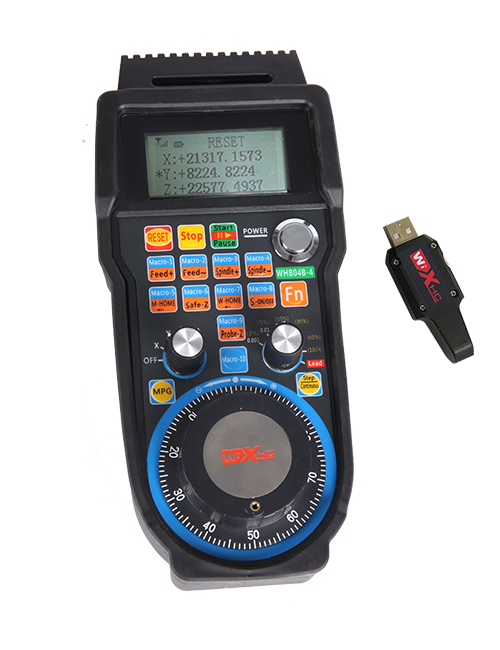
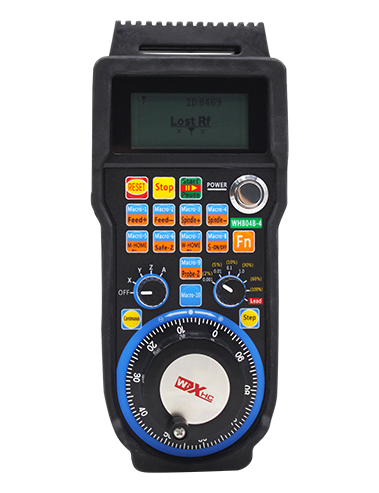
Inkxaso 2 amaqhosha ngokwezifiso, Ngohlobo lwe-windows yohlobo lwe-IO;
Inkxaso -2 Ulawulo lwe-axis;
Ixhasa ulawulo lwenqanaba le-3;


1.Intshayelelo Intshayelelo
2. Imveliso yeMveliso
| I-voltage esebenzayo kunye ne-current ye-wireless remote |
3V/14MA
|
| Iinkcukacha zebhetri | 2 AA iibhetri zealkaline, ubukhulu 5 |
| Uluhlu lwealam yombane ophantsi weremowuthi engenazingcingo | < 2.3V |
| I-voltage yombane wamandla | I-DC5V-24V/A |
| Uluhlu lomthwalo wokumisa i-receiver yongxamiseko | AC125V-1A/DC30V-2A |
| Ummkeli enze uluhlu lomthwalo wemveliso |
AC125V-1A/DC30V-2A
|
| Uluhlu lokulayisha iqhosha lesiqhelo lomamkeli | DC24V/50mA |
| Uluhlu lomthwalo wemveliso ye-axis yomamkeli | DC24V/50mA |
| Uluhlu lomthwalo wokukhuliswa kommkeli | DC24V/50mA |
| Amandla othumelo lwetheminali ephathwa ngesandla |
15dBm
|
| Umamkeli ufumana ubuntununtunu | -100dBm |
| Iifrikhwensi zonxibelelwano ezingenazingcingo | 433MHz frequency band |
| Umgama wonxibelelwano olungenazingcingo | Umqobo okhululekileyo umgama we 40 iimitha |
| Ubushushu bokusebenza | -25℃ < X < 55℃ |
| Ukuphakama kwe-Anti ukuwa | 1 (imitha) |
| Isiko leqhosha ubuninzi | 2 |


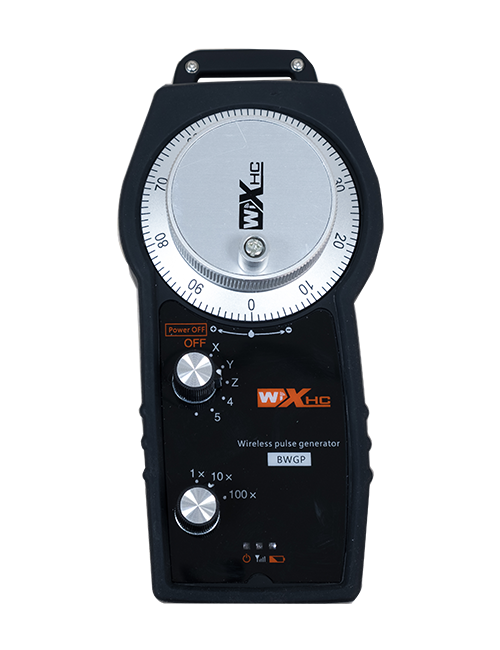
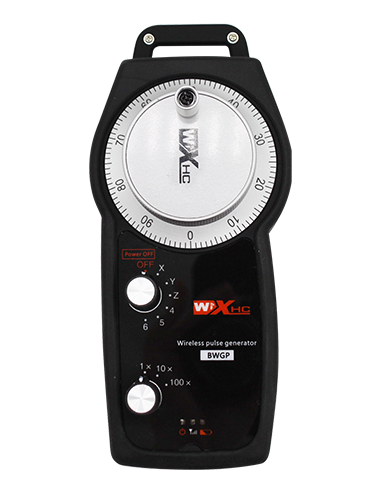
① Pulse encoder:
Cinezela kwaye ubambe iqhosha, gungxusa i-pulse encoder, ikhupha uphawu lwepulse,kunye nokulawula intshukumo ye-axis yomatshini.
② Enable button:
Cinezela naliphi na iqhosha lokuvula macala omabini, kwaye iiseti ezimbini zokwenza iziphumo ze-IO kumamkeli ziya kuqhuba. Khupha iqhosha lokuvula ukuze uqhawule uqhagamshelwano lwemveliso ye-IO; Kwaye ngaphambi kokutshintsha i-axis yokukhetha ukwandiswa kunye nokushukumisa isondo lesandla,iqhosha lokwenza kufuneka libanjwe phantsi ukuze lisebenze; Lo msebenzi unokurhoxiswa ngokusebenzisa isoftware yoqwalaselo.
③ Indicator lights:
Ukukhanya kwicala lasekhohlo: amandla ekukhanyeni,ivili lesandla lisebenzisa i-axis ukukhetha CIMA kumbane wokuvula, kwaye oku kukhanya kuhlala kukhanyisiwe emva kombane;
Ukukhanya okuphakathi: isibane somqondiso esikhanyisayo xa usebenzisa nawuphi na umsebenzi wevili lesandla, kwaye ayikhanyi xa kungekho msebenzi;
Ukukhanya kwecala lasekunene: Ukukhanya kwe-voltage ephantsi, inqanaba lebhetri eliphantsi,oku kuyadanyaza okanye kuhlala kuvuliwe, ibhetri kufuneka itshintshwe.
④ Emergency stop button:
Cinezela iqhosha lokumisa elingxamisekileyo, kunye neeseti ezimbini zexesha lokumisa imeko ezingxamisekileyo kwi-Ofisi kamamkeli ziya kuncitshiswa, kwaye yonke imisebenzi ye-handheel iya kuba ingasebenzi.
⑤ Magnification switch:
Cinezela kwaye ubambe iqhosha lokuvula ukutshintsha iswitshi yokwandisa, enokutshintsha ulwandiso olulawulwa livili lesandla.
⑥ Axis selection switch (Ukutshintsha kwamandla):
Cinezela kwaye ubambe iqhosha lokuvula ukutshintsha iqhosha lokukhetha i-axis, enokutshintsha i-axis yentshukumo elawulwa yi-handwheel. Tshintshela olu tshintsho ukusuka CIMA uye kuyo nayiphi na i-axis kwaye uvule amandla esondo lesandla.
⑦ Custom button:
Amaqhosha amabini angokwezifiso, nganye ihambelana nendawo yokuphuma ye-IO kwi-mamkeli.

1. Faka umamkeli kwiKhabhinethi yombane ngokusebenzisa i-buckle ngasemva, okanye uyifakele kwiKhabhinethi ngemingxunya ye-screw kwiikona ezine zomntu ofumanayo.
2. Bhekisa kumzobo wethu we-wiring ye-wiring kwaye uthelekise ngezixhobo zakho zendawo. Qhagamshela isixhobo kumamkeli ngeentambo.
3.Emva kokuba umamkeli elungiswe kakuhle, I-eriyali exhotywe ngumsebenzi kufuneka iqhagamshelwe, kwaye isiphelo sangaphandle se-antenna kufuneka sifakwe okanye sibekwe ngaphandle kwekhabhinethi yombane. Kucetyiswa ukuba uyibeke eqongeni kwiKhabhinethi yoMbane yeyona nto ibalulekileyo. Akuvumelekanga ukushiya i-antenna ingaxhunywanga okanye uyibeke ngaphakathi kwekhabhinethi yombane, njengoko oku kunokubangela ukuba umqondiso ungasetyenziswa.
4. Ekugqibeleni, vula isitshixo samandla sevili lesandla, kwaye unokuwusebenzisa umatshini ukude usebenzisa ivili lesandla.
6.2 Ubungakanani bofakelo lokufaka

6.3 Umzobo wereferensi ye-Wiring Wiring

7. Imiyalelo yeMveliso yeMveliso
1. Amandla kumatshini kunye nomamkeli. The receiver’s working indicator light flashes. Faka ibhetri kwivili lesandla lombane elingenazingcingo, khusela isiciko sebhetri, kwaye
vula isitshixo samandla sevili lesandla sombane esingenazingcingo. The handwheel’s battery level indicator light is on.
2. Khetha i-axis elungelelanisiweyo: Cinezela kwaye ubambe iqhosha, tshintsha iqhosha lokukhetha i-axis, kwaye ukhethe i-axis ofuna ukuyisebenzisa.
3. Khetha amandla: Cinezela kwaye ubambe iqhosha, tshintsha iswitshi yokwandisa,kwaye ukhethe inqanaba lokukhulisa elifunekayo.
4. I-Axis eshukumayo: Cinezela kwaye ubambe iqhosha, Khetha utshintsho lokukhetha i-Axis, Khetha utshintsho olwenziyo, kwaye ujikelezise i-pulse encoder. Jikelezisa ngokwewotshi ukuhambisa i
i-axis e-positive kunye ne-counterclockwise ukuhambisa i-axis egxekayo.
5. Cinezela kwaye ubambe nayiphi na iqhosha lesiqhelo, kwaye iqhosha elihambelanayo IO imveliso yomamkeli iya kuvulwa. Khupha iqhosha, kwaye imveliso iya kucinywa.
6. Cinezela iqhosha lokumisa elingxamisekileyo, I-temotivemes yokumisa i-IO ikhuphele i-mamkeli iya kuncitshiswa, Umsebenzi we-handheel uya kukhubazeka,Khupha iqhosha lokumisa ngexesha likaxakeka, Indawo yokumisa imeko ye-IO ikhuphe ivaliwe, Umsebenzi wesandla uza kubuyiselwa.
7. Ukuba isandla sesandla asisebenzi kangangexesha elithile, iyakungena ngokuzenzekelayo imo yokulala ukunciphisa ukusetyenziswa kwamandla. Xa isetyenziswa kwakhona, ivili lesandla lingenziwa ngokucinezela iqhosha lesandla.
8. Ukuba isandla sisetyenziswe ixesha elide, kucetyiswa ukuba utshintshe i-handwheel shaft kwindawo OFF, Cima igunya lesandla, kwaye wandise ubomi bebhetri.
8. Inkcazo yemodeli yemveliso

① :I-ZTWGP imele isimbo senkangeleko
②:Iparamest parameter parameter:
01: Ibonisa ukuba isignali ye-pulse output ngu-A, B; Pulse voltage 5v; ubuninzi be-pulse 100PPR.
02:Ibonisa ukuba iimpawu ze-pulse output ngu-A kunye no-B; I-Pulse voltage 12V; ubuninzi be-pulse 100PPR.
03:Ibonisa ukuba iimpawu ze-pulse output yi-A, B, A -, B -; Pulse voltage 5v; ubuninzi be-pulse 100PPR.
04:Ibonisa inqanaba lesekethe eliphantsi le-NPN, Nge-pulsemesmes iziphumo ze-A kunye ne-b;Inani lee-pulses yi-100PPR.
05:Ibonisa umgangatho wePNP ephezulu yePNP, Nge-pulsemesmes iziphumo ze-A kunye ne-b; Inani lee-pulses yi-100PPR.
③:Ukumela inani lokutshintsha kwe-axis yokukhetha, 2 imele 2 izembe.
④:Imele uhlobo lwesiginali yokukhetha i-axis, Inqaku le-Point-to-contal, kwaye i-B imele umqondiso wemveliso.
⑤:Imele uhlobo lwesignali yokutshintsha kophindaphindo, Inqaku le-Point-to-contal, kwaye i-B imele umqondiso wemveliso.
⑥:Imele inani lamaqhosha esiko, 2 imele 2 amaqhosha esiqhelo.
⑦:Imele unikezelo lwamandla kwi-handwheel yesixokelelwano, kwaye 05 imele ukuhanjiswa kwamandla kwi-5V.
⑧:L imele ikholamu yasekhohlo (isibambi semela sasekhohlo), kunye no-R umele umhlathi wasekunene (isibambi semela sasekunene).
9.Isisombululo sokungasebenzi kakuhle kweMveliso

1. Nceda uyisebenzise kwindawo eyomileyo kubushushu begumbi kunye noxinzelelo ukwandisa ubomi benkonzo.
2. Nceda uphephe ukusebenzisa kwiindawo ezingaqhelekanga ezinjengemvula kunye neebhubhu zamanzi ukwandisa ubomi beenkonzo.
3. Nceda ugcine imbonakalo yesandla icocekile ukwandisa ubomi benkonzo.
4. Nceda uphephe ukuntywila, ukuwa, ukugoba, njl. Ukuthintela ukonakaliswa kwezinto ezichanekileyo ngaphakathi kwesandla okanye iimpazamo zokuchaneka.
5. Ukuba ayisetyenziswanga ixesha elide, Nceda ugcine isandheel kwindawo ecocekileyo nekhuselekileyo. Ngexesha lokugcina kunye nokuhamba, Ingqwalaselo kufuneka ihlawulwe kumswakama kunye nokuchasana nokothusa.
11. Ulwazi ngoKhuseleko
1. Nceda ufunde imiyalelo ngononophelo ngaphambi kokusebenzisa kwaye kuthintele oochwephesha ekusebenzeni.
2. Nceda ubuyisele ibhetri ngexesha elifanelekileyo xa inqanaba lebhetri lisezantsi kakhulu ukunqanda iimpazamo ezibangelwa kukungonelanga kwamandla ebhetri kunye nokungakwazi ukusebenzisa ivili lesandla..
3. Ukuba ukulungiswa kuyafuneka, Nceda unxibelelane noMvelisi. Ukuba umonakalo ubangelwa kukuzilungisa, Umenzi akazukubonelela ngewaranti