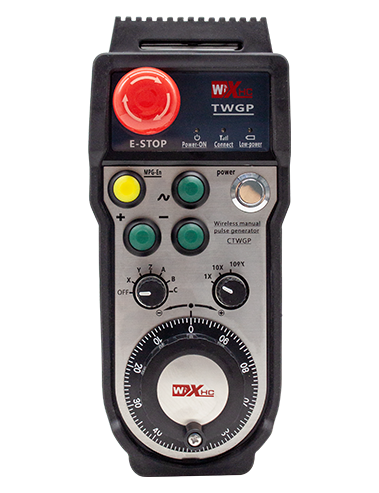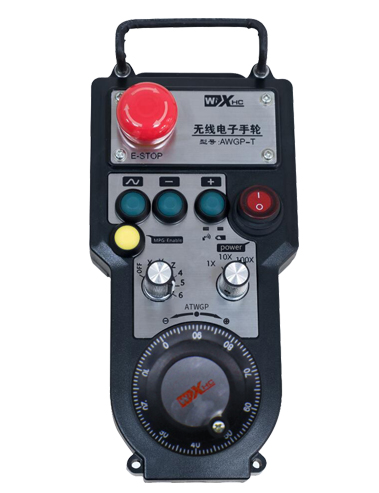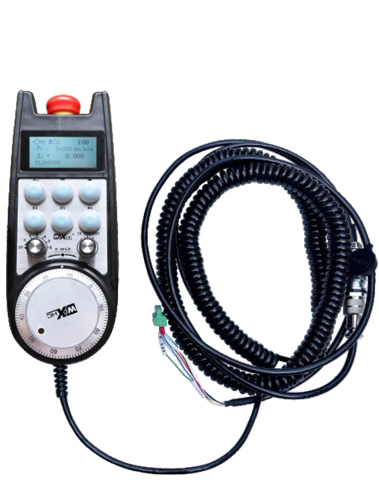
1. Lo okun pilogi ọkọ ofurufu 6-mojuto fun asopọ, pẹlu kan handwheel USB ipari ti 10 igun.
2. Iboju handwheel le ṣe afihan awọn ipoidojuko iṣẹ iṣẹ eto, darí ipoidojuko,kikọ sii oṣuwọn, Aṣayan axis, igbaya, ati alaye miiran.
3. Bọtini Ipa Pajawiri, Yipada Io ifihan, ati idaduro pajawiri tiipa kẹkẹ ọwọ jẹ ṣi wulo.
4. Atilẹyin 6 Awọn bọtini aṣa, yipada IO awọn ifihan agbara, ati pe o le ṣe awọn ifihan agbara si eto nipasẹ wiwu IO tabi ibaraẹnisọrọ.
Fọwọsi Itọsọna itọnisọna Iwe afọwọkọ
Isapejuwe
1. Ifihan ọja
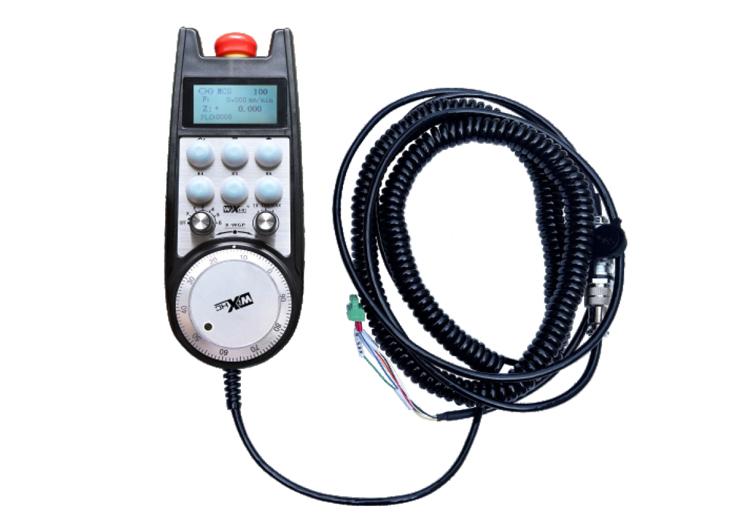
Kẹkẹ ẹrọ itanna ti a lo fun itọnisọna afọwọṣe, ipo, Ohun elo irinṣẹ, ati awọn iṣiṣẹ miiran lori awọn irinṣẹ ẹrọ CNC. Awoṣe ti kẹkẹ ọwọ itanna jẹ ifihan Siemens gangan ti a fi ọwọ wiwọ itanna ti a firanṣẹ. Kẹkẹ ọwọ ti sopọ si wiwo X130 ti eto Siemens nipasẹ okun nẹtiwọọki kan, ati awọn ipoidojuko eto ti wa ni kika ati han loju iboju LCD ti handwheel nipasẹ ibaraẹnisọrọ ilana S7. Kẹkẹ ọwọ tun le ṣakoso yiyan asulu eto, igbaya, awọn bọtini, Ati awọn ifihan agbara miiran nipasẹ ibaraẹnisọrọ.
2.Awọn ẹya iṣẹ iṣẹ
1. Lo okun pilogi ọkọ ofurufu 6-mojuto fun asopọ, pẹlu kan handwheel USB ipari ti 10 igun.
2. Iboju handwheel le ṣe afihan awọn ipoidojuko iṣẹ iṣẹ eto, darí ipoidojuko,kikọ sii oṣuwọn, Aṣayan axis, igbaya, ati alaye miiran.
3. Bọtini Ipa Pajawiri, Yipada Io ifihan, ati idaduro pajawiri tiipa kẹkẹ ọwọ jẹ ṣi wulo.
4. Atilẹyin 6 Awọn bọtini aṣa, yipada IO awọn ifihan agbara, ati pe o le ṣe awọn ifihan agbara si eto nipasẹ wiwu IO tabi ibaraẹnisọrọ.
5. Atilẹyin 6 tabi 8 Iṣakoso Iṣakoso, pẹlu awọn ifihan agbara IO yipada ti o le ṣejade si eto nipasẹ wiwu IO tabi ibaraẹnisọrọ.
6. Atilẹyin 3 tabi 4 awọn ipele ti iṣakoso titobi, pẹlu awọn ifihan agbara IO yipada ti o le ṣejade si eto nipasẹ wiwu IO tabi ibaraẹnisọrọ.
7. Ṣe atilẹyin BLUS ENGE, 100 Pulses / Yipada, le jade awọn ifihan agbara si awọn eto nipasẹ AB polusi onirin.
8. Ṣe atilẹyin ilana Siemens S7 ati Siemens 828D, 840DSL, ỌKAN ati awọn miiran awoṣe awọn ọna šiše.
3. Awọn alaye ọja
| Handwheel ṣiṣẹ agbara ipese foliteji | DC24V/1A |
| Oluṣinṣin Agbara Agbara Agbara | DC24V/1A |
| Olugba IO o wu fifuye ibiti | DC24V |
| Ọwọ kẹkẹ opin USB ipari | 10m |
| Ipari okun olugba opin | 1m |
| Ipari okun nẹtiwọki olugba opin | 3m |
| Iwọn otutu ti nṣiṣẹ | -25℃<X<55℃ |
| Anti-isubu iga | 1m |
| Aṣa Button opoiye | 6 |
| Awọn iwọn ọja | 233*90.7*77.4(mm) |
4.Ifihan iṣẹ ọja
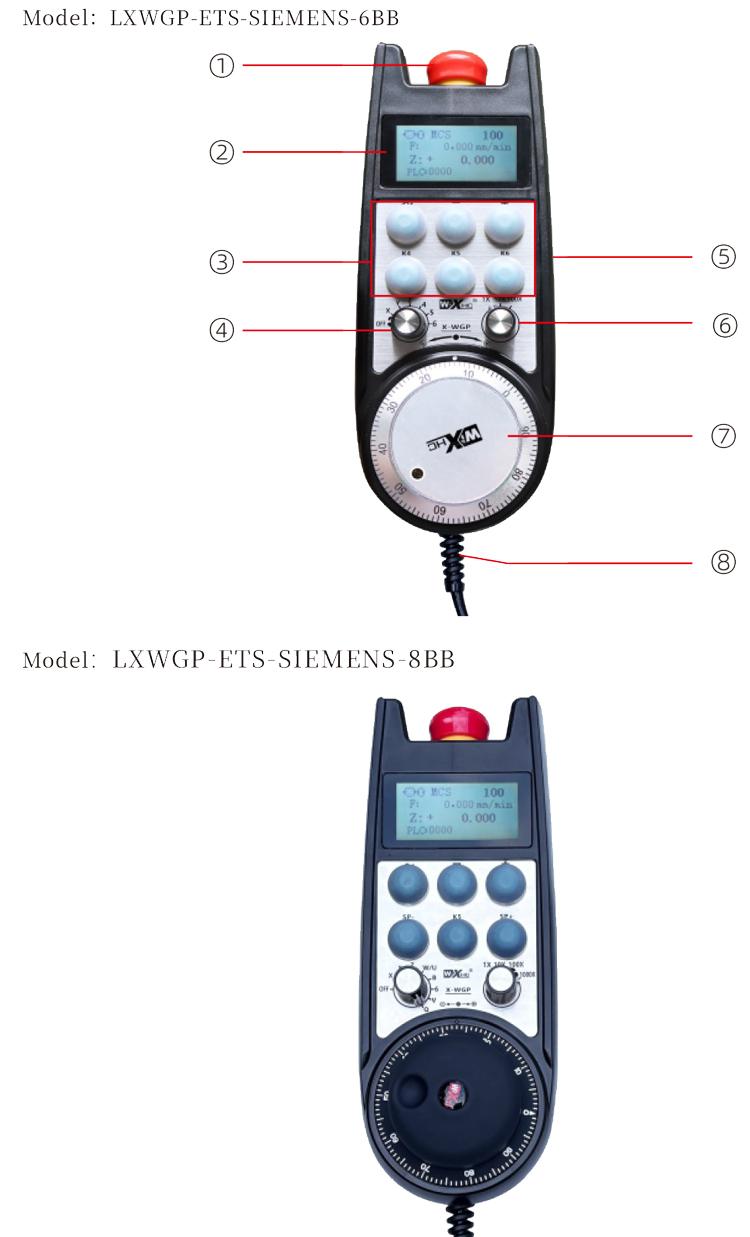
Akiyesi:
Bọtini idaduro pajawiri:
Tẹ bọtini iduro pajawiri, Ati awọn seto ti awọn ito awọn iyọrisi io jade lori olugba yoo ni asopọ, ati gbogbo awọn iṣẹ ti fi ọwọ ni ọwọ.
Lẹhin itusilẹ idaduro pajawiri, ITAN IM IO IPUPUPUPURT lori olugba ti wa ni pipade, ati gbogbo awọn iṣẹ ti handwheel ti wa ni pada.
② Screen display:
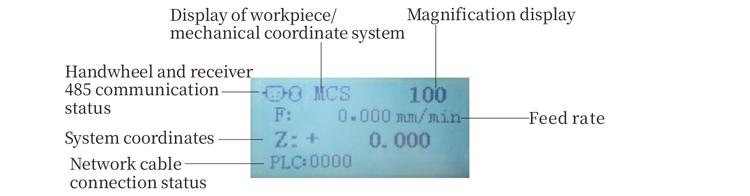
PLC: 0000 tọkasi wipe okun nẹtiwọki ti wa ni ko ti sopọ, PLC: 1010 tọkasi wipe okun nẹtiwọki ti wa ni ifijišẹ ti sopọ si awọn PLC eto.
PLC: 1110 duro aseyori kikọ ti eto data to handwheel, PLC: 0001 Ṣe aṣoju asopọ aṣeyọri si kọnputa naa.
③ Custom button:
6 Awọn bọtini aṣa, kọọkan ti o baamu si aaye iṣan io lori olugba, tun ti sopọ si eto nipasẹ ibaraẹnisọrọ.
④ Axis selection switch:
Yiyan yiyan asulu le yipada ipo gbigbe ti iṣakoso nipasẹ kẹkẹ ọwọ.
⑤ Enable button:
Tẹ mọlẹ boya mu bọtini ṣiṣẹ ni ẹgbẹ mejeeji lati mu koodu pulse ṣiṣẹ nipa gbigbọn. Ati awọn ẹgbẹ meji ti o wa lori olugba jẹ ki iṣelọpọ IO ṣiṣẹ, tu bọtini mu ṣiṣẹ lati jẹ ki o wu IO lati ge asopọ.
⑥ Magnification switch:Iyipada titobi le yi ilọju naa pada
dari nipasẹ awọn handwheel.
⑦ Pulse encoder:
Tẹ ki o mu bọtini ṣiṣẹ, gbọn koko ensu, emit kan ti pulse, ati iṣakoso iṣipopada ti ipo ẹrọ.
⑧ Handwheel cable:
Okun ti n ṣopọ kẹkẹ ọwọ ati olugba, bad plug, lo fun handwheel ipese agbara ati ibaraẹnisọrọ.
5. Aworan apẹrẹ ọja
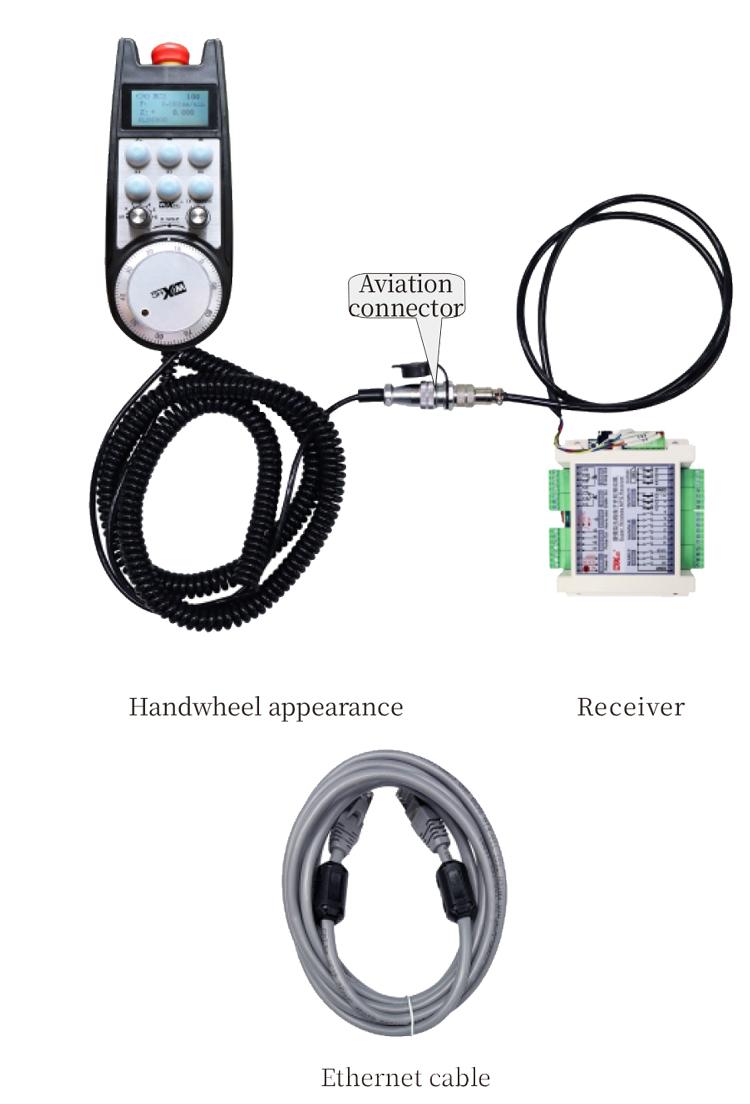
6. Itọsọna fifi sori ọja ọja
6.1 Awọn igbesẹ Ami ọja
6.1 Awọn igbesẹ Ami ọja
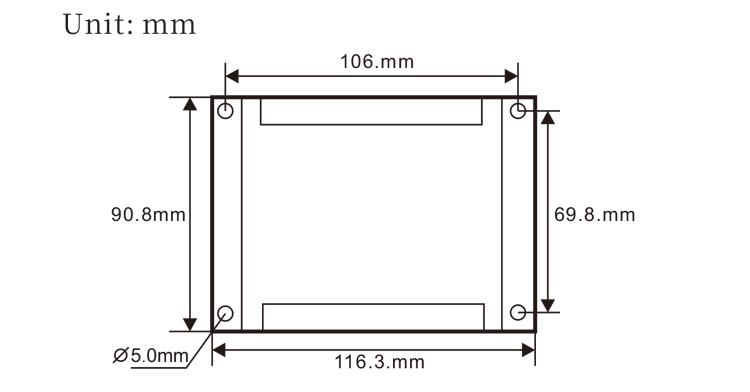
1. Fi sori ẹrọ olugba sinu minisita itanna nipasẹ awọn iho dabaru ni igun mẹrẹrin.
2. Tọka si aworan apanirun wa ki o ṣe afiwe rẹ pẹlu ohun elo lori-aaye rẹ. So ẹrọ pọ si olugba nipasẹ awọn kebulu ki o so olugba pọ si wiwo X130 ti eto nipa lilo awọn kebulu Ethernet.
3. Lẹhin atunse olugba, fi sori ẹrọ ni bad plug mimọ ni handwheel šiši ipo lori nronu, ati ki o pulọọgi awọn miiran opin ti awọn mimọ sinu handwheel ni wiwo lori awọn olugba. Lẹhinna fi pulọọgi ọkọ ofurufu ti okun ọwọ ọwọ sinu ipilẹ ki o mu ohun elo ti n ṣatunṣe pọ.
6.2 Olugba awọn ifitonileti fifi sori ẹrọ
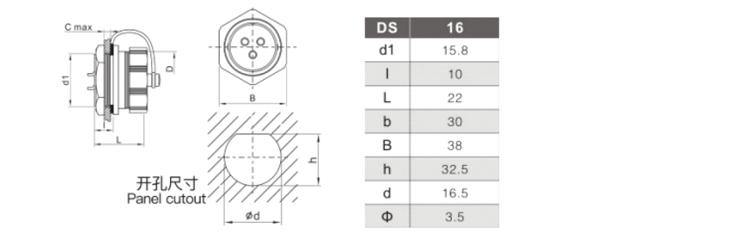
6.3 Awọn iwọn fifi sori ẹrọ ti awọn pilogi ọkọ ofurufu
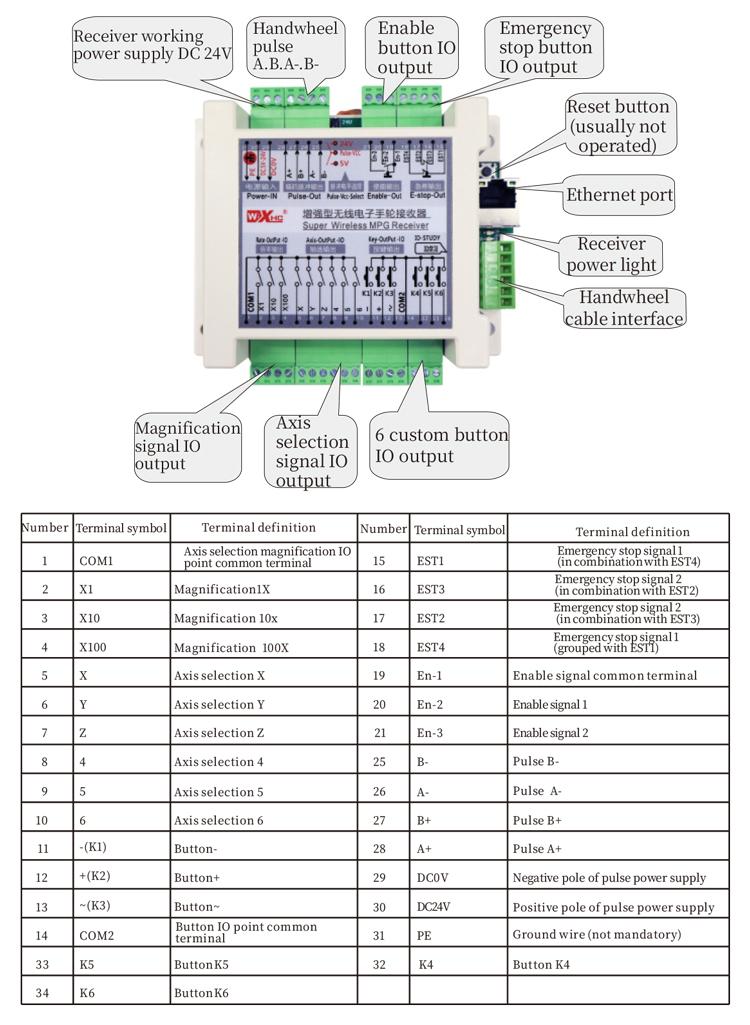
6.4 Olugba Wirgram Itọkasi Pipe
 7.Awọn ilana isẹ ọja
7.Awọn ilana isẹ ọja
1. Nigbati olugba ba wa ni titan ati ina Atọka iṣẹ ti olugba seju, so olugba pọ mọ kọmputa pẹlu okun nẹtiwọki kan, ṣeto adiresi IP ti o wa titi ti kọnputa naa, ati lo sọfitiwia irinṣẹ atunto nẹtiwọọki lati ṣeto awọn aye nẹtiwọọki ti iṣẹ ọwọ ọwọ. Fun awọn ọna eto pato, tọka si awọn “LXWGP-ETS Afọwọṣe Olumulo Handwheel ti firanṣẹ”.
2.Lẹhin ti awọn olugba ti ṣeto soke, Eto naa nilo lati ṣe eto eto PLC kan. Jọwọ tọkasi awọn “LXWGP-ETS Oriṣiriṣi Siemens Nọmba Iṣakoso Eto Awọn ọna Eto” ati PLC eto awọn ohun elo baraku fun awọn alaye.
3.Lẹhin ti pari awọn eto loke, ya awọn olugba si awọn ẹrọ itanna minisita ki o si fi o. Fa okun nẹtiwọọki jade lati kọnputa naa ki o so sinu wiwo X130 ti eto naa. So ipese agbara olugba ati laini pulse.3.
4.Lẹhin ti pari awọn eto loke, ya awọn olugba si awọn ẹrọ itanna minisita ki o si fi o. Fa okun nẹtiwọọki jade lati kọnputa ki o pulọọgi sinu wiwo X ti eto naa. So ipese agbara olugba ati laini pulse.
5. Yan yiyan asulu: Yipada yiyan axis yipada ki o yan ipo ti o fẹ ṣiṣẹ lori.
6. Yan igbekun: Yipada awọn magnification yipada ki o si yan awọn magnification ipele ti o nilo.
7. Igbese gbigbe: Tẹ ki o mu bọtini ṣiṣẹ, Yan yipada yiyan axis, Yan Yipada Aago, ati lẹhinna yi koodu pulse naa pada lati yi ipo gbigbe rere si ọna aago ati ipo gbigbe odi ni wiwọ aago..
8. Tẹ mọlẹ eyikeyi bọtini aṣa lati tan iṣẹjade IO ti bọtini ibaramu ninu olugba, ki o si tu bọtini naa silẹ lati pa iṣẹjade.
9. Tẹ bọtini iduro pajawiri, Ina pajawiri Io Nkan ti olugba yoo ti ge asopọ, Iṣẹ ọwọ ọwọ yoo jẹ alaabo, Tu silẹ Bọtini Duro pajawiri, Iduro pajawiri Io Opsips yoo wa ni pipade, ati iṣẹ ọwọ ni yoo pada.
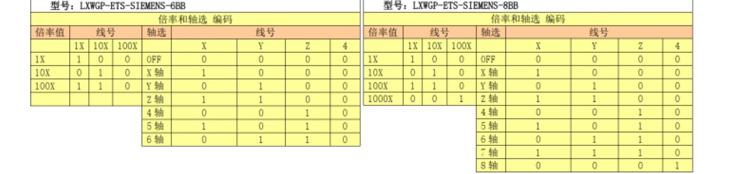
8.Apejuwe awoṣe ọja

① LXWGP represents a wired appearance style, ati wiwo ibaraẹnisọrọ olugba
jẹ ẹya àjọlò ni wiwo.
② : Ṣe aṣoju Siemens eto pato.
③ : duro fun nọmba ti awọn ayipada yiyan ti axis, duro aake, ati awọn aṣoju
ala.
④ : duro fun iru aṣayan asulu ati ifihan agbara, A ṣe aṣoju
ojuami-si-ojuami o wu ifihan agbara, ati b ṣe aṣoju ifihan ti o jade.
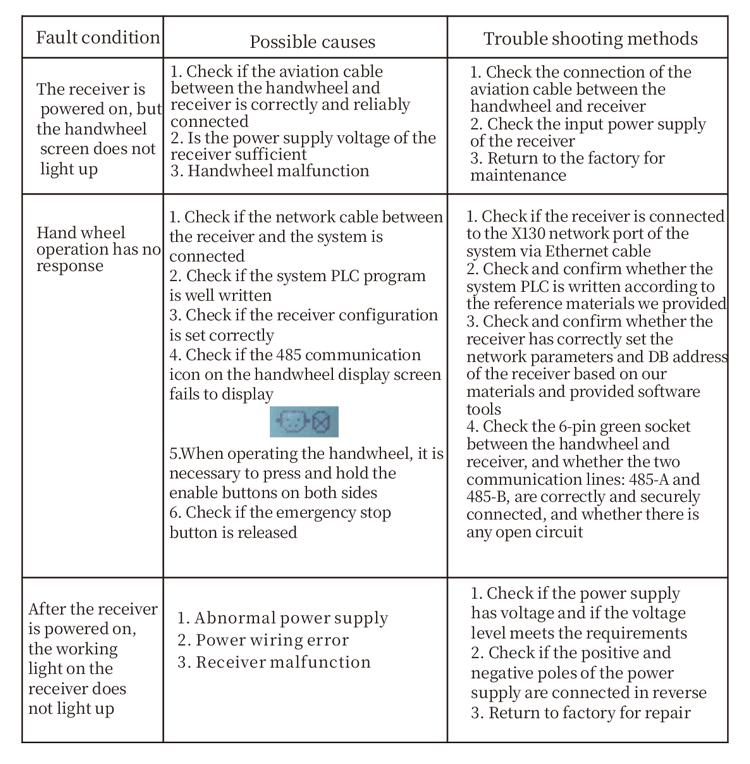
9.Ọja wahala ibon
10.Itọju
1. Jọwọ lo o ni agbegbe gbigbẹ ni iwọn otutu yara ati titẹ lati fa igbesi aye iṣẹ rẹ gbooro.
2. Jọwọ yago fun lilo ni awọn agbegbe ajeji gẹgẹ bi ojo ati awọn akara omi lati fa igbesi aye iṣẹ naa.
3. Jọwọ jẹ ki ifarahan ti ọwọ ti o di mimọ lati fa igbesi aye iṣẹ rẹ pọ si.
4. Jọwọ yago fun sisọ, ja bo, ijagun, patako ati bẹbẹ. Lati yago fun ibajẹ si awọn ẹya tootọ ninu awọn ọwọ ọwọ tabi awọn aṣiṣe deede.
5. Ti ko ba lo fun igba pipẹ, jọwọ tọju kẹkẹ ọwọ ni ibi ti o mọ ati ailewu. Lakoko ipamọ ati gbigbe, Ifarabalẹ yẹ ki o san si ọrinrin ati resistance igboro.
11. Alaye Aabo
1. Jọwọ ka awọn itọsọna naa ni pẹkipẹki ṣaaju lilo ati idiwọ ti kii ṣe awọn akosemose lati iṣiṣẹ.
2. Ti eyikeyi ipo ajeji ba waye pẹlu kẹkẹ ọwọ, jọwọ da lilo rẹ duro lẹsẹkẹsẹ ki o yanju iṣoro naa. Ṣaaju laasigbotitusita, o jẹ eewọ lati lo kẹkẹ afọwọṣe ti ko tọ lẹẹkansi lati yago fun awọn ijamba ailewu ti o fa nipasẹ awọn aṣiṣe afọwọṣe aimọ;
3. Ti Tunṣe ba nilo, Jọwọ kan si olupese. Ti ibajẹ ba fa nipasẹ titunṣe ara, Olupese naa ko ni pese atilẹyin ọja