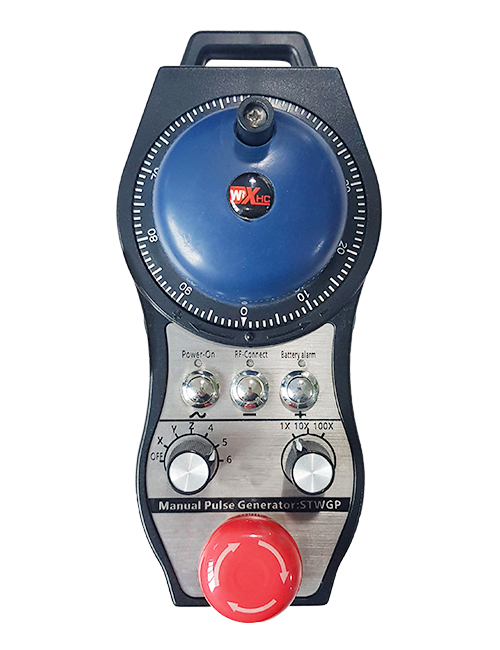
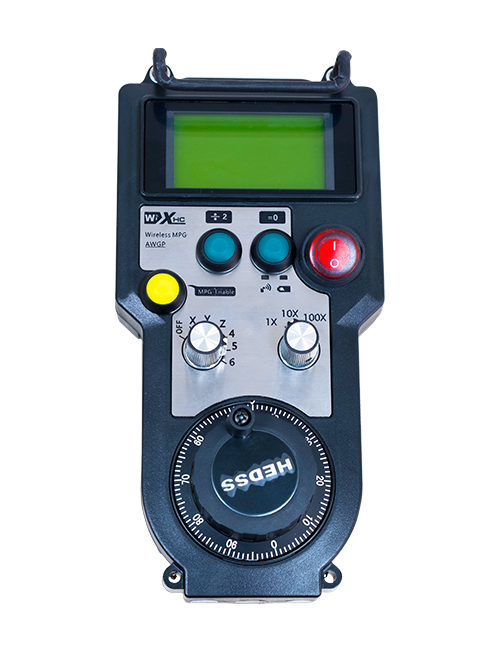
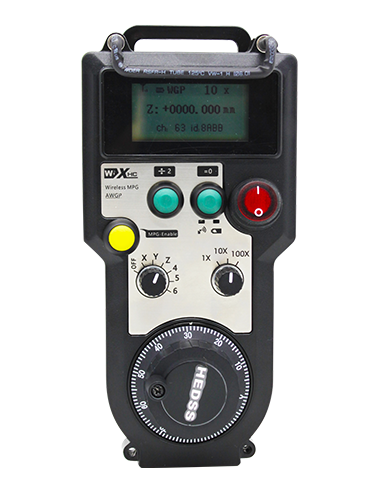
Isekela 2 izinkinobho ezenziwe ngokwezifiso, ngokukhishwa kwesiginali ye-IO yohlobo lokushintsha;
Isekela -2 Ukulawulwa kwe-Axis;
Isekela ukulawula kokukhuliswa kwamaleveli angu-3;


1.Isingeniso Somkhiqizo
2. Izici ezisebenzayo zomkhiqizo
| I-voltage esebenzayo kanye ne-current yesilawuli kude esingenantambo |
3V/14MA
|
| Ukucaciswa kwebhethri | 2 AA amabhethri e-alkaline, usayizi 5 |
| Ibanga le-alamu ye-voltage ephansi yesilawuli kude esingenantambo | < 2.3V |
| Amandla wokuthola amandla okuthola amandla | I-DC5V-24V/A |
| Ibanga lokulayisha kokuphuma kwesimo esiphuthumayo somamukeli | I-AC125V-1A/DC30V-2A |
| Isamukeli sinikeze amandla ububanzi bokulayisha okukhiphayo |
I-AC125V-1A/DC30V-2A
|
| Ibanga lokulayisha lokukhipha inkinobho yangokwezifiso | I-DC24V/50mA |
| Ibanga lokulayisha lokuphumayo kokukhetha kwe-eksisi yesitholi | I-DC24V/50mA |
| Ububanzi bokulayisha kokukhuliswa komamukeli | I-DC24V/50mA |
| Amandla okudlulisa wetheminali ephathwa ngesandla |
15dBm
|
| Umamukeli uthola ukuzwela | -100dBm |
| Imvamisa yokuxhumana okungenantambo | 433Ibhendi yefrikhwensi ye-MHz |
| Ibanga lokuxhumana okungenantambo | Ibanga elingenamgoqo lika- 40 amadesi |
| Izinga lokushisa lokusebenza | -25℃ < X < 55℃ |
| Ukuphakama kwe-Anti ukuwa | 1 (umshini) |
| Ubuningi benkinobho yangokwezifiso | 2 |


① Pulse encoder:
Cindezela ubambe inkinobho yokunika amandla, Nyakazisa i-Encoder ye-Pulse, khipha isinali yokushayela,futhi ulawule ukunyakaza kwe-eksisi yomshini.
② Enable button:
Cindezela inkinobho yokunika amandla kunoma yiluphi uhlangothi, futhi amasethi amabili okunika amandla ukuphuma kwe-IO kumamukeli azoqhuba. Dedela inkinobho yokunika amandla ukuze unqamule okukhiphayo kwe-IO; Futhi ngaphambi kokushintsha ukukhuliswa kokukhethwa kwe-eksisi nokunyakazisa isondo lesandla,inkinobho yokunika amandla idinga ukubanjwa ukuze isebenze; Lo msebenzi ungakhanselwa ngesofthiwe yokumisa.
③ Indicator lights:
Ukukhanya ohlangothini lwesobunxele: amandla ekukhanyeni,isondo lesandla lisebenzisa i-eksisi ukuze ukhethe UKUVALA ukuze uvule amandla, futhi lokhu kukhanya kuhlala kukhanya ngemva kokukhanyisa;
Ukukhanya okuphakathi: isibani sesignali esikhanyisa lapho usebenzisa noma yimuphi umsebenzi wesondo lesandla, futhi ayikhanyi uma kungekho msebenzi;
Ukukhanya ohlangothini lwesokudla: Ukukhanya okuphansi kwe-alamu, izinga lebhethri eliphansi,lokhu kukhanya kukhanya noma kuhlale kuvuliwe, ibhethri idinga ukushintshwa.
④ Emergency stop button:
Cindezela inkinobho yokumisa eziphuthumayo, Futhi amasethi amabili okuma okuma eziphuthumayo okuphumayo ku-owemukelayo azonqanyulwa, futhi yonke imisebenzi yesandla izobingalungile.
⑤ Magnification switch:
Cindezela futhi ubambe inkinobho yokunika amandla ukuze ushintshe iswishi yokukhulisa, okungashintsha ukukhuliswa okulawulwa yisondo lesandla.
⑥ Axis selection switch (ukushintshwa kwamandla):
Cindezela futhi ubambe inkinobho yokunika amandla ukuze ushintshe iswishi yokukhetha i-eksisi, engashintsha i-eksisi yokunyakaza elawulwa yi-handwheel. Shintsha le swishi isuke kokuthi IVALIWE iye kunoma iyiphi i-eksisi bese uvula amandla esondo lesandla.
⑦ Custom button:
Izinkinobho ezimbili zangokwezifiso, Ngayinye ehambelana ne-IO Output Point ku-Receiver.

1. Faka ukwamukela kwikhabhinethi kagesi ngebhande ngemuva, noma uyifake kwikhabethe ngokusebenzisa izimbobo zesikulufa emakhoneni amane womukeli.
2. Bheka umdwebo wethu we-wiring owemukelayo bese uyiqhathanisa nemishini yakho esendaweni. Xhuma okokusebenza kumamukeli ngezintambo.
3.Ngemva kokuba umamukeli elungiswe kahle, I-antenna ifakwe owemukelayo kumele axhunywe, futhi ingxenye engaphandle ye-antenna kufanele ifakwe noma ibekwe ngaphandle kwekhabhinethi kagesi. Kunconywa ukuyibeka phezulu kwekhabethe kagesi ngomphumela omuhle kakhulu wesiginali. Akuvunyelwe ukushiya uthi lwe-antenna lungaxhumekile noma ulubeke ngaphakathi kwekhabhinethi kagesi, njengoba lokhu kungase kubangele ukuthi isignali ingasebenziseki.
4. Ekugcineni, vula inkinobho yamandla yesondo lesandla, futhi ungasebenzisa umshini ukude usebenzisa isondo lesandla.
6.2 Ubukhulu bokufaka

6.3 I-Receiver Wiring Reference Diagram

7. Imiyalo yokusebenza komkhiqizo
1. Amandla emshinini kanye nomamukeli. The receiver’s working indicator light flashes. Faka ibhethri ku-handwheel ye-elekthronikhi engenantambo, vikela ikhava yebhethri, na-
vula iswishi yamandla yesondo lesandla le-elekthronikhi elingenantambo. The handwheel’s battery level indicator light is on.
2. Khetha i-axis yokuxhumanisa: Cindezela ubambe inkinobho yokunika amandla, shintsha inkinobho yokukhetha i-eksisi, bese ukhetha i-eksisi ofuna ukuyisebenzisa.
3. Khetha Ukukhulisa: Cindezela ubambe inkinobho yokunika amandla, shintsha iswishi yokukhulisa,bese ukhetha ileveli yokukhulisa oyifunayo.
4. Ukuhambisa i-AXX: Cindezela ubambe inkinobho yokunika amandla, Khetha ukushintshwa kokukhethwa kwe-axisi, Khetha ukushintshwa kokukhulisa, bese uzungezisa isifaki khodi sokushaya kwenhliziyo. Zungezisa ngokwewashi ukuze uhambise i
i-eksisi ephozithivu futhi iphikisana newashi ukuze uhambise i-eksisi enegethivu.
5. Cindezela ubambe noma iyiphi inkinobho yangokwezifiso, futhi inkinobho ehambisanayo okukhiphayo kwe-IO kowamukelayo kuzovulwa. Dedela inkinobho, futhi okukhiphayo kuzocishwa.
6. Cindezela inkinobho yokumisa eziphuthumayo, Ukukhishwa okuhambisanayo okuphuthumayo okuphumayo okuphumayo kwalowo owemukelayo kuzonqanyulwa, Umsebenzi wesandla uzokhutshazwa,Khipha inkinobho yokumisa eziphuthumayo, Ukukhishwa okuphuthumayo okuphumayo okuzovalwa, futhi umsebenzi wesandla uzobuyiselwa.
7. Uma isandla sesandla singasebenzi isikhathi esithile, izongena ngokuzenzakalelayo kumodi yokulala ukuze inciphise ukusetshenziswa kwamandla. Lapho isetshenziswa futhi, isondo lesandla lingenziwa lisebenze ngokucindezela inkinobho yokuvula amandla.
8. Uma isandla sesandla asisetshenziswa isikhathi eside, kunconywa ukuthi ushintshe i-handwheel shaft endaweni ye-OFF, cisha amandla esandla, futhi wandise impilo yebhethri.
8. Incazelo yemodeli yomkhiqizo

① :I-ZTWGP imele isitayela sokubukeka
②:Amapharamitha okukhishwa kwe-Pulse:
01: Ibonisa ukuthi isignali yokuphuma kwe-pulse ingu-A, B; I-Pulse Voltage 5v; ubuningi be-pulse 100PPR.
02:Ibonisa ukuthi amasiginali okukhipha ishayela ngu-A no-B; I-Pulse voltage 12V; ubuningi be-pulse 100PPR.
03:Okubonisa ukuthi amasiginali okukhipha i-pulse ngu-A, B, A -, B -; I-Pulse Voltage 5v; ubuningi be-pulse 100PPR.
04:Kukhombisa okukhishwe okuphezulu kwe-NPN okuvulekile kwe-NPN, ngezimpawu zokuphuma ze-pulse ze-a no b;Inombolo yama-pulses yi-100PPR.
05:Kubonisa okuphumayo kwe-PNP ye-PNP, ngezimpawu zokuphuma ze-pulse ze-a no b; Inombolo yama-pulses yi-100PPR.
③:Imele inani lamaswishi okukhetha i-eksisi, 2 imele 2 izembe.
④:Imele uhlobo lwesiginali yokukhetha i-eksisi, Isiginali yokuphuma ekhomba iphuzu, futhi b imele isinali ekhishwe okufakiwe.
⑤:Imele uhlobo lwesignali yokuphindaphinda, Isiginali yokuphuma ekhomba iphuzu, futhi b imele isinali ekhishwe okufakiwe.
⑥:Imele inombolo yezinkinobho zangokwezifiso, 2 imele 2 izinkinobho ngokwezifiso.
⑦:Imele ukunikezwa kwamandla kwesondo lesandla lesistimu, na- 05 imele ukunikezwa kwamandla we-5V.
⑧:L imele ikholomu yesokunxele (umbambi wommese kwesokunxele), futhi u-R umele ikholomu ekwesokudla (umbambi wommese wesokudla).
9.Isixazululo Sokungasebenzi Komkhiqizo

1. Sicela uyisebenzise endaweni eyomile ekushiseni kwegumbi kanye nengcindezi yokwengeza impilo yayo yenkonzo.
2. Sicela ugweme ukusebenzisa ezindaweni ezingajwayelekile njengama-bubble emvula namanzi ukuze unwebe impilo yenkonzo.
3. Sicela ugcine ukubonakala kwesandla esihlanzekile ukwelula impilo yayo yenkonzo.
4. Sicela ugweme ukuncipha, ukuwa, lapho kuqhuma, njll. Ukuvimbela ukulimala kwezinto ezinembile ngaphakathi kwamaphutha noma ukunemba amaphutha.
5. Uma kungasetshenziswanga isikhathi eside, Sicela ugcine i-handwheel endaweni ehlanzekile nephephile. Ngesikhathi sokugcina nokuhamba, Ukunakwa kufanele kukhokhwe umswakama nokumelana nokuthuthumela.
11. Imininingwane Yezokuphepha
1. Sicela ufunde imiyalo ngokucophelela ngaphambi kokusebenzisa futhi wenqabe ongeyena ochwepheshe ekusebenzeni.
2. Sicela ushintshe ibhethri ngesikhathi esifanele lapho ileveli yebhethri iphansi kakhulu ukuze ugweme amaphutha abangelwa amandla ebhethri anganele kanye nokungakwazi ukusebenzisa isondo lesandla..
3. Uma ukulungiswa kudingeka, Sicela uxhumane nomenzi. Uma umonakalo ubangelwa ukuzilungisa, umenzi ngeke anikeze iwaranti
-500x650.png)