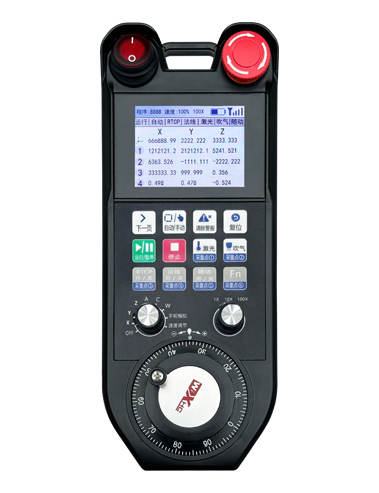
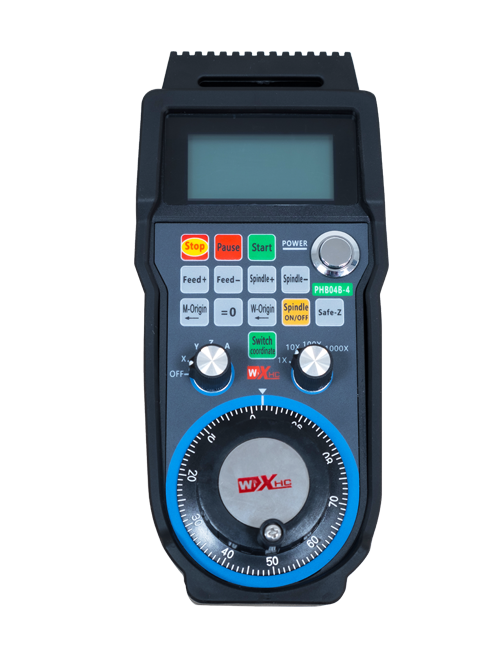
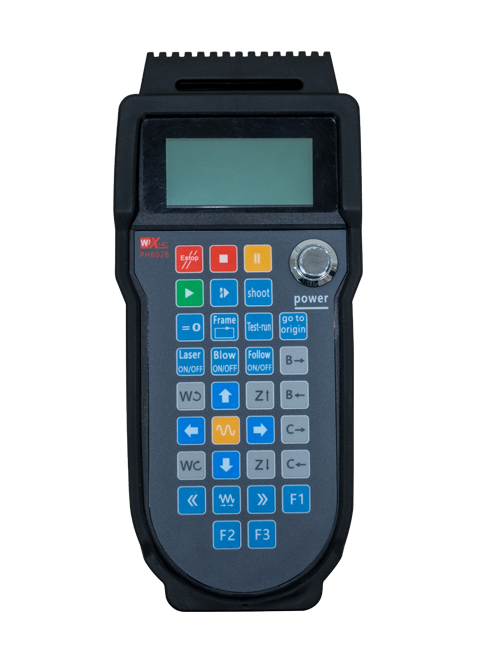
Steunstuk 12 pasgemaakte knoppie-programmering
Ondersteun 2,8-duim skerm, vertoon inhoud persoonlike programmering
Gebruik 433MHZ draadlose kommunikasietegnologie, die draadlose werking
afstand is 80 meter

£300.00
Steunstuk 12 pasgemaakte knoppie-programmering
Ondersteun 2,8-duim skerm, vertoon inhoud persoonlike programmering
Gebruik 433MHZ draadlose kommunikasietegnologie, die draadlose werking
afstand is 80 meter
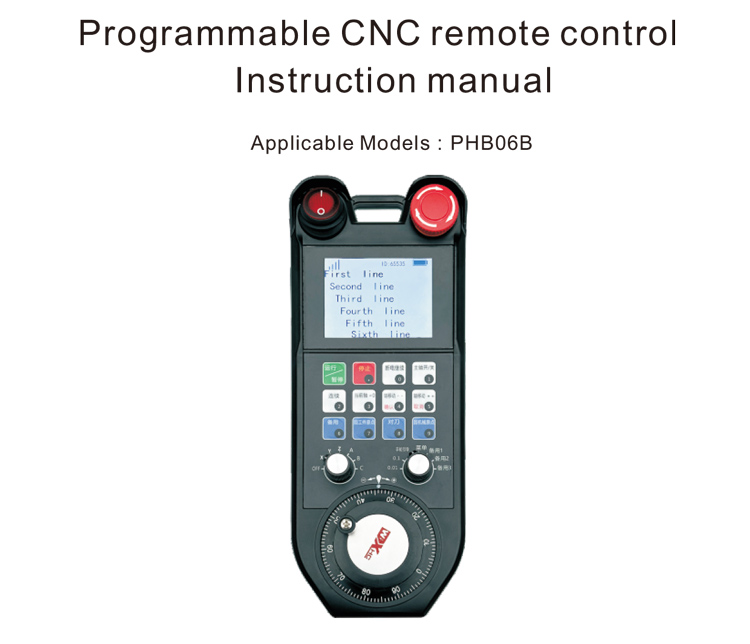
1.Produk Inleiding
Die programmeerbare CNC-afstandsbediening PHB06B is geskik vir draadloos
afstandbeheer werking van verskeie CNC stelsels. Dit ondersteun gebruikers om
pas programmering aan en ontwikkel knoppiefunksies om afstandbeheer te realiseer
beheer van verskeie funksies op die CNC-stelsel; dit ondersteun gebruikers om
pas programmering aan en ontwikkel vertooninhoud om dinamies te realiseer
vertoon van stelselstatus; die afstandbeheerder kom met 'n herlaaibare
battery en ondersteun Tipe-C-koppelvlaklaai.
2.Produk kenmerke
1. Gebruik 433MHZ draadlose kommunikasietegnologie, die draadlose werking
afstand is 80 meter;
2. Gebruik outomatiese frekwensiesprongfunksie, 32 stelle draadlose afstandbeheer
beheerders kan terselfdertyd gebruik word sonder om mekaar te beïnvloed;
3. Steunstuk 12 pasgemaakte knoppie-programmering;
4. Ondersteun 2,8-duim skerm, vertoon inhoud persoonlike programmering;
5. Steunstuk 1 6-spoed-as keuse skakelaar, wat op maat geprogrammeer kan word;
6. Steunstuk 1 7-spoedvergroting skakelaar, wat op maat geprogrammeer kan word;
7. Steunstuk 1 elektroniese handwiel, 100 polse/draai;
8. Ondersteun standaard Type-C-laai; 5V-2A laai spesifikasie; battery
spesifikasie 18650/12580mWh battery.
3.Werkbeginsel
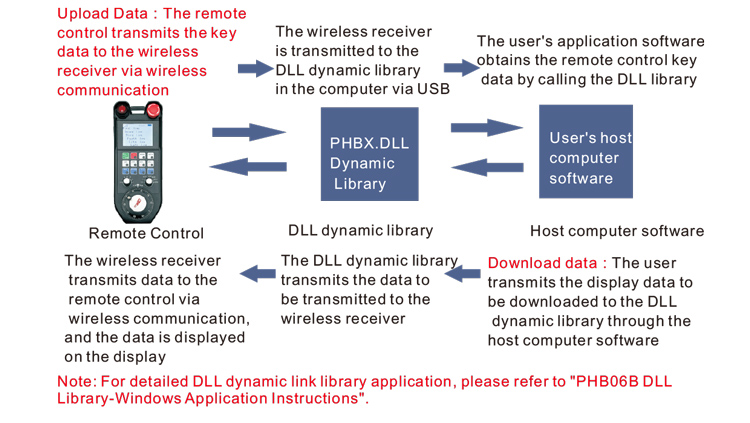
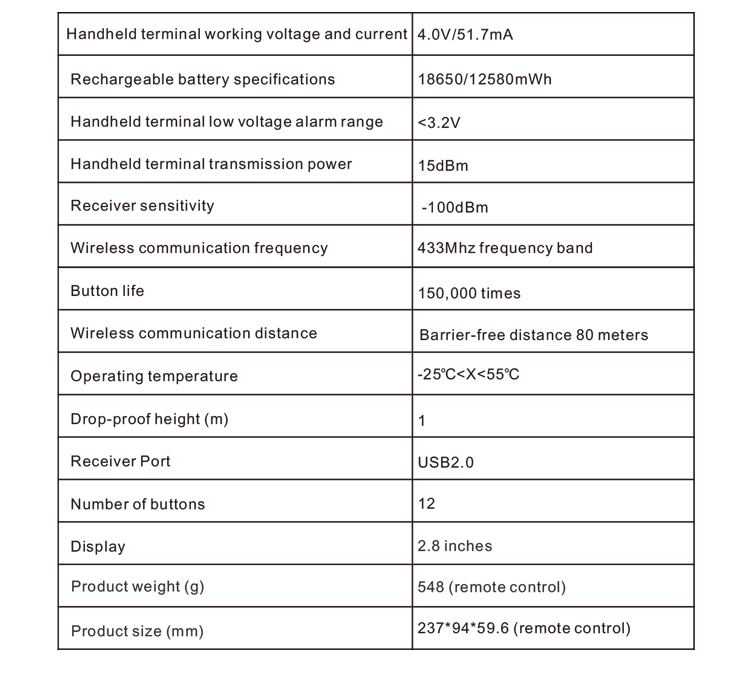
4. Produk spesifikasies
5.Produkfunksie inleiding
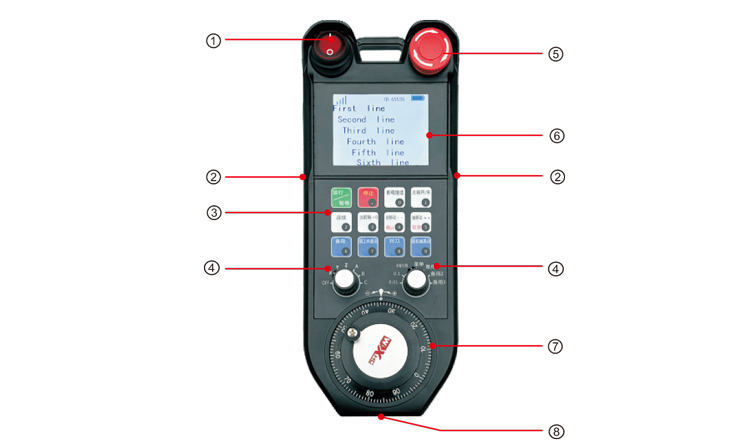
Notas:
①Power switch:
Beheer handwiel om oop en toe te maak
②Enable buttons on both sides:
Die aktiveringsknoppie moet gedruk word om die handwiel te draai;
③Custom button area
12 knoppies gerangskik in 3X4, gebruiker-gedefinieerde programmering;
④Axis selection, vergroting skakelaar
1 6-posisie-as seleksie skakelaar, wat aangepas en geprogrammeer kan word;
1 7-posisie verhouding skakelaar, wat aangepas en geprogrammeer kan word
⑤ Emergency stop switch:
Handwiel noodstopskakelaar;
⑥Display area:
Kan huidige krag vertoon, sein, en pasgemaakte vertooninhoud;
⑦Electronic hand wheel:
1 elektroniese handwiel, 100 polse/draai.
⑧Charging port:
Ingeboude herlaaibare battery, gelaai met Tipe-C-laaier, laaispanning 5V,
stroom 1A-2A; laai tyd 7 ure;
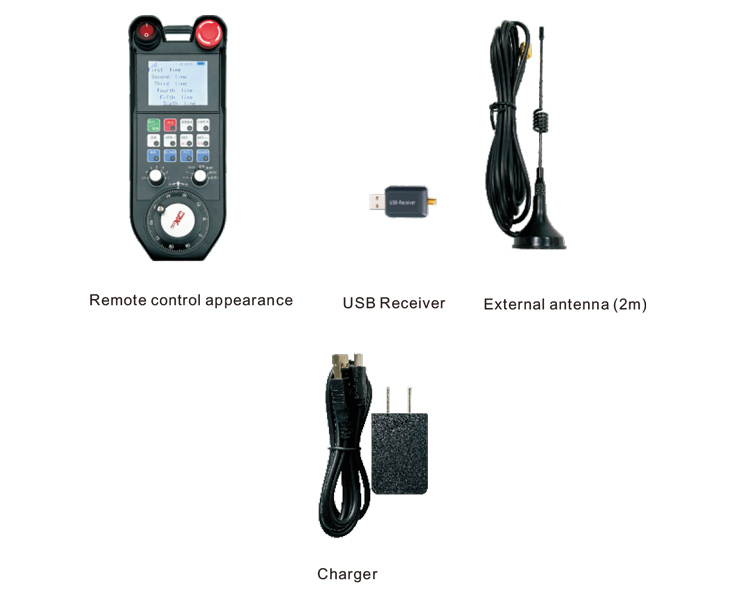
6.Produk bykomstighede diagram
7.Produk Installasie Gids
1. Plaas die USB-ontvanger in die rekenaar, die rekenaar sal outomaties
herken en installeer die USB-toestelbestuurder sonder handmatige installasie;
2. Plaas die afstandbeheer in die laaier. Nadat die battery ten volle gelaai is, draai
op die kragskakelaar, skakel die afstandbeheerder aan, en die skerm wys normaal, wat
beteken die aanskakeling is suksesvol;
3. Na aanskakel, jy kan enige knoppiebewerking uitvoer. Die afstandbeheer kan
ondersteun terselfdertyd dubbele knoppie-werking. Wanneer jy enige knoppie druk, 'n swart
vierkant sal langs die sein op die afstandbeheerder verskyn, wat aandui dat die knoppie
is geldig.
8.Produk Bediening Instruksies
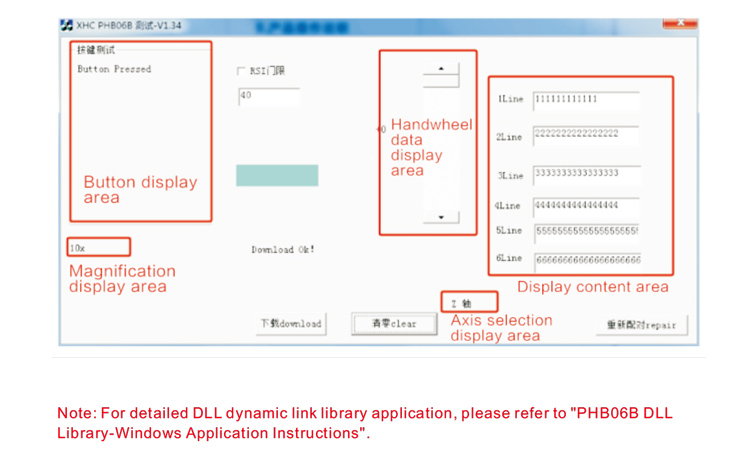
Voor produkontwikkeling en gebruik, jy kan die Demo-sagteware wat ons verskaf gebruik om te toets
die knoppies en vertoning van die afstandbeheer, of gebruik die Demo as 'n verwysingsroetine vir
toekomstige programmeringsontwikkeling;
Voordat u die Demo-sagteware gebruik, prop asseblief die USB-ontvanger in die rekenaar, maak
seker die afstandbeheerder het genoeg krag, skakel die kragskakelaar aan, en gebruik dit dan;
Wanneer enige knoppie op die afstandbeheerder gedruk word, die toets sagteware Demo sal die
ooreenstemmende sleutelwaarde. Nadat dit vrygestel is, die sleutelwaarde-vertoning verdwyn, wat daarop dui
die knoppie oplaai is normaal.
9.Produk probleemoplossing
10. Onderhoud en versorging
1. Gebruik dit asseblief in 'n droë omgewing met normale temperatuur en druk om uit te brei
die dienslewe;
2. Moenie skerp voorwerpe gebruik om die sleutelarea aan te raak nie om die lewensduur van die sleutel te verleng;
3. Hou asseblief die sleutelarea skoon om sleutelslytasie te verminder;
4. Vermy druk en val om skade aan die afstandbeheerder te veroorsaak;
5. As dit vir 'n lang tyd nie gebruik word nie, verwyder asseblief die battery en bêre die afstandbeheer en
battery op 'n skoon en veilige plek;
6. Gee aandag aan vogbestand tydens berging en vervoer.
11.Veiligheidsinligting
1. Lees asseblief die instruksies noukeurig voor gebruik. Nie-professionele persone word verbied
van bedryf.
2. Gebruik asseblief die oorspronklike laaier of 'n laaier wat deur 'n gewone vervaardiger vervaardig is
dieselfde spesifikasies.
3. Laai asseblief betyds om verkeerde werking as gevolg van onvoldoende krag te vermy
die afstandbeheerder nie reageer nie.
4. Indien herstel nodig is, kontak asseblief die vervaardiger. As die skade veroorsaak word deur
selfherstel, die vervaardiger sal nie waarborg verskaf nie.