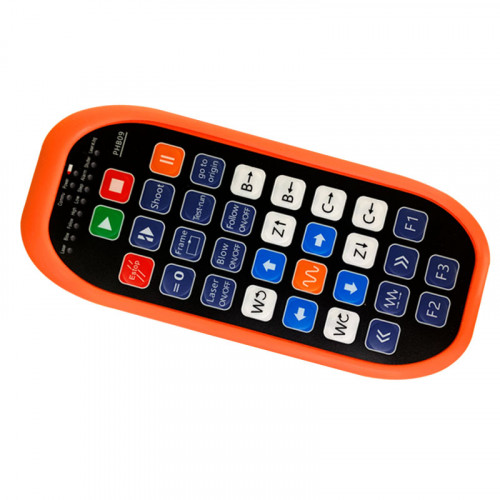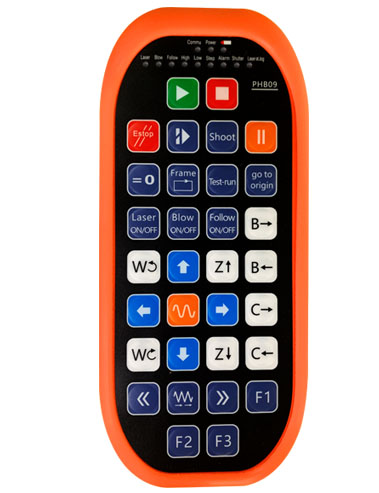
Ituboy 32 Custom button programming
Ituboy 9 naandan nga LED light display programming
Paggamit sa 433mhz wireless nga teknolohiya sa komunikasyon, ang wireless operation
distansya mao 80 metro

£300.00
Ituboy 32 Custom button programming
Ituboy 9 naandan nga LED light display programming
Paggamit sa 433mhz wireless nga teknolohiya sa komunikasyon, ang wireless operation
distansya mao 80 metro
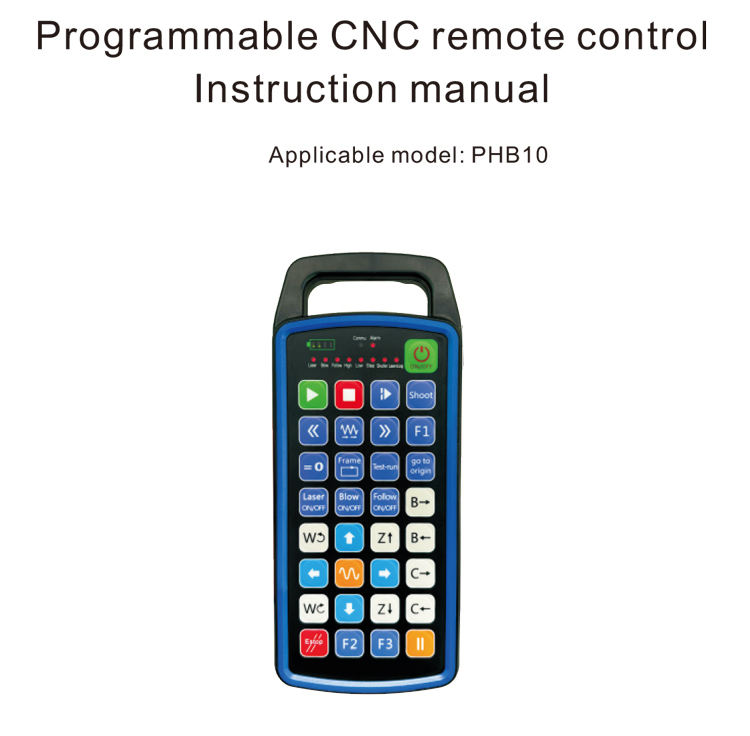
1.Pasiuna
Ang programmable CNC remote control PHB10 angay alang sa wireless
Remote Control Operation sa lainlaing mga sistema sa CNC. Gisuportahan niini ang gitakda sa user
programming aron mapalambo ang mga function sa buton, ug makaamgo hilit nga kontrol sa lain-laing
function sa CNC system; kini nagsuporta sa user-defined programming sa pagpalambo
Ang mga suga sa LED aron mosiga ug mapalong, ug makaamgo sa dinamikong pagpakita sa kahimtang sa sistema;
ang hilit nga kontrol adunay usa ka rechargeable nga baterya ug nagsuporta sa Type-C
pag-charge sa interface.
2.Mga Features sa Produkto
1. Paggamit sa 433mhz wireless nga teknolohiya sa komunikasyon, ang wireless operation
distansya mao 80 metro;
2.Gamit ang Awtomatikong Funcing Function function, 32 Mga Set sa Wireless Remote
Ang mga controller mahimong gamiton sa parehas nga oras nga wala makaapekto sa usag usa;
3.Ituboy 32 Custom button programming;
4.Ituboy 9 naandan nga LED light display programming;
5.Suportahi ang lebel sa waterproof nga IP67;
6.Suportahi ang standard Type-C interface charging; 5V-2A nga pagsingil sa detalye;
1100 mAh dako nga kapasidad nga baterya, uban sa awtomatikong pagkatulog standby function; makaamgo
ultra-taas nga ubos nga gahum standby;
7.Suportahi ang real-time nga pagpakita sa gahum.
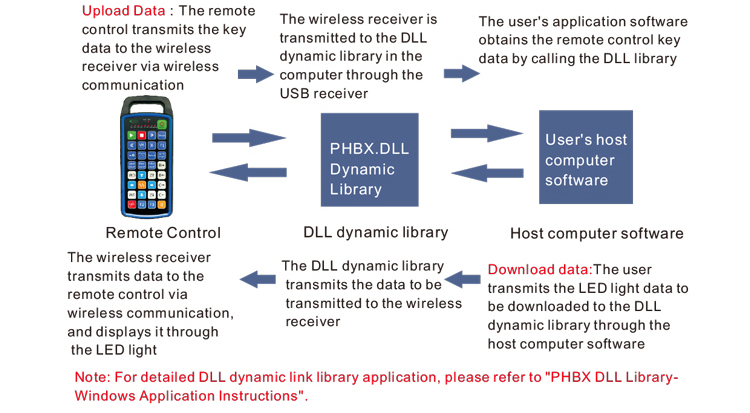
3.Binuhatan nga Nagtrabaho
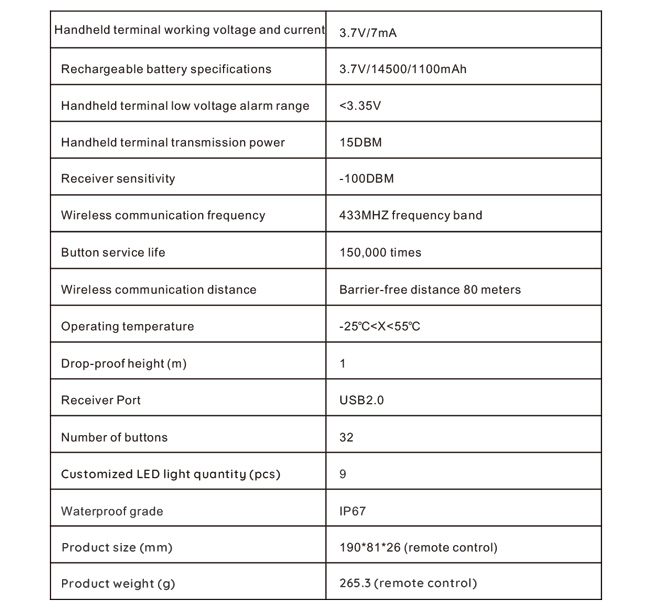
4. Mga detalye sa produkto
5.Pasiuna sa Produkto
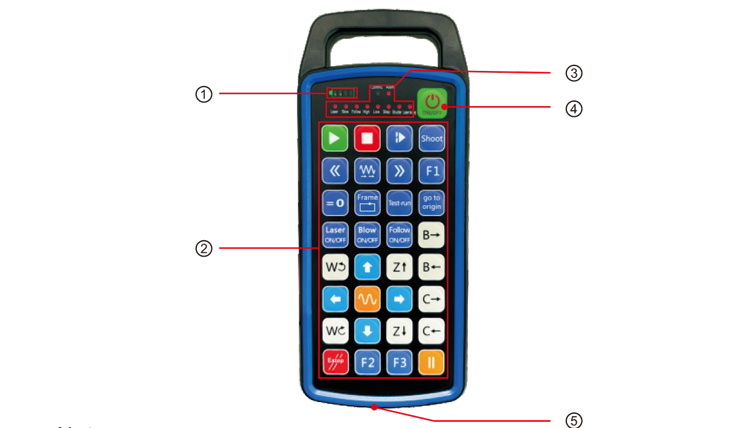
Malain:
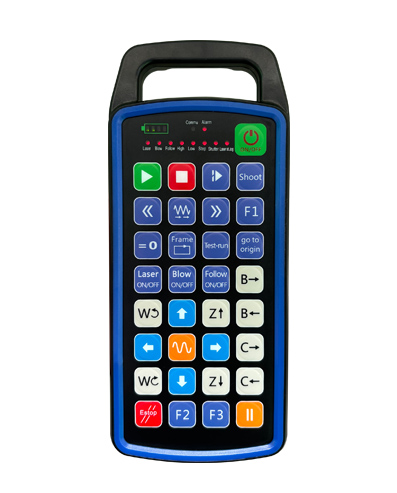
①Battery level display:
Nagsiga human ma-on, mapalong human mapatay;
Kung ang suga sa indikasyon sa baterya usa ra ka bar ug nagpadayon sa pagkidlap, kini nagpasabot sa
ubos kaayo ang baterya. Palihug ilisan ang baterya;
Kung ang mga suga sa indikasyon sa baterya kay ang tanan ug ang uban nga mga suga sa LED mokidlap balik ug
unahan, kini nagpasabot nga ang baterya ubos kaayo. Palihug ilisan ang baterya;
Kung ang indicator sa baterya dili mosiga o mawala, ug ang aparato dili mahimo
nagsugod pinaagi sa pagpindot ug pagpugong sa power button, Palihug pulihan ang baterya;
②Button area:32 butones nga gihan-ay sa 4X8, Gipalayo sa Gumagamit nga Pag-program;
③Status LED:
COMMU: Butang nga indicator light, mosiga kung ang buton gipugos ug moadto
gawas kon ang buton gibuhian; Ang ubang mga suga kay custom display;
④Power switch:
Long press alang sa 3 segundo aron ma-on, dugay nga press alang sa 3 segundos sa pagpalong;
⑤Charging port:
Gamita ang Type-C nga charger sa pag-charge, Pag-charge sa boltahe 5V, Karon 1A-2A; pag-charge
panahon 3-5 Oras;
Sa dihang nag-charge, nagkidlap ang power indicator, nga nagpakita nga kini nag-charge. Kanus-a
bug-os nga na-charge, ang power indicator magpakita sa tibuok bar nga walay pagkidlap.
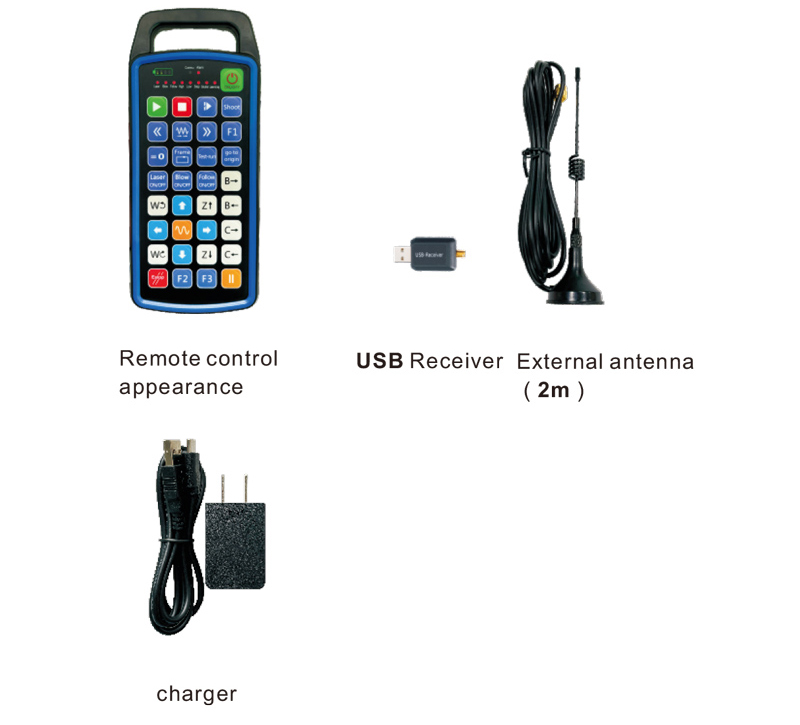
6.Diagram sa mga accessories sa produkto
7.Giya sa Pag-install sa Produkto
1 . Gisulod nako ang USB receiver sa computer, awtomatik nga ang computer
mailhan ug i-install ang driver sa USB device nga walay manwal
2. Isulud ang hilit nga kontrol sa charger. Pagkahuman sa baterya hingpit nga gisuhan, press
ug kupti ang power button alang sa 3 segundos. Ang hilit nga kontrol mo-on ug ang gahum
mosiga ang indicator, nga nagpakita nga ang power-on malampuson.
3. Human sa gahum sa, Mahimo nimo ang bisan unsang operasyon sa butones. Ang remote control
makasuporta sa dual button nga operasyon sa samang higayon. Kung gipugos nimo ang bisan unsang butones, ang
Ang suga sa COMMU sa remote control mosiga, nga nagpakita nga kini nga buton balido.
8.Mga panudlo sa operasyon sa produkto
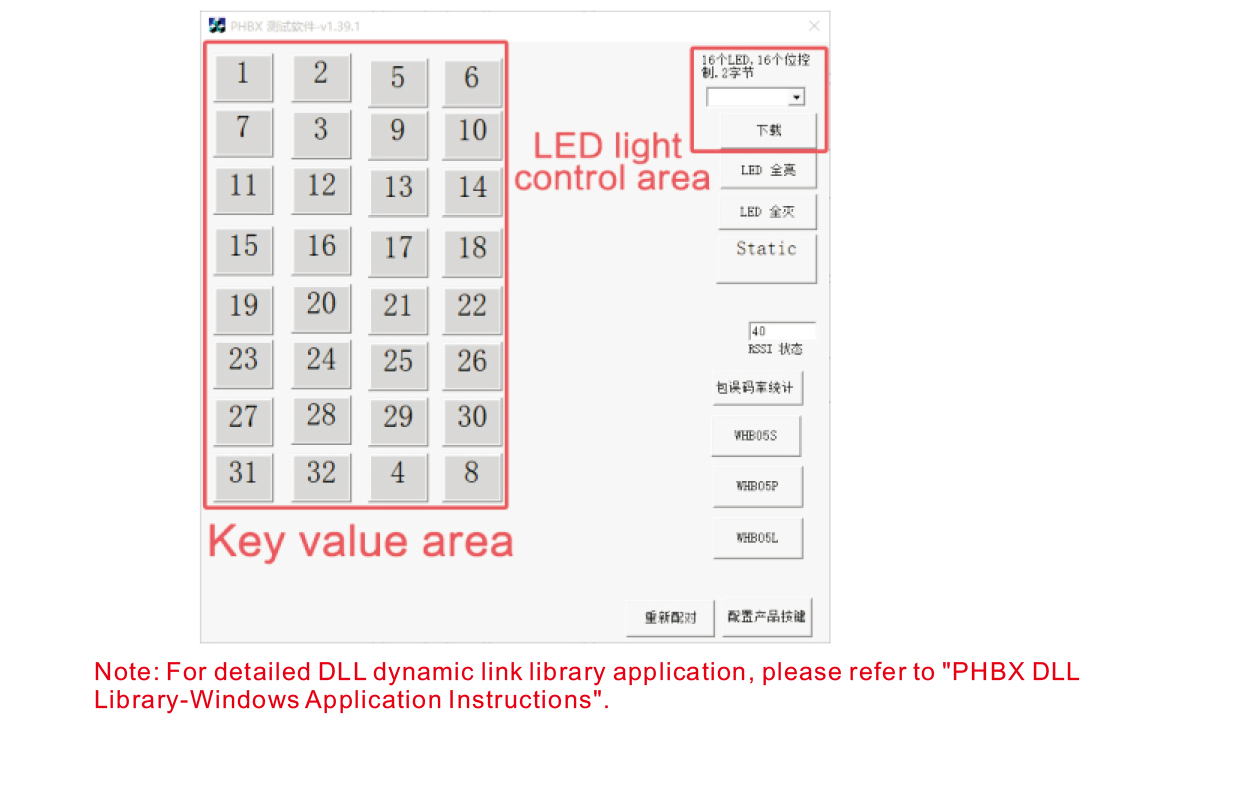
Sa wala pa ang pag-uswag sa produkto ug paggamit, mahimo nimong gamiton ang demo software nga among gihatag
sulayi ang mga buton sa hilit nga kontrol ug ang LED nga suga sa hilit nga kontrol. Mahimo nimo
gamiton usab ang demo isip usa ka reperensiya nga rutina alang sa umaabot nga pagpalambo sa programming.
Sa wala pa gamiton ang software sa demo, Palihug isulud ang USB makadawat sa computer,
siguroa nga ang remote controller adunay igong gahum, pindota ug kupti ang power button sa t
ipadayon kini, ug dayon gamiton kini;
Kung ang bisan unsang butones sa hilit nga kontrol gipugngan, ipakita ang demo sa software sa pagsulay
ang katugbang nga yawe nga bili. Pagkahuman sa pagpagawas niini, Ang yawe nga pagpakita sa kantidad mawala,
nga nagpakita nga ang yawe upload mao ang normal;
Mahimo usab nimo pilion ang numero sa suga sa LED sa demo sa software sa pagsulay, i-klik ang pag-download,
ug ang katugbang nga numero sa suga sa remote control mosiga, nga nagpakita nga ang
Ang LED nga suga kay kasagarang nag-download.
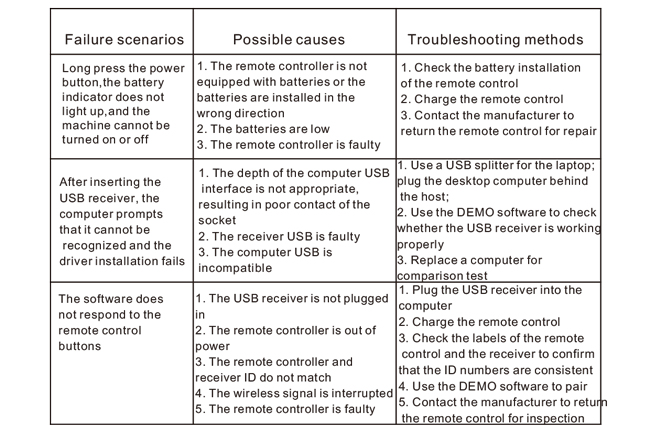
9.Pagsulbad sa Produkto
10. Pagmentinar ug pag-atiman
1. Palihug gamita kini sa usa ka uga nga palibot nga adunay normal nga temperatura ug pagpit-os nga molawig
Ang Kinabuhi sa Serbisyo;
2. Ayaw paggamit og mahait nga mga butang aron matandog ang yawe nga lugar aron mapalapdan ang kinabuhi sa serbisyo sa yawi;
3. Palihug hupti nga limpyo ang yawe nga lugar aron makunhuran ang yawe nga pagsul-ob;
4. Paglikay sa pagpuga ug pagkahulog hinungdan sa kadaot sa hilit nga kontrol;
5. Kung dili gigamit sa dugay nga panahon, palihug kuhaa ang baterya ug ibutang ang remote control
ug baterya sa limpyo ug luwas nga lugar;
6. Pagtagad sa kaumog-proof sa panahon sa pagtipig ug transportasyon.
11.Impormasyon sa Kaluwas
1. Palihug basaha pag-ayo ang mga panudlo sa wala pa gamiton. Ang mga dili-propesyonal gidili sa
nag-operate.
2. Palihug gamita ang orihinal nga charger o usa ka charger nga gihimo sa usa ka regular nga tiggama nga adunay
parehas nga mga detalye.
3. Palihug pag-charge sa oras aron malikayan ang sayup nga operasyon tungod sa dili igo nga gahum nga hinungdan sa
remote control nga dili mosanong.
4. Kung ang pag-ayo gikinahanglan, Palihug kontaka ang tiggama. Kung ang kadaot gipahinabo sa pag-ayo sa kaugalingon,
Ang tiggama dili maghatag garantiya.