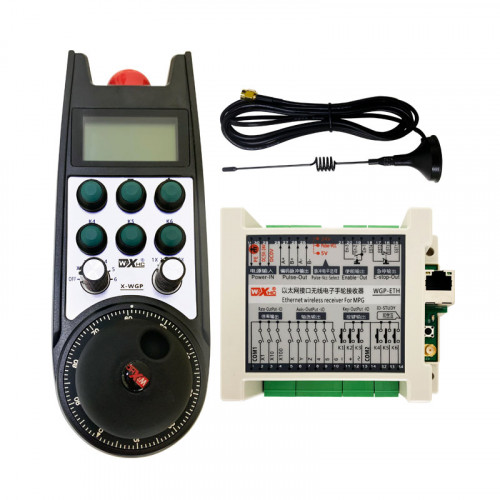
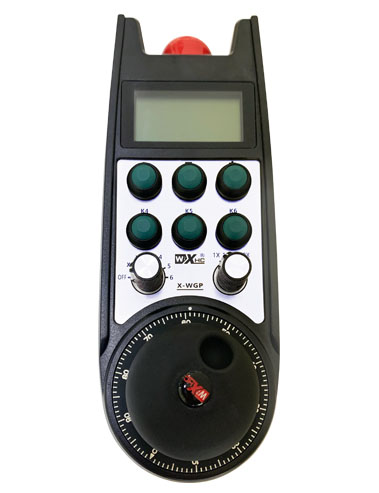
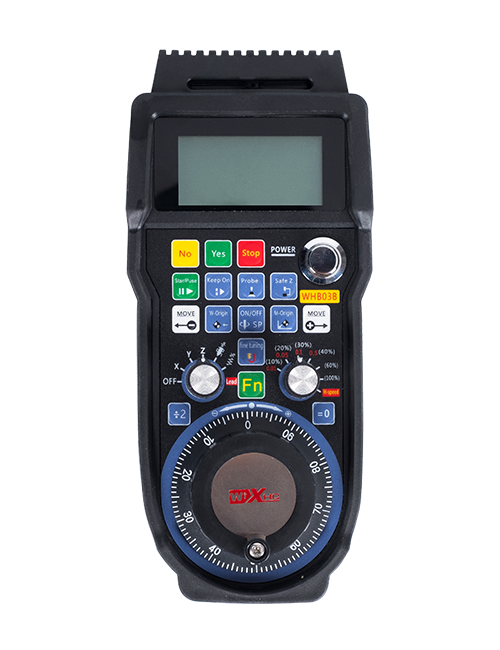
Understøtter 2 Tilpasbare knapper, med switch-type IO-signaludgang;
Understøtter -2 Axis kontrol;
Understøtter forstørrelseskontrol på 3 niveauer;


1.Produktintroduktion
2. Produktfunktionelle funktioner
| Driftsspænding og strøm af trådløs fjernbetjening |
3V/14MA
|
| Batterispecifikationer | 2 AA alkaliske batterier, størrelse 5 |
| Lavspændingsalarm rækkevidde af trådløs fjernbetjening | < 2.3V |
| Modtagerens strømforsyningsspænding | DC5V-24V/A |
| Modtagerens nødstop udgangsbelastningsområde | AC125V-1A/DC30V-2A |
| Modtager aktiveret udgangsbelastningsområde |
AC125V-1A/DC30V-2A
|
| Modtagerens brugerdefinerede knapudgangsbelastningsområde | DC24V/50mA |
| Udgangsbelastningsområde for valg af modtagerakse | DC24V/50mA |
| Modtagerens forstørrelses udgangsbelastningsområde | DC24V/50mA |
| Transmissionseffekt af håndholdt terminal |
15dBm
|
| Modtager modtager følsomhed | -100dBm |
| Trådløs kommunikationsfrekvens | 433MHz frekvensbånd |
| Trådløs kommunikationsafstand | Barriere fri afstand af 40 meter |
| Driftstemperatur | -25℃ < X < 55℃ |
| Anti faldhøjde | 1 (måler) |
| Brugerdefineret knap antal | 2 |


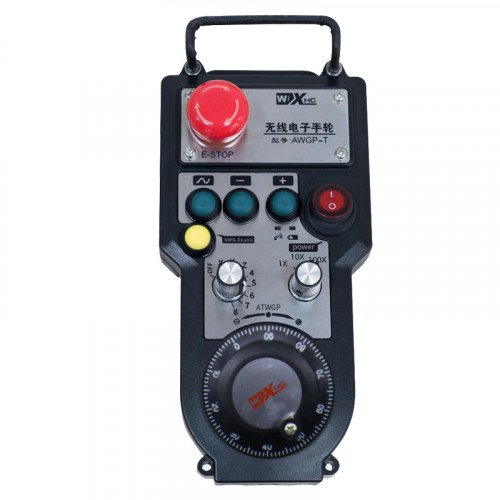
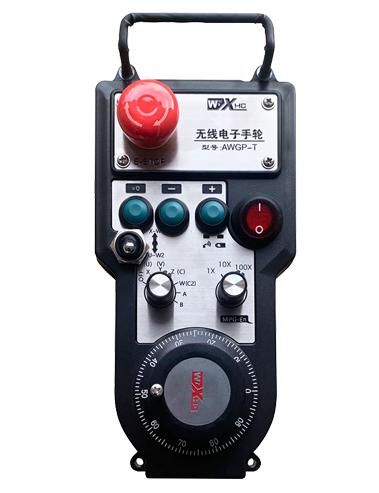
① Pulse encoder:
Tryk på og hold aktiveringsknappen nede, ryst pulsgiveren, udsende et pulssignal,og styre bevægelsen af maskinaksen.
② Enable button:
Tryk på en af aktiveringsknapperne på hver side, og de to sæt aktiverede IO-udgange på modtageren vil lede. Slip aktiveringsknappen for at frakoble aktiverings-IO-udgangen; Og før du skifter aksevalgsforstørrelsen og ryster håndhjulet,aktiveringsknappen skal holdes nede for at være effektiv; Denne funktion kan annulleres via konfigurationssoftware.
③ Indicator lights:
Venstre sidelys: tænde lyset,håndhjulet bruger aksen til at vælge OFF for power on, og dette lys forbliver tændt efter tænding;
Mellemlys: et signallys, der lyser, når du betjener enhver funktion på håndhjulet, og lyser ikke, når der ikke er nogen betjening;
Højre sidelys: Alarmlys med lav spænding, lavt batteriniveau,dette lys blinker eller forbliver tændt, batteri skal udskiftes.
④ Emergency stop button:
Tryk på nødstopknappen, og de to sæt nødstop IO-udgange på modtageren vil blive afbrudt, og alle håndhjulets funktioner vil være ugyldige.
⑤ Magnification switch:
Tryk og hold aktiveringsknappen nede for at skifte forstørrelseskontakten, som kan skifte forstørrelsen styret af håndhjulet.
⑥ Axis selection switch (strømafbryder):
Tryk og hold aktiveringsknappen nede for at skifte aksevalgskontakten, som kan skifte bevægelsesaksen styret af håndhjulet. Skift denne kontakt fra OFF til en hvilken som helst akse, og tænd for håndhjulet.
⑦ Custom button:
To brugerdefinerede knapper, hver svarende til et IO-udgangspunkt på modtageren.

1. Installer modtageren i det elektriske skab gennem spændet på ryggen, Eller installer det i skabet gennem skruehullerne i de fire hjørner af modtageren.
2. Se vores modtagerledningsdiagram og sammenlign det med dit udstyr på stedet. Tilslut udstyret til modtageren via kabler.
3.Efter at modtageren er korrekt fastgjort, antennen udstyret med modtageren skal tilsluttes, og den ydre ende af antennen skal installeres eller placeres uden for det elektriske kabinet. Det anbefales at placere det på toppen af det elektriske skab for den bedste signaleffekt. Det er forbudt at lade antennen være uden forbindelse eller at placere den inde i elskabet, da dette kan resultere i, at signalet bliver ubrugeligt.
4. Endelig, tænd for strømafbryderen på håndhjulet, og du kan fjernbetjene maskinen ved hjælp af håndhjulet.
6.2 Modtagerinstallationsdimensioner

6.3 Modtager ledningsreferencediagram

7. Produktoperationsinstruktioner
1. Tænd for maskinen og modtageren. The receiver’s working indicator light flashes. Installer batteriet i det trådløse elektroniske håndhjul, fastgør batteridækslet, og
tænd for afbryderen på det trådløse elektroniske håndhjul. The handwheel’s battery level indicator light is on.
2. Vælg koordinataksen: Tryk på og hold aktiveringsknappen nede, skift omskifteren til aksevalg, og vælg den akse, du vil betjene.
3. Vælg forstørrelse: Tryk på og hold aktiveringsknappen nede, skift forstørrelseskontakten,og vælg det ønskede forstørrelsesniveau.
4. Bevægelig akse: Tryk på og hold aktiveringsknappen nede, vælg kontakten til valg af akse, vælg forstørrelseskontakten, og drej derefter pulsgiveren. Drej med uret for at flytte
positiv akse og mod uret for at flytte den negative akse.
5. Tryk og hold en vilkårlig brugerdefineret knap nede, og den tilsvarende knap IO-udgang på modtageren vil blive tændt. Slip knappen, og udgangen vil blive slukket.
6. Tryk på nødstopknappen, den tilsvarende nødstop IO-udgang fra modtageren vil blive afbrudt, håndhjulsfunktionen deaktiveres,slip nødstopknappen, nødstop IO-udgangen vil blive lukket, og håndhjulsfunktionen vil blive genoprettet.
7. Hvis håndhjulet ikke betjenes i en periode, den går automatisk i dvaletilstand for at reducere strømforbruget. Når den bruges igen, håndhjulet kan aktiveres ved at trykke på aktiveringsknappen.
8. Hvis håndhjulet ikke bruges i længere tid, det anbefales at skifte håndhjulsakslen til OFF-positionen, slå håndhjulet fra, og forlænge batteriets levetid.
8. Produktmodelbeskrivelse

① :ZTWGP repræsenterer udseendets stil
②:Pulsudgangsparametre:
01: Indikerer, at pulsudgangssignalet er A, B; Pulsspænding 5V; pulsmængde 100PPR.
02:Indikerer, at pulsudgangssignalerne er A og B; Pulsspænding 12V; pulsmængde 100PPR.
03:Indikerer, at pulsudgangssignalerne er A, B, EN -, B -; Pulsspænding 5V; pulsmængde 100PPR.
04:Angiver en lav-niveau NPN åben kredsløbsudgang, med pulsudgangssignaler på A og B;Antallet af pulser er 100PPR.
05:Angiver PNP-kildeoutput på højt niveau, med pulsudgangssignaler på A og B; Antallet af pulser er 100PPR.
③:Repræsenterer antallet af aksevalgskontakter, 2 repræsenterer 2 akser.
④:Repræsenterer typen af aksevalgskontaktsignal, A repræsenterer punkt-til-punkt udgangssignal, og B repræsenterer kodet udgangssignal.
⑤:Repræsenterer typen af multiplikationsskiftsignal, A repræsenterer punkt-til-punkt udgangssignal, og B repræsenterer kodet udgangssignal.
⑥:Repræsenterer antallet af brugerdefinerede knapper, 2 repræsenterer 2 Brugerdefinerede knapper.
⑦:Repræsenterer strømforsyningen til systemets håndhjul, og 05 repræsenterer 5V strømforsyning.
⑧:L repræsenterer venstre kolonne (venstre knivholder), og R repræsenterer den højre kolonne (højre knivholder).
9.Løsning på produktfejl

1. Brug det i et tørt miljø ved stuetemperatur og pres for at udvide sit levetid.
2. Undgå at bruge i unormale miljøer såsom regn og vandbobler for at forlænge levetiden.
3. Hold håndhjulets udseende rent for at forlænge dets levetid.
4. Undgå venligst at klemme, falder, støde, osv. for at forhindre beskadigelse af præcisionskomponenterne inde i håndhjulet eller nøjagtighedsfejl.
5. Hvis ikke brugt i lang tid, Opbevar håndhjulet på et rent og sikkert sted. Under opbevaring og transport, Der skal rettes opmærksomhed på fugt- og stødmodstand.
11. Sikkerhedsoplysninger
1. Læs instruktionerne omhyggeligt inden brug og forbyder ikke -fagfolk at operere.
2. Udskift venligst batteriet i tide, når batteriniveauet er for lavt for at undgå fejl forårsaget af utilstrækkelig batteristrøm og manglende evne til at betjene håndhjulet.
3. Hvis reparation er påkrævet, Kontakt producenten. Hvis skaden er forårsaget af selvreparation, producenten giver ikke garanti