Описание

1.Продуктым пуртымаш
Wireless Remote Control is used for manual guidance, позиционирование, tool setting and other operations of CNC machine tools. Тиде продукт беспроводной передаче технологийым налеш ., йӱлам кораҥдаш йӱла пружин проводник подключение ., иземдыме оборудованийым ыштен кертдыме кабель-влак ., кабельым тарватыме ситыдымашым кораҥдаш, нефть петырыме, да т. д., and is more convenient to operate.It is widely applicable to CNC machine tools such as gantry machining centers, gantry vertical lathes, and CNC gear processing machines, and is compatible with various mainstream CNC system brands on the market, including Siemens, Мицубиши, ФАНУК, Syntec and more.
2.Продукт функций
1. 433 МГц беспроводной коммуникаций технологийым кучылтеш, беспроводной паша тораште 20 мый.
2.Адаптивный частоташте тӧрштылмаш; 32 набор-влак беспроводной пульт дене пайдаланаш лиеш ик жапыште мешаяш.
3.Supports the emergency stop button, and the emergency stop button remains effective even after the remote control is powered off.
4.Палшык 3 шкешотан кнопко-влак дене вашталтыме IO сигнал лектыш.
5.6-осевый управленийым поддержатла, жана 7 12-осевый управлений марте келыштарыме.
6. 3-ступенчатый кугемдыме управленийым поддержатла, да 4-ступенчатый кугемдыме управлений настраиваться.
7.кнопкым темдал функцийым поддержатла, кудо коммутаций IO сигналым луктын кертеш, да тыгак управлений осевый ойырен налаш, кугемдымаш да кодер.
8.Программе гоч осевый ойырен налме да кугемдыме кодироватлыме типым вашталташ полша.
9. Supports pulse encoder with specification of 100 революцийлан ик пульсы - влак ..
10. Supports standard Type-C charging with 5V-2A charging specification; built-in battery
specification: 14500 / 1100мА.
3. Продуктын спецификация .
| Working Voltage and Current of Handheld Terminal |
3.7V/20.0mA |
| Charging Battery Specification |
3.7V/14500/1100mAh
|
| Low Voltage Alarm Range of Handheld Terminal |
<3.35В |
| Receiver Power Supply Voltage |
DC5V-24V/1A |
| Receiver Emergency Stop Output Load Range |
AC125В-1А/ДК30В-2А |
| Receiver Enable Output Load Range |
AC125В-1А/ДК30В-2А |
| Receiver Custom Button Output Load Range |
DC24В/50мА .
|
| Receiver Axis Selection Output Load Range |
DC24В/50мА . |
| Receiver magnification Output Load Range |
DC24В/50мА . |
| Handheld Terminal Transmit Power |
15дБм
|
| Налме приёмникым налын чулымлыкым . |
-100дБм |
| Беспроводной коммуникаций чӱчкыдылык |
433МГц частота диапазон .
|
| Wireless Communication Distance |
20 meters barrier-free distance
|
| Operating Temperature |
-25℃<Х<55℃ |
| Safe drop height |
1 м
|
| Number of Custom Buttons |
3
|
| Product Weight |
546.86(g) |
| Product Dimensions |
200*87*72(mm) |
4. Продукт функцийым пуртымаш .

Палемдыме:
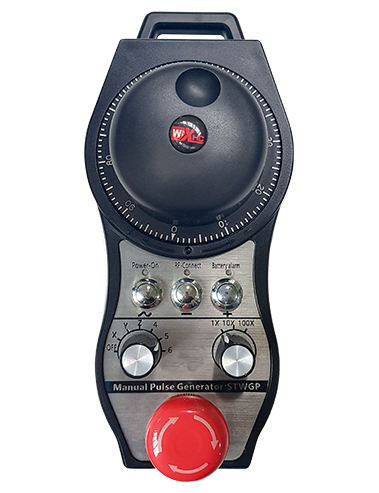
① Emergency Stop Button:
Аварийный тошкалтыш кнопкым темдал ., the two groups of emergency stop IO outputs on the receiver will disconnect, and all remote control functions will be invalidated.Release the emergency stop button, the emergency stop IO outputs on the receiver will be closed, and all remote control functions will be restored. Ешартыш, even if the remote control is powered off, pressing the emergency stop button can still activate the emergency stop IO output of the receiver.
② Enable Button:
Press either enable button on both sides, the two sets of enable IO outputs on the receiver will conduct. Release the enable button, and the enable IO outputs will disconnect. It is necessary to press and hold the enable button before toggling axis selection, magnification or rotating the remote control for the operation to take effect.This function can be canceled through the configuration software.
③ Axis Selection Switch (Power Switch):
Кнопкым темдал да кучен ., then toggling the axis selection switch can control the movement of axis .Press and hold the enable button, then toggle the axis selection switch to switch the motion axis controlled by the remote control. Toggle the switch from the OFF position to any axis position, and the remote control will power on automatically.
④ Pulse Encoder:
Press and hold the enable button and rotate the pulse encoder, it will output pulse signals to control the movement of the machine axis.
⑤ LCD Display Screen:

5. Product Accessories Diagram

6. Продуктым шындыме йӧн .
6.1 Продуктым шындыме ошкыл-влак
1. Install the receiver in the electrical cabinet via the buckle on its back, or mount it inside the electrical cabinet through the screw holes at the four corners of the receiver.
2. Мемнан приёмникым проводник схемым ончалза ., тудым тендан дене таҥастараш он-площадкыште оборудованийым ., and connect the equipment to the receiver with cables.
3. After the receiver is fixed in place, install the supporting antenna of the receiver properly. Mount or place the outer end of the antenna outside the electrical cabinet. It is recommended to place it on the top of the electrical cabinet for optimal signal performance. Do not leave the antenna uninstalled or place it inside the electrical cabinet; уке гын, signal failure may occur.
4. Пытартыш, turn on the remote control power switch, then you can remotely operate the machine via the remote control.
6.2 Receiver Installation Dimensions

6.3 Приёмник проводко справочник диаграмме .
7. Продукт операций инструкций-влак .
1. Машина да приёмникыште куатым .. The receiver operation indicator flashes. After the wireless electronic remote control is fully charged, toggle it from the OFF gear to the X-axis gear, and the remote control display lights up.
2. Select the axis : Кнопкым темдал да кучен ., toggle the axis selection switch to select the axis to be operated.
3. Select the magnification: Кнопкым темдал да кучен ., toggle the magnification switch to select the required magnification gear.
4. Axis movement: Кнопкым темдал да кучен ., select the axis selection switch and the magnification switch, then rotate the pulse encoder. Rotate clockwise to move the axis in the positive direction, and rotate counterclockwise to move the axis in the negative direction.
5. Кеч-могай шкешотан кнопкым темдал да кучен ., the corresponding button IO output of the receiver will turn on; release the button, and the output will turn off.
6. Аварийный тошкалтыш кнопкым темдал ., the corresponding emergency stop IO output of the receiver disconnects and the remote control function becomes invalid. Release the emergency stop button, the emergency stop IO output closes and the remote control function is restored.
7. If the wireless remote control is not operated for a period of time, тудо автоматически пурен мален режимыште куатым кучылтмо иземдаш манын .. It can be used normally again by pressing the enable button again.
8.If the wireless remote control is not used for a long time, turn the axis switch to OFF to turn off the power and extend battery life
8. Продукт Модель Описание .
①:UWGP stands for appearance style.
②:Pulse Output Parameters:
01: Пульс лектыш сигналым А ., Б; Пульс напряжений 5В .; импульсный кугыт 100ППР ..
02: Пульс лектыш сигналым А ., Б; Пульс напряжений 12В .; pulse quantity 25PPR.
03: Пульс лектыш сигналым А ., Б, ИК -, Б -; Пульс напряжений 5В .; импульсный кугыт 100ППР ..
04: НПН-ым низкоуровневый почмо схемым ончыкта, импульс лектыш сигнал дене А да В .; The number of pulses is 100PPR.
05: Кӱкшӧ кӱкшытыштӧ ПНП источник лектышым ончыкта ., импульс лектыш сигнал дене А да В .; Импульс-влакын чотышт 100ППР ..
③:Represents the axis selection switch quantity; 6 stands for 6 оҥам, 7 stands for 7 оҥам, and so on.
④: Represents the signal type of the axis selection switch.A stands for point-to-point output signal, and B stands for encoder output signal.
⑤: Represents the signal type of the magnification switch.A stands for point-to-point output signal, and B stands for encoder output signal.
⑥: Шке ыштыме кнопко-влакын чотыштым ончыкта .; 3 corresponds to 6 шкешотан кнопко-влак.
⑦: Represents the power supply for the system remote control. 05 stands for 5V power supply, жана 24 stands for 24V power supply.
⑧: Represents the contact charging mode. It starts charging automatically when placed back on the charging base.
9. Продукт нелылыкым кораҥдаш .

10. Maintenance and upkeep
1. Пожалуйста, тудым кучылташ курго средаште пӧлем температур да давленийым тудын служитлыме ӱмыржым шуяш манын ..
2. Please avoid using in abnormal environments such as rain and water to extend the service life.
3. Please keep the appearance of the remote control clean to extend its service life.
4. Please avoid crushing, dropping, or bumping, да т. д.. to prevent damage to the precision components inside the remote control or accuracy errors.
5. Кужу жап ок кучылталт гын ., please store the remote control in a clean and safe place.
6. Avoid moisture and shock during storage and transportation.
11. Лӱдыкшыдымылык нерген увер
1. Пожалуйста, инструкцийым сайын лудын лекса, кучылтмо деч ончыч да пашам ышташ чарыме огыл профессионал-влак.
2. Please charge the remote control in a timely manner when the battery level is too low, to avoid malfunction and operational errors caused by insufficient power.
3. If you repair it yourself and cause damage, the warranty will be void.