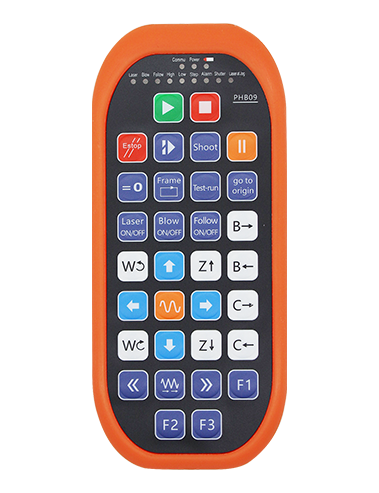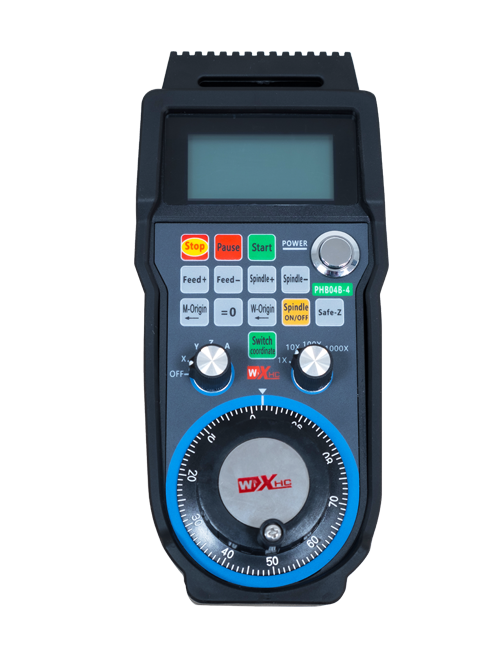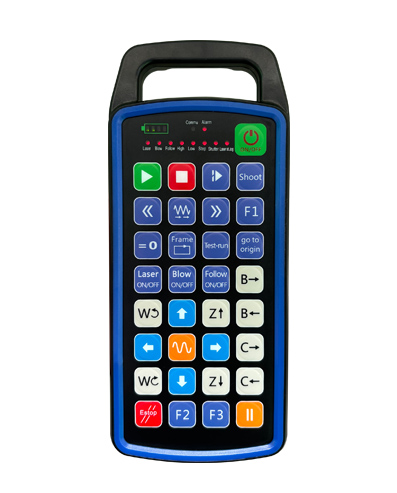
සහාය 32 අභිරුචි බොත්තම් වැඩසටහන්කරණය
සහාය 9 අභිරුචි LED ආලෝක සංදර්ශක වැඩසටහන්කරණය
433MHZ රැහැන් රහිත සන්නිවේදන තාක්ෂණය භාවිතා කිරීම, රැහැන් රහිත මෙහෙයුම
දුර වේ 80 මීටර

£300.00
සහාය 32 අභිරුචි බොත්තම් වැඩසටහන්කරණය
සහාය 9 අභිරුචි LED ආලෝක සංදර්ශක වැඩසටහන්කරණය
433MHZ රැහැන් රහිත සන්නිවේදන තාක්ෂණය භාවිතා කිරීම, රැහැන් රහිත මෙහෙයුම
දුර වේ 80 මීටර
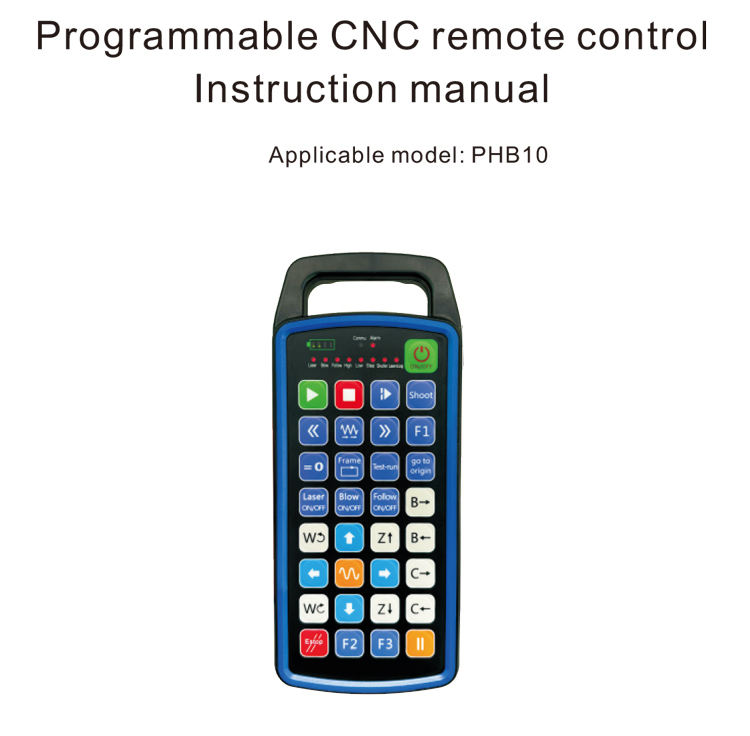
1.නිෂ්පාදන හැඳින්වීම
වැඩසටහන්ගත කළ හැකි CNC දුරස්ථ පාලක PHB10 රැහැන් රහිත සඳහා සුදුසු වේ
විවිධ CNC පද්ධතිවල දුරස්ථ පාලක මෙහෙයුම. එය පරිශීලක-නිර්වචනය සඳහා සහය දක්වයි
බොත්තම් කාර්යයන් සංවර්ධනය කිරීම සඳහා වැඩසටහන්කරණය, සහ විවිධ දුරස්ථ පාලනය අවබෝධ කර ගන්න
CNC පද්ධතිය මත ක්රියා කරයි; එය පරිශීලක-නිර්වචනය කරන ලද වැඩසටහන් සංවර්ධනය කිරීමට සහාය වේ
LED ආලෝකය දැල්වීමට සහ නිවා දැමීමට, සහ පද්ධති තත්ත්වයේ ගතික සංදර්ශකය අවබෝධ කර ගැනීම;
දුරස්ථ පාලකය නැවත ආරෝපණය කළ හැකි බැටරියක් සමඟ එන අතර Type-C සඳහා සහය දක්වයි
අතුරු මුහුණත ආරෝපණය කිරීම.
2.නිෂ්පාදන විශේෂාංග
1. 433MHZ රැහැන් රහිත සන්නිවේදන තාක්ෂණය භාවිතා කිරීම, රැහැන් රහිත මෙහෙයුම
දුර වේ 80 මීටර;
2.ස්වයංක්රීය සංඛ්යාත පැනීමේ කාර්යය භාවිතා කිරීම, 32 රැහැන් රහිත දුරස්ථ කට්ටල
පාලකයන් එකිනෙක බලපෑමෙන් තොරව එකවර භාවිතා කළ හැක;
3.සහාය 32 අභිරුචි බොත්තම් වැඩසටහන්කරණය;
4.සහාය 9 අභිරුචි LED ආලෝක සංදර්ශක වැඩසටහන්කරණය;
5.IP67 ජල ආරක්ෂිත මට්ටමට සහය දක්වයි;
6.සම්මත Type-C අතුරුමුහුණත ආරෝපණය කිරීමට සහය දක්වයි; 5V-2A ආරෝපණ පිරිවිතර;
1100 mAh විශාල ධාරිතාවකින් යුත් බැටරි, ස්වයංක්රීය නින්ද පොරොත්තු ක්රියාකාරිත්වය සමඟ; අවබෝධ කරගන්නවා
අතිශය දිගු අඩු බල පොරොත්තුවක්;
7.බලය තත්ය කාලීන සංදර්ශනයට සහය වන්න.
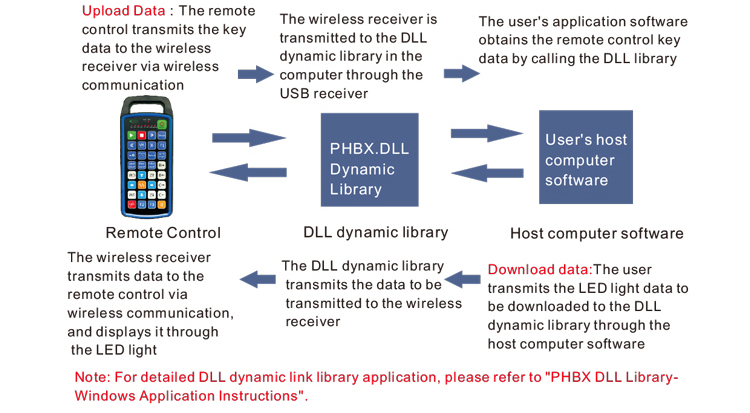
3.වැඩ කරන මූලධර්මය
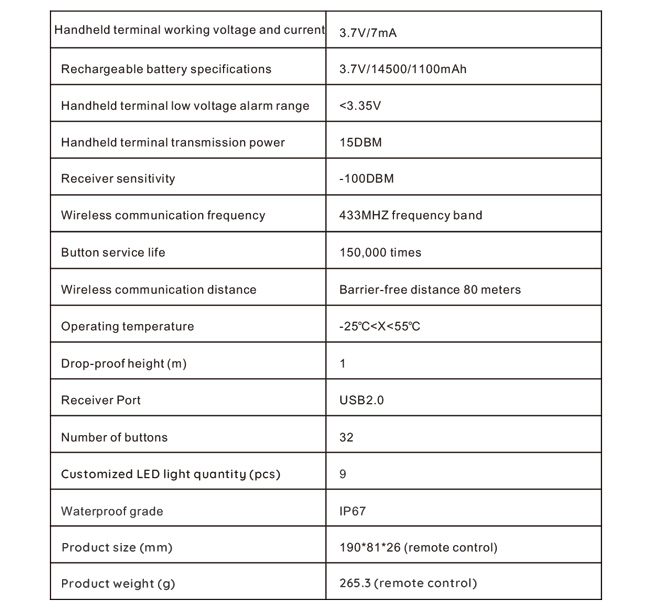
4. නිෂ්පාදන පිරිවිතර
5.නිෂ්පාදන කාර්යය හැඳින්වීම
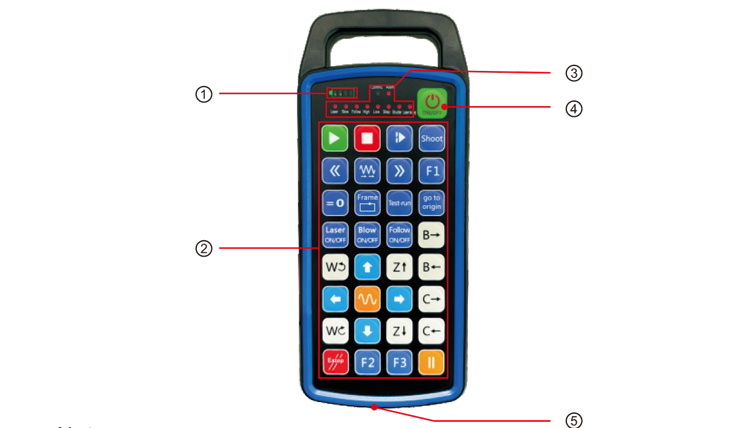
සටහන්:
①Battery level display:
බලයෙන් පසු දැල්වෙයි, විදුලිය විසන්ධි වූ පසු නිවා දමයි;
බැටරි දර්ශක ආලෝකය එක් තීරුවක් පමණක් වන අතර එය දැල්වෙමින් පවතී නම්, එහි තේරුම
බැටරිය අඩුයි. කරුණාකර බැටරිය ප්රතිස්ථාපනය කරන්න;
බැටරි දර්ශක ලයිට් සියල්ලම දැල්වී ඇත්නම් සහ අනෙකුත් LED ලාම්පු ෆ්ලෑෂ් බැක් සහ
ඉදිරියට, ඒ කියන්නේ බැටරිය ගොඩක් අඩුයි. කරුණාකර බැටරිය ප්රතිස්ථාපනය කරන්න;
බැටරි දර්ශකය දැල්වෙන්නේ නැතිනම් හෝ පිටතට යනවා නම්, සහ උපාංගය විය නොහැක
බල බොත්තම එබීමෙන් සහ අල්ලා ගැනීමෙන් ආරම්භ විය, කරුණාකර බැටරිය ප්රතිස්ථාපනය කරන්න;
②Button area:32 බොත්තම් 4X8 ලෙස සකසා ඇත, පරිශීලක-නිර්වචනය කරන ලද වැඩසටහන්කරණය;
③Status LED:
COMMU: බොත්තම් දර්ශක ආලෝකය, බොත්තම ඔබා ගිය විට දැල්වෙයි
බොත්තම මුදා හරින විට පිටතට; අනෙකුත් විදුලි පහන් අභිරුචි සංදර්ශක වේ;
④Power switch:
සඳහා දිගු ඔබන්න 3 සක්රිය කිරීමට තත්පර, සඳහා දිගු ඔබන්න 3 අක්රිය කිරීමට තත්පර;
⑤Charging port:
ආරෝපණය කිරීමට Type-C චාජර් භාවිතා කරන්න, ආරෝපණ වෝල්ටීයතාව 5V, වත්මන් 1A-2A; අයකිරීම
කාලය 3-5 පැය;
ආරෝපණය කරන විට, බල දර්ශකය දැල්වෙයි, එය ආරෝපණය වන බව අඟවයි. කවදා ද
සම්පූර්ණයෙන්ම ආරෝපිත, බල දර්ශකය දැල්වීමකින් තොරව සම්පූර්ණ තීරුව පෙන්වයි.
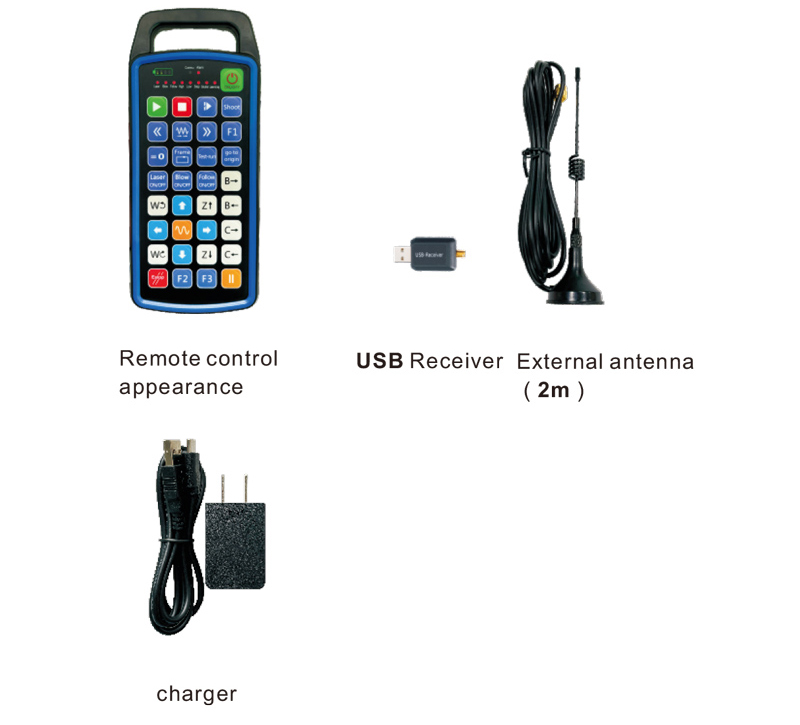
6.නිෂ්පාදන උපාංග රූප සටහන
7.නිෂ්පාදන ස්ථාපන මාර්ගෝපදේශය
1 . මම USB රිසීවරය පරිගණකයට ඇතුල් කරනවා, පරිගණකය ස්වයංක්රීයව සිදුවනු ඇත
අත්පොත නොමැතිව USB උපාංග ධාවකය හඳුනාගෙන ස්ථාපනය කරන්න
2. චාජරයට දුරස්ථ පාලකය ඇතුල් කරන්න. බැටරිය සම්පූර්ණයෙන්ම ආරෝපණය වූ පසු, ඔබන්න
සහ බල බොත්තම ඔබාගෙන සිටින්න 3 තත්පර. දුරස්ථ පාලකය සක්රිය කර බලය ලබා දෙනු ඇත
දර්ශකය දැල්වෙනු ඇත, බලය ක්රියාත්මක කිරීම සාර්ථක බව පෙන්නුම් කරයි.
3. බලගැන්වීමෙන් පසු, ඔබට ඕනෑම බොත්තමක් මෙහෙයුමක් කළ හැකිය. දුරස්ථ පාලකය
එකවර ද්විත්ව බොත්තම් මෙහෙයුමට සහය විය හැක. ඔබ ඕනෑම බොත්තමක් එබූ විට, ඒ
දුරස්ථ පාලකයේ COMMU ආලෝකය දැල්වෙනු ඇත, මෙම බොත්තම වලංගු බව පෙන්නුම් කරයි.
8.නිෂ්පාදන මෙහෙයුම් උපදෙස්
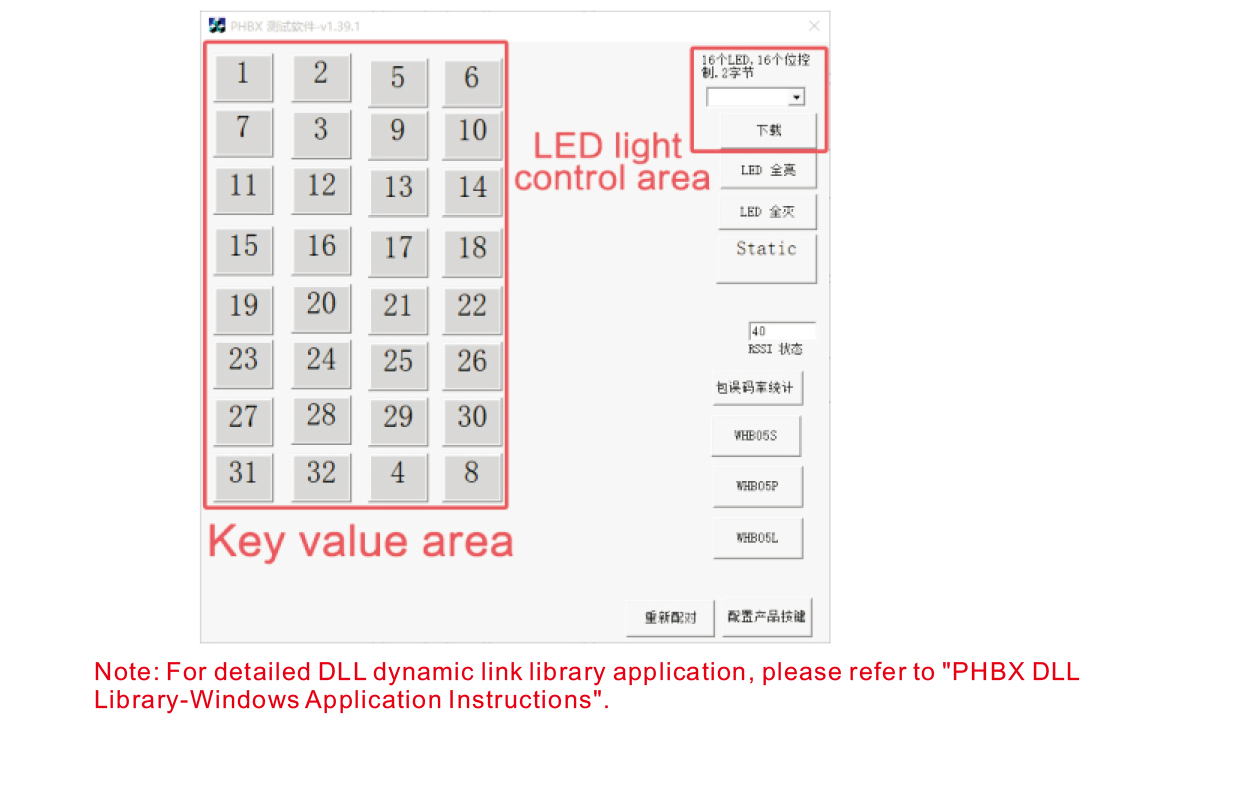
නිෂ්පාදන සංවර්ධනය හා භාවිතයට පෙර, ඔබට අප ලබා දෙන demo මෘදුකාංගය භාවිතා කළ හැක
දුරස්ථ පාලකයේ බොත්තම් සහ දුරස්ථ පාලකයේ LED ආලෝකය පරීක්ෂා කරන්න. ඔයාට පුළුවන්
අනාගත ක්රමලේඛන සංවර්ධනය සඳහා යොමු පුරුද්දක් ලෙස ද demo භාවිතා කරන්න.
Demo මෘදුකාංගය භාවිතා කිරීමට පෙර, කරුණාකර USB ග්රාහකය පරිගණකයට සම්බන්ධ කරන්න,
දුරස්ථ පාලකයට ප්රමාණවත් බලයක් ඇති බවට වග බලා ගන්න, t වෙත බල බොත්තම ඔබාගෙන සිටින්න
එය සක්රිය කරන්න, ඉන්පසු එය භාවිතා කරන්න;
දුරස්ථ පාලකයේ ඕනෑම බොත්තමක් එබූ විට, පරීක්ෂණ මෘදුකාංග demo දර්ශනය වනු ඇත
අනුරූප ප්රධාන අගය. එය මුදා හැරීමෙන් පසුව, ප්රධාන අගය සංදර්ශකය අතුරුදහන් වේ,
යතුර උඩුගත කිරීම සාමාන්ය බව පෙන්නුම් කරයි;
ඔබට පරීක්ෂණ මෘදුකාංග ආදර්ශනය මත LED ආලෝක අංකයද තෝරාගත හැක, බාගත ක්ලික් කරන්න,
සහ දුරස්ථ පාලකයේ අනුරූප ආලෝක අංකය දැල්වෙනු ඇත, බව අඟවමින්
LED ආලෝකය සාමාන්යයෙන් බාගත වේ.
9.නිෂ්පාදන දෝශ නිරාකරණය
10. නඩත්තු කිරීම සහ රැකවරණය
1. කරුණාකර එය දිගු කිරීමට සාමාන්ය උෂ්ණත්වය සහ පීඩනය සහිත වියළි පරිසරයක භාවිතා කරන්න
සේවා ජීවිතය;
2. යතුරේ සේවා කාලය දීර්ඝ කිරීම සඳහා ප්රධාන ප්රදේශය ස්පර්ශ කිරීමට තියුණු වස්තූන් භාවිතා නොකරන්න;
3. යතුරු ඇඳීම අවම කිරීම සඳහා කරුණාකර යතුරු ප්රදේශය පිරිසිදුව තබා ගන්න;
4. දුරස්ථ පාලකයට හානි කිරීමට මිරිකීමෙන් හා වැටීමෙන් වළකින්න;
5. දිගු කාලයක් භාවිතා නොකළහොත්, කරුණාකර බැටරිය ඉවත් කර දුරස්ථ පාලකය ගබඩා කරන්න
සහ පිරිසිදු හා ආරක්ෂිත ස්ථානයක බැටරි;
6. ගබඩා කිරීමේදී සහ ප්රවාහනයේදී තෙතමනය-ප්රතිරෝධය කෙරෙහි අවධානය යොමු කරන්න.
11.ආරක්ෂිත තොරතුරු
1. භාවිතයට පෙර කරුණාකර උපදෙස් හොඳින් කියවන්න. වෘත්තීය නොවන අයට තහනම්
ක්රියාත්මක වේ.
2. කරුණාකර මුල් චාජරය හෝ සාමාන්ය නිෂ්පාදකයෙකු විසින් නිෂ්පාදනය කරන ලද චාජරයක් භාවිතා කරන්න
එකම පිරිවිතර.
3. ප්රමාණවත් බලයක් නොමැති වීම හේතුවෙන් වැරදි ක්රියාකාරිත්වය වළක්වා ගැනීමට කරුණාකර නියමිත වේලාවට ආරෝපණය කරන්න
දුරස්ථ පාලකය ප්රතිචාර නොදක්වයි.
4. අලුත්වැඩියා කිරීම අවශ්ය නම්, කරුණාකර නිෂ්පාදකයා අමතන්න. ස්වයං-අලුත්වැඩියා කිරීම නිසා හානිය සිදුවුවහොත්,
නිෂ්පාදකයා වගකීමක් ලබා නොදේ.